What Is Performance Management? How Activity Data Can Support Reviews
Performance management becomes difficult when managers have to discuss productivity without enough facts. A small business may know that deadlines are slipping, but not know why. Employees may appear busy, yet reports or results tell a different story. In some cases, managers may also need to address repeated visits to games, video sites, entertainment websites, or other non-work websites during office hours.
A good performance conversation should not be built on vague impressions. Managers need clear goals, fair policies, website access records, application usage reports, and enough context to understand what is really happening.
That is where computer activity data can support performance management. It does not replace judgment, coaching, or communication. But it can give managers a more objective starting point for reviewing work patterns on company-owned Windows PCs.
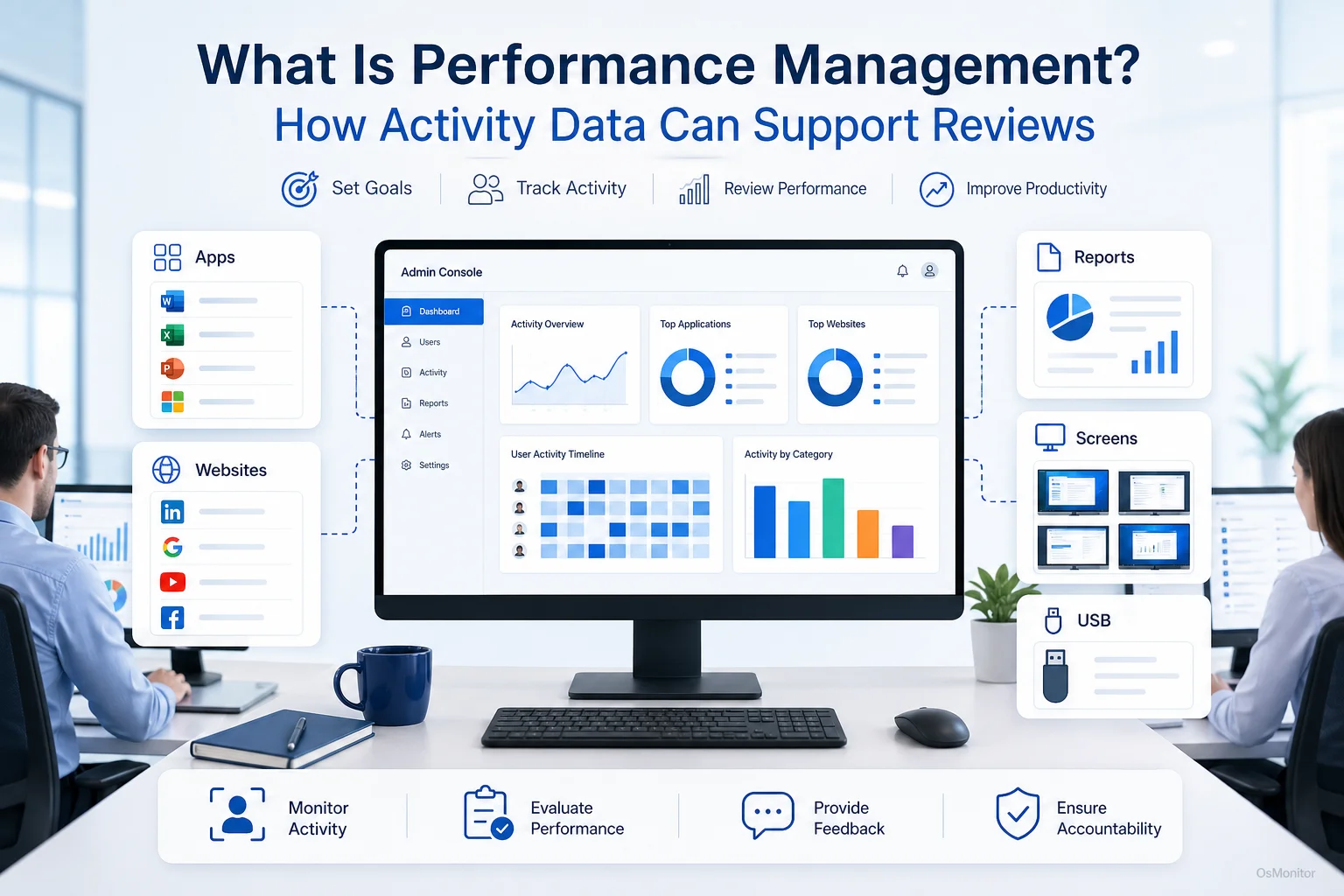
A practical overview of performance management for workplace computer management.
What Does Performance Management Mean in Practice?
Performance management is the ongoing process of setting expectations, reviewing progress, giving feedback, and helping employees improve their work. It is not just an annual review form. Done well, it is a regular management process that connects individual work with business goals.
Some people search for “what is performance management” because the term can sound formal. In plain business language, performance management means making sure employees understand what good work looks like, receive useful feedback, and have a fair way to improve.
A practical performance management process usually includes:
- Goal Setting: Define what the employee is expected to achieve.
- Clear Standards: Explain what good performance looks like for the role.
- Regular Feedback: Discuss progress, blockers, and improvement areas before problems become serious.
- Coaching and Support: Help employees improve skills, focus, workflow, and work habits.
- Performance Review: Review results against goals and expectations.
- Development Planning: Identify training, role changes, or future growth opportunities.
The purpose is not only to catch poor performance. Good performance management should also recognize strong work, improve employee focus, support fair decisions, and help managers solve problems earlier.
When computer-based work is involved, activity data can add useful context. For example, it can show whether employees are spending time in core business applications, whether non-work browsing is becoming a pattern, or whether a team may need better tools or training.
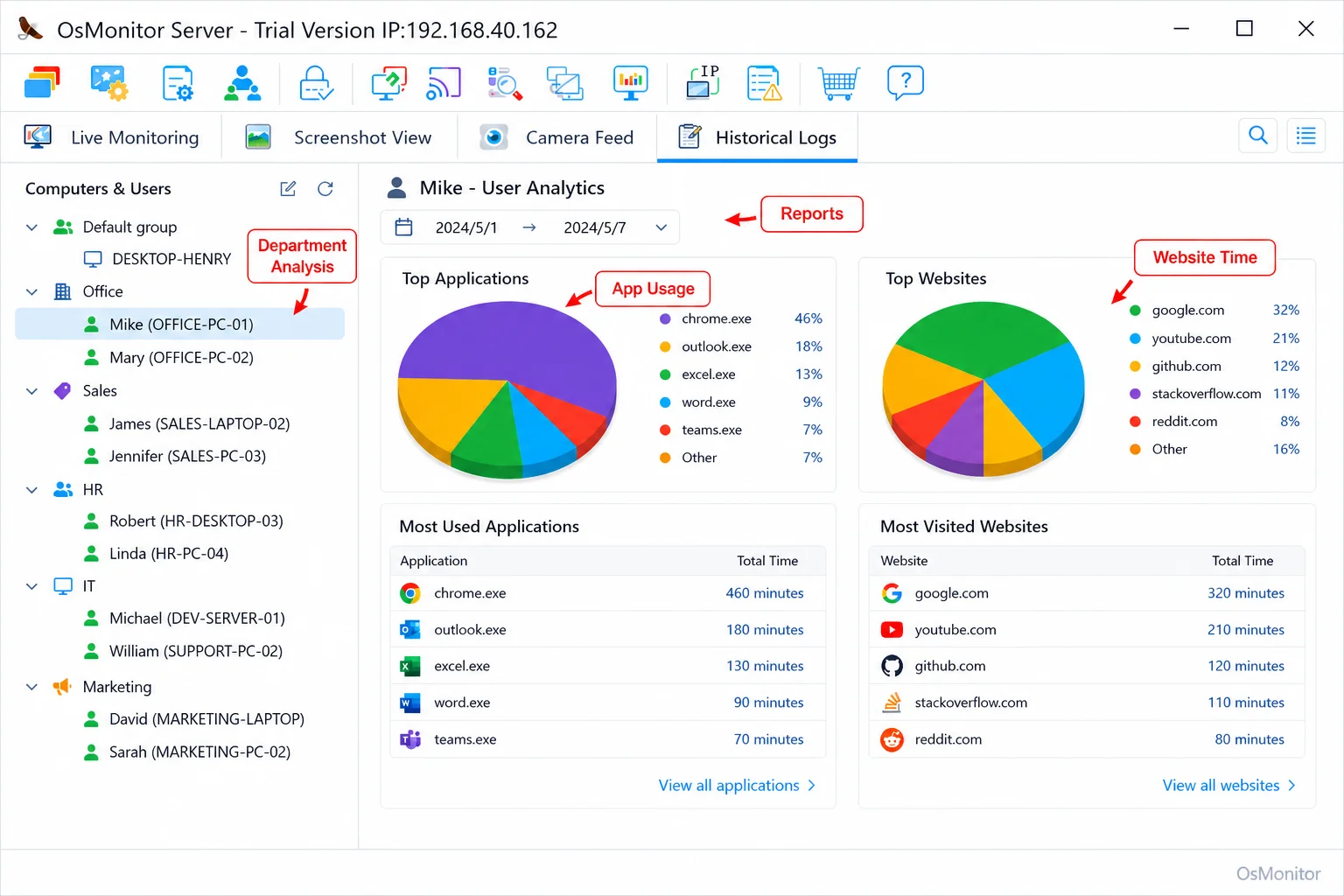
A real-product style screenshot highlighting application and productivity reports in OsMonitor.
Why Objective Data Is Crucial for Modern Performance Reviews
Traditional performance reviews often depend too much on memory. A manager may remember the most recent problem, the loudest complaint, or one strong project, while missing the larger pattern. This can create unfair reviews and uncomfortable conversations.
Objective data helps reduce that problem. It gives managers something concrete to review together with the employee.
For example:
- Application usage reports can show whether an employee spends most work time in role-related software.
- Website activity records can show whether non-work browsing is occasional or repeated.
- Activity timelines can show general work patterns across the day.
- File activity records can show document-related work where relevant.
- Department reports can show whether an issue is individual or team-wide.
This does not mean every number tells the full story. A browser may be used for productive research. Idle time may reflect meetings, phone calls, or work away from the computer. A single website visit may mean very little.
But patterns over time can help managers have better conversations. Instead of saying, “I feel like you are distracted,” a manager can say, “Let’s review the activity pattern and see what might be affecting focus.”
Tools that provide Application Usage Monitoring for Employee Computers & Tools can help turn digital work habits into practical reports for performance review and coaching.
Key Metrics to Support Performance Management
When using computer activity data for performance management, the focus should be on job-related patterns, not isolated moments. The right metrics depend on the employee’s role, the company policy, and the type of work being reviewed.
Application and Software Usage
Application usage reports help managers understand whether work time is aligned with the employee’s role.
Useful questions include:
- Is a designer spending enough time in design software?
- Is a sales employee using the CRM regularly?
- Is a support agent active in the ticketing system?
- Is an accountant using accounting software and spreadsheets as expected?
- Are employees relying on unauthorized or unnecessary software?
- Is a business application underused because employees need training?
High usage of core applications can support a positive productivity review. Low usage may show a problem, but managers should ask why before making conclusions. The issue may be workload, training, poor software design, unclear priorities, or blocked access.
This is where performance management performance data should be used carefully. The goal is not to turn software time into a simple score. The goal is to understand whether work patterns match the role.
Website Browsing and Internet Activity
For many jobs, the internet is necessary. Sales, marketing, customer support, research, purchasing, and operations teams may all need web access. At the same time, the internet can become a major distraction.
Website activity reports can help managers review:
- Time spent on work-related websites.
- Time spent on non-work websites.
- Repeated visits to entertainment, shopping, gaming, or video sites.
- Bandwidth-heavy activity that may affect the office network.
- Whether website usage follows the company’s computer and internet policy.
This is especially useful when a business wants to reduce non-work browsing during office hours. For more detail, see Employee Internet Monitoring Software for Workplace Web Usage.
Website data should always be reviewed with context. A marketing employee may legitimately use social platforms. A training team may use video sites. A purchasing employee may use e-commerce websites for work. The policy should define what is acceptable by role.
Activity Timelines and Work Patterns
Activity timelines can show how computer usage changes throughout the day. This can help managers understand workflow rhythm, possible distractions, idle periods, or support needs.
Useful patterns may include:
- Long periods in core work applications.
- Frequent switching between unrelated tools.
- Repeated idle periods during core hours.
- Unusual start or end times.
- A sharp drop in activity compared with previous weeks.
- Heavy activity with little break time, which may suggest overload.
Again, these signals are not proof by themselves. They are conversation starters. A low-activity period may mean the employee was in a meeting, on a phone call, or working offline. Managers should ask before assuming.
| Traditional Metric | Data-Supported Metric | Example Insight |
|---|---|---|
| Manager Observation | Application Usage Time | Employee spends most work time in core design, CRM, accounting, or project software. |
| Self-Reported Progress | Website Browsing History | Non-work website time decreases after policy clarification and coaching. |
| Peer Feedback | Activity Timeline | Reports show consistent work patterns during core hours. |
| Project Completion | File Operation Logs | Document access and edits provide context for contribution to shared work. |
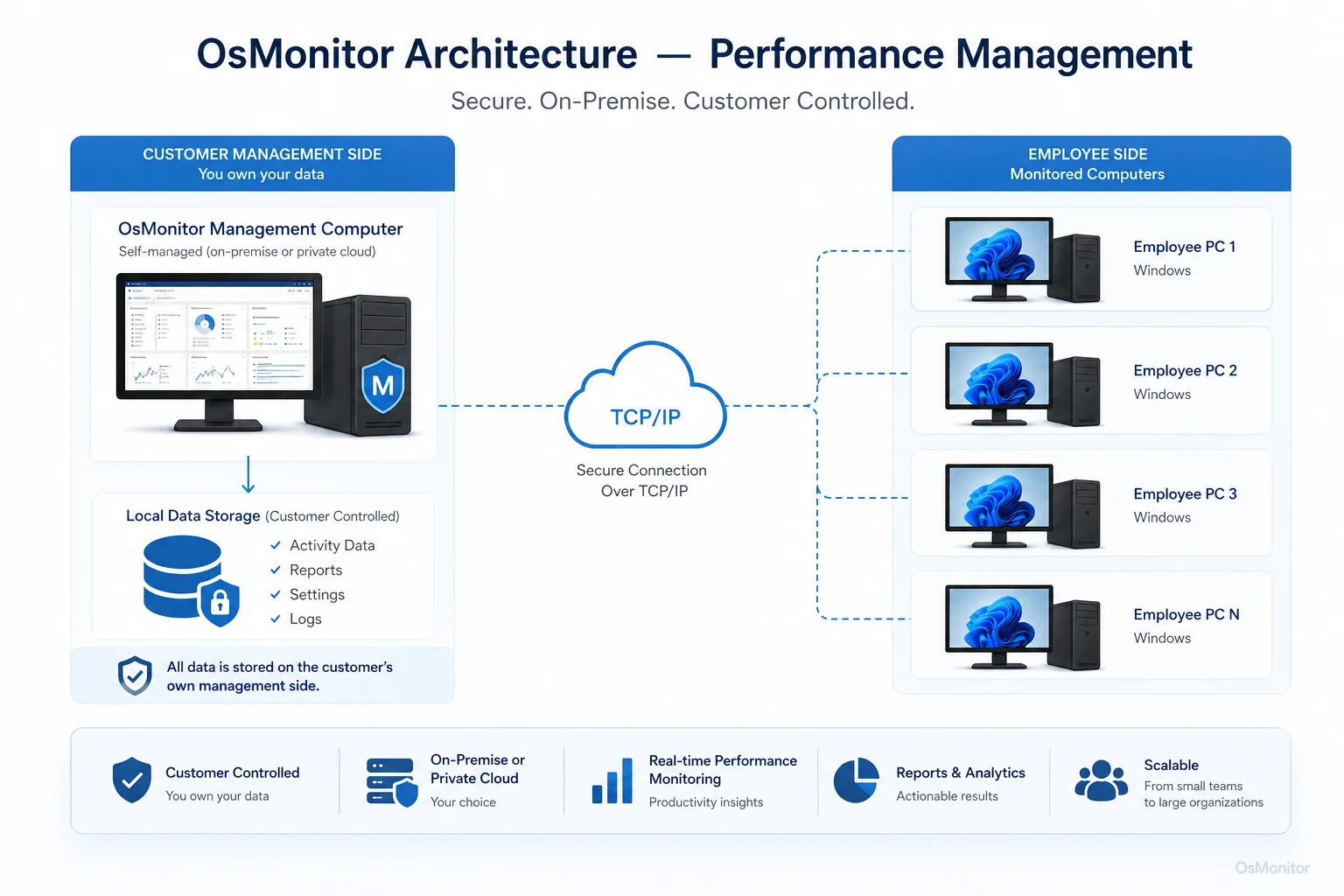
OsMonitor keeps monitoring data under the customer’s control on the management computer or self-managed server.
Balancing Software with Policy and Communication
Monitoring software is not a complete performance management system. It is only one source of information. The value comes from combining data with clear policy, fair management, and useful communication.
Establish Clear Policies: Before using any computer activity data, create a written computer and internet usage policy. Explain what is acceptable, what is restricted, what may be reviewed, and why.
Be Transparent: Employees should know that company-owned computers may be managed and reviewed for legitimate business purposes. Transparency reduces confusion and helps build trust.
Focus on Coaching, Not Punishment: If reports show excessive non-work browsing, the first useful question is why. Is the employee underloaded, unclear about priorities, blocked by a task, disengaged, or dealing with poor workflow?
Review Patterns with Context: One website visit or one idle period should not drive a performance decision. Look for repeated patterns and compare them with role expectations.
Use Data Alongside Other Evidence: Activity reports should be combined with project results, quality of work, customer feedback, manager observations, and employee conversations.
Maintain Data Privacy and Control: Sensitive activity records should be stored securely and accessed only by authorized people. OsMonitor uses a client/server architecture that stores monitoring data on the customer’s own management computer or self-managed server, instead of a vendor-controlled cloud.
Used well, activity data can make performance reviews more specific and less emotional. Used poorly, it can damage trust. The difference is policy, transparency, and management judgment.
Legal and Ethical Considerations
When computer activity data becomes part of performance management, businesses must handle it carefully.
In many regions, employers may manage and review activity on company-owned computers for legitimate business purposes when employees have been properly notified. However, employment and privacy laws vary by country, state, province, and industry.
Businesses should:
- Create a clear written computer and internet usage policy.
- Inform employees before activity records are collected or reviewed.
- Use monitoring only on company-owned computers and legitimate business systems.
- Limit report access to authorized managers or IT staff.
- Avoid collecting unnecessary personal information.
- Review activity data with context.
- Consult qualified legal counsel before deployment.
The purpose should be responsible workplace computer management, fair performance review, IT support, policy consistency, and productivity improvement.
Frequently Asked Questions (FAQ)
What is performance management?
Performance management is the ongoing process of setting work expectations, reviewing progress, giving feedback, coaching employees, and helping them improve. It is not only an annual review; it is a continuous process that connects employee work with business goals.
How can computer activity data support performance management?
Computer activity data can show application usage, website activity, active time, idle time, activity timelines, and file activity on company-owned computers. These reports can help managers understand work patterns and support more specific performance conversations.
Is performance management legal for businesses?
Yes, performance management is a normal business practice. When it includes reviewing computer activity, businesses should use a clear written policy, notify employees, and comply with local employment and privacy laws. Legal requirements vary, so qualified legal counsel should be consulted.
Does OsMonitor require a client on employee computers?
Yes. OsMonitor uses a client/server model. A lightweight client program must be installed on each employee Windows computer the business wants to manage. The management console collects activity records for authorized review.
Where is OsMonitor monitoring data stored?
OsMonitor stores collected data on the customer’s own management computer or self-managed server. It is not a cloud SaaS product, and normal activity records are not stored on an OsMonitor vendor cloud.
Can OsMonitor work without internet in a LAN?
Yes. OsMonitor can work inside a local area network without requiring internet access for its core monitoring, reporting, and management functions.
What Windows versions does OsMonitor support?
OsMonitor supports Windows 7 and later versions, including Windows 10, Windows 11, and Windows Server editions. It supports both 32-bit and 64-bit Windows systems.
Performance management works best when expectations are clear, feedback is regular, and reviews are based on more than memory or opinion. For computer-based teams, application usage, website activity, and activity timelines can provide useful context.
Used transparently and responsibly, OsMonitor can support performance management with practical computer activity reports, policy controls, and on-premise data storage. To see how activity data can enhance your performance management process, you can Download OsMonitor Free Trial and explore its reporting features.