Hubstaff vs OsMonitor:
Which Solution Fits Your Business?
When organizations look for employee monitoring software, they often confuse time tracking with IT security. Hubstaff is an industry leader in time tracking, timesheets, and payroll management for freelancers. OsMonitor is an IT control solution designed for internal network security, active endpoint restrictions, and real-time visual oversight. Here is an objective comparison to help you choose the right path.
Feature-by-Feature Comparison
| Capabilities | OsMonitor | Hubstaff |
|---|---|---|
| Core Use Case & Deployment | ||
| Primary Focus | IT Security & Active Control | Time Tracking & Payroll |
| Deployment Architecture | 100% On-Premise / LAN | Cloud-First SaaS |
| Cost Structure | One-Time Licensing | Recurring Subscriptions |
| Active IT Control | ||
| Website & App Blocking | ✅ Native Enforcement | Not a primary focus |
| USB Flash Drive Control | ✅ Block or Read-Only | Not supported |
| Mandatory Document Backup | ✅ Yes | Not supported |
| Visual Monitoring | ||
| Screen Visibility Approach | Live Real-Time View | Periodic Random Screenshots |
| Live TV-Wall Layout | ✅ Yes | Not a core feature |
| IT Remote Desktop Assistance | ✅ Yes | Not supported |
| HR & Workforce Tracking | ||
| Timesheets & Payroll Integrations | Not supported | ⭐⭐⭐⭐⭐ (Advanced) |
| Freelancer Invoicing | Not supported | ✅ Yes |
| Mobile GPS Tracking | Not supported | ✅ Yes |
Best Fit by Industry / Workforce Type
| Environment / Workforce | Better Choice |
|---|---|
| Freelancers & Contract Workers | Hubstaff |
| Field Workers & Delivery Teams (GPS) | Hubstaff |
| Remote Creative Agencies | Hubstaff |
| Mid-Market Manufacturing | OsMonitor |
| Organizations Requiring Strict Local Data Custody | OsMonitor |
| Schools & Educational Labs | OsMonitor |
| In-House Office IT Departments | OsMonitor |
When Hubstaff is the Better Fit
The time tracking platform is highly recommended if your organization:
- Hires freelancers and pays them by the hour.
- Requires automatic payroll integrations (like PayPal or Payoneer).
- Needs mobile GPS tracking for employees on the move.
- Relies on proof-of-work features via periodic random screenshots.
- Prefers a cloud-centric setup with external data hosting.
When OsMonitor is the Clear Choice
OsMonitor is specifically designed for businesses that:
- Manage in-house employees and prioritize internal IT security over payroll.
- Need active control to block non-work websites, games, and USB drives.
- Want continuous live screens via a real-time TV-Wall instead of random snapshots.
- Require a one-time perpetual license with no recurring SaaS fees.
- Mandate strict on-premise data localization within a local area network.
Deep Dive: Core Philosophies
1. Timesheets vs. Active IT Enforcement
Time tracking software is built to log hours and calculate wages. If an employee visits a non-work website, the software simply records it. OsMonitor is built for proactive IT management. Rather than just logging the activity, OsMonitor empowers administrators to actively enforce company policies by blocking unauthorized applications, restricting specific URLs, and preventing data leaks via USB ports.
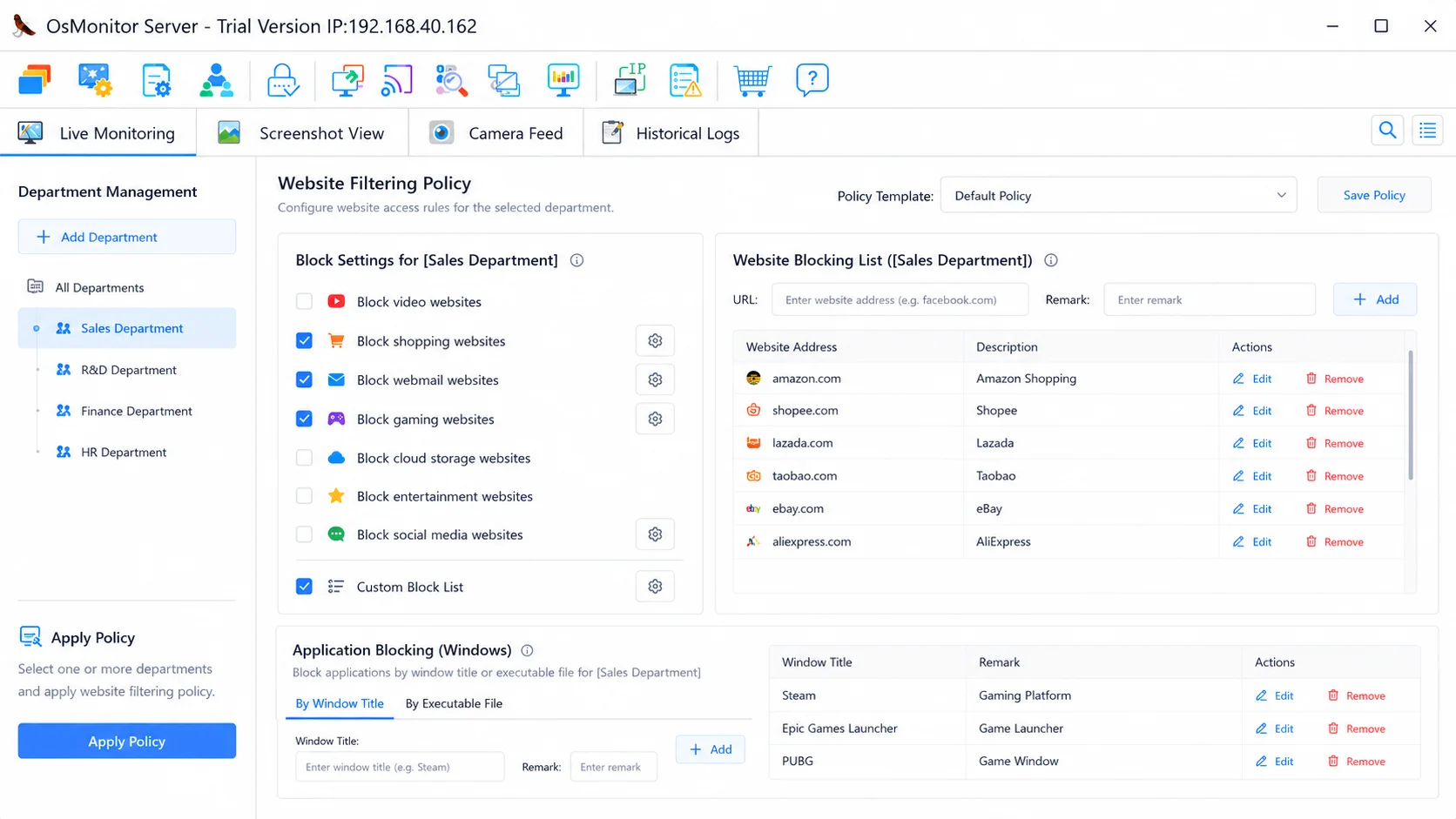
Actively enforce company policies by blocking non-work applications and websites.
2. Random Screenshots vs. Live Visual Oversight
To verify freelancer productivity, time tracking tools often take random screenshots at set intervals (e.g., every 5 to 10 minutes). While useful for billing, this leaves massive visual blind spots for internal IT security. OsMonitor provides continuous live monitoring. Through an intuitive TV-Wall layout, administrators can view multiple endpoint screens simultaneously in real-time, and seamlessly initiate remote desktop assistance when required.
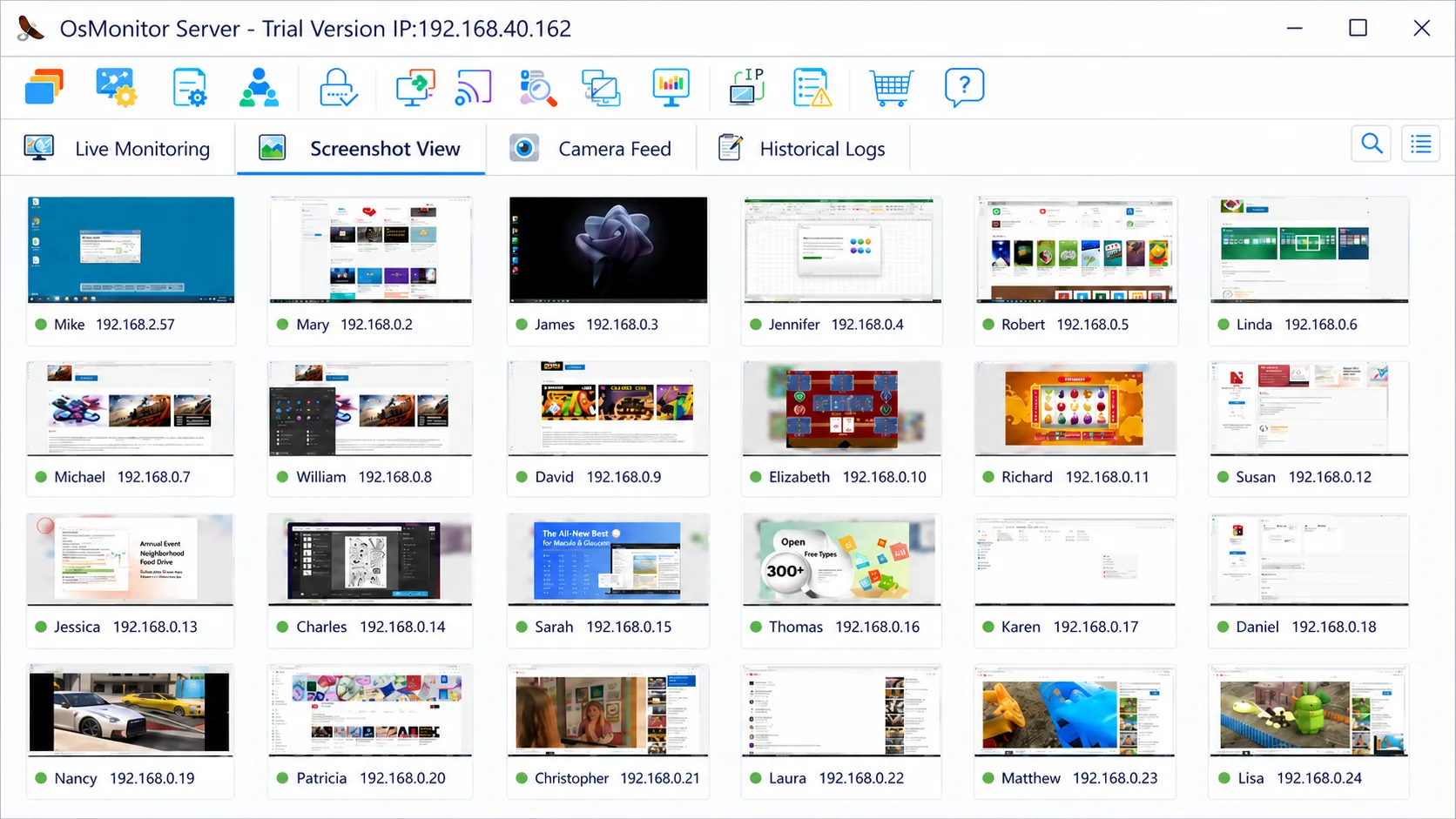
OsMonitor provides a highly responsive TV-Wall for continuous IT visibility.
3. Pricing Philosophy: Perpetual Licensing vs. Recurring Subscriptions
Cloud-based time tracking platforms require ongoing operational budgets, typically charging a monthly fee per user. As your in-house team grows, so does your subscription cost. OsMonitor utilizes a perpetual license model. By securing the software through a one-time payment, organizations acquire permanent ownership, avoiding the financial strain of recurring SaaS fees and establishing strong long-term budget predictability.
4. True Data Sovereignty (On-Premise vs. Cloud)
SaaS platforms require your workforce data to be uploaded and processed on their external cloud servers. For traditional businesses, schools, or manufacturing firms bound by data localization policies, this is often problematic. OsMonitor operates entirely on your Local Area Network (LAN). The software functions perfectly offline, ensuring sensitive operational data never leaves your facility.
Practical IT Control for Windows Environments
OsMonitor is highly optimized for Microsoft office environments. The entire management package is < 6MB, offering immediate IT visibility with zero monthly subscription fees.