WorkTime vs OsMonitor:
Which Management Philosophy Fits You?
The choice between WorkTime and OsMonitor highlights different approaches to endpoint management. WorkTime is primarily focused on a "non-intrusive" philosophy, delivering productivity data. OsMonitor provides a highly flexible alternative: offering a Basic Version for strict privacy compliance (no screenshots or chat logs), alongside active IT controls like website blocking and USB protection that many analytics tools lack.
Feature-by-Feature Comparison
| Capabilities | OsMonitor | WorkTime |
|---|---|---|
| Privacy & Visual Monitoring | ||
| Strict Privacy Mode (No Screenshots) | ✅ Yes (OsMonitor Basic Version) | ✅ Yes (Core Philosophy) |
| Optional Real-Time TV-Wall | ✅ Yes (Full Version) | Not available |
| Chat Content Logging | Flexible (Disabled in Basic) | Not available |
| Active Enforcement & IT Tools | ||
| Website & App Blocking | ✅ Active Enforcement | Primarily passive tracking |
| USB Flash Drive Control | ✅ Block or Read-Only | Not a core feature |
| IT Remote Desktop Assistance | ✅ Direct Native Support | Not available |
| Mandatory Document Backup | ✅ Yes | Not available |
| Analytics & Architecture | ||
| Behavioral & Productivity Analytics | ⭐⭐⭐ (Basic) | ⭐⭐⭐⭐⭐ (Advanced) |
| Deployment Options | On-Premise / LAN exclusively | Cloud & On-Premise |
| Cost Structure | One-Time Licensing | Generally Subscription-Based |
Best Fit by Industry / Organizational Policy
| Environment / Policy Rule | Better Choice |
|---|---|
| Remote Teams Utilizing Personal Devices (BYOD) | WorkTime |
| Organizations Focused Solely on Productivity Audits | WorkTime |
| Strict Privacy Environments Requiring Endpoint Blocking | OsMonitor (Basic Version) |
| Mid-Market Manufacturing & Industrial | OsMonitor |
| Schools & Educational Labs (Requires active blocking) | OsMonitor |
| In-House Office IT Departments | OsMonitor |
| Environments Requiring USB Data Protection | OsMonitor |
When WorkTime is the Better Fit
The platform is highly recommended if your organization:
- Requires highly detailed analytical reports on software usage without any visual oversight.
- Maintains a remote workforce using personal (BYOD) devices where blocking is inappropriate.
- Does not need to actively manage endpoint security or hardware restrictions.
- Is comfortable managing subscriptions for cloud-based reporting or maintenance.
When OsMonitor is the Clear Choice
OsMonitor is specifically designed for businesses that:
- Want the flexibility to choose between strict privacy (Basic Version) or visual compliance (Full Version).
- Need active IT control to block unauthorized websites, games, and USB drives.
- Provide internal IT support and require integrated remote desktop capabilities.
- Prefer a straightforward one-time perpetual license with no recurring SaaS fees.
- Mandate strict on-premise data localization within a secure local network.
Deep Dive: Core Philosophies
1. Flexibility: Privacy Compliance Meets Active Control
Based on publicly available documentation, WorkTime is designed with a primary focus on being non-intrusive, omitting screen recording to protect employee privacy. However, it generally lacks the ability to actively enforce network policies. OsMonitor provides the best of both worlds. By utilizing the OsMonitor Basic Version, organizations can ensure zero screen capturing and zero chat logging to comply with strict privacy laws, while still retaining the critical ability to block non-work websites and disable unauthorized USB drives.
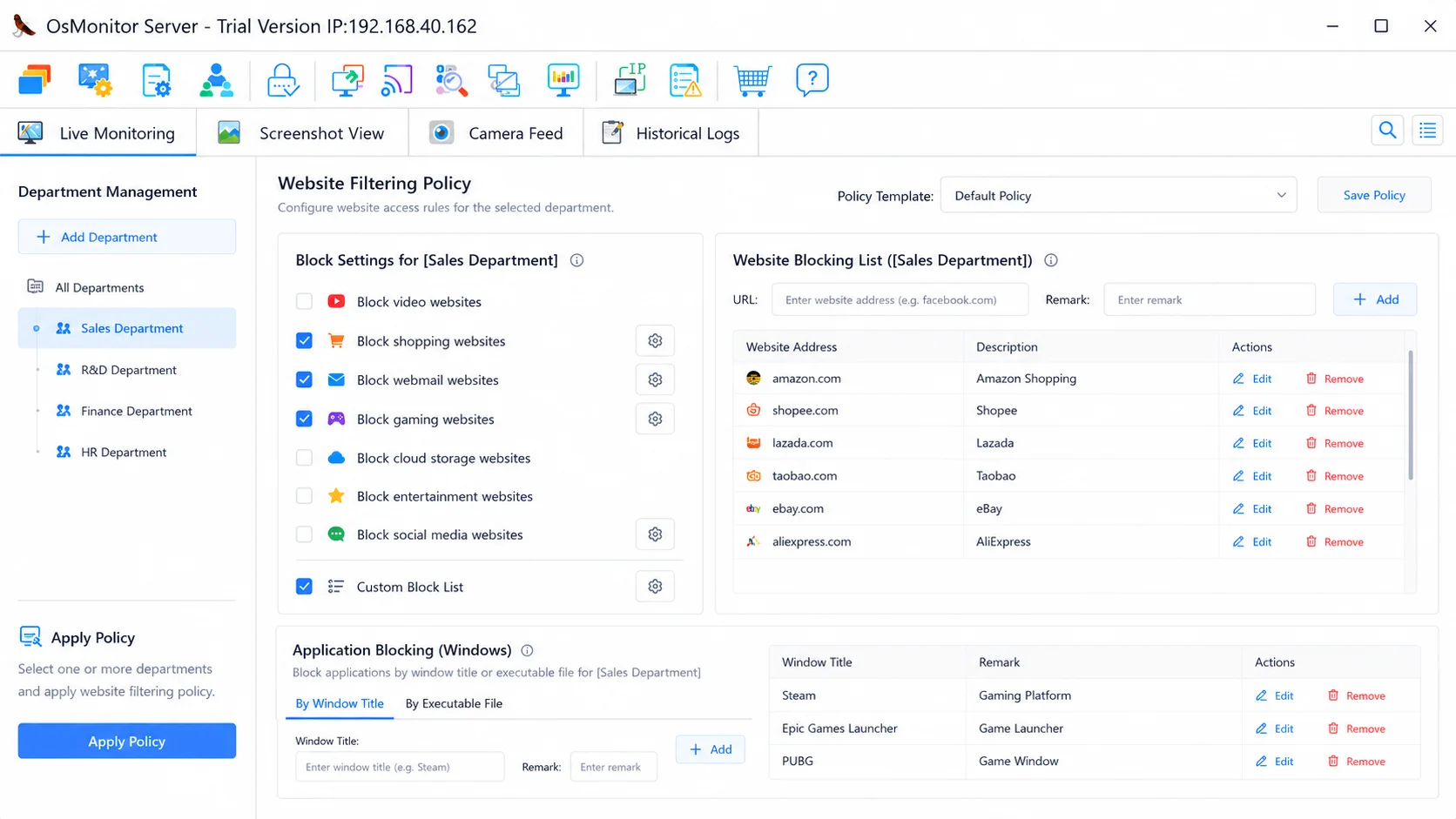
Even in strict privacy mode, administrators can still enforce company policies by blocking non-work applications.
2. Passive Reporting vs. Proactive IT Enforcement
Analytics platforms are often designed to observe. If an employee connects an unauthorized thumb drive to a secure workstation, a passive tool will simply log the event for a later report. OsMonitor empowers IT to act. Through centralized configurations, administrators can establish active application blacklists, restrict website access, and manage USB read/write permissions to prevent security incidents before they happen.
3. Pricing Philosophy: Perpetual Licensing vs. Subscriptions
A major factor in long-term deployment is the software pricing model. Modern analytics platforms generally offer subscription-based licensing options for their cloud tiers, or require periodic maintenance fees. OsMonitor operates on a perpetual license model. By securing the software through a one-time payment, organizations acquire lifetime software ownership, avoiding the financial strain of recurring SaaS fees and establishing strong long-term budget predictability.
4. Optional Visual Oversight (Full Version)
While the Basic Version offers strict privacy, many organizations eventually require visual proof for compliance or IT support. With the OsMonitor Full Version, administrators gain access to an intuitive TV-Wall layout, allowing them to view multiple endpoint screens simultaneously and immediately verify endpoint activity.
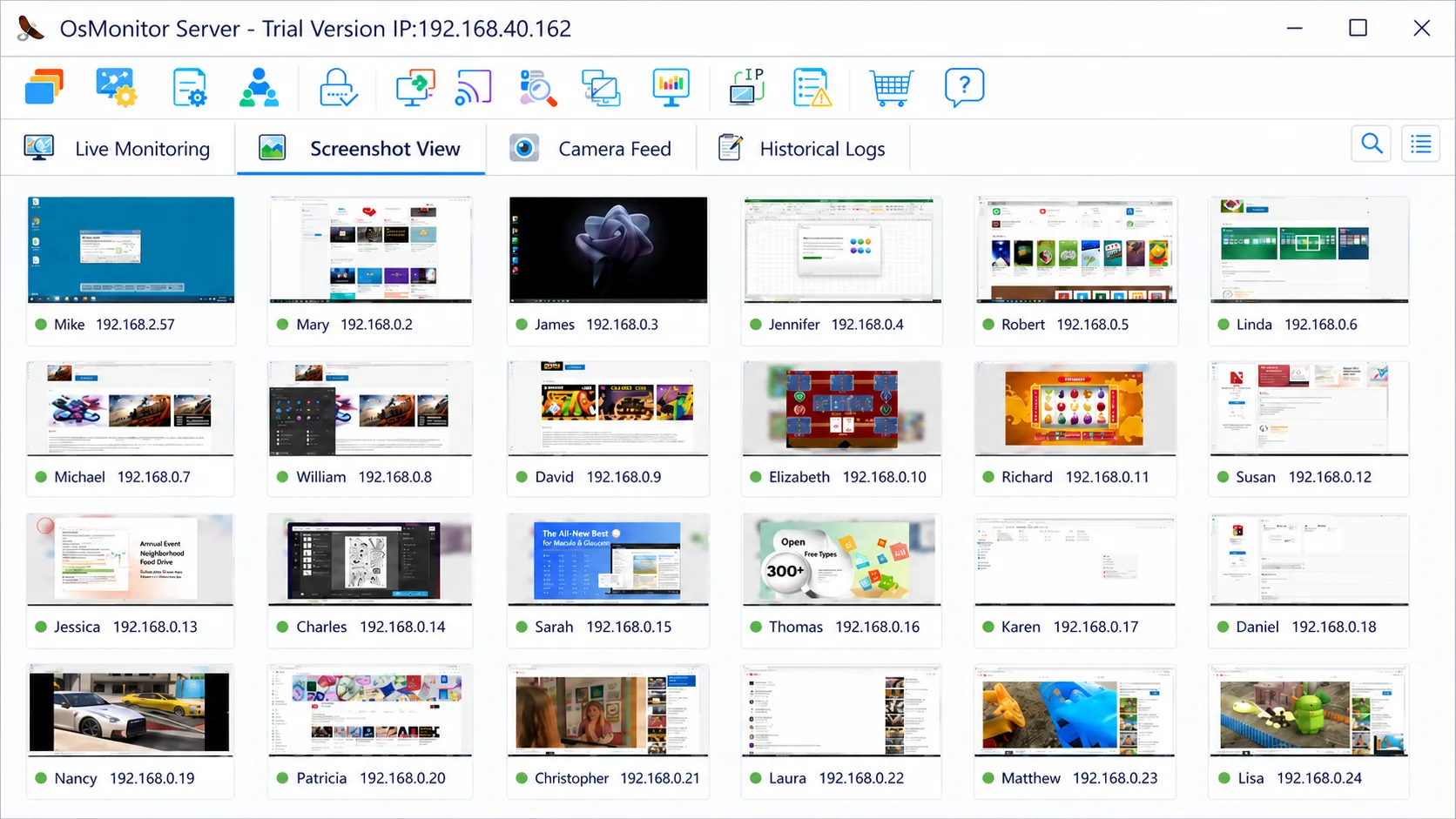
The Full Version unlocks highly responsive visual monitoring via the TV-Wall.
Pros & Cons Summary
WorkTime
👍 Pros
- Strong productivity analytics
- Privacy-focused approach
- Suitable for BYOD environments
👎 Cons
- Limited endpoint enforcement
- No native USB control
- Limited active IT management capabilities
OsMonitor
👍 Pros
- Website and application blocking
- USB device control
- Perpetual licensing (One-time payment)
- Remote IT support capabilities
👎 Cons
- Windows-focused deployment
- Less analytics depth than specialized productivity platforms
- Not designed for Mac environments
Frequently Asked Questions
Does OsMonitor offer a non-intrusive, privacy-first option?
Yes. OsMonitor offers a Basic Version that completely omits screen capturing and chat logging to comply with strict workplace privacy regulations, providing a similarly non-intrusive footprint to pure analytics tools but with added IT control features.
Can passive analytics tools block websites and applications?
Based on publicly available documentation, non-intrusive platforms typically focus primarily on productivity tracking and reporting. They are not generally designed to actively block or restrict employee actions. OsMonitor provides native enforcement capabilities to block specific websites, applications, and games.
Which software supports USB drive control?
Hardware-level endpoint control is not generally a primary focus of passive analytics tools. OsMonitor includes built-in Endpoint DLP features, allowing IT administrators to completely block USB storage devices or set them to read-only mode.
Do both platforms offer on-premise deployment?
Yes, both solutions offer on-premise options. However, OsMonitor is exceptionally lightweight (the installation package is under 6MB) and operates effortlessly over standard LAN TCP/IP.
Which solution is better for highly privacy-sensitive environments?
If company policy strictly forbids the capturing of visual data, the OsMonitor Basic Version provides the necessary privacy compliance while retaining essential tools like website blocking and USB control.
Does OsMonitor require extensive training to operate?
No. OsMonitor is built for immediate, practical IT use. The interface is intuitive, allowing managers to apply blocking rules or view analytics with minimal specialized training.
How does the pricing structure compare?
Cloud analytics tools generally offer subscription-based licensing options. OsMonitor utilizes a simple, straightforward perpetual licensing model—a one-time payment for lifetime software ownership.
Flexible IT Control for Windows Environments
OsMonitor is highly optimized for Microsoft office environments. The entire management package is < 6MB, offering immediate IT visibility with zero monthly subscription fees.