ActivTrak vs OsMonitor:
Which Solution Fits Your Business?
Choosing the right employee monitoring software is not about finding the "best" tool, but rather the tool that aligns with your specific organizational goals. In this honest comparison, we evaluate ActivTrak and OsMonitor across features, pricing structures, and deployment architectures to help you make an informed decision.
Feature-by-Feature Comparison
| Capabilities | OsMonitor | ActivTrak |
|---|---|---|
| Architecture & Pricing | ||
| Deployment Model | 100% On-Premise / LAN | Cloud-First Architecture |
| Cost Structure | One-Time Licensing | Subscription Pricing |
| Platform Support | Windows Only | Windows, macOS, ChromeOS |
| Active Control & Enforcement | ||
| Website Blocking | ✅ Native Enforcement | Not a primary focus |
| Application Blocking | ✅ Native Enforcement | Not a primary focus |
| USB Flash Drive Control | ✅ Block or Read-Only | Not designed for hardware control |
| Mandatory Document Backup | ✅ Yes | Not a core feature |
| Visual Monitoring & IT Support | ||
| Real-Time Screen TV-Wall | ✅ Yes | Limited focus |
| Remote Desktop Control | ✅ Yes | Requires third-party tools |
| Offline LAN Monitoring | ✅ Fully Functional | Primarily cloud-dependent |
| Analytics & HR Metrics | ||
| Productivity Analytics | ⭐⭐⭐ (Basic) | ⭐⭐⭐⭐⭐ (Advanced) |
| Workforce Burnout Insights | Not supported | ✅ Yes |
| Third-Party App Integrations | Limited | ✅ Extensive |
Best Fit by Industry / Scale
| Industry / Environment | Better Choice |
|---|---|
| Mid-Market Manufacturing | OsMonitor |
| Healthcare & Medical Clinics | OsMonitor |
| Organizations Requiring Strict Local Data Custody | OsMonitor |
| Schools & Educational Labs | OsMonitor |
| Remote Tech Teams | ActivTrak |
| Marketing & Consulting Firms | ActivTrak |
| Hybrid Workforces | ActivTrak |
When ActivTrak May Be the Better Fit
The analytics platform is an exceptional tool if your organization:
- Operates a fully distributed, remote workforce.
- Prefers a cloud-first infrastructure and SaaS tools.
- Focuses primarily on HR metrics, burnout prevention, and behavioral coaching.
- Does not require active endpoint restrictions (like blocking apps or USBs).
- Uses mixed OS environments (Windows, Macs, Chromebooks).
When OsMonitor is the Clear Choice
OsMonitor is specifically designed for businesses that:
- Require strict on-premise data localization for compliance.
- Need active IT control (blocking websites, games, and USB drives).
- Want to see live screens via a real-time TV-Wall layout.
- Prefer a one-time perpetual license instead of monthly subscription fees.
- Operate primarily in a Windows environment.
Deep Dive: Architecture & Practicality
1. Active Policy Enforcement vs. Passive Observation
Analytics platforms provide brilliant dashboards showing what employees did after the fact. However, if an employee spends hours on unauthorized desktop games or irrelevant websites, passive software is primarily designed to log it. OsMonitor empowers IT to enforce policies proactively. You can set up strict application blacklists, restrict website access, and manage USB peripheral permissions.
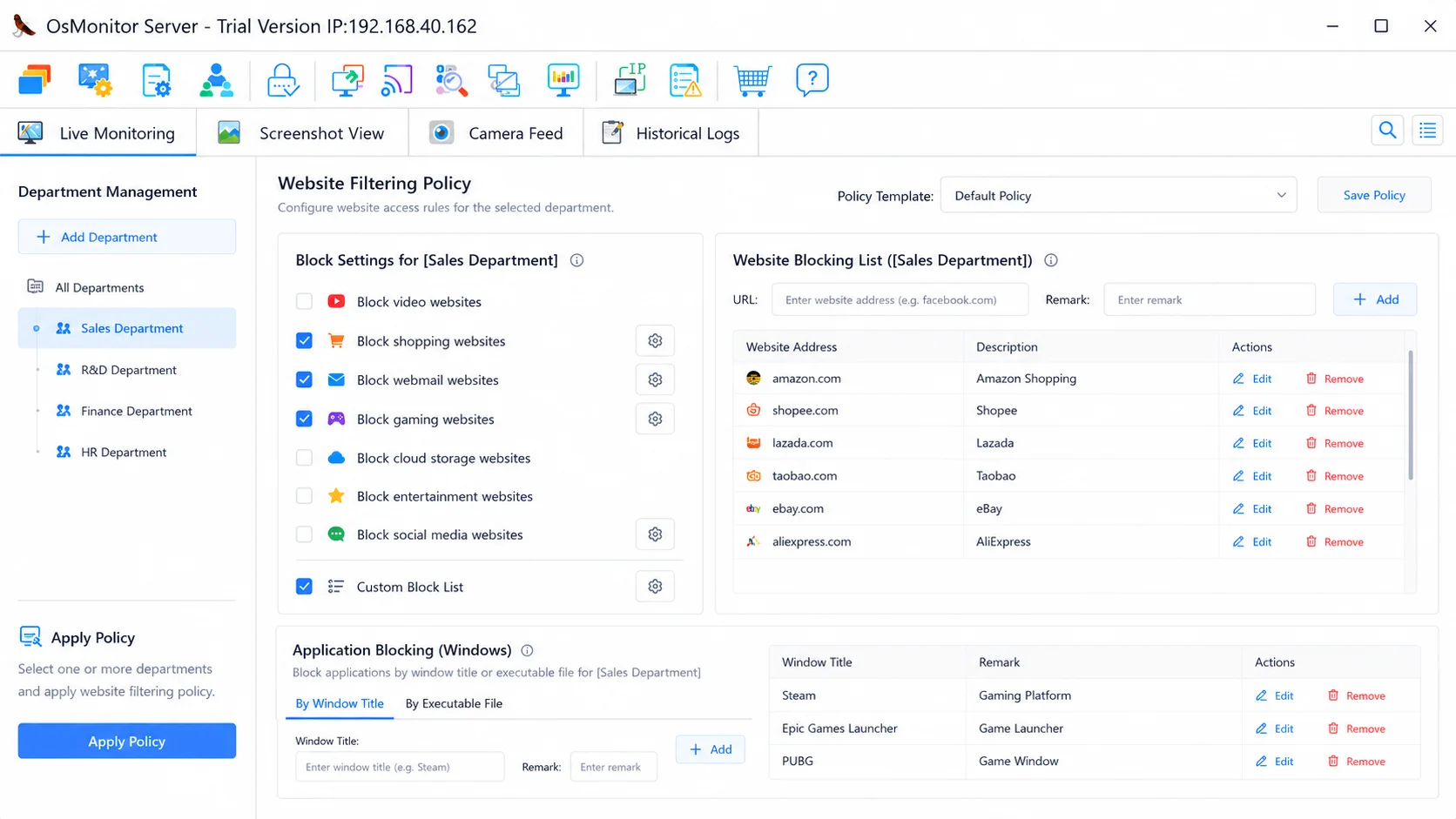
Actively enforce company policies by blocking non-work applications and websites.
2. Pricing Philosophy: Perpetual Licensing vs. Recurring Subscriptions
A major factor in the long-term cost of ownership is the underlying software pricing model. Modern analytics threat solutions are primarily built around recurring user subscriptions. This means your organization must allocate continuous operational budget year after year. OsMonitor operates on a perpetual license model. By securing your software through a one-time payment, it can provide strong long-term value and budget predictability, making it highly attractive for growing IT setups.
3. True Data Sovereignty (On-Premise vs. Cloud)
As a cloud SaaS platform, most competitors require your workforce data to be processed on external servers. For organizations bound by strict data localization regulations or internal security policies, this can present compliance hurdles. OsMonitor operates entirely on your Local Area Network (LAN) or your self-managed infrastructure. You act as the sole data custodian, and the system functions perfectly even in air-gapped offline environments.
4. Real-Time Visual Screen Monitoring
To align with productivity-first positioning, cloud solutions often rely less on traditional visual monitoring. If your management requires the ability to see exactly what is on an employee's screen, OsMonitor provides a comprehensive live TV-Wall layout. IT administrators can seamlessly switch to remote desktop mode to provide immediate support.
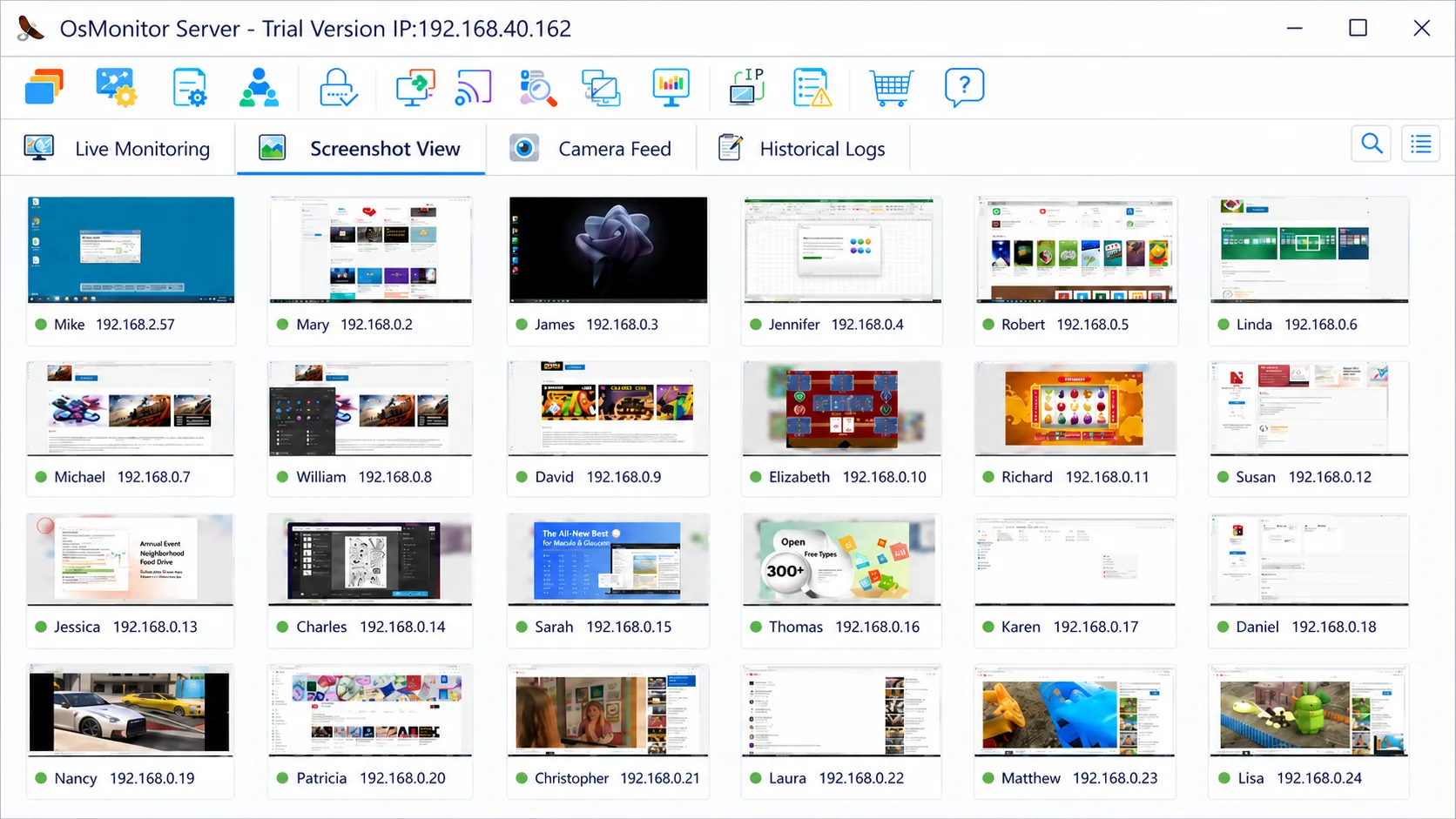
Monitor multiple employee screens simultaneously in real-time.
Lightweight & Built for Windows
OsMonitor is highly optimized for Microsoft environments (Windows 7+, including Server editions). The entire package is < 6MB, ensuring minimal disruption to your employees' daily workflows.