Computer Lab Monitoring Software for Schools & Training Centers
Although OsMonitor is widely used for employee monitoring and endpoint management in business environments, many schools, training centers, and educational labs use the same technology to supervise shared Windows computers. Many schools rely on Windows computer labs for teaching, but maintaining both order and hardware infrastructure is a complex operational task. Instructors and IT administrators need a unified method to verify student activities, block specific websites, ban non-educational software, guide students remotely, and backup critical assignments. OsMonitor provides a lightweight, on-premise infrastructure solution designed specifically for classroom supervision and comprehensive computer lab management.
Core Computer Lab Management Capabilities
| Lab Management Needs | OsMonitor Classroom Solution |
|---|---|
| Web & Software Restriction | ✅ Active Enforcement: Block specific websites by URL/keyword and automatically terminate any non-educational software programs or standalone games. |
| Direct Student Guidance | ✅ Remote Desktop Control: Instantly take over a student's keyboard and mouse to provide direct hands-on tutoring from the teacher's desk. |
| Assignment Protection | ✅ Automated Document Backup: Scheduled fetching of student files to the central server to prevent accidental deletion or hardware-related data loss. |
| Power & Operations Control | ✅ Remote Management: Execute forced shutdowns, remote reboots, or configure automated scheduled batch power-offs for entire computer labs. |
| Classroom Acoustics & Order | ✅ Forced Audio Muting: Instantly mute workstation sound cards globally from the teacher console to maintain immediate instructional focus. |
| Workstation Performance Auditing | ✅ Resource Tracking: View live hardware diagnostics including real-time CPU utilization, memory allocations, and available disk space across all machines. |
| USB Storage Control | ✅ Completely block unauthorized USB flash drives or set them to read-only mode to prevent file-sharing or malware infections. |
| Flexible Screen Tracking | ✅ Track live screens at highly optimized 3-second snapshot intervals with multi-display support, or turn it off entirely for privacy compliance. |
Deep Dive: Workstation Maintenance and Supervision Tools
1. Prevent Distractions: Block Specific Websites & Non-Educational Software
Based on publicly available documentation, keeping shared computer laboratories structured requires the absolute power to restrict access to non-learning tools. OsMonitor delivers native, proactive web and application filters. Administrators can block specific websites by URLs or keywords, ensuring distracting social media platforms or video streaming portals remain completely unreachable during instructional hours. Concurrently, the system can automatically detect and terminate non-educational software programs and standalone gaming executables (.exe processes) the moment a student attempts to launch them, keeping focus strictly on academic work.
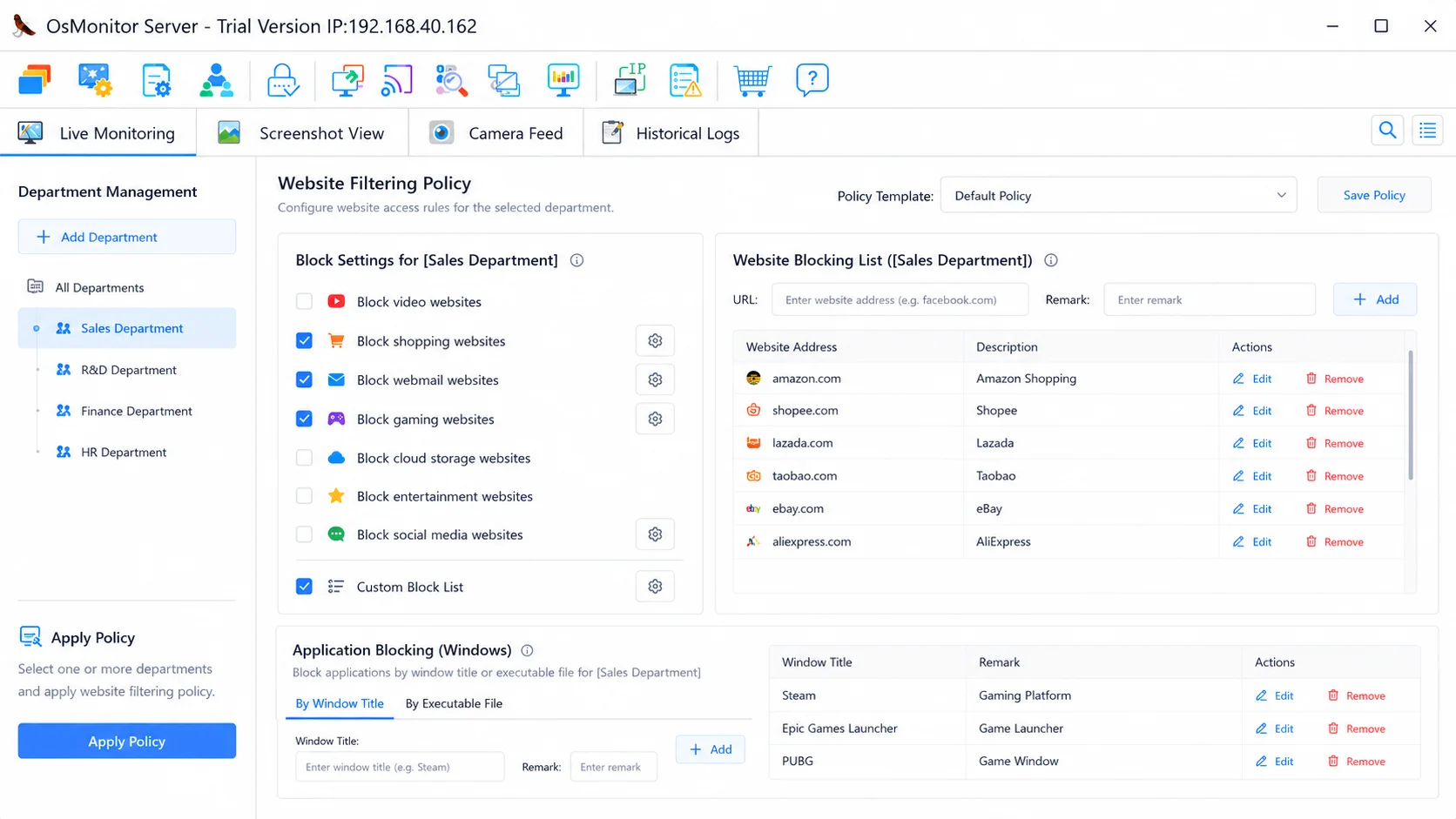
Enforce standardized laboratory baselines and configure active software or website blocklists from a central dashboard.
2. Remote Power Management & Centralized Audio Muting
Manually managing power cycles across a massive school facility is a significant operational burden. OsMonitor incorporates comprehensive power control utilities directly into the server console. IT administrators can trigger forced remote shutdowns, execute reboots for unresponsive systems, or establish automated schedules to turn off all lab computers simultaneously at the end of the day, helping to reduce electricity overhead. Furthermore, teachers can use the forced audio muting feature to instantly silence all workstation sound cards, eliminating disruptive noise from video games or media streams and bringing immediate focus back to the lecture.
3. Workstation Resource Auditing & Hardware Diagnostics
Maintaining software integrity on shared school networks requires robust, real-time performance tracking. OsMonitor includes a dedicated administrative panel to remote check CPU, memory, and disk space occupancy for every system. This allows IT staff to quickly pinpoint workstations suffering from hardware degradation, full storage drives, or hidden processes. When an administrator identifies an unauthorized task causing a resource bottleneck, they can execute a remote process termination command to kill the unapproved program immediately, safeguarding lab computing resources.
4. Classroom Interaction & Desktop Wallpaper Locking
Instructors can optimize instructional hours by utilizing streamlined automation utilities. Rather than relying on students to type complex website URLs manually, educators can use the URL broadcasting engine to automatically open any targeted web link on all client desktops simultaneously. To maintain an orderly and standardized training environment, OsMonitor allows administrators to enforce and lock standard desktop wallpapers across the laboratory, preventing students from displaying inappropriate background graphics. Mass messaging options also allow immediate pop-up text alerts to appear on top of all active user applications.
5. High-Efficiency Screen Monitoring & Optional Visibility
For organizations requiring visual verification, OsMonitor includes a live TV-Wall layout that arranges multiple workstation views onto a unified grid. To minimize local area network bandwidth footprint, the platform captures compressed image snapshots at a highly optimized minimum capture interval of 3 seconds. Full multi-monitor architectures are supported natively, tracking dual-screen setups side-by-side. However, if regional compliance policies strictly forbid screen tracking, administrators can turn off the visual capture module entirely, using the system solely for power management, hardware auditing, and software blocking.
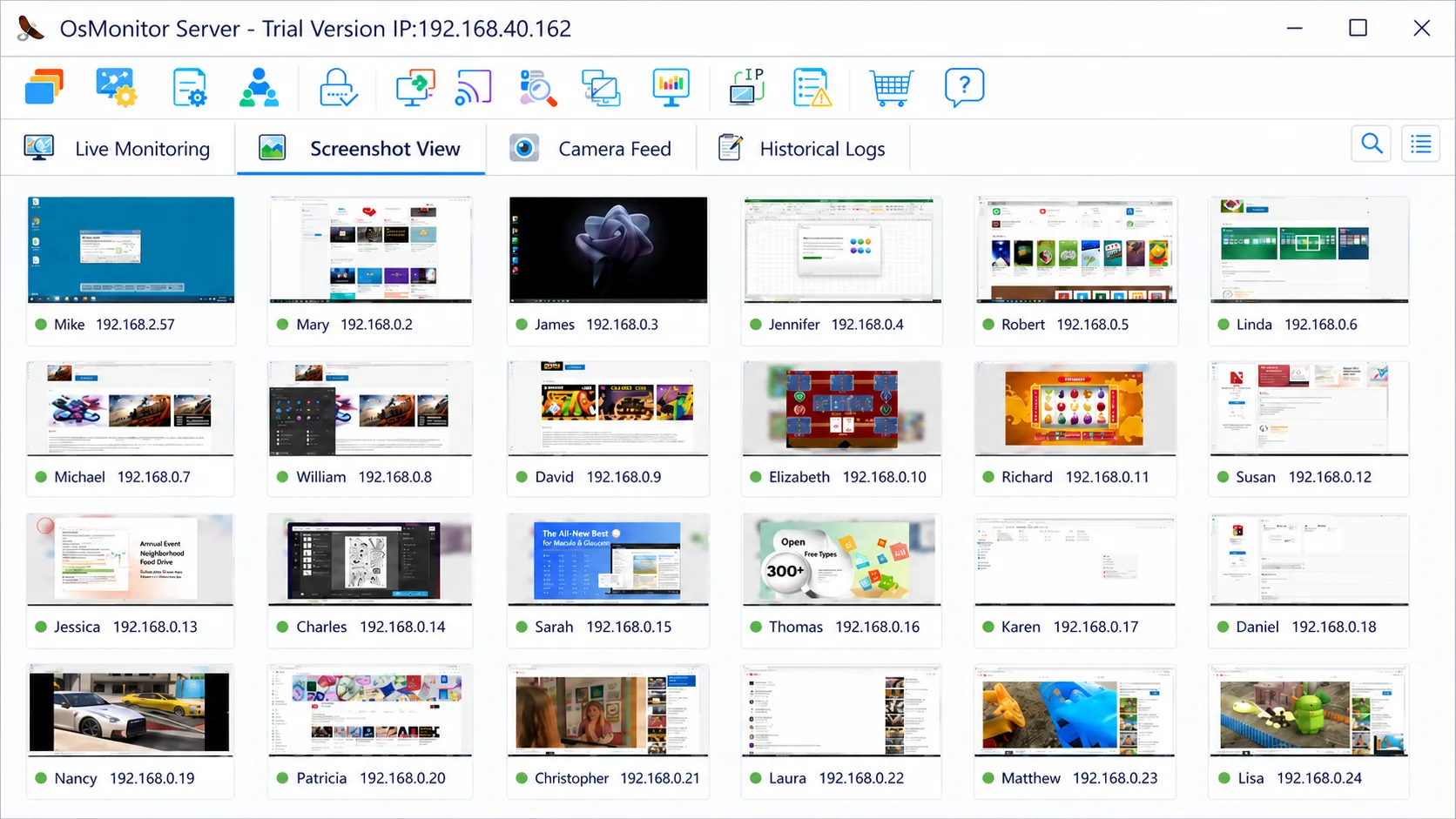
The live TV-Wall captures high-quality workstation snapshots every 3 seconds to maintain comprehensive classroom oversight.
6. Direct Remote Guidance & Assignment Protection
Effective classroom management requires active support and asset preservation alongside restrictions. When a student struggles with a software task, teachers can initiate a remote desktop control session to instantly take over the student's keyboard and mouse, providing direct, hands-on guidance without walking across the room. Furthermore, to safeguard critical student work, OsMonitor features automated document backup. The system can be scheduled to automatically fetch specific file types (such as essays or project files) from local workstations and securely archive them on the management server, completely eliminating the risk of data loss due to accidental deletion, malicious tampering, or sudden hardware crashes.
Frequently Asked Questions
Can a teacher take remote control of a student's computer to provide help?
Yes. Instructors can instantly launch a remote desktop session from the management console to take control of a student's keyboard and mouse, allowing them to provide direct, hands-on guidance without leaving their desk.
How does the software prevent students from losing their assignments?
OsMonitor includes an automated document backup feature. It can be scheduled to automatically fetch and securely copy specific file types (like Word documents or project files) from student workstations to the central server, preventing data loss from accidental deletion or hardware failure.
Can OsMonitor block specific websites and non-educational software?
Yes. OsMonitor provides native IT enforcement to block specific websites by URLs or keywords. It can also automatically terminate any non-educational software programs or standalone games (.exe processes) the moment a student attempts to launch them.
Can an instructor send mass messages to individual, selected, or all student computers?
Yes. OsMonitor provides highly flexible communication tools. Instructors can select a single workstation, a specific group of students, or broadcast a mass pop-up message to all computers in the lab simultaneously to issue announcements or warnings.
Can a teacher turn off or reboot all lab computers simultaneously?
Yes. OsMonitor includes comprehensive remote power management tools. IT administrators can execute forced remote shutdowns, trigger immediate reboots, or configure automated scheduled batch power-offs to ensure all lab machines are shut down automatically after school hours to save energy.
Is it possible to mute all student computer sound cards from the teacher console?
Yes. To maintain strict classroom discipline, instructors can enforce global audio muting across all connected workstations with a single click, instantly silencing any unauthorized media playback or game sounds.
How can an administrator monitor computer lab hardware health remotely?
OsMonitor provides a live dashboard displaying real-time hardware utilization metrics. Administrators can monitor CPU spikes, memory load, and remaining disk space for every workstation directly from the central console.
Does the platform support student computers with multiple monitors connected?
Yes. If a student workstation is connected to multiple displays, OsMonitor automatically logs and tracks all connected screens simultaneously, arranging them side-by-side on the teacher's management grid to prevent any monitoring blind spots.
Is screen monitoring mandatory, or can it be turned off for privacy?
Screen monitoring is completely flexible. OsMonitor allows administrators to disable visual screen capturing and history archiving globally to comply with strict institutional privacy regulations, while fully retaining the ability to block websites, broadcast URLs, and enforce wallpapers.
Related Core Features
OsMonitor provides computer lab management by deploying our unified core platform capabilities across local network architectures:
Streamline Your Computer Lab Management
OsMonitor provides a highly optimized, lightweight IT management platform for Microsoft environments. Bring complete structure, endpoint security, and unified control to your school workstations today.