Monitor Employee Computer Screens in Real Time
OsMonitor is an on-premise employee monitoring software built for businesses that need real-time visibility into employee computer screens, live desktop sessions, and visual workflows across Windows business PCs. Managers can easily monitor multiple computer screens at once, review past screenshot history, and investigate incidents using timestamped visual evidence from a centralized console.
Live Screen View
Monitor employee computer screens in real time with a customizable TV-wall format.
Screenshot History
Perform employee screenshot monitoring automatically and play it back like a video.
Screen Capture Alerts
Trigger a screen capture instantly when an employee types a sensitive keyword.
1. Live Screen Matrix: Real-Time Employee Screen Monitoring
OsMonitor gives managers a centralized dashboard for real-time employee screen monitoring across the company network. OsMonitor's live screen monitoring software allows managers to see exactly what every employee is working on right now.
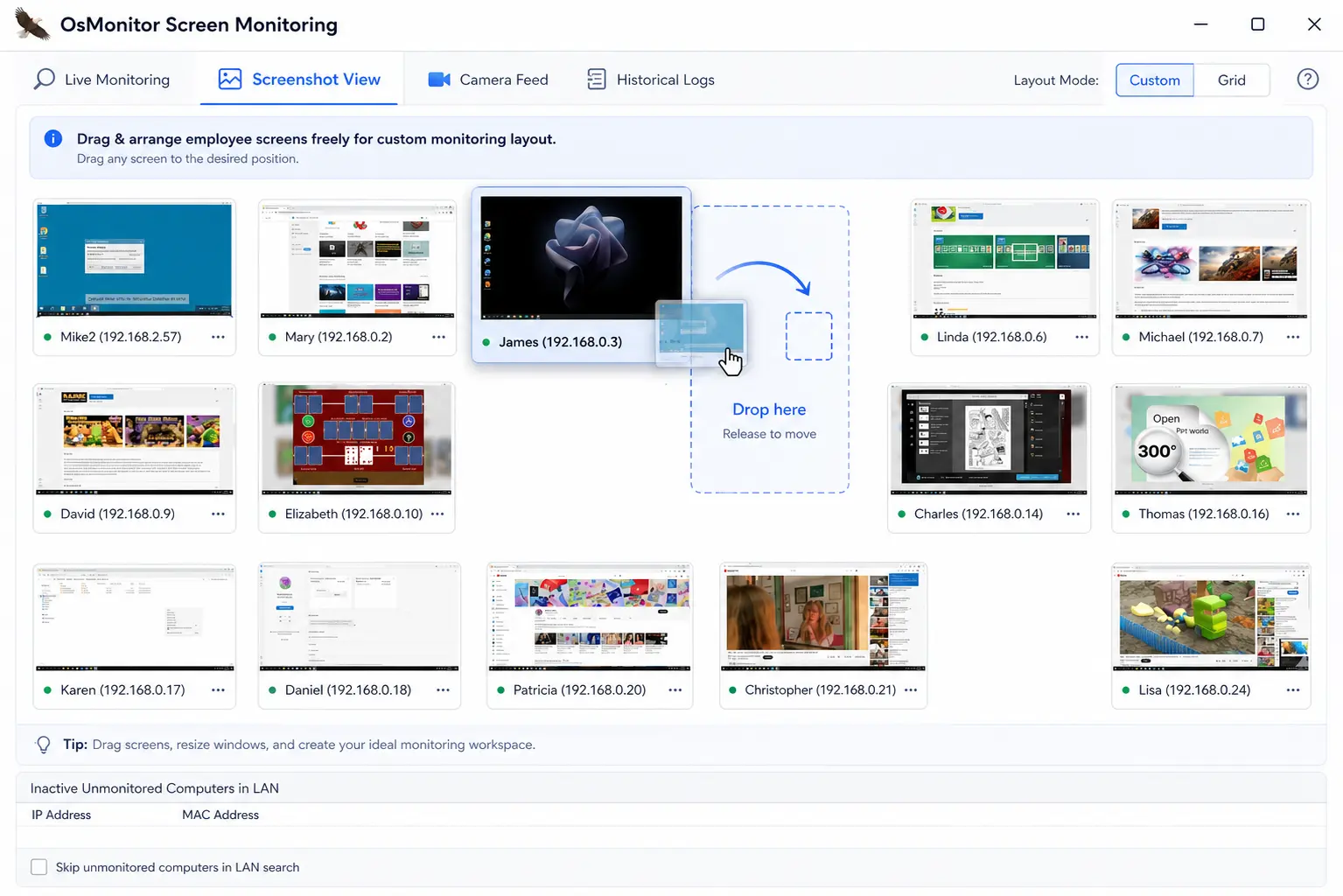
Monitor dozens of computer screens simultaneously. Drag and drop to create your ideal layout.
- Monitor Multiple Computer Screens: View multiple remote desktops at the same time in a grid. Easily check an entire department's visual workflow.
- Smart Auto-Arrange: The software automatically scales and arranges the screen thumbnails to fit your monitor perfectly.
- Custom Drag-and-Drop Memory: Want to keep a close eye on specific users? Drag their screen to the center. OsMonitor saves your layout automatically for your next login.
2. Screenshot History for Employee Screen Monitoring
Continuous live viewing is not always practical. OsMonitor automatically captures screen images over time, allowing managers to review historical visual activity whenever an incident, audit, or compliance check requires it.
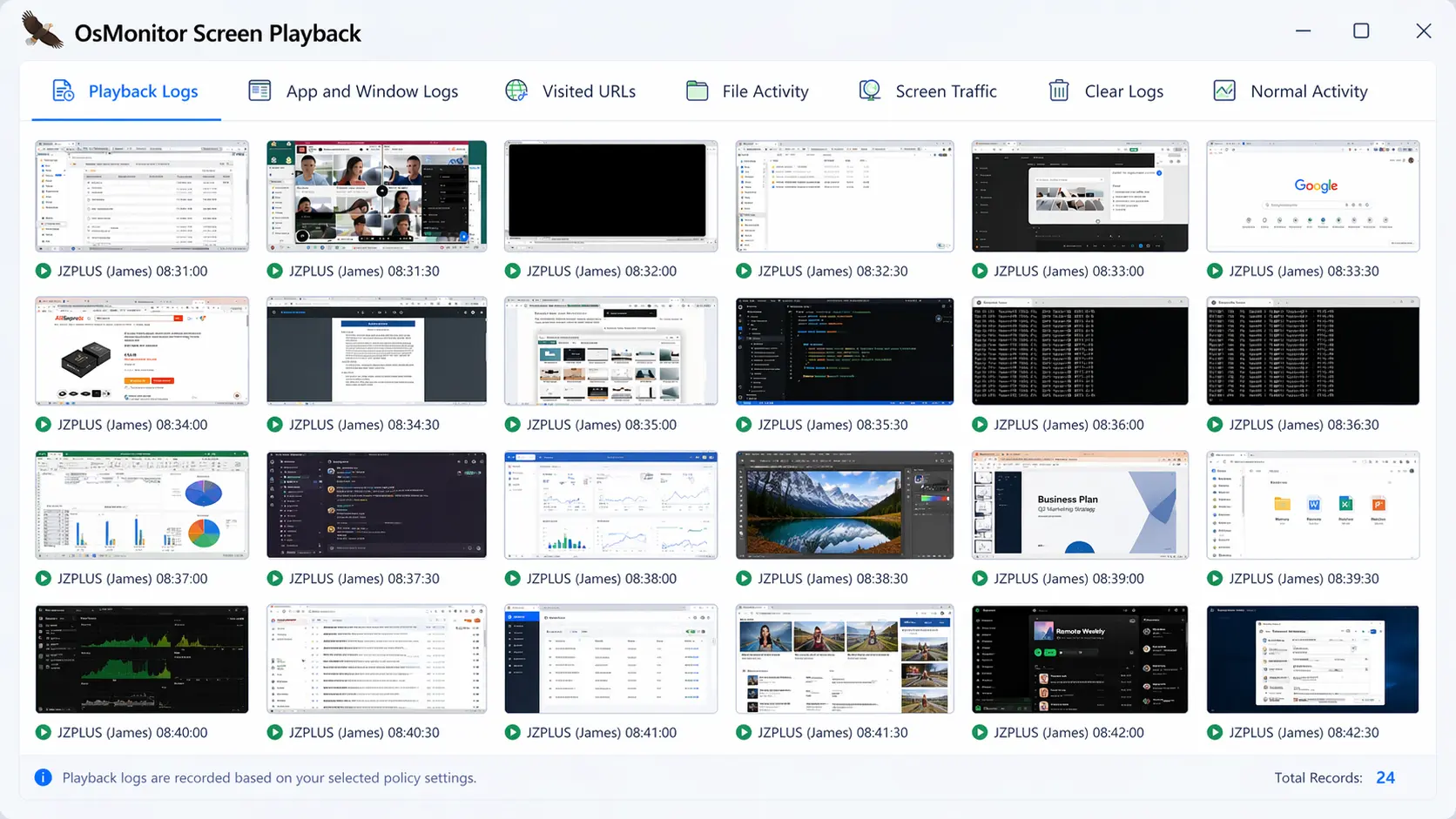
Browse past screenshots as a grid, or play them back as an automated slide animation.
- Employee Screenshot Monitoring: Set the timer to capture a screenshot every few seconds for high-security teams, or every few minutes for standard tracking.
- Animated Slide Playback: Do not waste time clicking through hundreds of images. Select a specific employee and time range to play the historical screenshots as a smooth video.
- Smart "No-Change" Detection: If an employee steps away and their screen is static, the software pauses capturing. This saves massive amounts of server disk space.
3. Alert-Based Screen Capture for Incident Investigation
Beyond live viewing, OsMonitor extends employee screen monitoring with alert-based screen capture, helping managers preserve visual evidence for incident investigation. Use global keywords to trigger instant screenshots for undeniable visual proof.
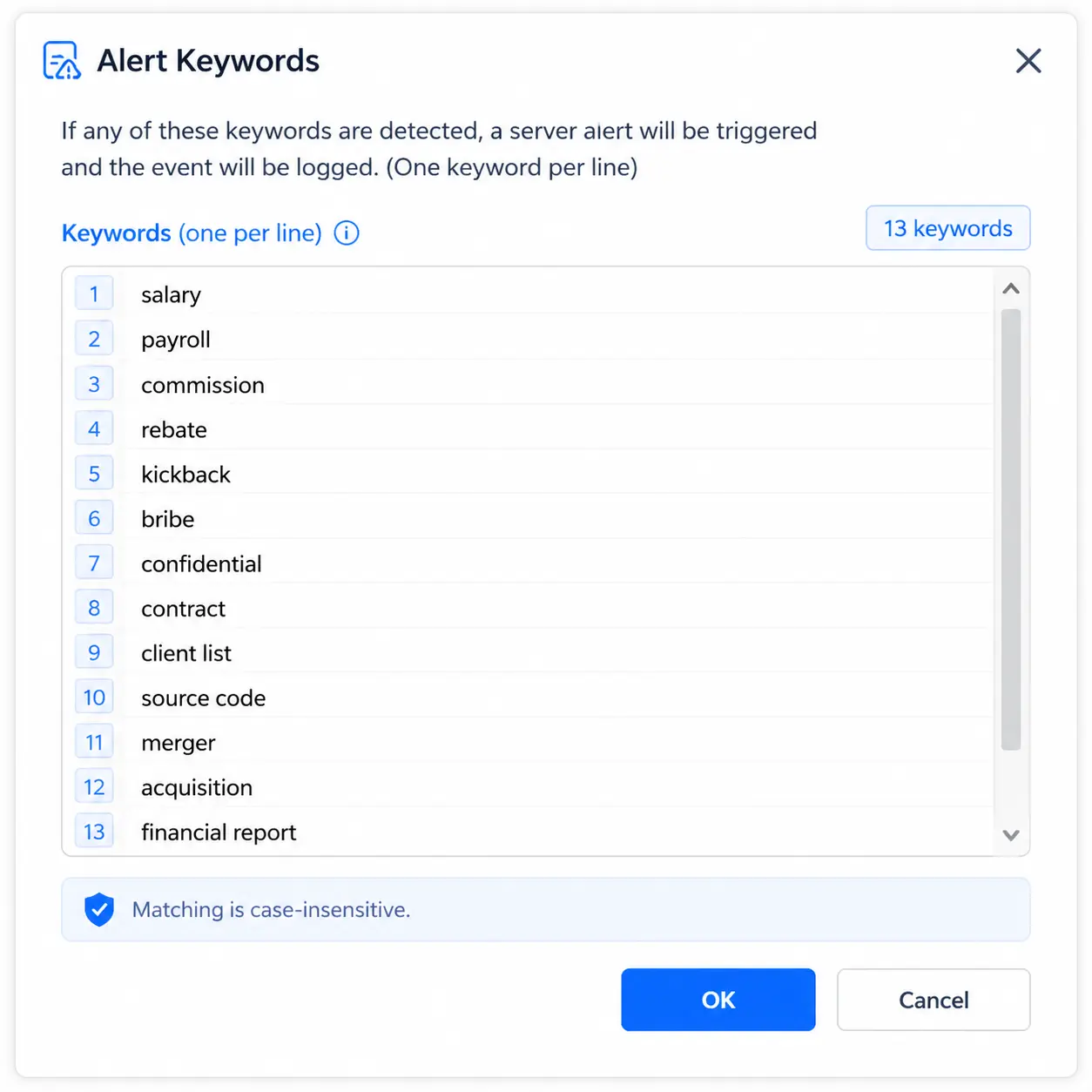
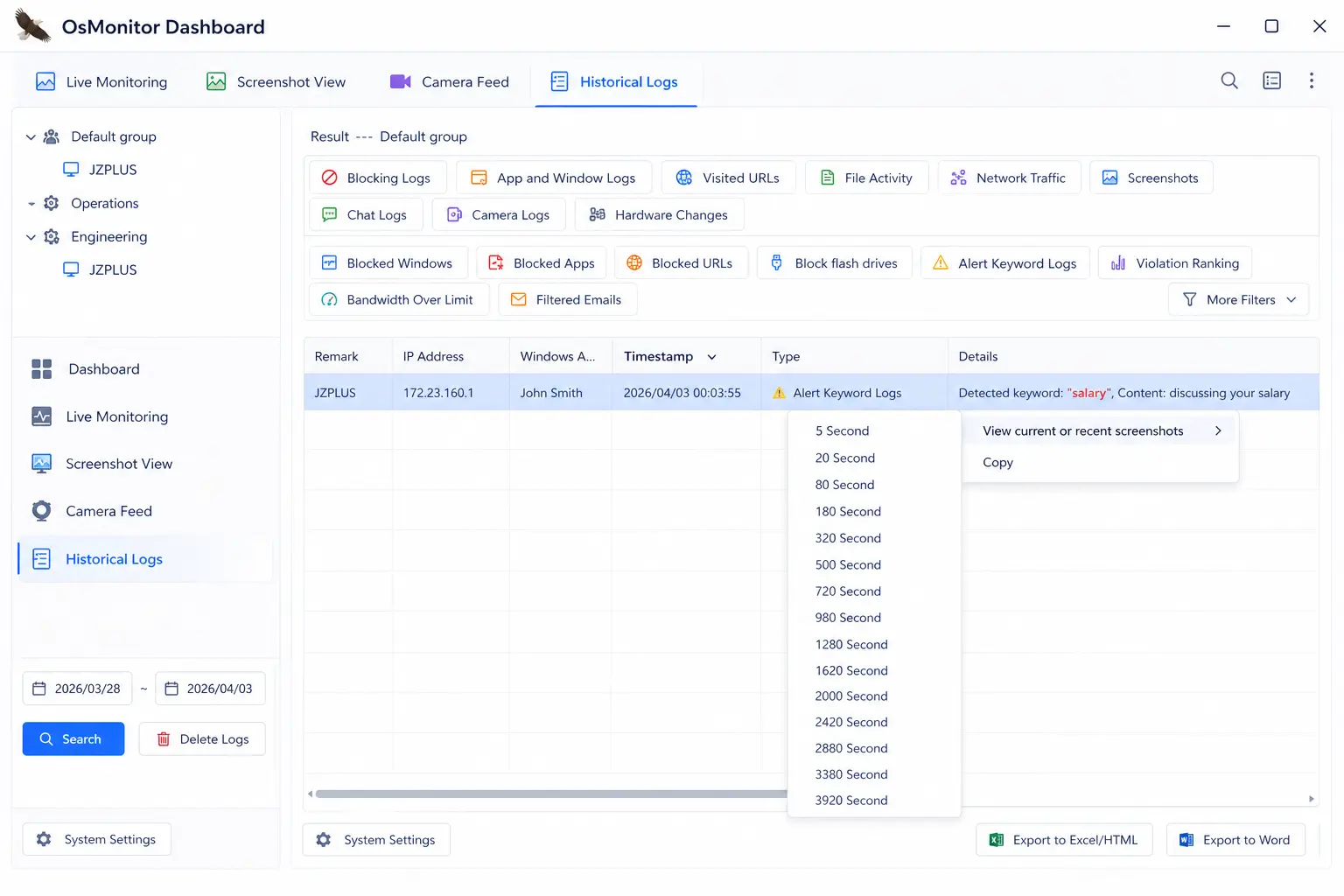
Right-click any alert log to instantly retrieve the screen image from that exact moment.
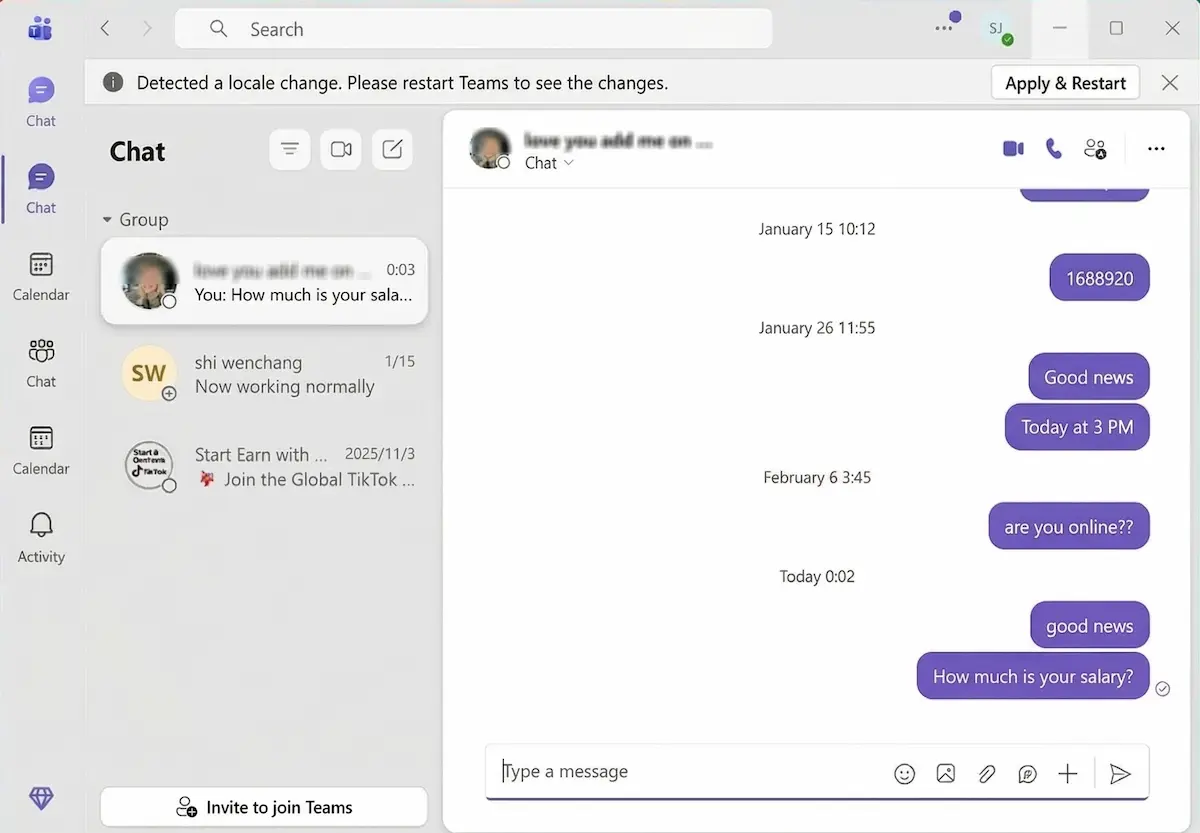
View the exact context of the violation, such as a sensitive conversation triggering a screen capture.
- Triggered Screen Capture: Define sensitive words (like "salary" or "client list"). The software captures the screen instantly if the keyword appears in chats, clipboards, or file names.
- Right-Click Retrieval: Inside your logs, simply right-click the alert event to pull up the exact screen visual from that timestamp.
- Precision Time-Slicing: Need more context? Choose to view what was happening on the screen 5 seconds or 20 seconds around the exact timestamp of the event.
4. Why Businesses Use Employee Screen Monitoring Software
Organizations across various industries rely on on-premise screen monitoring to ensure compliance, protect sensitive data, and maintain productivity.
Maintain strict visual audit trails to ensure employees handle financial records according to regulations.
Monitor live screens to ensure agents are using company software correctly and providing quality support during active calls.
Prevent data theft, protect sensitive files from USB copying, and capture instant screen evidence the moment unauthorized actions occur.
❓ Frequently Asked Questions (FAQ)
It is a business tool that allows managers to view employee computer screens in real time and review automated screenshot history for auditing, compliance, and incident investigation.
Yes, in many jurisdictions businesses can use employee screen monitoring software for legitimate purposes such as security, compliance, and productivity management. Employers should always follow local laws, internal policies, and employee notification requirements before deployment.
Yes. Our live screen monitoring software features a TV-wall matrix. You can watch dozens of remote computer screens simultaneously and drag important ones to the center.
Yes, it saves screenshots as JPG files. Because OsMonitor is an on-premise screen monitoring software, all images are stored safely on your own local server, not on a public cloud. You can customize the storage path and adjust the capture frequency to save disk space.
Yes, absolutely. If an employee's computer is connected to multiple physical displays, OsMonitor will capture and monitor all active screens perfectly.
No. OsMonitor is an extremely lightweight tool (only a few megabytes in size). Because it uses low-level system APIs built specifically for Windows employee monitoring, its CPU and memory usage remain very low during normal operation, so performance impact is minimal for everyday office work.
No. The network traffic generated by OsMonitor is negligible for a standard Local Area Network (LAN). The software is designed for practical visual evidence retention, not for streaming 4K high-definition video. More importantly, because OsMonitor is an on-premise solution, all screen monitoring data stays securely within your local network. It is not cloud-based, meaning it will absolutely not consume any of your company's internet bandwidth.
You don't need to manually search through thousands of images. Simply define your Alert Keywords. When an event triggers, go to your Alert Logs, right-click it, and the software will instantly show you the screen capture taken at that exact time.
Ready to Gain Total Visual Control?
OsMonitor combines powerful screen monitoring functions with a highly secure on-premise deployment, ensuring your data never leaves your local network. We offer a transparent, one-time payment pricing structure with absolutely no monthly fees. Test these features on your own network by starting a free trial today.