Streamline Your LAN with Centralized Remote IT Management
OsMonitor goes beyond standard employee activity monitoring software to act as your complete on-premise remote IT management software. As a powerful LAN administration software, we make managing Windows PCs effortless—from providing instant remote support to automatically inventorying network hardware.
🖥️Remote Access
Launch an unattended remote desktop for business instantly without disrupting workflow.
⚙️Bulk Operations
Easily restart remote office computers or schedule bulk shutdowns across the LAN.
📊Asset Inventory
Maintain a complete hardware and software inventory for all network computers automatically.
🎯 Best For:
- IT administrators needing unattended remote access software to resolve issues quickly.
- Network admins looking for reliable remote shutdown software to manage office power usage.
- Managers requiring complete centralized endpoint control over LAN workstations.
- Organizations looking for an automated way to generate a hardware and software inventory.
1. Centralized Endpoint Control: The Ultimate LAN Management
Gone are the days of walking desk-to-desk to fix computer issues. As a top-tier remote PC management software, OsMonitor provides a powerful, unified dashboard where comprehensive network administration is literally at your fingertips.
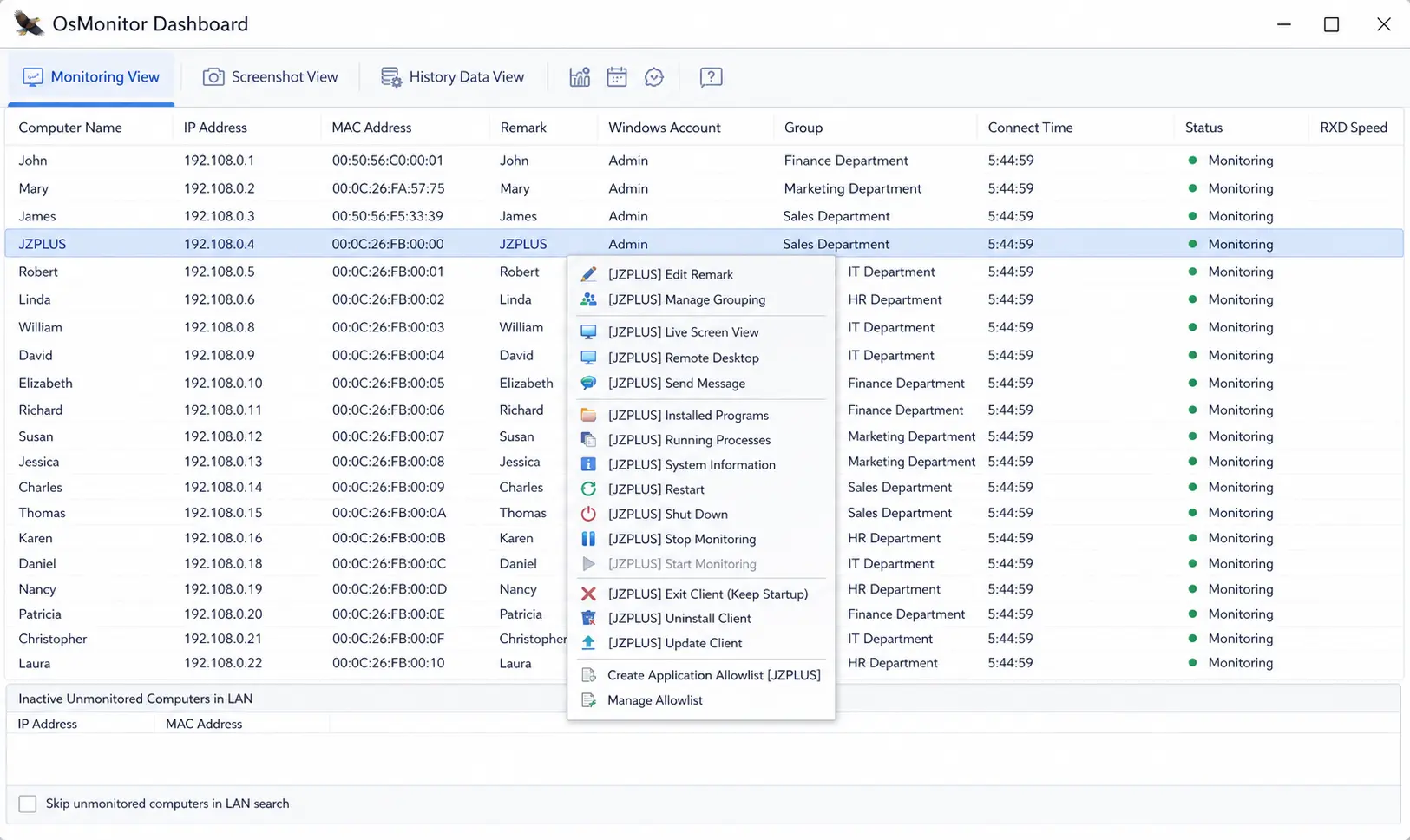
Select a monitored computer from the live list and right-click to instantly launch remote management tools.
- Instant Execution: Select any online PC from your monitoring list, right-click, and immediately trigger administrative commands without any setup on the client side.
- Broadcast Messaging: Need to make a company-wide announcement? Send a direct popup message to specific departments or all online computers simultaneously.
2. Bulk Operations: Remote Shutdown & Restart Software
Reduce manual IT workload by automating daily routines. OsMonitor acts as both a remote shutdown software and a remote restart software, allowing you to configure time-based strategies for entire departments.
- Shut Down Multiple Computers on LAN: Save company energy costs and ensure security by setting specific time periods (e.g., 18:00 to 18:30) for client PCs to power off automatically. No more leaving PCs running overnight.
- Manual Power Management: IT staff can easily restart remote office computers that are unresponsive directly from the server dashboard, avoiding unnecessary physical visits.
- Dynamic Policy Profiles: Automatically switch monitoring or restriction rules based on the time of day, such as disabling web filters during the lunch break.
3. Unattended Remote Desktop for Business
Provide instant IT support without leaving your desk. OsMonitor's screen control feature is designed for seamless, non-intrusive administration.
- Instant Unattended Access: Unlike consumer tools that require the user to click "Accept," our unattended remote access software connects instantly.
- Non-Intrusive Workflow: Perform system diagnostics or deploy fixes while the user is away from their desk, ensuring their workflow is never interrupted.
4. Network Inventory Software: Hardware & Software Audits
Say goodbye to manual Excel spreadsheets. Let OsMonitor automatically build a comprehensive hardware and software inventory across your entire network.
- Hardware Inventory Software: Right-click any PC to pull a complete hardware inventory for network computers, instantly viewing System Information including CPU, Memory, disk space, and network adapters.
- Software Inventory Software: Easily track installed software on company PCs. Generate a real-time list of installed programs and currently running processes to detect unauthorized apps or hidden games instantly.
❓ Frequently Asked Questions (FAQ)
No. OsMonitor provides unattended remote desktop for business. Unlike standard tools that require a user to approve the connection or share a password, IT administrators can connect instantly. This is perfect for after-hours maintenance or providing immediate IT support without popping up disruptive prompts on the employee's screen.
Using our built-in network inventory software, you can right-click any monitored computer to instantly pull a full list of all installed programs and running processes directly from your central server.
Absolutely. Our remote shutdown software module allows you to set time-based strategies (e.g., automatically trigger a shutdown at 6:00 PM) and apply them to specific departments or the entire network to save energy.
No, OsMonitor is an entirely on-premise remote IT management software. All asset data, hardware specs, and management logs are stored securely on your local server.
Ready to Simplify Your LAN Administration?
Download OsMonitor today to get full control over remote desktop access, bulk scheduling, and IT asset tracking.