Professional Web Filtering & Application Control for Windows
OsMonitor is a comprehensive solution for organizations that need to block non-work websites, control application usage, and ensure employees stay focused. By using centralized, group-based policies, administrators can easily filter internet content and manage software execution across the entire network.
🚀Boost Productivity
Reduce non-work browsing and instant distractions during office hours.
🛡️Improve Focus
Prevent access to non-work related websites and unauthorized software.
📂Centralized Control
Manage all filtering and control policies from a single server.
1. Internet Usage Control: Block Websites by Category
The most efficient way to manage internet monitoring is through category-based filtering. OsMonitor includes predefined lists for the most common workplace distractions.
- Smart Checkboxes: Instantly block entire categories like Social Media, Games, or Video Sites by simply checking the boxes.
- Custom Tweaks: You can manually Add or Remove specific URLs and keywords to fine-tune the filter.
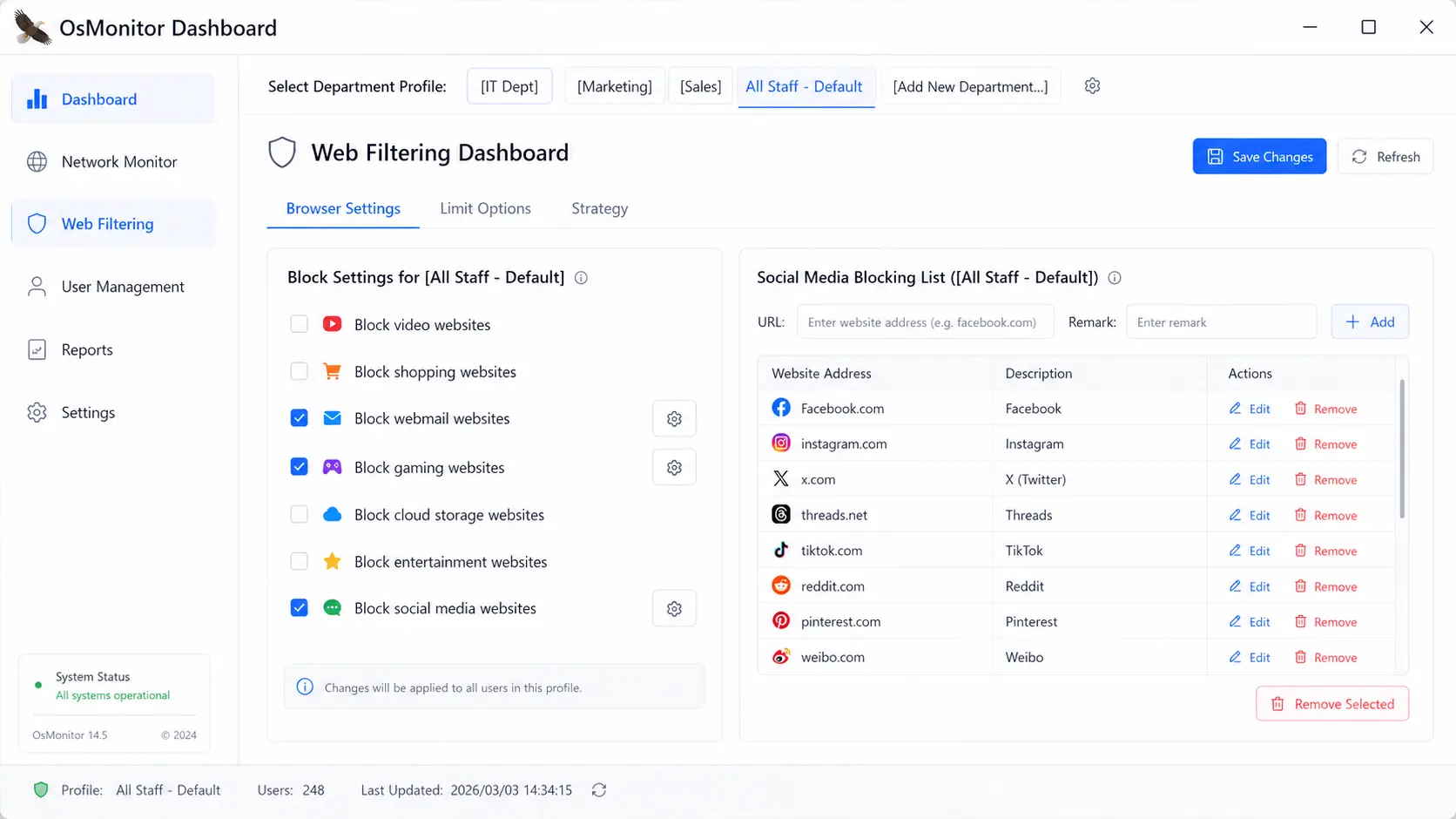
Simply check the boxes to block specific website categories across all browsers.
2. Professional Web Filtering: Allow Approved Sites Only (Whitelist)
For high-focus departments, our software supports a strict "Allowed Websites" (Whitelist) mode. This blocks all internet access except for the specific work-related sites you approve.
How to Setup an Allowed Website List:
- Define Keywords: Add essential work domains or keywords (e.g., google.com) to the list.
- Apply Restriction: Select "Allow only URLs containing keywords" to block everything else.
- Instant Enforcement: Save the settings to apply the new rules to the group immediately.
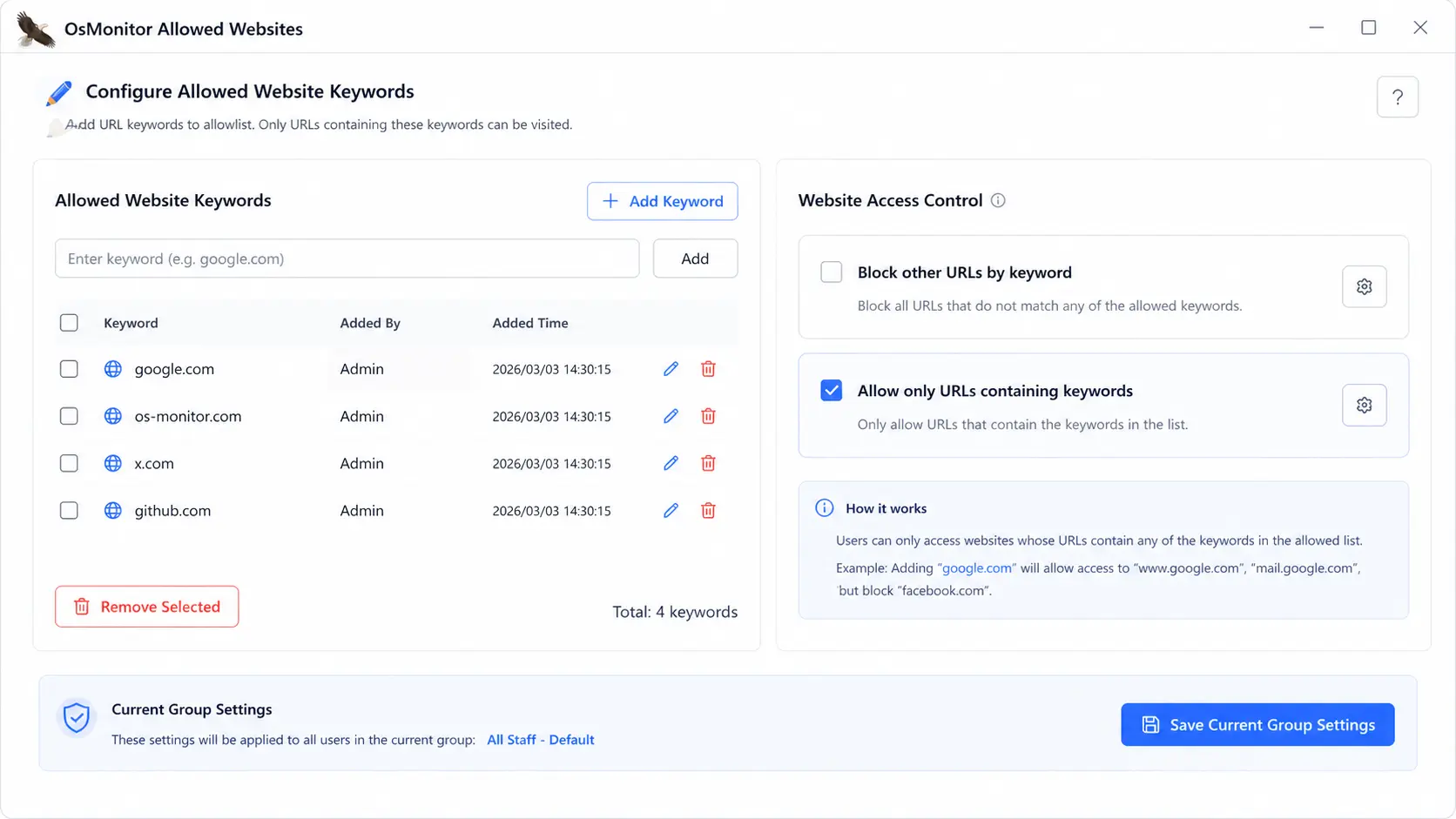
Create a professional workspace by allowing only verified keywords.
3. Windows Application Control: Prevent Unauthorized Software
To protect endpoints from malicious or leisure software, OsMonitor provides robust control to stop non-work programs from running. You can manage software execution through two professional methods:
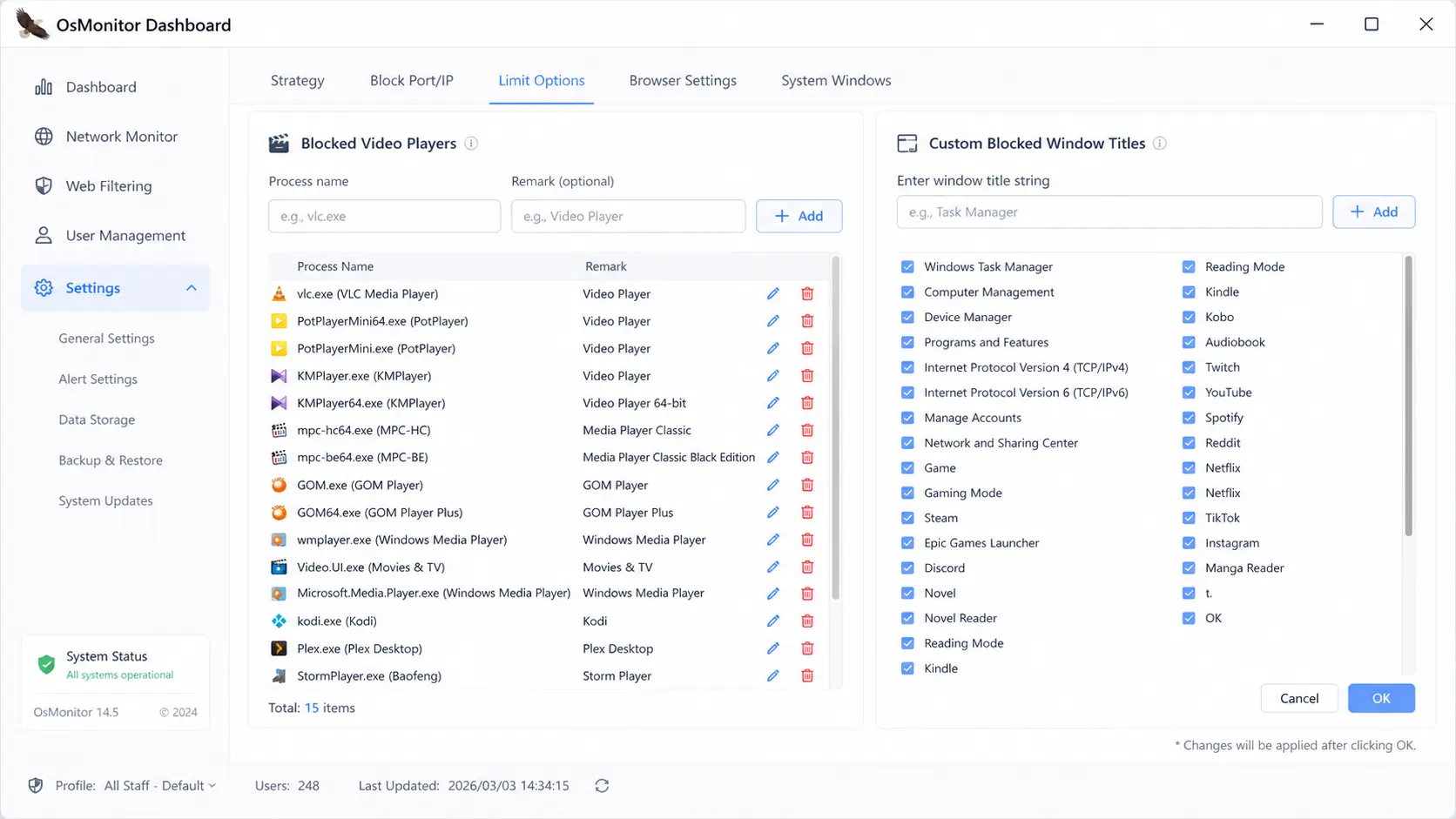
Method A: Block Specific Programs and Window Titles
Ideal for managing common distractions like chat tools or video players.
- Process Blocking: Automatically close programs by their .exe name (e.g., WhatsApp.exe).
- Window Title Interception: Intercept applications based on keywords in the title. If a window title contains a banned word, the app is instantly closed.
Method B: MD5 Application Control (Zero-Trust Security)
For maximum security, use our MD5-based whitelist. This ensures only verified programs can run, regardless of their filename.
- Register: Use the Server to "register" approved software running on a sample PC.
- Block: OsMonitor captures the unique digital fingerprints (MD5) of these programs.
- Enforce: Only these verified applications will be allowed to run for that department.
Flexible Enforcement Modes
Choose the enforcement mode that fits your company's management style:
🛡️Automatic Close & Log
The unauthorized program or browser is instantly closed. The event is silently logged on the Server.
⚠️Custom Warning
In addition to closing the program, a custom message pops up on the employee's screen to explain the policy violation.
🕵️Silent Auditing
Nothing is blocked. The software or website opens normally, but the Server silently records the duration for managerial analysis.
❓ Filtering & Control FAQ
Can OsMonitor block websites by category?
Yes. Our software can block entire categories like social media, games, and video sites by checking a single box in the management console.
Can it allow only approved websites?
Absolutely. By enabling the "Allowed Websites" (Whitelist) mode, it blocks all internet access except for the specific work-related domains you specify.
Can it block unauthorized software on Windows?
Yes. OsMonitor can terminate unauthorized programs based on their process name or their unique MD5 digital fingerprint, making it impossible to evade the block.
What browsers are supported? Do I need to change my network settings?
As a native Windows monitoring software, it supports almost all major web browsers globally (Chrome, Edge, Firefox, etc.). You do not need to change your network structure or hardware.
Does OsMonitor support silent auditing mode?
Yes. For corporate audits where managers need to monitor activities without interrupting the workflow, the silent auditing mode allows employees to use any website or software normally, while the Server silently logs the activity and time spent for productivity reports.
OsMonitor is the leading On-Premise Employee Monitoring Software. Unlike cloud-based solutions, all your filtering logs and activity data stay securely on your own local server, ensuring 100% privacy and compliance.
Ready to Gain Complete Workplace Visibility?
Download OsMonitor to filter web usage and control applications with our affordable lifetime licenses today.