Disengaged Employees: Warning Signs and Workplace Data Signals
Disengaged employees are not always easy to spot at first. The team may still look busy, messages may still be answered, and tasks may still move forward slowly. But over time, managers may notice missed deadlines, weaker work quality, more distractions, and less initiative.
For a small business, one practical warning sign may be repeated time spent on games, video streaming, entertainment websites, shopping sites, or other non-work browsing during office hours. The right response is not to jump to conclusions. A manager first needs clear website access records, application usage reports, and enough context to understand whether the issue is workload, unclear expectations, low motivation, burnout, or policy drift.
Workplace data cannot explain everything about employee disengagement, but it can help managers see patterns earlier and start better conversations.
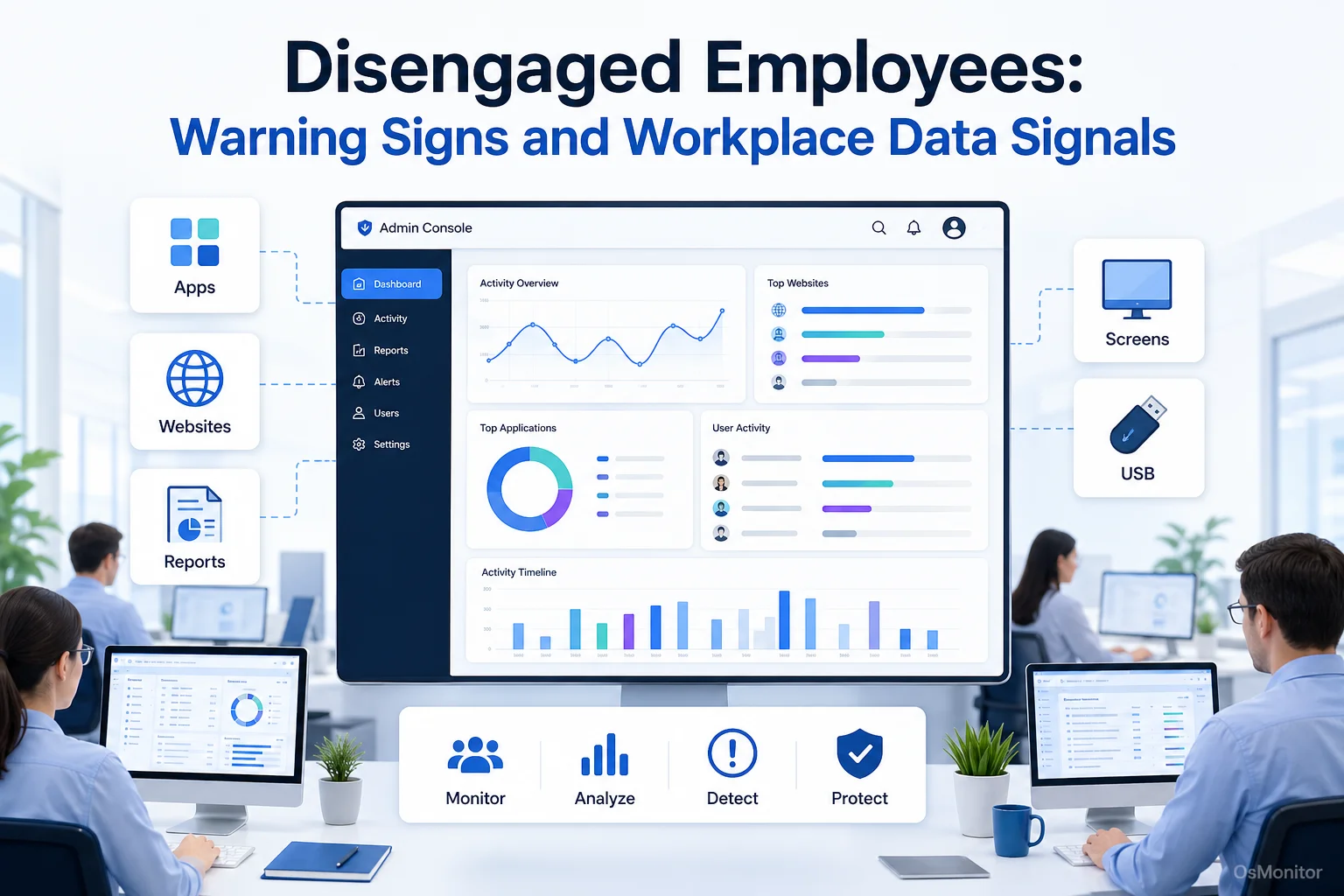
A practical overview of disengaged employees for workplace computer management.
What is Employee Disengagement and Why Does It Matter?
Employee disengagement means an employee has become mentally or emotionally disconnected from their work, team, or company goals. A disengaged employee may still show up and complete some tasks, but the energy, ownership, focus, and initiative are often missing.
Some people search for “what is employee disengagement” or “what is a disengaged employee” because disengagement can sound vague. In plain business terms, it means the employee is no longer fully invested in doing good work for the organization.
The cost of disengaged employees can appear in several ways:
- Lower Productivity: Tasks take longer, output drops, and deadlines become harder to meet.
- Lower Work Quality: Mistakes increase because attention and care decline.
- Weaker Team Morale: Disengagement can spread when other employees see low effort being tolerated.
- More Management Time: Managers spend more time following up, correcting work, and clarifying basic expectations.
- Higher Attrition: Employee disengagement can increase turnover because disconnected employees are more likely to look for other opportunities.
Many managers ask how employee disengagement impacts attrition. The connection is practical: when employees stop feeling connected to the work, the team, or the company’s future, leaving becomes easier. Even before someone quits, disengagement can quietly reduce performance.
Understanding the signs of disengaged employees helps managers act earlier. Direct communication matters most, but computer activity patterns can provide useful supporting evidence.
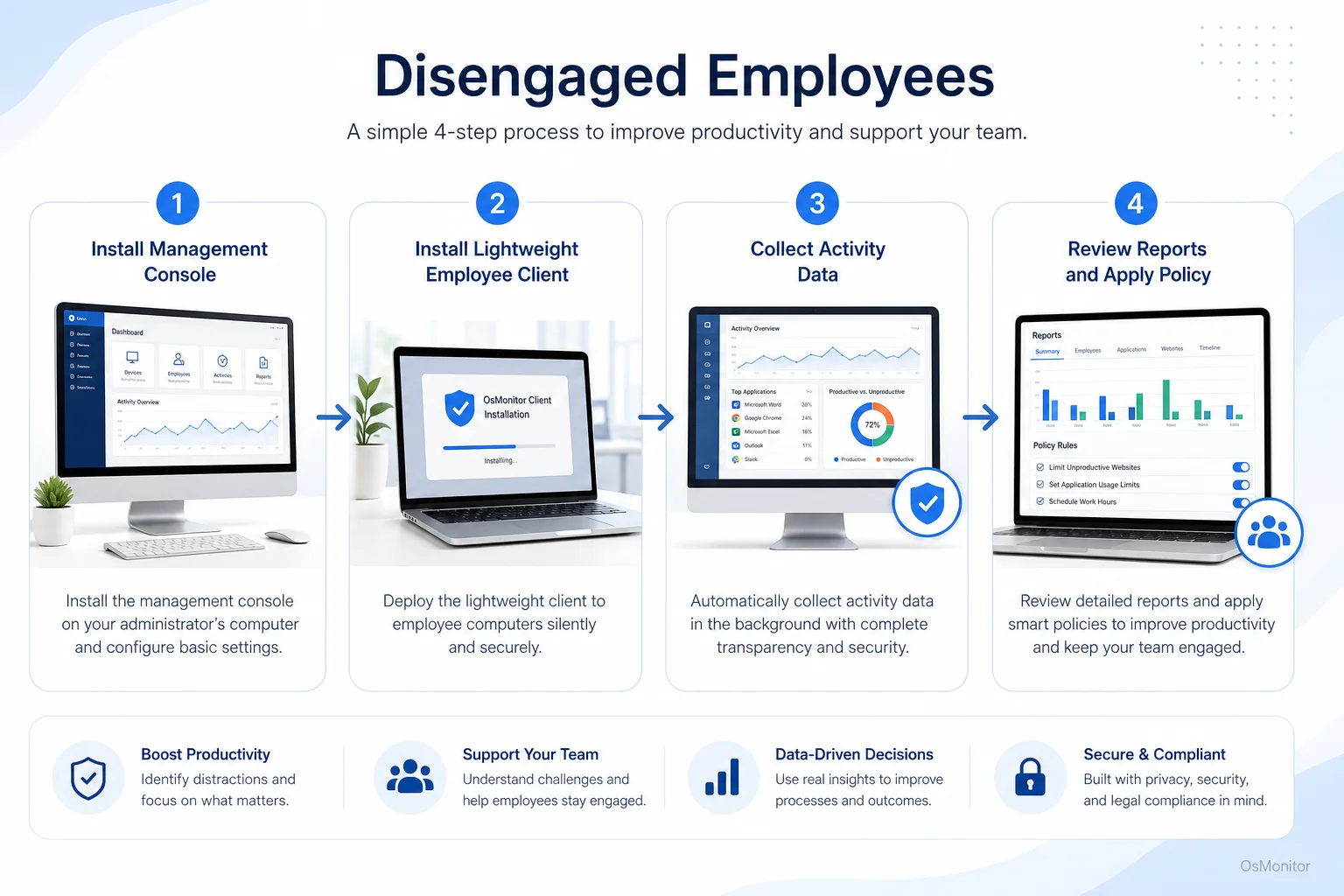
A simple workflow showing how workplace signals can support disengaged employees.
Observable Signals of Disengaged Employees in Computer Activity
A single slow day does not mean someone is disengaged. Everyone has low-focus periods, support delays, or unusual tasks. The useful signal is a repeated pattern over time.
Workplace computer activity records can help managers compare normal work patterns with recent changes. These records may come from Employee Activity Monitoring Software that reports application usage, website activity, active time, idle time, file activity, and department-level trends.
Here are common digital signals that may suggest employee disengagement:
| Digital Signal | Potential Interpretation |
|---|---|
| High Non-Work Website Usage | Repeated time on entertainment, shopping, news, or unrelated sites during core hours may suggest distraction, underuse, or low motivation. |
| Low Core Application Usage | A drop in CRM, design tools, accounting software, project software, or other required tools may show reduced work focus. |
| Increased Idle Time | Long inactive periods may suggest unclear tasks, blocked work, low motivation, or possible workload mismatch. |
| Reduced Project-Related Activity | Fewer document updates, file operations, or work-related application sessions may show that assigned work is not moving forward. |
| Unstable Activity Patterns | Large swings between intense activity and long inactive periods may suggest poor prioritization, overload, or disengagement. |
These signals should not be used as automatic proof. They should guide better questions.
For example, instead of saying, “You are disengaged,” a manager can say, “I noticed less time in the project system this week and more inactive time than usual. Is anything blocking your work?”
That kind of conversation is more useful and more professional.
Some articles talk about the “7 habits of highly disengaged employees.” In real management, it is better to avoid turning people into labels. Look for patterns such as low initiative, repeated distraction, poor follow-through, withdrawal from communication, missed deadlines, careless mistakes, and resistance to feedback. Then investigate the cause.
Engaged vs disengaged employees often look different in their day-to-day behavior. Engaged employees tend to use core tools consistently, communicate when blocked, follow through on tasks, and look for ways to solve problems. Disengaged employees may show lower ownership, lower focus, and weaker alignment with team goals.
Strategies to Reduce Disengagement: Software, Policy, and Management
Technology can help reveal possible disengagement, but it cannot fix the human side by itself. The best strategies to reduce disengagement and quiet quitting combine clear data, fair policies, better management, and meaningful support.
When Software Helps
Workplace computer activity management software is useful when managers need clearer facts before taking action.
It can help with:
- Gathering Objective Data: Reports on application usage, website activity, active time, idle time, and policy events can reduce guesswork.
- Identifying Team-Wide Trends: If an entire department shows more non-work browsing or less use of core tools, the issue may be workload, leadership, tools, or unclear priorities.
- Supporting Coaching Conversations: Activity reports can help managers discuss work patterns with specific examples.
- Applying Clear Policies: Website and application rules can help reduce recurring distractions when employees have been properly informed.
- Finding Support Needs: Lower activity may not mean low effort. It may mean someone is blocked by software, waiting for instructions, or unsure what to do next.
For businesses that need data control, On-Premise Employee Monitoring Software can keep collected records on the company’s own management computer or self-managed server instead of a vendor-controlled cloud.
When Policy and Management are Key
Software cannot solve the causes of employee disengagement by itself. Managers still need to understand why the disengagement is happening.
Common causes of employee disengagement include:
- Unclear expectations.
- Lack of recognition.
- Poor communication.
- Weak management.
- Repetitive work with no growth path.
- Unfair workload distribution.
- Low trust in leadership.
- Limited training or support.
- Burnout or long-term stress.
- Tools and processes that make work harder than necessary.
Some people search for “what causes employee disengagement cyberaiperformance com” or similar phrases when researching this topic. A clearer question is simply: what causes employee disengagement in this workplace? The answer usually comes from combining employee conversations, manager observations, workload review, and activity data.
How to motivate disengaged employees depends on the cause. If the issue is unclear goals, set clearer priorities. If the issue is poor tools, improve the workflow. If the issue is burnout, reduce overload. If the issue is lack of recognition, improve feedback. If the issue is repeated policy violation, enforce rules fairly.
Good management actions include:
- Hold regular one-on-one conversations.
- Clarify expectations and deadlines.
- Recognize good work quickly.
- Remove unnecessary blockers.
- Provide training and better tools.
- Review workload balance.
- Offer growth opportunities where possible.
- Apply policies consistently.
- Act early before disengagement becomes normal.
The impact of employee disengagement is usually larger than one person’s output. It can affect morale, customer service, quality, deadlines, and retention. That is why managers should address it early and professionally.
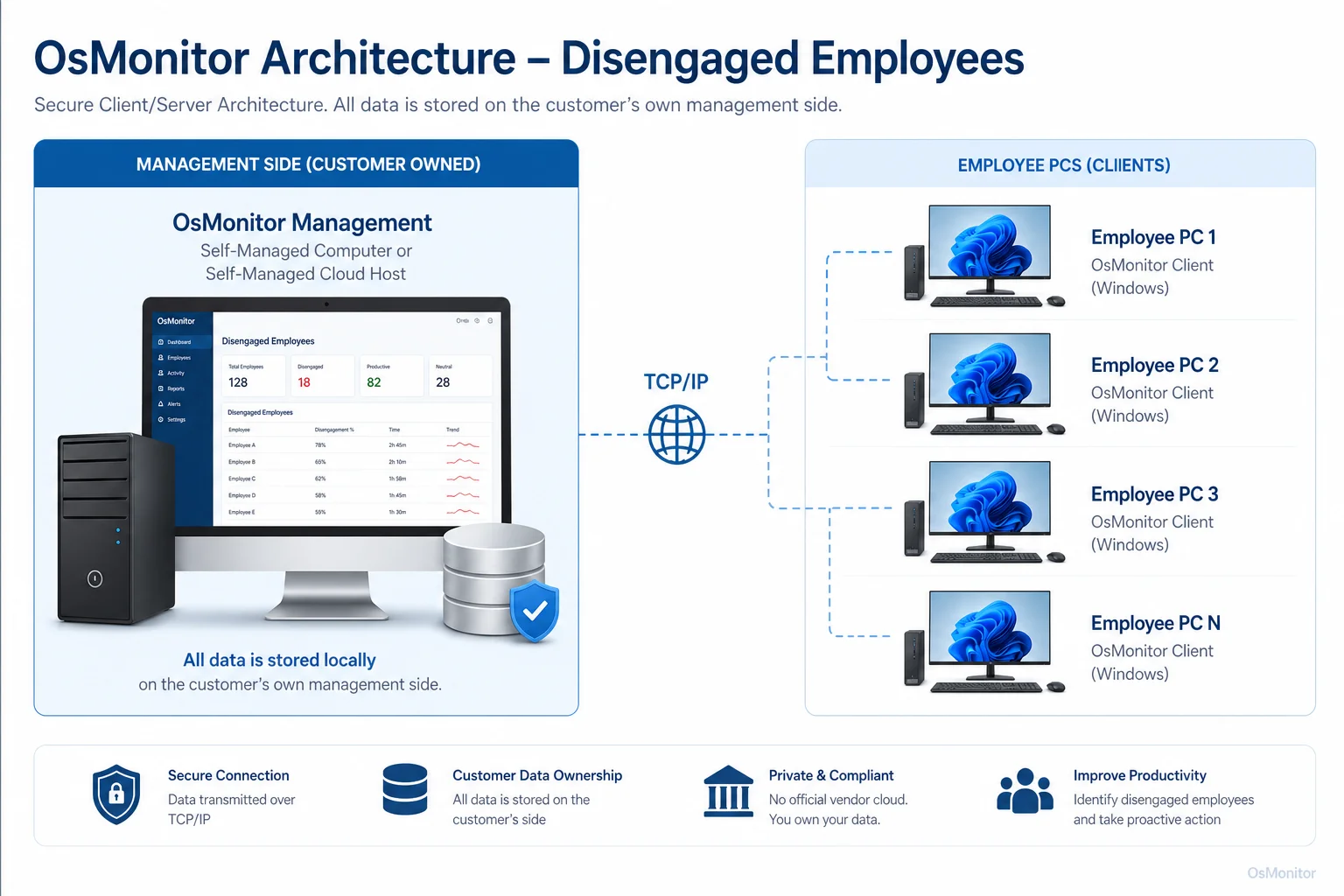
OsMonitor keeps monitoring data under the customer’s control on the management computer or self-managed server.
A Note on Transparency and Legal Use
Any workplace computer activity management system should be used transparently and responsibly. Employees should understand what is collected, why it is collected, who can review it, and how the information will be used.
Before using activity data to identify signs of a disengaged employee, businesses should:
Create a Clear Policy: Explain acceptable use of company computers and internet access.
Notify Employees: Make sure employees know that company-owned computers may be managed and reviewed for legitimate business purposes.
Use Data with Context: Do not judge someone based on one website visit, one idle period, or one unusual day.
Limit Report Access: Only authorized managers or IT staff should review sensitive activity records.
Focus on Improvement: Use reports to support coaching, policy consistency, IT support, and productivity improvement.
Consult Legal Counsel: Employment and privacy laws vary by country, state, province, and industry. Businesses should seek qualified legal advice before implementing monitoring or employee activity review programs.
Trust matters. Activity data should help managers ask better questions, not replace respectful leadership.
Frequently Asked Questions (FAQ)
What is a disengaged employee?
A disengaged employee is someone who is mentally or emotionally disconnected from their work, team, or company goals. They may complete basic tasks, but often show lower motivation, less initiative, weaker focus, and reduced commitment to good results.
What are common signs of employee disengagement?
Common signs of employee disengagement include missed deadlines, lower work quality, reduced communication, less initiative, increased distraction, more idle time, less use of core work tools, and repeated non-work activity during business hours. These signs should be reviewed as patterns, not isolated events.
What causes employee disengagement?
Employee disengagement can be caused by unclear expectations, weak management, lack of recognition, poor tools, unfair workload, limited growth, burnout, poor communication, or low trust in the organization. Computer activity data may show behavior changes, but conversations are needed to understand the cause.
How can managers motivate disengaged employees?
Managers can motivate disengaged employees by clarifying expectations, recognizing good work, removing blockers, providing training, improving tools, balancing workload, offering growth opportunities, and having honest one-on-one conversations. If policy issues are involved, rules should be applied clearly and consistently.
Is monitoring for signs of employee disengagement legal?
In many regions, businesses may manage and review activity on company-owned computers for legitimate business purposes when there is a clear written policy and employees have been properly notified. However, laws vary by country, state, province, and industry. Businesses should consult qualified legal counsel before implementing computer activity monitoring.
Does OsMonitor require a client on employee computers?
Yes. OsMonitor uses a client/server architecture. A lightweight client must be installed on each employee Windows computer that the business wants to manage. The management console collects activity data for authorized review.
Where is OsMonitor monitoring data stored?
OsMonitor stores monitoring data on the customer’s own hardware, such as the management computer or a self-managed server. Normal activity records are not stored on a vendor-controlled cloud, giving the business direct control over the data.
Can OsMonitor work without internet in a LAN?
Yes. OsMonitor can work inside a local area network without requiring internet access for its core monitoring, reporting, and management functions.
What Windows versions does OsMonitor support?
OsMonitor supports Windows 7 and later versions, including Windows 10, Windows 11, and Windows Server editions. It supports both 32-bit and 64-bit Windows systems.
Disengaged employees rarely become disengaged overnight. Usually, the signs build slowly: lower focus, weaker follow-through, more distraction, less communication, and declining output.
Used transparently and responsibly, OsMonitor can help managers notice workplace activity patterns earlier through website records, application usage reports, activity timelines, and on-premise data control. To see how OsMonitor’s reporting and activity management features can fit into your workplace strategy, you can View OsMonitor Pricing for its one-time purchase options.