Workforce planning becomes practical when a business needs to connect daily work with future staffing decisions. It is not only an HR exercise about headcount. For many small businesses, it starts with a simple question: are employees using work time, software, and company computers in a way that supports the business?
For example, a company may want to reduce time spent on games, video streaming, entertainment websites, or other non-work browsing during work hours. To do that fairly, managers need a clear computer usage policy and reliable website access records for review.
That situation may sound like a small productivity issue, but it connects directly to workforce planning. If daily activity does not match business priorities, staffing plans, training plans, and productivity goals will be built on weak information.
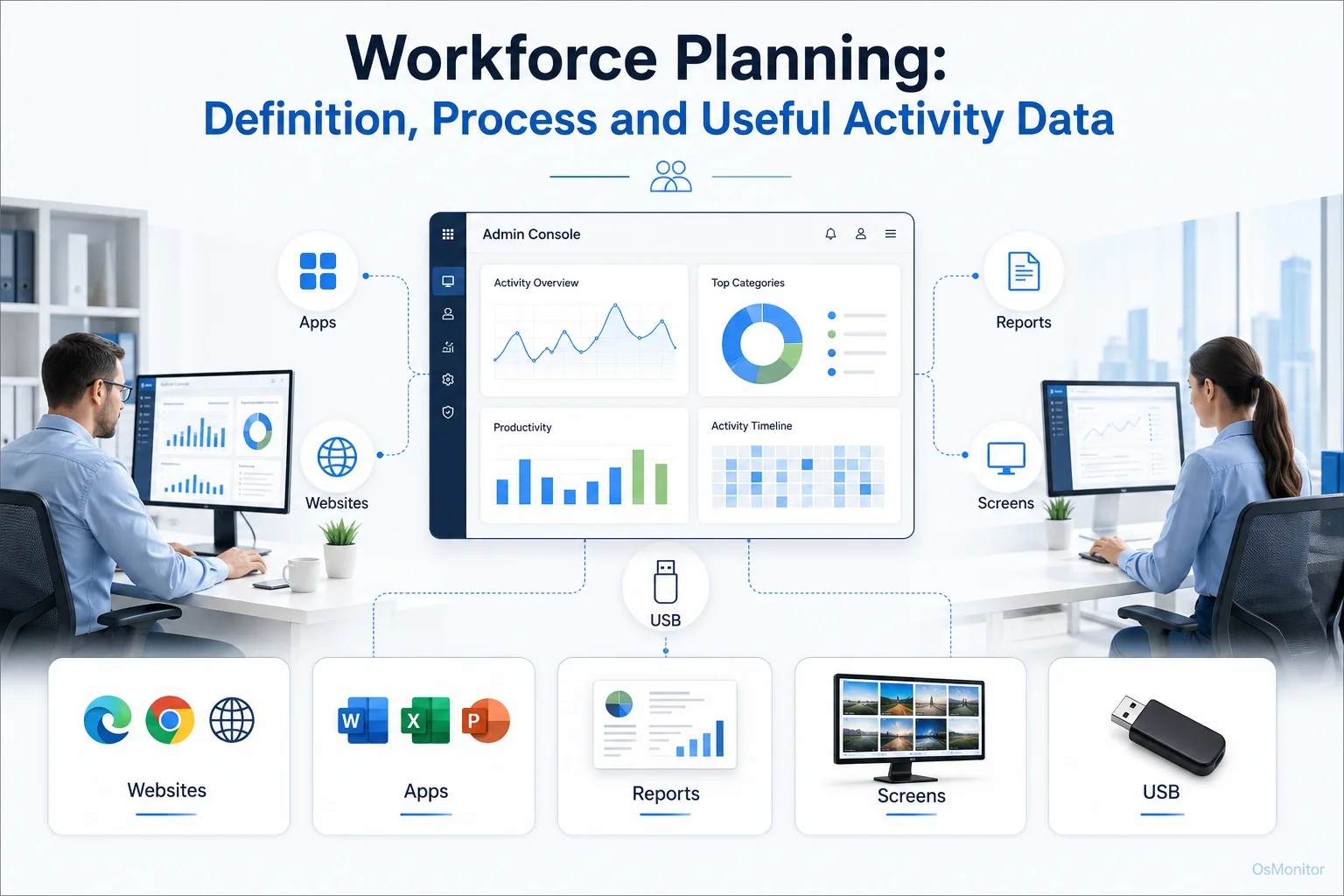
A practical overview of workforce planning for workplace computer management.
What is Strategic Workforce Planning?
Workforce planning is the process of understanding your current workforce, forecasting future needs, and making sure the business has the right people, skills, tools, and capacity to reach its goals.
Some people search for “what is workforce planning,” “workforce planning meaning,” or “what is workforce planning in HR.” In simple terms, workforce planning helps a business answer this question: do we have the right people doing the right work, with the right tools, at the right time?
Strategic workforce planning goes one step further. It connects workforce decisions to long-term business goals. Instead of only reacting when a position becomes empty, strategic workforce planning looks ahead. It considers future projects, skills gaps, hiring needs, training needs, software usage, productivity patterns, and possible workload changes.
The benefits of workforce planning include:
- Avoiding talent shortages or unnecessary overstaffing.
- Reducing hiring costs by planning earlier.
- Improving employee retention and engagement.
- Supporting better workforce planning and development.
- Making staffing and training decisions with clearer data.
- Improving productivity by identifying workflow and resource problems.
- Helping managers align people, tools, and business goals.
Why is workforce planning important? Because without it, businesses often hire too late, train too little, keep inefficient processes too long, or make staffing decisions based on pressure rather than evidence.
Effective workforce planning is not only about future hiring. It is also about understanding how the current team works today.
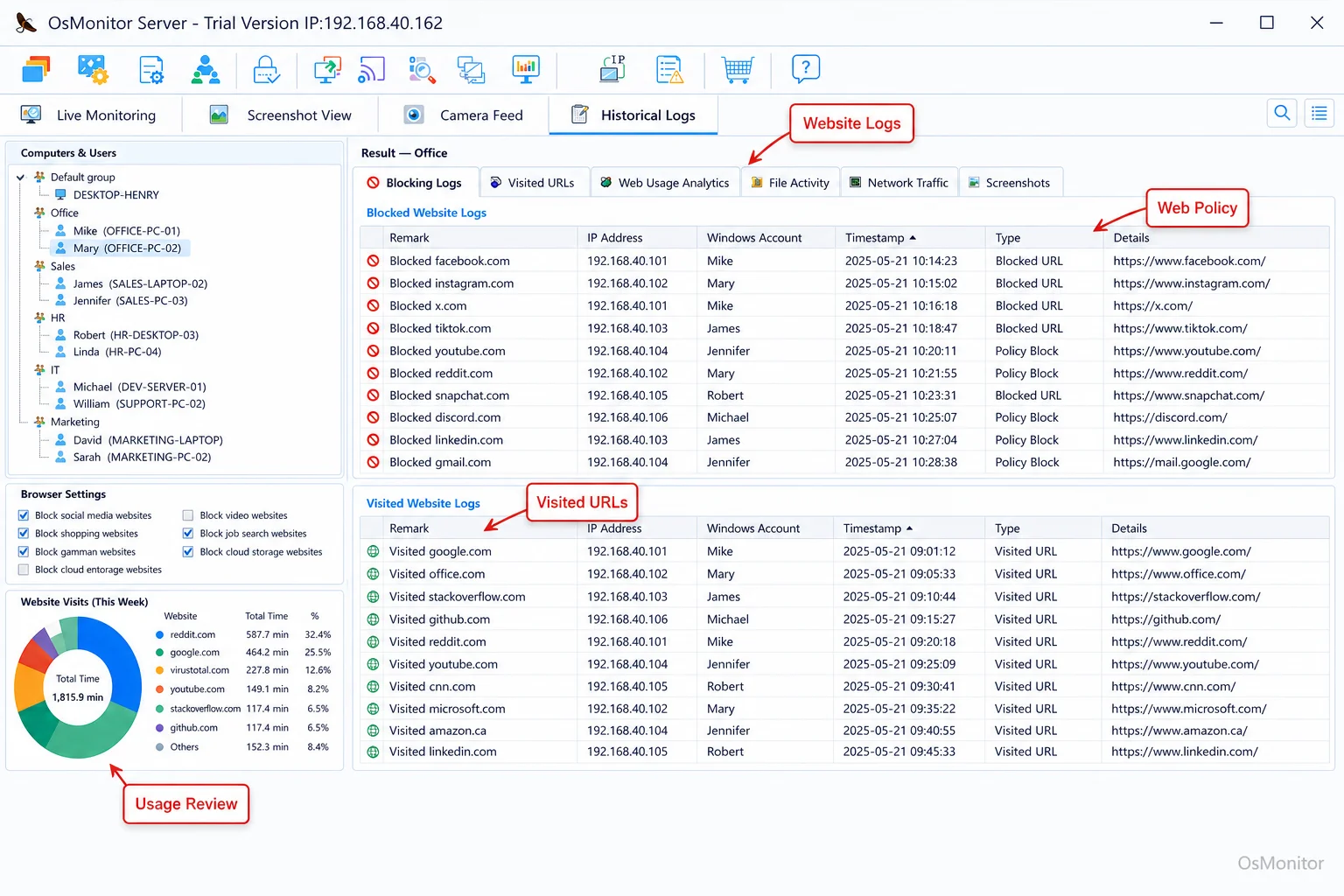
A real-product style screenshot highlighting website activity monitoring in OsMonitor.
The 4-Step Workforce Planning Process
Most workforce planning models follow a simple cycle. The names may vary, but the idea is usually the same: understand the current workforce, forecast future needs, find the gaps, and take action.
Step 1: Supply Analysis (Assess Your Current Workforce)
The first step is to understand what you already have. This includes current employees, roles, skills, experience, performance, workload, and capacity.
In a computer-based workplace, supply analysis should also include how company-owned computers are being used. Which applications are central to daily work? Which teams are overloaded? Which tools are rarely used? Are employees spending time in the systems required for their roles?
This is where objective activity records from Employee Activity Monitoring Software can help. Application usage, website activity, active time, and department reports can provide practical baseline data for data driven workforce planning.
Step 2: Demand Forecasting (Determine Future Needs)
Demand forecasting looks ahead. Based on business goals, upcoming projects, customer demand, and market conditions, what will the company need in the future?
This may include:
- More employees in certain departments.
- New technical or operational skills.
- Better software tools.
- More training for existing staff.
- Changes in work schedules or team structure.
- Better support for remote or branch-office employees.
Workforce planning and forecasting should combine business strategy with real operating data. For example, if a department already spends heavy time in CRM, support tools, and customer communication software, future demand may require more staff or better workflow automation.
Step 3: Gap Analysis (Identify the Differences)
Gap analysis compares where the business is today with where it needs to be.
Common workforce gaps include:
- Headcount Gaps: Do you need more people, fewer people, or different roles?
- Skills Gaps: Does the team have the skills needed for future work?
- Productivity Gaps: Are distractions, poor tools, or weak processes reducing output?
- Technology Gaps: Are employees missing the software, access, or support they need?
- Policy Gaps: Are computer and internet usage expectations unclear or inconsistently enforced?
This is where operational workforce planning becomes very useful. A high-level plan may say the company needs better productivity. But computer activity reports may show the more specific issue: too much time on unrelated websites, underused business software, or repeated workflow delays in one department.
Step 4: Solution Implementation (Develop and Execute Your Plan)
The final step is to build a plan and act on it. Workforce planning strategies may include hiring, training, reskilling, role redesign, software changes, process improvement, or clearer computer usage policies.
For example:
- If a team lacks skills, provide training.
- If a department is overloaded, adjust staffing.
- If expensive software is unused, review licenses or train employees.
- If non-work browsing is affecting output, create clearer policies and reporting.
- If remote employees lose time waiting for support, improve remote assistance.
- If work is unevenly distributed, adjust roles or workflows.
A workforce planning template or workforce planning template Excel file can help organize this process. But a template is only as useful as the data behind it. The best strategic workforce planning template combines HR information with practical operational data.
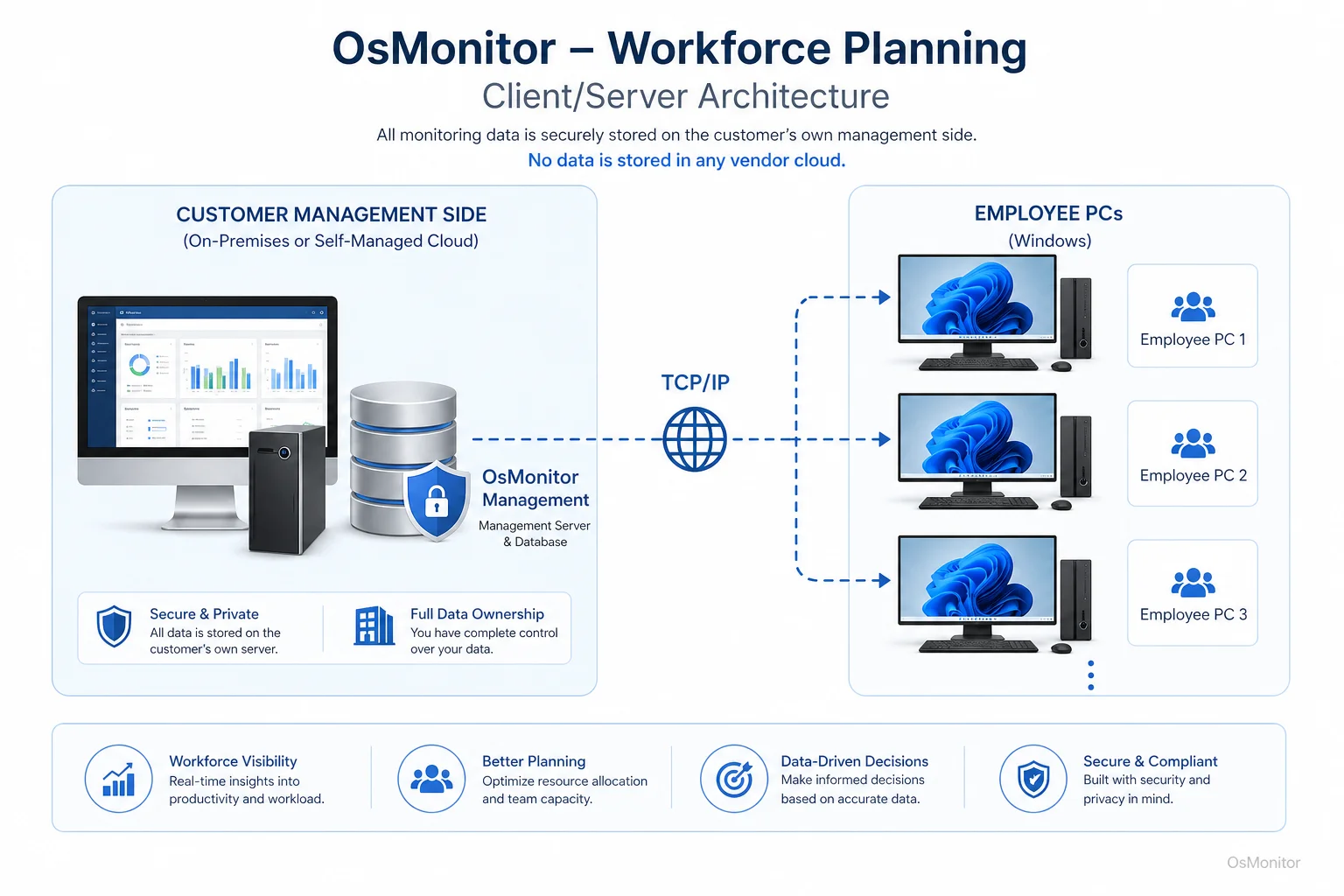
OsMonitor keeps monitoring data under the customer’s control on the management computer or self-managed server.
How Computer Activity Data Supports Workforce Planning
Traditional workforce planning often relies on HR data such as headcount, turnover, job roles, payroll, attendance, skills, and training records. That information matters. But it may not show how work actually happens day to day.
Computer activity data adds a practical layer. For office teams, many work patterns appear through applications, websites, files, active time, idle time, bandwidth usage, and policy events.
Here are useful workforce planning metrics that can come from computer activity records:
| Metric | What It Reveals | Workforce Planning Application |
|---|---|---|
| Application Usage Time | Which software is critical for daily tasks and which licenses may be underused. | Supports software budgeting, training plans, and tool ROI review. |
| Website Category Time | Time spent on work-related websites compared with entertainment, social media, or other non-work sites. | Helps refine internet usage policies and identify productivity drains. |
| File Operation Counts | Frequency of access, creation, copying, or modification of work files. | Supports project activity review and data management policies. |
| Idle vs. Active Time | Computer activity patterns across the day or week. | Helps understand workload rhythm, possible overwork, or underuse of capacity. |
Computer activity data can support workforce planning examples such as:
- A call center reviewing whether agents spend enough time in CRM and ticketing tools.
- An accounting team checking whether core accounting software is being used as expected.
- A small business reviewing whether non-work websites are affecting productivity.
- A manager identifying whether a team needs training on a newly purchased software tool.
- An IT administrator reviewing bandwidth usage before upgrading network capacity.
An effective Employee Internet Monitoring Software for Workplace Web Usage can provide the website activity records needed for fair policy review and practical planning.
The key is to use the data responsibly. Computer activity records should support better questions, not replace management judgment.
Choosing the Right Workforce Planning Tools
The market for workforce planning tools is broad. Some workforce planning platforms focus on HR, talent planning, compensation, headcount forecasting, and scenario modeling. Large enterprises may use systems such as Workday workforce planning or other strategic workforce planning tools for complex planning.
Some people also search for terms like “edge workforce planning platform features,” “workforce planning news,” or “workforce planning solutions” when comparing options. Those searches may point to larger platforms, industry updates, or enterprise planning systems.
For small and mid-sized businesses, a more focused workforce planning tool may be more practical. If the immediate question is how employees use company-owned Windows computers, then computer activity management software can provide useful ground-level data.
OsMonitor is workplace productivity and employee computer activity management software. It helps businesses collect application usage records, website activity, screen activity, department reports, and policy-related computer data. This makes it useful as an operational data source for workforce planning.
It is not a full HR workforce planning platform. It does not handle payroll, benefits, succession planning, or advanced AI forecasting. Its role is more focused: showing how company-owned Windows PCs are used during daily work.
Because OsMonitor uses a client/server model, monitoring data is stored on the customer’s own management computer or self-managed server. Normal activity records are not stored on an OsMonitor vendor cloud. For businesses that care about data control, this can be an important advantage.
A Note on Transparency and Legal Use
When workforce planning includes computer activity records, transparency is essential. Businesses should explain what is being collected, why it is being collected, who can review it, and how it will be used.
Best practices include:
- Create a clear written computer and internet usage policy.
- Inform employees that company-owned computers may be managed and reviewed.
- Use data to improve productivity, planning, training, support, and policy consistency.
- Limit report access to authorized managers or IT staff.
- Review patterns with context instead of judging isolated activity.
- Consult qualified legal counsel to ensure compliance with local employment and privacy laws.
The goal should be responsible monitoring and better planning, not unfair micromanagement.
Frequently Asked Questions about Workforce Planning
What is workforce planning?
Workforce planning is the process of analyzing current workforce capacity and forecasting future needs so a business has the right people, skills, tools, and roles at the right time. It helps companies connect staffing decisions with business goals.
What is strategic workforce planning?
Strategic workforce planning connects workforce decisions to long-term business strategy. It looks beyond immediate staffing problems and considers future skills, roles, technology, training, workload, and business direction.
What is workforce planning in HR?
In HR, workforce planning usually includes headcount planning, skills analysis, hiring forecasts, succession planning, retention, training, and workforce development. For computer-based teams, HR planning can be strengthened with operational data such as application usage, website activity, and productivity reports.
What are the benefits of workforce planning?
Workforce planning benefits include better hiring decisions, fewer skills gaps, improved productivity, stronger employee retention, clearer training plans, better software and resource allocation, and more data-driven staffing decisions.
What are common workforce planning models?
Many workforce planning models follow four steps: supply analysis, demand forecasting, gap analysis, and solution implementation. Some organizations use more detailed models, but most follow the same basic logic of understanding current capacity, forecasting future needs, identifying gaps, and taking action.
What workforce planning metrics should a business track?
Useful workforce planning metrics may include headcount, turnover, skills coverage, workload, productivity, software usage, active time, department activity, training needs, and resource utilization. For office computer environments, application usage and website activity records can provide useful operational context.
Is workforce planning legal for businesses?
Yes, workforce planning is a standard business practice. When it includes reviewing activity on company-owned computers, businesses should use a clear policy, notify employees, limit access to reports, and follow local employment and privacy laws. Legal requirements vary, so businesses should consult qualified legal counsel.
Does OsMonitor require a client on employee computers?
Yes. OsMonitor uses a client/server model. A lightweight client program must be installed on each employee Windows computer the business wants to manage, and the central management console collects activity records for authorized review.
Where is OsMonitor monitoring data stored?
OsMonitor stores monitoring data on the customer’s own hardware, such as the management computer or a self-managed company server. Normal activity records are not stored on a vendor-controlled cloud.
Can OsMonitor work without internet in a LAN?
Yes. OsMonitor can work inside a local area network without requiring internet access for its core monitoring, reporting, and management functions.
What Windows versions does OsMonitor support?
OsMonitor supports Windows 7 and later versions, including Windows 10, Windows 11, and Windows Server editions. It supports both 32-bit and 64-bit systems.
Strategic workforce planning works best when high-level business goals are connected with real operating data. HR records can show who is on the team. Computer activity reports can show how work is actually being done.
Used transparently and responsibly, OsMonitor can support data driven workforce planning by providing application usage records, website activity reports, productivity patterns, and on-premise data control. To see how objective computer activity data can support your planning efforts, you can Download OsMonitor Free Trial and explore its reporting features.