Attrition Rate: Meaning, Formula and How to Reduce Turnover Risk
Attrition rate becomes important when employees are leaving faster than the business can comfortably handle. For a small company, even a few resignations can disrupt projects, overload the remaining team, and weaken customer service.
Sometimes the warning signs appear before people leave. A manager may notice lower productivity, missed deadlines, less engagement with core work tools, or more time spent on games, video sites, entertainment websites, or other non-work browsing during office hours. Those patterns do not prove someone will resign, but they can suggest that something in the workplace needs attention.
To reduce turnover risk, businesses need two kinds of information: clear HR numbers, such as the employee attrition rate, and practical workplace signals that may show disengagement before resignation happens.
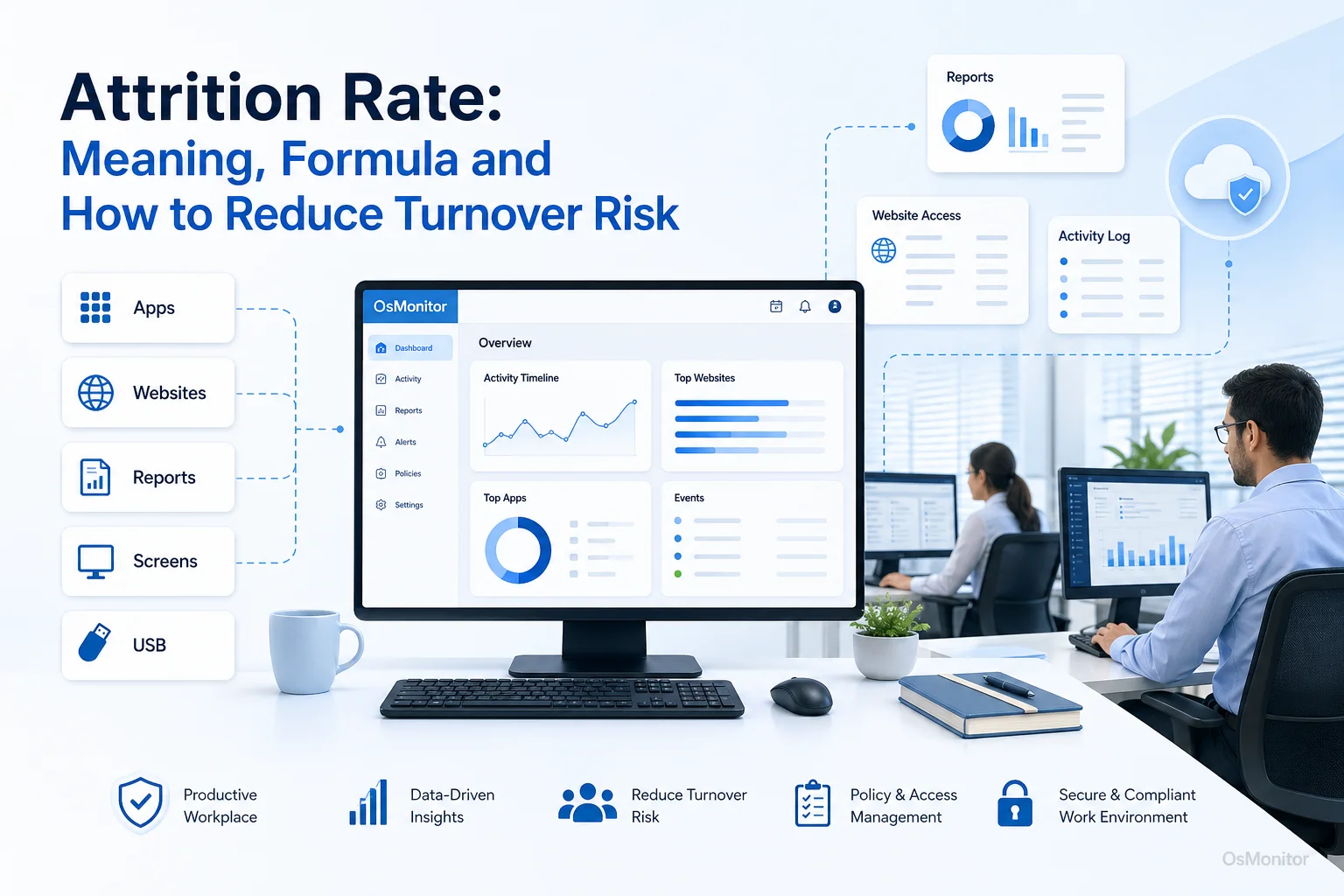
A practical overview of attrition rate for workplace computer management.
What is Attrition Rate? A Clear Definition
The attrition rate is the percentage of employees who leave a company during a specific period. It is usually measured monthly, quarterly, or annually.
Some people search for “attrition rate meaning,” “attrition rate definition,” “what is attrition rate,” or “what does attrition rate mean.” In plain business language, attrition rate means how quickly employees are leaving your organization.
Attrition is often compared with turnover. In everyday business writing, people sometimes use the terms together. More strictly, attrition may refer to employees leaving and not being replaced, while turnover often means employees leave and the company hires replacements. For most small businesses, the practical concern is the same: people are leaving, and the business needs to understand why.
Tracking your employee attrition rate matters because it affects:
- Hiring Costs: Recruiting, interviewing, onboarding, and training replacements takes time and money.
- Team Stability: Frequent departures interrupt projects and reduce continuity.
- Customer Service: New or overloaded employees may struggle to maintain service quality.
- Workplace Morale: When good employees leave, remaining team members may feel pressure or uncertainty.
- Knowledge Loss: Departing employees take experience, customer knowledge, and process knowledge with them.
- Workforce Planning: Attrition trends help managers plan hiring, training, and succession more realistically.
A high attrition rate is not just an HR number. It is a signal that the business should look deeper at management, workload, compensation, culture, career growth, and employee engagement.
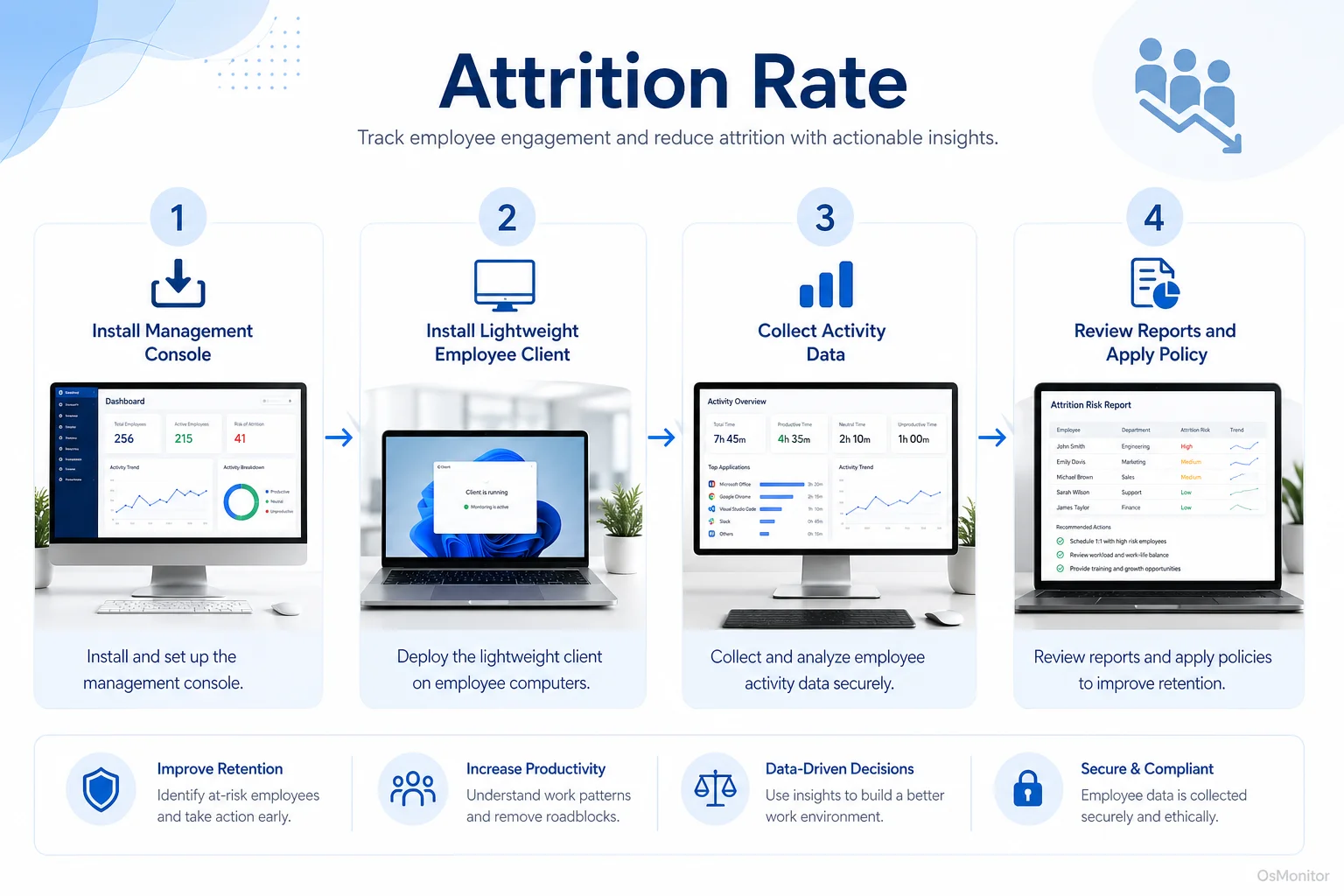
A simple workflow showing how workplace signals can support attrition rate.
How to Calculate Attrition Rate: The Formula and Examples
Calculating attrition rate is simple once you know the employee count and the number of people who left during the period.
The Attrition Rate Formula
The standard attrition rate formula is:
Attrition Rate (%) = (Number of Employees Who Left / Average Number of Employees) × 100
To use this formula for calculating attrition rate, you need two numbers:
Number of Employees Who Left: Count the employees who left during the period you are measuring. This may include resignations, retirements, layoffs, or other separations, depending on how your company defines the metric.
Average Number of Employees: Add the number of employees at the beginning of the period and the number at the end, then divide by two.
Average Employees = (Employees at Start + Employees at End) / 2
This is the most common formula to calculate attrition rate. Some companies may adjust the formula depending on whether they want to measure voluntary attrition, involuntary attrition, department attrition, or total employee attrition.
Attrition Rate Calculation Example
Here is a simple attrition rate calculation.
A company starts the year with 100 employees. At the end of the year, it has 110 employees. During the year, 15 employees left.
Calculate the average number of employees:
(100 + 110) / 2 = 105
Apply the formula for calculating attrition rate:
(15 / 105) × 100 = 14.29%
The company’s annual attrition rate is 14.29%.
This is how to calculate attrition rate for a year. The same method works for a month or quarter.
If you are wondering how to compute attrition rate or how to compute for attrition rate, the steps are the same: count departures, calculate average employees, divide departures by average employees, and multiply by 100.
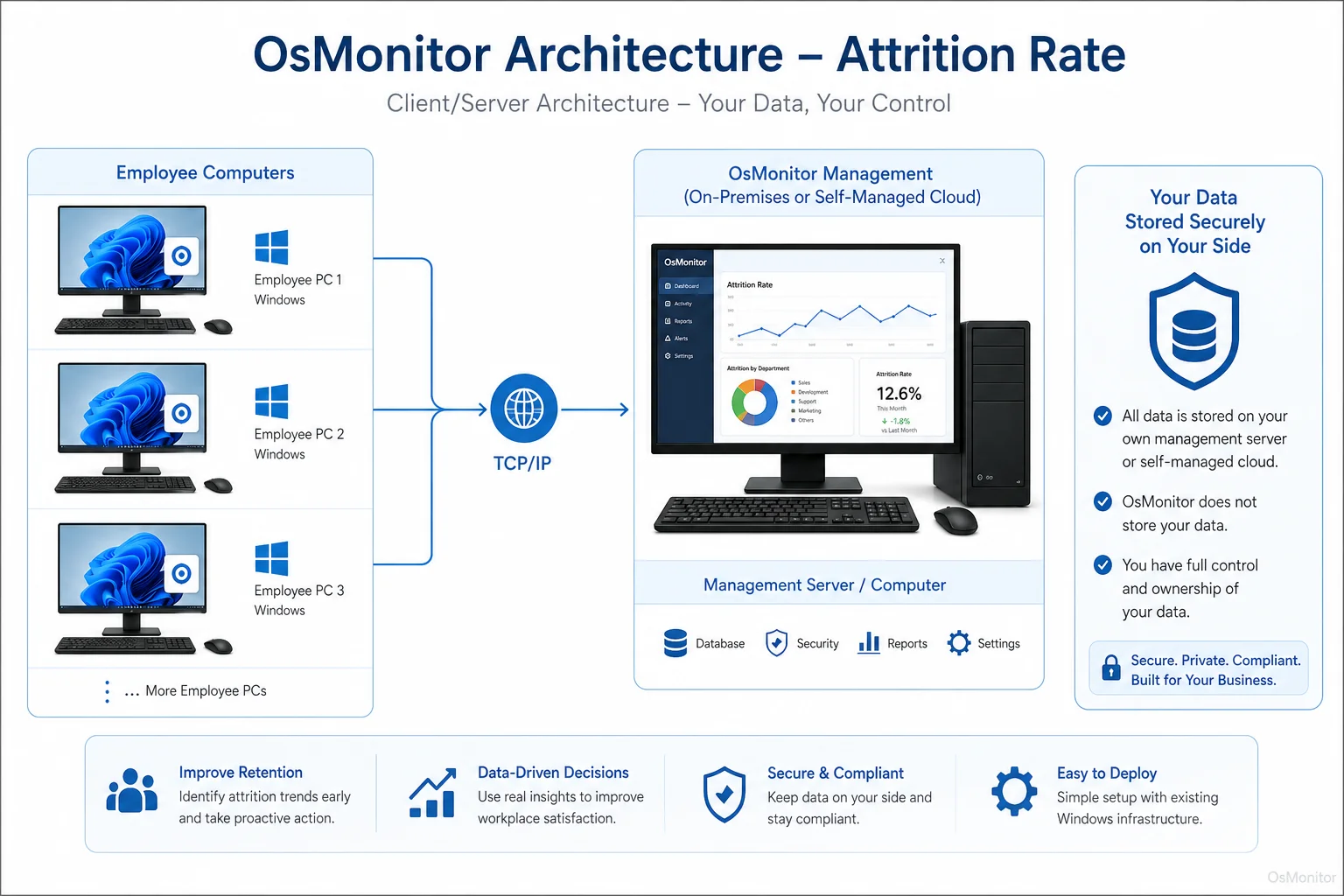
OsMonitor keeps monitoring data under the customer’s control on the management computer or self-managed server.
What is a Good Attrition Rate?
There is no single good attrition rate for every company. A normal attrition rate depends on the industry, job type, country, labor market, company size, and working conditions.
For example, retail, hospitality, seasonal work, and call center roles often have a higher typical attrition rate. Government, education, professional services, and specialized technical roles may have lower attrition in many cases. A startup may also have different expectations than a mature company.
Instead of chasing one universal number, businesses should ask better questions:
- What is the average attrition rate in our industry?
- Is our attrition rate rising or falling over time?
- Which departments have the highest attrition?
- Are new employees leaving quickly?
- Are strong performers leaving more often than expected?
- Are people leaving because of workload, management, pay, career growth, or culture?
- Are we replacing every role, or are some positions being removed?
A low attrition rate meaning is usually positive: employees are staying, the workplace is stable, and hiring pressure is lower. But the lowest attrition rate is not always the goal. Some attrition is normal, and occasionally healthy, especially when poor role fit or business restructuring is involved.
A high attrition rate deserves attention when it is above your normal baseline, above industry expectations, or concentrated in one department, manager group, or job role.
Using Workplace Data to Understand and Reduce Attrition Risk
Attrition rate is a lagging indicator. It tells you what already happened. The employee has already left.
To reduce attrition risk, managers also need earlier signals. Workplace activity data can sometimes help show changes in engagement, focus, workload, or work habits before someone resigns.
This is where Employee Activity Monitoring Software can provide useful operational context on company-owned Windows PCs.
Possible early warning signals may include:
- Decreased Core Application Usage: Less time in CRM, accounting software, project tools, design tools, ticketing systems, or other required applications.
- Increased Non-Work Activity: More time on entertainment websites, social media, shopping sites, or unrelated browsing during work hours.
- Changed Work Patterns: Starting later, ending earlier, longer idle periods, or unusual activity outside normal hours.
- Reduced Collaboration Tool Usage: Less activity in chat tools, project platforms, shared documents, or internal systems.
- Lower Overall Computer Activity: A noticeable drop compared with the employee’s own previous pattern.
- More Policy Events: Repeated attempts to access blocked sites or applications may signal disengagement or unclear expectations.
These signals should not be treated as proof that someone will leave. They are conversation starters. A drop in work activity may mean disengagement, but it may also mean unclear tasks, poor tools, lack of training, burnout, family stress, or a temporary project change.
OsMonitor is workplace productivity and employee computer activity management software for company-owned Windows computers. It records application usage, website activity, screen activity, active time, idle time, and reports that can help managers understand work patterns. Because data is stored on the customer’s own management computer or self-managed server, businesses keep direct control over normal activity records.
| Indicator Type | Example Metric | How to Observe It |
|---|---|---|
| Lagging Indicator | Exit Interview Feedback | Collected after an employee resigns. |
| Lagging Indicator | High Attrition Rate | Calculated from historical HR data. |
| Leading Indicator | Decreased Software Usage | Reports show less time in core work applications. |
| Leading Indicator | Increased Web Browsing | Website records show more time on non-work sites or job boards. |
| Leading Indicator | Change in Work Schedule Patterns | Activity records show altered start times, end times, or long idle periods. |
Used responsibly, workplace data can help managers act earlier. For example, if a strong employee suddenly reduces use of core tools and starts showing long idle periods, a manager can check in and ask whether workload, tools, training, or motivation are becoming a problem.
Legal and Ethical Considerations
Any computer activity management system should be used transparently and responsibly. Employees should understand what is collected, why it is collected, who can review it, and how the information will be used.
OsMonitor is designed for legal business use on company-owned Windows computers, but legal requirements vary by country, state, province, and industry. Businesses should consult qualified legal counsel before implementing employee activity monitoring or using workplace data in retention programs.
Best practices include:
- Create a clear written computer and internet usage policy.
- Notify employees that company-owned computers may be managed and reviewed.
- Use activity records for legitimate business purposes, such as productivity review, IT support, policy compliance, and retention risk awareness.
- Limit report access to authorized managers or IT staff.
- Review patterns with context instead of judging isolated events.
- Combine data with direct communication, manager feedback, and HR records.
- Avoid treating activity data as a complete explanation of an employee’s intentions.
A tool like Computer Monitoring Software should support a healthier workplace strategy, not replace trust or good management.
Frequently Asked Questions
What does attrition rate mean?
Attrition rate means the percentage of employees who leave a company during a specific period. It helps businesses understand workforce stability, retention trends, and possible problems with culture, management, workload, or compensation.
What is the attrition rate formula?
The common attrition rate formula is: Attrition Rate (%) = (Number of Employees Who Left / Average Number of Employees) × 100. Average employees are usually calculated as (Employees at Start + Employees at End) / 2.
How do you calculate attrition rate?
To calculate attrition rate, count how many employees left during the period, calculate the average number of employees during that period, divide departures by average employees, and multiply by 100. This gives the attrition rate as a percentage.
What is a good attrition rate?
A good attrition rate depends on your industry, role type, region, and company size. Instead of using one universal number, compare your rate with industry benchmarks, your own historical trend, and department-level patterns. A stable or decreasing attrition rate is usually a good sign.
What is a high attrition rate?
A high attrition rate means employees are leaving at a level that may create business problems. It is especially concerning when the rate is higher than your industry norm, rising over time, or concentrated in one team, role, or manager group.
Is monitoring employee activity to predict attrition legal?
In many regions, businesses may review activity on company-owned computers for legitimate business purposes when employees have been properly notified and a clear policy is in place. However, laws vary. Businesses should consult qualified legal counsel before using employee activity data in retention or attrition risk programs.
Does OsMonitor require a client on employee computers?
Yes. OsMonitor uses a client/server model. The management console runs on a manager’s computer or self-managed server, and a lightweight client is installed on each employee Windows computer that the business wants to manage.
Where is OsMonitor monitoring data stored?
OsMonitor stores monitoring data on the customer’s own management computer or self-managed server. It is not a cloud SaaS product, and normal activity records are not uploaded to OsMonitor vendor servers.
Can OsMonitor work without internet in a LAN?
Yes. OsMonitor can work inside a local area network without requiring internet access for its core monitoring, reporting, and management functions.
What Windows versions does OsMonitor support?
OsMonitor supports Windows 7 and later versions, including Windows 10, Windows 11, and Windows Server editions. It supports both 32-bit and 64-bit Windows systems.
Attrition rate tells you how many employees have already left. Workplace activity data may help you notice risk patterns earlier, before disengagement turns into resignation.
Used transparently and responsibly, OsMonitor can support retention efforts with application usage reports, website activity records, activity timelines, and on-premise data control. To learn more about setting up a system for workplace computer management, Read the Quick Start Guide and see how you can get started.