Quiet Quitting: Meaning, Signs and What Managers Should Measure
Quiet quitting becomes a concern when employees still show up and complete the basics, but the extra effort, initiative, and ownership quietly disappear. Projects may move more slowly. Fewer people volunteer for new work. Meetings feel flat. Work quality may be “acceptable,” but no longer strong.
For a small business, the first visible sign may be more time spent on games, video streaming, entertainment websites, social media, or other non-work browsing during office hours. That does not automatically prove quiet quitting, but it is a signal worth understanding.
The right response is not just to block websites and move on. Managers need clear website access records, application usage reports, and enough context to understand whether the problem is disengagement, burnout, unclear expectations, poor management, or a weak workload structure.
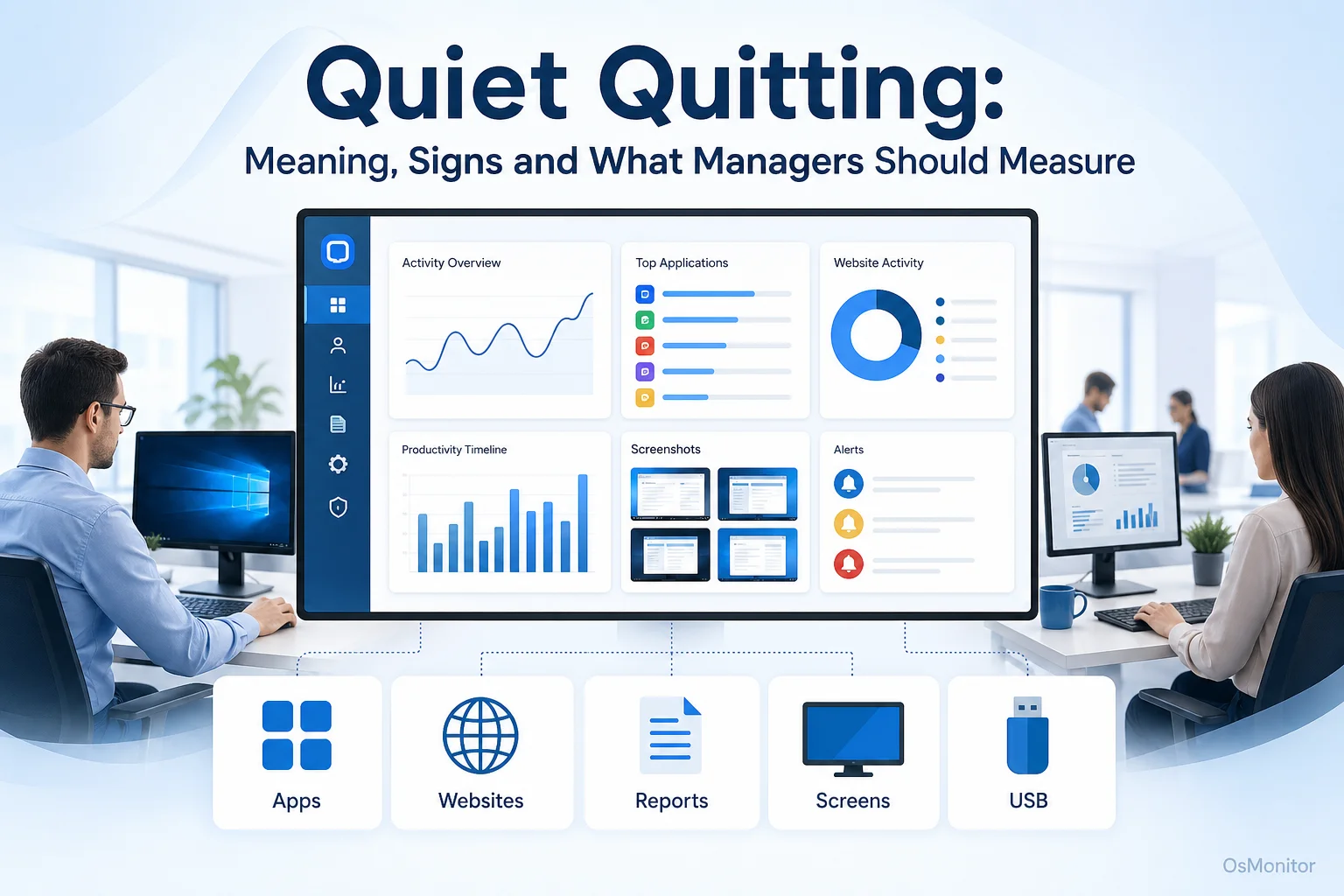
A practical overview of quiet quitting for workplace computer management.
What is Quiet Quitting? A Practical Definition for the Workplace
Quiet quitting does not mean an employee is secretly resigning. A practical quiet quitting definition is this: an employee continues doing the minimum required work but stops going beyond the basic job description.
Some people search for “quiet quitting meaning,” “define quiet quitting,” “definition quiet quitting,” or “quiet quitting definition workplace 2025” because the phrase can sound confusing. In plain workplace language, quiet quitting means the employee is still employed, but mentally and emotionally less invested.
Quiet quitting may look like:
- Doing assigned tasks but avoiding extra responsibility.
- No longer volunteering for new projects.
- Contributing less in meetings.
- Avoiding problem-solving beyond the bare minimum.
- Logging off exactly on time every day, even when urgent work needs coordination.
- Showing less interest in team goals or company improvement.
- Completing work with less care or fewer ideas than before.
Some people also use the phrase soft quitting and quiet quitting to describe similar patterns of low engagement. The difference is not always clear. Both usually point to reduced commitment, lower initiative, and a weaker connection between the employee and the work.
Quiet quitting can be connected to work-life balance. Not every employee who protects personal time is disengaged. A healthy boundary is not the same as low effort. The real issue appears when the employee’s basic work quality, teamwork, reliability, or responsibility starts to decline.
Businesses care about quiet quitting because it can slowly affect:
- Project timelines.
- Customer service quality.
- Team morale.
- Innovation and problem solving.
- Workload balance for engaged employees.
- Manager time and follow-up effort.
To define quiet quitting in a useful way, managers should look for patterns of disengagement, not isolated moments.
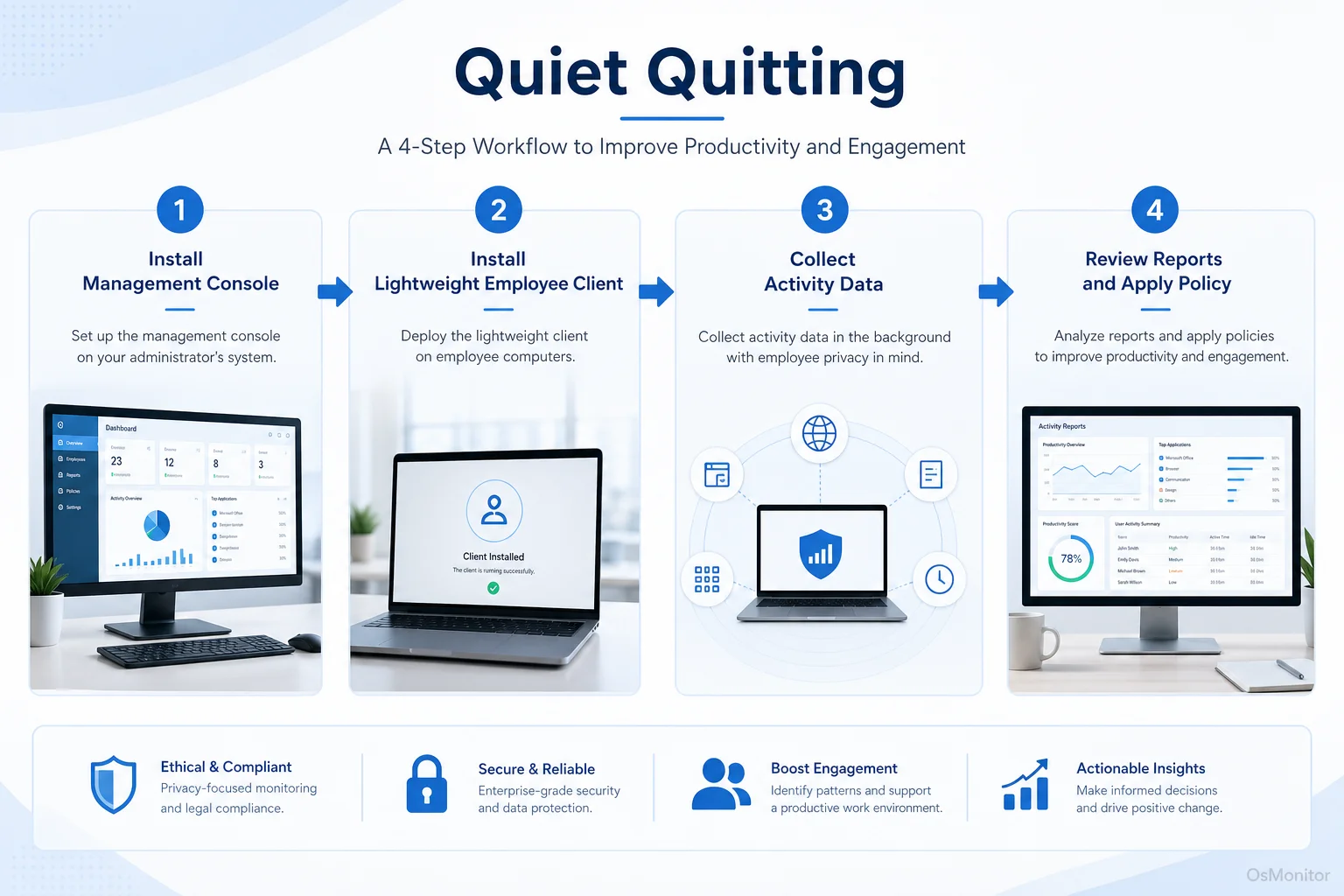
A simple workflow showing how workplace signals can support quiet quitting.
Common Signs of Quiet Quitting and How to Spot Them
The signs of quiet quitting usually appear gradually. One quiet meeting or one slow day does not mean someone is quietly quitting. Managers should look for repeated changes over time.
Common signs include:
- Reduced Proactivity: The employee stops suggesting improvements, raising concerns, or volunteering for meaningful work.
- Lower Meeting Engagement: They attend meetings but rarely contribute, ask questions, or follow up.
- Strict Minimum Effort: They complete only what is assigned and avoid anything outside the narrow task list.
- Less Team Connection: They withdraw from collaboration, informal communication, or team problem-solving.
- Declining Work Quality: Tasks are completed, but with more mistakes, less care, or less ownership.
- More Avoidance Behavior: They may delay responses, avoid decisions, or spend more time on unrelated activities.
- Reduced Use of Core Tools: They spend less time in the applications required for their role.
For computer-based roles, some of these patterns may show up in digital activity records. Tools like Employee Activity Monitoring Software can help managers compare current activity patterns with normal work behavior.
| Behavioral Sign | Potential Digital Signal Observable Through Computer Activity Records |
|---|---|
| Decreased engagement | Reduced use of collaboration software or project tools during work hours. |
| Decline in proactive work | Fewer new documents created or less time in core productivity applications. |
| Sticking strictly to basic hours | Very consistent login and logout times with little flexibility during urgent periods. |
| Increased non-work activity | Higher percentage of time spent on entertainment, social media, shopping, or news websites. |
| Drop in work quality | Less time in required work applications, followed by rushed or incomplete output. |
These signals are not proof by themselves. A person may use fewer collaboration tools because the project changed. A person may log off on time because the company encourages healthy boundaries. A person may visit a video site for work training.
The value of workplace data is that it helps managers ask better questions. For example: “I noticed less activity in the project tools this month. Are you blocked, overloaded, or missing something you need?”
What Managers Should Measure: Beyond Simple Time Tracking
Quiet quitting is not solved by counting hours. Someone can sit at a computer all day and still be disengaged. Another employee may work fewer visible hours but produce excellent results.
Managers should measure patterns that help explain work quality, focus, and support needs.
Useful metrics include:
Application and Website Usage: Review whether work hours are being spent in business applications, communication tools, project systems, research tools, or unrelated websites. This helps managers understand daily digital habits on company-owned computers.
Productivity Trends Over Time: One day does not tell much. A gradual drop in core application usage or a steady increase in non-work browsing over several weeks is more meaningful. This is where Computer Monitoring Software for Business PCs can provide useful long-term reports.
Core Tool Usage: For a sales team, this may mean CRM. For support, it may mean ticketing software. For accounting, it may mean accounting systems and spreadsheets. For developers, it may mean IDEs, code tools, and project systems.
Collaboration Activity: Reduced activity in team tools may show withdrawal, but context matters. Some roles require quiet focus. Managers should compare patterns against role expectations.
Active and Idle Time: Long idle periods or unstable work patterns may suggest disengagement, but they may also indicate meetings, phone calls, blocked work, or non-computer tasks.
Policy Events: Repeated attempts to access blocked websites or applications may show unclear expectations, low engagement, or recurring distraction.
Work Output and Quality: Activity data should be compared with real output: completed tasks, customer results, quality, deadlines, and manager feedback.
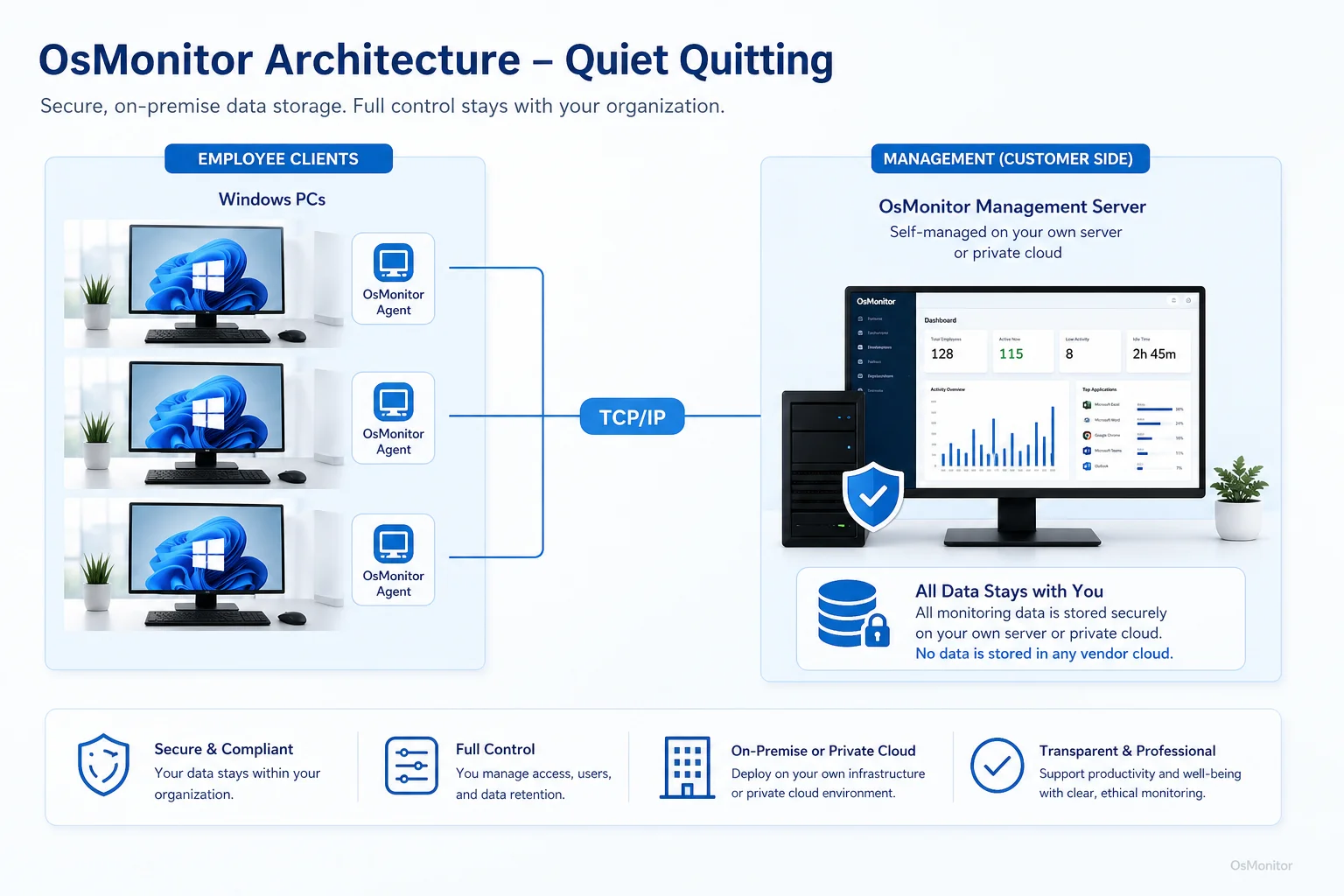
OsMonitor keeps monitoring data under the customer’s control on the management computer or self-managed server.
How to Prevent Quiet Quitting: Policy, Management, and Tools
Software can show activity patterns, but it cannot fix quiet quitting by itself. How to prevent quiet quitting depends on understanding why employees are pulling back.
Common causes include:
- Lack of recognition.
- Unclear priorities.
- Weak management communication.
- Burnout or workload imbalance.
- Limited career growth.
- Poor tools or frustrating workflows.
- Low trust in leadership.
- Feeling underpaid or undervalued.
- Unfair workload distribution.
- Repeated policy confusion.
A practical prevention strategy should combine policy, management, and tools.
Establish Clear Computer Use Policies: Employees should know what is acceptable on company-owned computers, what is recorded, and how reports may be used.
Have Better One-on-One Conversations: Use data as a starting point, not an accusation. Ask what has changed, what support is missing, and whether the workload is reasonable.
Improve Recognition: Employees are less likely to disengage when good work is noticed and fairly rewarded.
Fix Workflow Problems: If employees avoid a tool or spend too much time switching between systems, the issue may be process design, not motivation.
Review Workload Balance: If engaged employees are carrying too much extra work, quiet quitting may spread.
Use Tools Transparently: When using OsMonitor or similar employee computer activity management software, explain what is monitored and why. The purpose should be productivity review, IT support, policy consistency, and protection of company resources.
Respond Early: A small pattern of disengagement is easier to correct than months of resentment, poor morale, or silent withdrawal.
Some people search for “how to quiet quitting,” but the clearer management question is how to prevent quiet quitting or how to respond when it appears. The answer is not pressure alone. It is better communication, clearer expectations, fairer workload, useful tools, and responsible data use.
Legal and Ethical Considerations
Any computer activity management system should be used legally, transparently, and responsibly.
Businesses should:
- Create a written computer and internet usage policy.
- Inform employees that company-owned computers may be managed and reviewed.
- Explain what data is collected, why it is collected, and who can access it.
- Use reports for legitimate business purposes, such as productivity review, IT support, policy compliance, and workflow improvement.
- Avoid using single activity records as proof of disengagement.
- Limit report access to authorized managers or IT staff.
- Consult qualified legal counsel to ensure compliance with local employment and privacy laws.
OsMonitor is designed for workplace productivity and computer activity management on company-owned Windows computers. It uses an on-premise client/server model, so collected data is stored on the customer’s own management computer or self-managed server rather than an OsMonitor vendor cloud.
Responsible use matters. Data should support better management conversations, not replace trust.
Frequently Asked Questions (FAQ)
What is the definition of quiet quitting in the workplace?
Quiet quitting is when an employee continues doing the basic duties of the job but stops going beyond minimum expectations. They may avoid extra responsibility, contribute less, show lower initiative, and become less emotionally invested in the company’s goals.
What are common quiet quitting examples?
Quiet quitting examples include no longer volunteering for projects, giving minimal meeting input, avoiding extra problem-solving, reducing collaboration, doing only assigned tasks, and showing less care in work quality. In computer-based jobs, it may also appear as reduced use of core work tools or more time spent on unrelated websites during work hours.
What are signs of quiet quitting?
Signs of quiet quitting include lower initiative, reduced communication, less interest in team goals, declining work quality, less collaboration, repeated distraction, and a pattern of doing only the minimum required. Managers should look for trends over time, not one isolated event.
Is addressing quiet quitting through monitoring legal for businesses?
In many regions, businesses may review activity on company-owned computers for legitimate business purposes when there is a clear written policy and employees have been properly notified. However, laws vary by country, state, province, and industry. Businesses should consult qualified legal counsel before using computer activity monitoring tools.
Does OsMonitor require a client on employee computers?
Yes. OsMonitor uses a client/server architecture. A lightweight client program must be installed on each employee Windows computer the company wants to manage. The management console collects reports for authorized review.
Where is OsMonitor monitoring data stored?
OsMonitor stores monitoring data on the customer’s own management computer or self-managed server. It is an on-premise solution, and normal activity data is not uploaded to an OsMonitor vendor cloud.
Can OsMonitor work without internet in a LAN?
Yes. OsMonitor can work inside a local area network without requiring internet access for its core monitoring, reporting, and management functions.
What Windows versions does OsMonitor support?
OsMonitor supports Windows 7 and later versions, including Windows 10, Windows 11, and Windows Server editions. It supports both 32-bit and 64-bit Windows systems.
Quiet quitting is usually a symptom, not the whole problem. It may point to disengagement, burnout, poor communication, unclear expectations, or weak management systems.
Used transparently and responsibly, OsMonitor can help managers understand workplace activity patterns through application usage reports, website records, activity timelines, and on-premise data control. To understand how to implement these monitoring strategies effectively, you can Read the Quick Start Guide and see how the software works.