Computer Monitoring Software for Business PCs
When your team grows beyond a handful of people in the same room, keeping tabs on workstation health and daily workflow becomes a massive logistical headache. You can’t physically walk behind every desk to check if software updates are running, if folks are stuck on a technical issue, or if company hardware is being used responsibly. That blind spot is exactly why IT departments and business owners look into monitoring a computer. Having a centralized view replaces the need to constantly interrupt your team with manual status check-ins, giving you a clear, bird’s-eye perspective of your entire network.
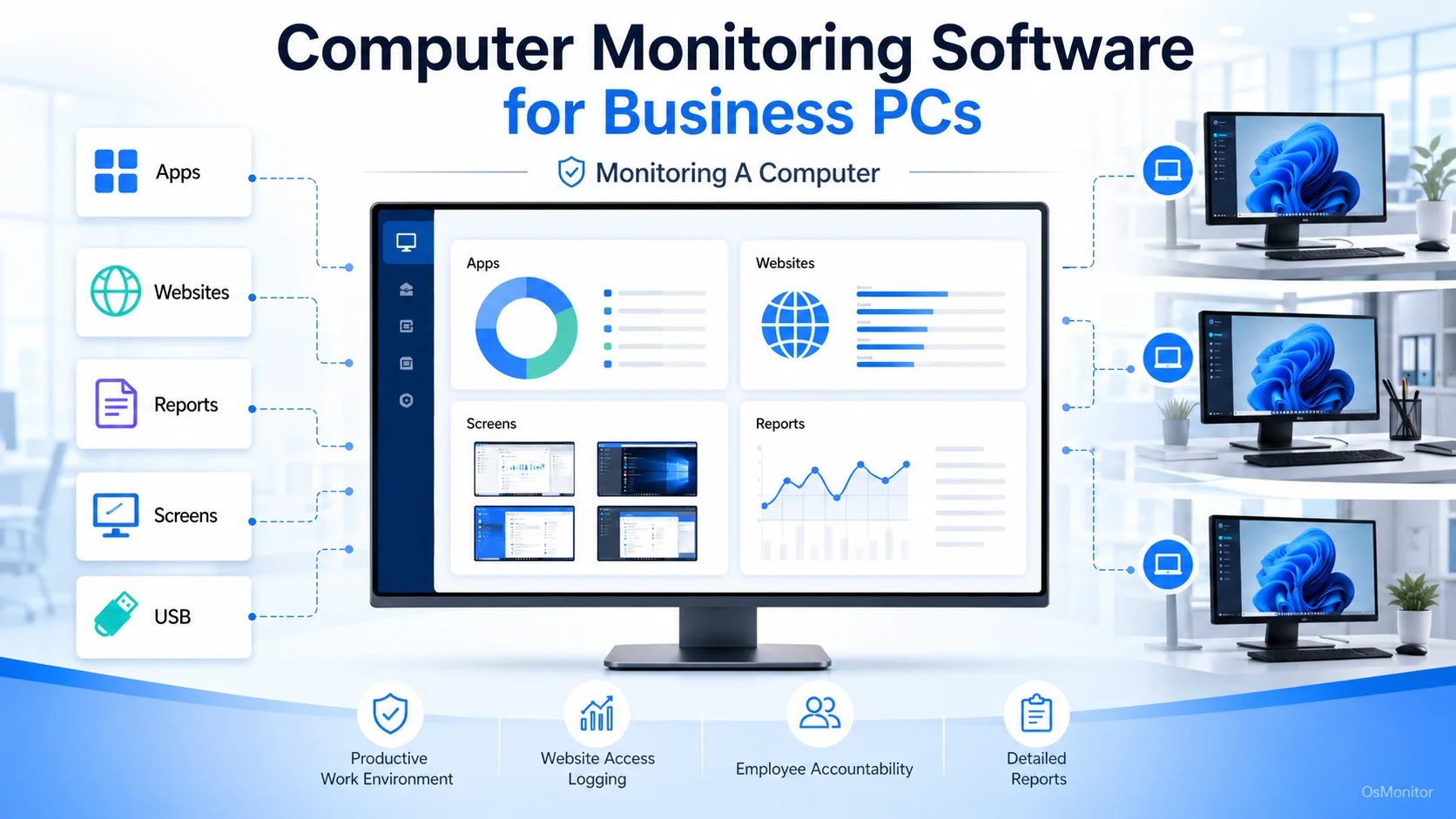
A practical overview of monitoring a computer for workplace computer management.
What is Computer Monitoring and Who Needs It?
People often ask, what is computer monitoring exactly? At its core, computer monitoring is simply using a reliable software system to observe and log user activities on company-owned hardware. It’s not about micromanaging every mouse click; it’s about doing authorized workplace monitoring to ensure productivity, enforce acceptable use policies, and protect digital assets. By rolling out solid computer monitoring software, you gain hard data on how your resources are actually being utilized.
This type of computer software monitoring is a game-changer for:
- Business Owners & Managers: To get an objective read on team productivity and ensure everyone is aligned without hovering over shoulders.
- IT Administrators: To enforce security baselines, manage software licenses, and deploy remote helpdesk support seamlessly.
- Team Leaders: To spot workflow bottlenecks and ensure staff have the right tools to do their jobs.
- Human Resources: To gather accurate application and website usage records for objective performance reviews.
Whether you are managing an in-house team or looking for a contractor time tracking app solution for remote workers, a structured approach to monitor computer use just makes operational sense.
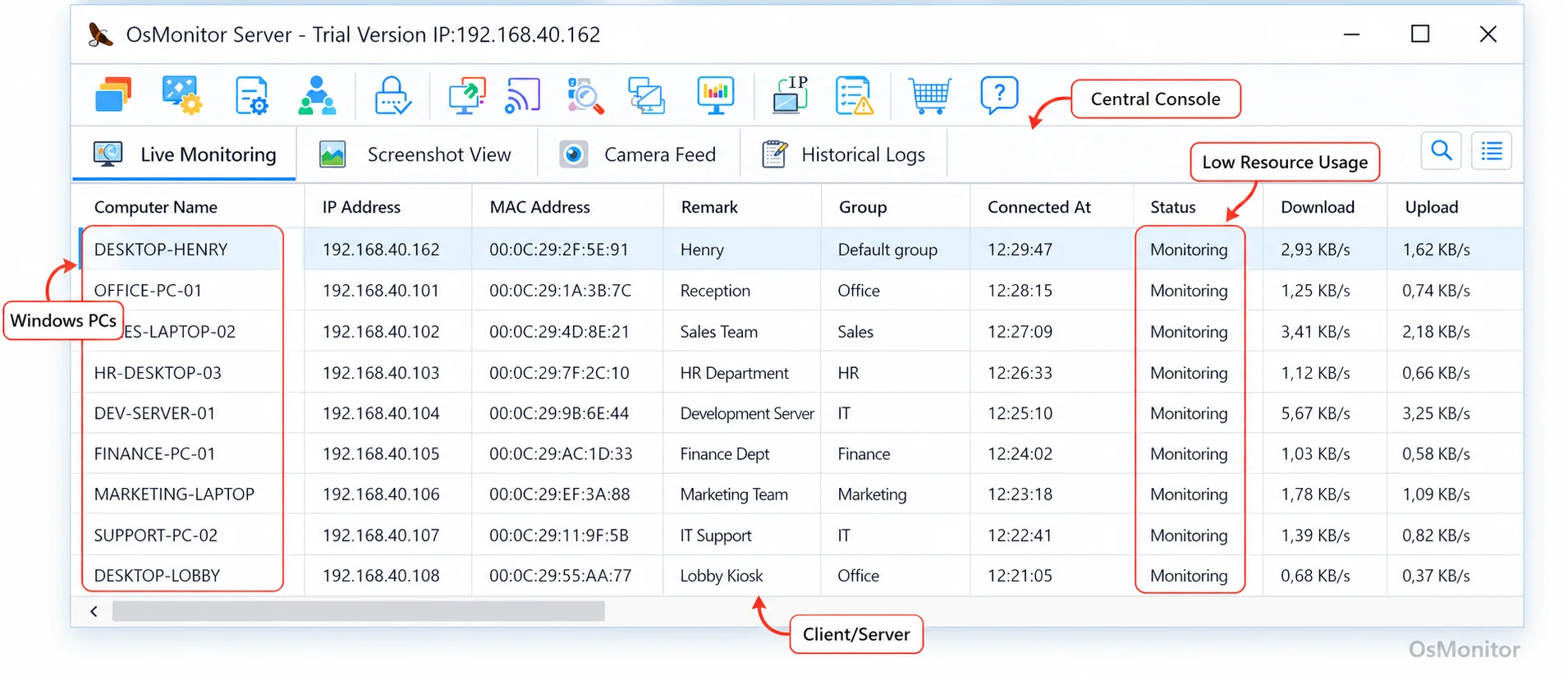
A real-product style screenshot highlighting centralized computer monitoring in OsMonitor.
OsMonitor: Transparent Workplace Management, Not Security Auditing
Let’s clarify the computer monitoring meaning in the context of OsMonitor. This platform is built specifically for transparent workplace computer management. It’s meant for legal, policy-based computer management on company-owned Windows machines. If you need a solid computer monitoring app to improve operational efficiency and understand digital tool usage, this hits the sweet spot.
However, don’t confuse OsMonitor with a heavy-duty enterprise cybersecurity suite or a SIEM (Security Information and Event Management) system. While we offer excellent data protection features—like USB restrictions and automated document backups—it isn’t a formal security audit platform. The focus here is firmly on practical, everyday office computer monitoring and administration.
How OsMonitor’s Client/Server Architecture Works
From an IT perspective, the best computer monitoring programs keep things local and secure. OsMonitor uses a straightforward client/server model, which guarantees high performance and keeps your data exactly where it belongs: on your own hardware.
- Server/Manager Console: You run the server-side software for monitoring computer activity on a dedicated machine in your office (or your own self-managed cloud instance). This acts as your central hub.
- Client Software: A lightweight pc monitor software client is installed quietly on each employee Windows PC. It runs in the background, logs the necessary activity, and securely funnels that data back to your central console.
This architecture means you are running a completely closed loop. It operates flawlessly over a Local Area Network (LAN) without ever needing to touch the public internet.
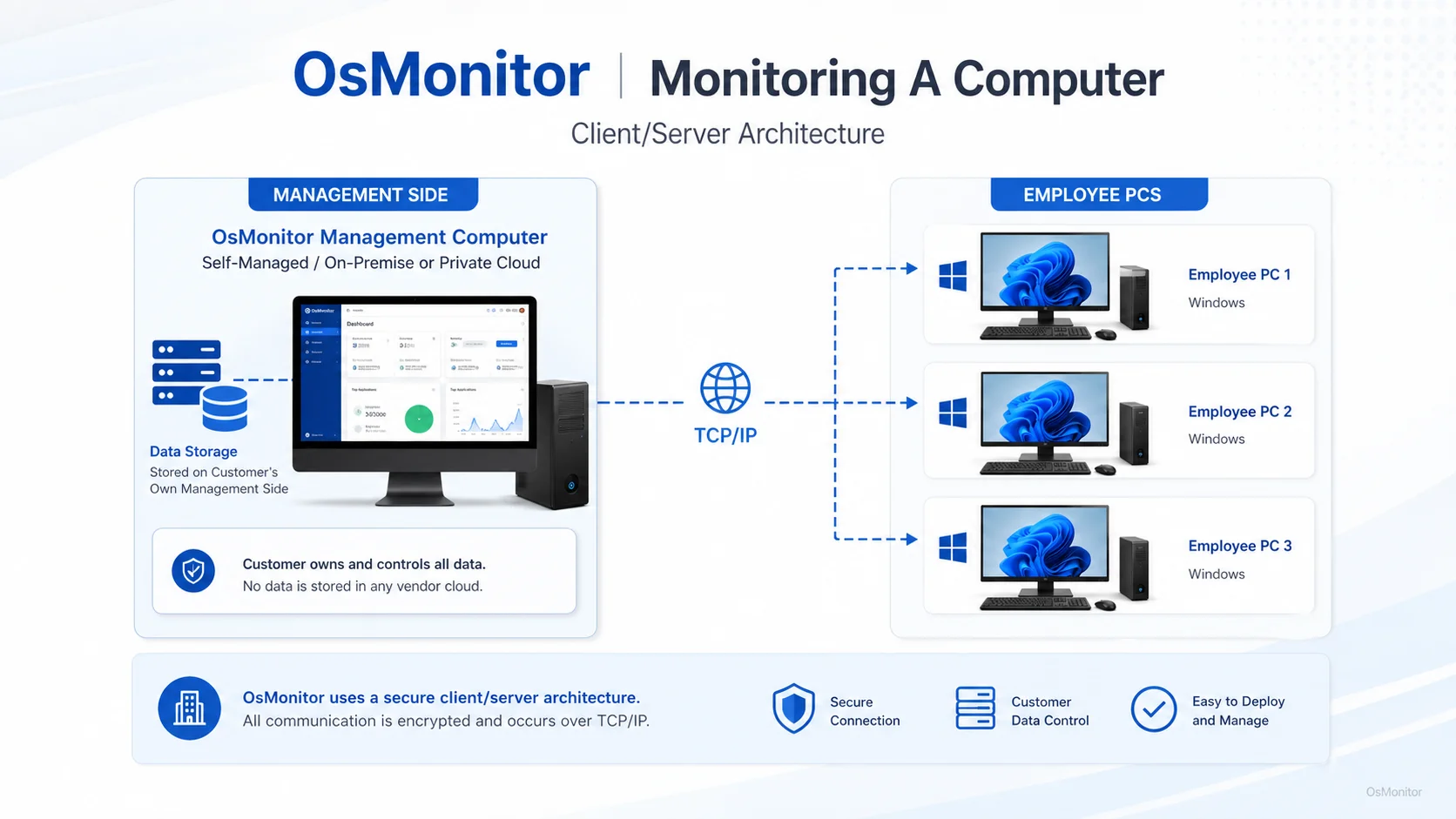
OsMonitor keeps monitoring data under the customer’s control on the management computer or self-managed server.
Core Features for Comprehensive PC Activity Monitoring
A good pc activity monitoring software suite needs a balanced toolkit to give you the full picture without overwhelming your IT staff.
Real-Time Screen Monitoring
Seeing live displays is arguably the most requested feature when evaluating real time computer monitoring software. The dashboard gives you a grid view of multiple desktops, so you can perform a team activity review at a glance. You can zoom in on a specific screen, or use the screen track functionality to record and review activity like a video—perfect for troubleshooting user errors or doing a retrospective productivity review. It’s essentially top-tier pc screen monitor software built right in.
Website and Application Controls
If you want to monitor computer usage effectively, you need to know where the time goes. OsMonitor tracks active windows, generating computer usage monitoring software reports that detail exactly which apps and sites are eating up the day. Need a reliable software to log internet activity? You’ve got it. You can even block access to unauthorized programs or distraction-heavy websites to enforce your company’s acceptable use policy. Dive deeper into this capability with our guide on Application Usage Monitoring for Employee Computers & Tools.
Device and Peripheral Management
Hardware control is a critical part of monitoring computer fleets. You can lock down USB ports, set external drives to read-only, and log every file copy operation. While it might not be explicitly branded as the best computer hardware monitoring software, these peripheral controls provide a rock-solid audit trail for physical data transfers.
Detailed Reports and Records
Data is useless if you can’t read it. As a comprehensive computer tracking software, OsMonitor generates digestible reports, including:
- Application usage statistics
- Website browsing history
- File operation logs
- Bandwidth usage and download statistics
- Violation counts for policy breaches
These computer usage reports make it incredibly simple to identify trends and address issues before they impact the bottom line.
Remote Assistance and Document Backup
Any robust pc system monitoring software should make IT support easier. The built-in remote desktop tool lets administrators take over a session to fix a problem instantly. Plus, the automated document backup quietly saves copies of essential files to the server, protecting your team against accidental deletions.
On-Premise Data Control and Deployment Flexibility
Unlike heavily marketed cloud SaaS tools, OsMonitor is a strict, on-premise computer monitor software. The data lives on your server. You own it.
This gives you massive advantages:
- Data Privacy: Total ownership of your employee activity records.
- Security: As a true monitoring software for pc, it runs entirely offline within your LAN, drastically reducing external threat vectors.
- Performance: Local data transfer is lightning fast.
- Cost-Effectiveness: We skip the recurring fees. It’s a one-time purchase, making it an incredibly cost-effective (and in the long run, operating almost like a free computer monitoring software compared to endless monthly subscriptions) way to handle pc tracking software needs.
For remote teams, you can host the server on your own private cloud or access it via VPN. If you’re weighing the benefits of self-hosted solutions, our guide on On-Premise Employee Monitoring Software breaks down the details.
Practical Use Cases for OsMonitor
| Business Need | Relevant OsMonitor Feature |
|---|---|
| Real-time team status updates | computer activity overview Monitoring |
| Reviewing past work activity | Screen Playback & History |
| Preventing non-work browsing | Website Filtering & Blocking |
| Tracking software license usage | Application Usage Reports |
| Securing company data | USB Device Control & Document Backup |
Responsible Use and Limitations
Deploying computer tracking tools should always be handled above board. We strongly advise rolling out a clear, written policy outlining that company-owned machines are subject to personal computer monitoring software policies for security and productivity reasons.
Keep in mind, OsMonitor is designed strictly for Windows environments (Windows 7 and up, including Server editions). It operates as an excellent tool for monitoring a computer, but it should still be paired with your standard antivirus and firewall stacks for complete network health.
Frequently Asked Questions
What is monitoring a computer in a business context?
In business, monitoring a computer means utilizing specialized tools to manage company-owned PCs. This includes logging web traffic, viewing screen activity, and controlling device access to ensure operations run smoothly and company policies are upheld.
Is monitoring a computer legal for businesses?
Yes, in most jurisdictions, employers have the legal right to monitor company-owned property. However, it is essential to implement responsible monitoring practices, transparently inform your employees, and consult local legal counsel to ensure your computer monitoring programs align with regional privacy laws.
Does OsMonitor require a client on employee computers?
Yes. As a client/server monitoring computer system, it requires a small, unobtrusive client program to be installed on each Windows machine you want to manage.
Where is OsMonitor monitoring data stored?
Your data is stored exclusively on your own hardware. Whether you use a physical office server or your own cloud instance, your computer usage monitoring software data is never transmitted to our vendor servers.
Can OsMonitor work without internet in a LAN?
Absolutely. It functions perfectly within a Local Area Network (LAN) without any outside internet connection, making it an incredibly secure pc monitor software.
What Windows versions does OsMonitor support?
It supports Windows 7, 8, 10, and 11, along with Windows Server editions (both 32-bit and 64-bit).
Ready to see how OsMonitor can improve productivity and streamline PC management in your organization? Download OsMonitor Free Trial to explore its full range of features.