How to Manage a Remote Team Without Micromanaging
When managers search for how to manage a remote team, they are usually trying to solve one difficult problem: how do you keep work moving when people are not in the same room, without turning every day into a stream of status messages and interruptions?
In an office, a manager can often sense whether the team is busy, stuck, or drifting. With remote work, that natural visibility disappears. A manager may want a simple way to review team activity, understand who may need help, and keep projects on track without constantly asking, “What are you working on?”
The answer is not micromanagement. The answer is a better system: clear goals, predictable communication, strong remote team collaboration, and responsible visibility into company-owned work computers when needed.
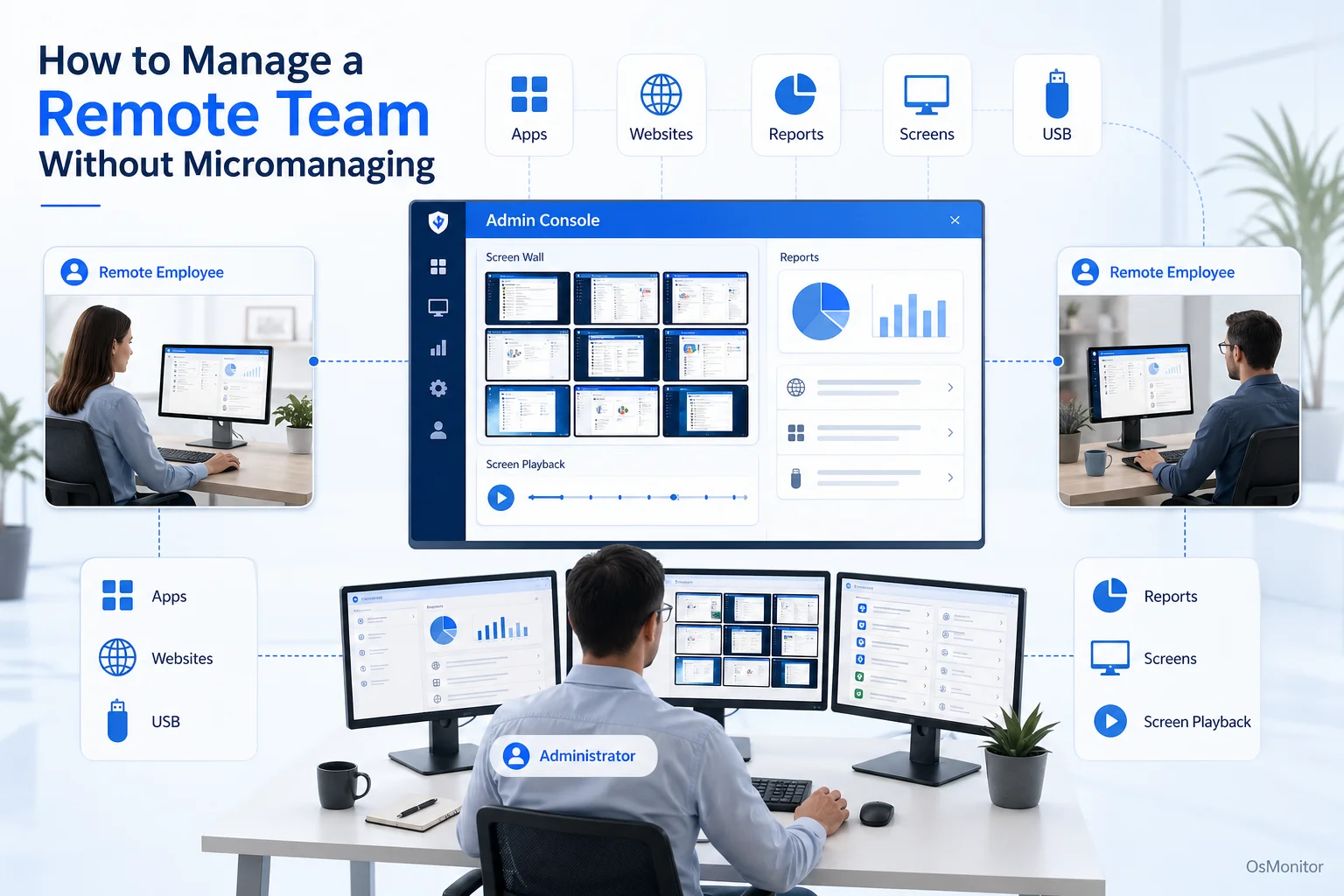
A practical overview of how to manage a remote team for workplace computer management.
The Core Challenge: Balancing Trust and Accountability
The hardest part of managing a remote team is balancing trust with accountability. If managers provide no structure, work can become unclear. If managers overcorrect with constant check-ins, employees feel pressured, distracted, and less trusted.
To manage a remote team effectively, the focus should move from physical presence to clear outcomes. Remote management works best when employees understand what matters, when work is due, how progress is reported, and where to ask for help.
Managers often struggle with:
- Limited Visibility: It is harder to know whether people are focused, blocked, overloaded, or waiting for direction.
- Communication Gaps: Messages can be missed, delayed, or misunderstood across time zones and schedules.
- Productivity Concerns: Managers may worry about distractions or inconsistent work habits on company-owned PCs.
- Team Connection: Remote employees can feel disconnected from the group if collaboration is not intentional.
- Support Delays: IT problems can take longer to solve when nobody is physically nearby.
The wrong solution is to ask for updates every hour or expect instant replies all day. That creates noise and reduces deep work.
The better solution is a remote management framework built around expectations, outcomes, tools, and respectful visibility.
Establishing a Foundation for Effective Remote Management
Software can support remote work, but it cannot fix unclear management. Before adding monitoring or reporting tools, the team needs a practical operating rhythm.
Set Clear Expectations and Goals
Remote employees should never have to guess what “good work” means. Every person should understand their responsibilities, deadlines, priorities, and communication expectations.
Useful practices include:
- Define Roles Clearly: Make sure each person knows what they own and where handoffs happen.
- Use Measurable Goals: Set goals that are specific, realistic, and tied to business outcomes.
- Document Processes: Keep standard procedures, policies, file locations, and workflows easy to find.
- Clarify Working Hours: Define core availability hours, response expectations, and after-hours boundaries.
- Separate Urgent from Non-Urgent: Not every message needs an immediate reply.
Clear expectations reduce the need for constant supervision. They also make productivity review fairer because employees know what they are being measured against.
Foster a Culture of Communication
Remote team collaboration does not happen automatically. It needs structure.
A good communication system should reduce confusion without creating too many meetings.
- Use Scheduled Check-ins: Weekly team meetings and regular one-on-ones can keep work aligned without interrupting people all day.
- Use Asynchronous Communication First: Tools like Slack, Microsoft Teams, email, or project comments are useful for non-urgent updates.
- Use Video for Complex Issues: Video calls are better for difficult discussions, coaching, planning, and relationship building.
- Keep Decisions Written Down: Remote teams lose time when decisions live only in chat history or one person’s memory.
- Create Shared Project Dashboards: Managers should not need to ask for every status update manually.
For teams that need more structure, the right tools and policies matter. You can also review Remote Employee Monitoring Software for Work-from-Home Teams for the software side of remote computer management.
Provide the Right Tools for Collaboration
A remote team is only as strong as its tools and habits. Employees need reliable access to the systems required for their jobs.
Common tools include:
- Project management software such as Asana, Jira, Trello, or ClickUp.
- Communication tools such as Microsoft Teams, Slack, or Zoom.
- Cloud document platforms such as Google Workspace or Microsoft 365.
- Secure remote access such as VPN or approved remote desktop systems.
- Company computer management tools for reporting, policy control, and IT support.
People sometimes search for “best practices for remote team collaboration on social media content.” For that specific type of remote team, the same principles apply: define content ownership, keep an editorial calendar, document approval steps, centralize files, set review deadlines, and use clear communication channels.
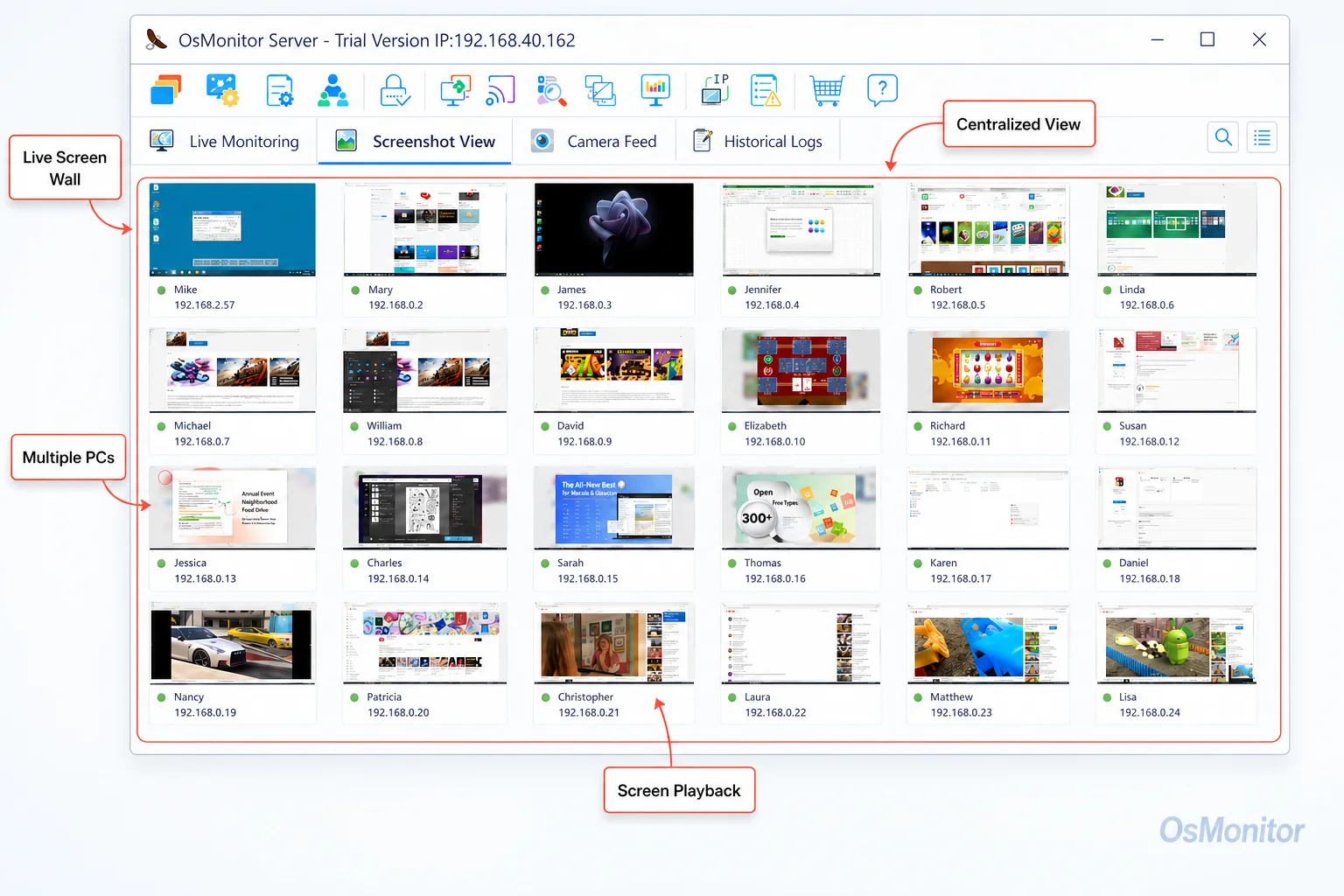
A real-product style screenshot highlighting employee screen monitoring in OsMonitor.
Using Technology to Enhance Visibility, Not to Micromanage
Once the team has clear goals and communication habits, technology can help managers understand work patterns without interrupting everyone constantly.
The key is purpose. Remote management tools should support coordination, productivity review, IT support, and policy consistency. They should not be used to pressure employees over every small action.
Gaining Insight into Work Patterns
Instead of asking “What did you do today?” every afternoon, managers can review broader work patterns.
OsMonitor can provide reports on application usage, website activity, active time, idle time, and department-level computer activity from company-owned Windows PCs. This can help managers understand:
- Which applications are used most.
- Whether employees are using approved business tools.
- Whether non-work websites are consuming too much time.
- Whether employees may need training or support.
- Whether company computer policies are being followed.
This can be part of a broader Employee Activity Monitoring Software strategy when used transparently and responsibly.
The goal is not to watch every minute. The goal is to understand patterns that affect work.
Visualizing Team Activity with Screen Monitoring
A remote manager may sometimes need a quick view of team activity, similar to the general awareness they would have in an office. OsMonitor’s screen wall feature can display live thumbnails of managed employee screens in one centralized view.
This can help with:
- Coordinating active tasks.
- Identifying who may need help.
- Supporting training or data entry teams.
- Reviewing activity during critical work periods.
- Reducing unnecessary “just checking” messages.
This feature should be used only with clear policy, employee notice, and legitimate business purpose. Used properly, it supports awareness and assistance. Used poorly, it can damage trust.
Centralized Management for Distributed Teams
To manage remote team computers, the system needs to work across locations.
OsMonitor uses a client/server model. The management console runs on a manager’s computer, administrator’s PC, or self-managed server. A lightweight client is installed on each employee Windows computer the company wants to manage.
For remote employees, the company can use VPN or another approved network setup so managed computers can communicate with the server. Some businesses may use a self-managed cloud host, depending on their IT environment.
This keeps reporting centralized while allowing the business to control where data is stored. Normal monitoring data is stored on the customer’s own management computer or self-managed server, not on an OsMonitor vendor cloud.
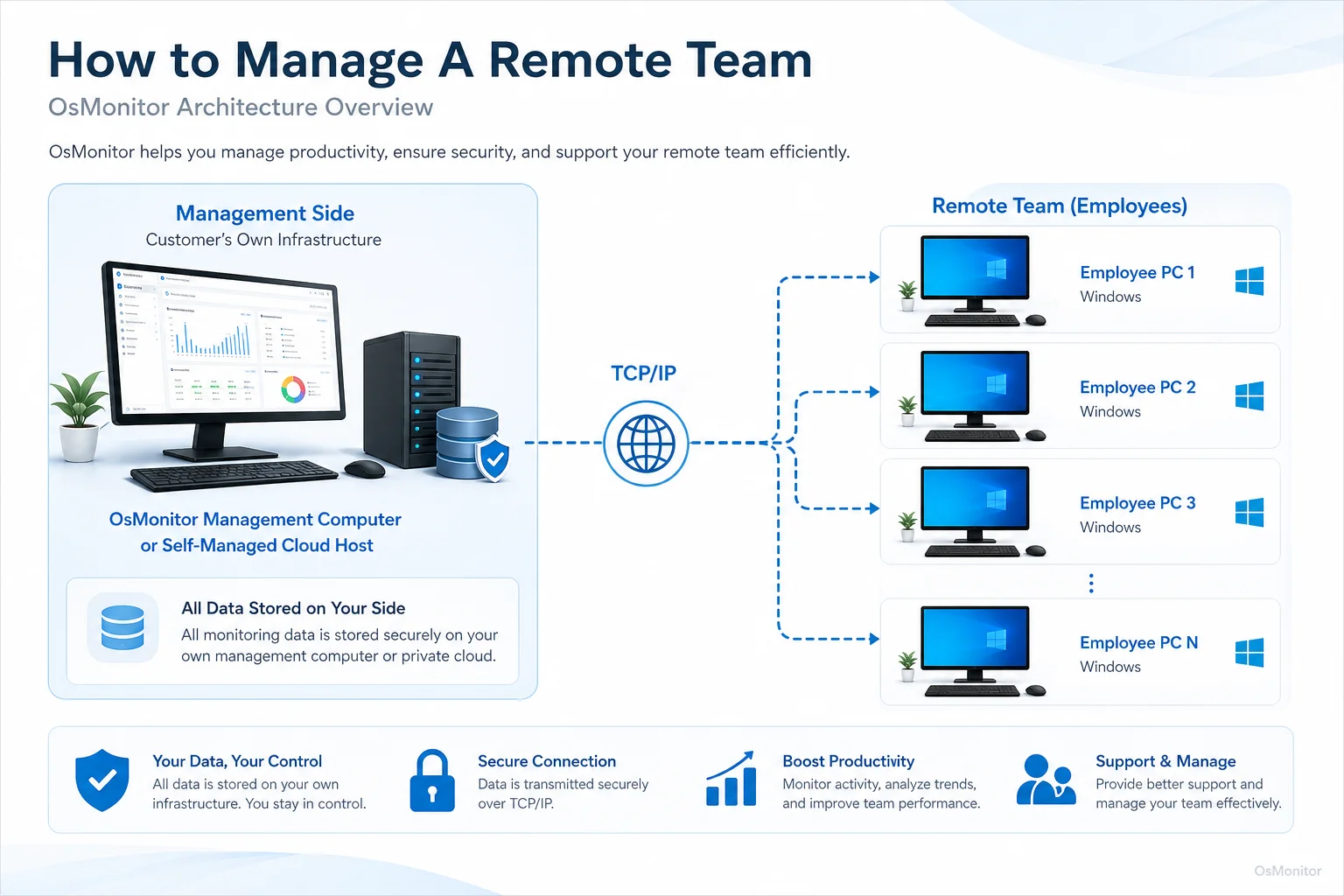
OsMonitor keeps monitoring data under the customer’s control on the management computer or self-managed server.
Best Practices for Implementation and Transparency
Knowing how to manage remote team activity responsibly is just as important as choosing the right tool. Transparency is not optional.
Before using computer activity management software, businesses should create a clear policy and explain the purpose. Employees should know what is being collected, why it is being collected, who can review the reports, and how the data will be used.
Good implementation practices include:
Create a Clear Policy: Explain computer usage rules, report access, data retention, and acceptable use of company-owned devices.
Inform Employees: Make sure every remote employee understands the policy before tools are used.
Focus on Business Use: Use reports for productivity review, IT support, policy compliance, and protection of company resources.
Avoid After-Hours Overreach: Be careful with non-work hours, personal time, and local privacy requirements.
Review Patterns, Not Isolated Moments: A single idle period or website visit rarely tells the full story.
Use Data to Support Conversations: Reports should help managers ask better questions, not replace communication.
Consult Legal Counsel: Employment and privacy laws vary by country, state, province, and industry. Businesses should get qualified legal advice before deploying monitoring software.
The table below shows the difference between micromanagement and healthier remote management.
| Micromanagement Tactic | Effective Management Alternative |
|---|---|
| Constant status update requests | Scheduled check-ins and clear project dashboards |
| Watching every small action | Reviewing high-level productivity and activity reports |
| Dictating every task detail | Setting clear goals and trusting employees to execute |
| Requiring instant replies | Using asynchronous communication for non-urgent work |
| Focusing only on hours worked | Measuring results, progress, and work quality |
How to motivate a remote team also comes back to the same basics: clear goals, trust, useful tools, recognition, fair workload, quick support, and a sense that people are part of a real team. Monitoring software alone does not motivate people. Good management does.
Frequently Asked Questions (FAQ)
What is the goal of managing a remote team effectively?
The goal is to help remote employees do good work with clear expectations, strong communication, useful tools, and fair accountability. Managing a remote team effectively means focusing on outcomes, reducing confusion, supporting collaboration, and using visibility tools responsibly.
How can managers improve remote team collaboration?
Managers can improve remote team collaboration by documenting workflows, using shared project dashboards, holding focused check-ins, encouraging asynchronous communication, centralizing files, setting clear deadlines, and making decisions visible to the whole team.
How do you manage a remote team without micromanaging?
Set clear goals, define responsibilities, use project dashboards, schedule regular check-ins, and review high-level work patterns instead of interrupting employees constantly. When computer activity tools are used, they should support productivity, IT help, and policy consistency—not minute-by-minute pressure.
Is it legal to use software to manage a remote team?
In many regions, businesses may manage and review activity on company-owned computers for legitimate business purposes when employees have been properly notified and a clear policy is in place. However, laws vary by country, state, province, and industry. Businesses should consult qualified legal counsel before implementing remote computer activity monitoring.
Does OsMonitor require a client on employee computers?
Yes. OsMonitor uses a client/server model. A lightweight client program must be installed on each employee Windows computer the company wants to manage. The management console runs on a manager’s computer or self-managed server.
Where is OsMonitor monitoring data stored?
OsMonitor stores collected data on the customer’s own management computer or self-managed server. It is not a cloud SaaS product, and normal monitoring data is not stored on an OsMonitor vendor cloud.
Can OsMonitor work without internet in a LAN?
Yes. OsMonitor can work inside a local area network without requiring internet access for its core monitoring, reporting, and management functions. For remote workers, the company can use VPN or another approved network setup so employee computers can connect to the management console.
What Windows versions does OsMonitor support?
OsMonitor supports Windows 7 and later versions, including Windows 10, Windows 11, and Windows Server editions. It supports both 32-bit and 64-bit Windows systems.
Managing a remote team well is not about recreating the office through constant digital check-ins. It is about building trust, setting clear expectations, improving remote team collaboration, and using technology only where it helps.
Used transparently and responsibly, OsMonitor can support remote team management with application and website reports, screen activity review, remote assistance, policy controls, and customer-controlled data storage. If you’re looking for a solution with a one-time purchase model, you can View OsMonitor Pricing to see how it fits your budget.