Workforce Management: Definition, Tools and Monitoring Use Cases
Workforce management becomes a real concern when a business owner can see that people are working, but the results do not match the time being spent. Projects move slowly. Some employees seem focused, while others may be spending too much time on games, video sites, entertainment websites, or other non-work activities during office hours.
At that point, the business needs more than reminders. It needs clear computer usage policies, website access records, application usage reports, and a fair way to review workplace performance.
That is where workforce management tools can help. For computer-based teams, good workforce management is not only about schedules and attendance. It is also about understanding how company-owned computers are used, where employee efficiency is strong, and where better policies, coaching, or support may be needed.
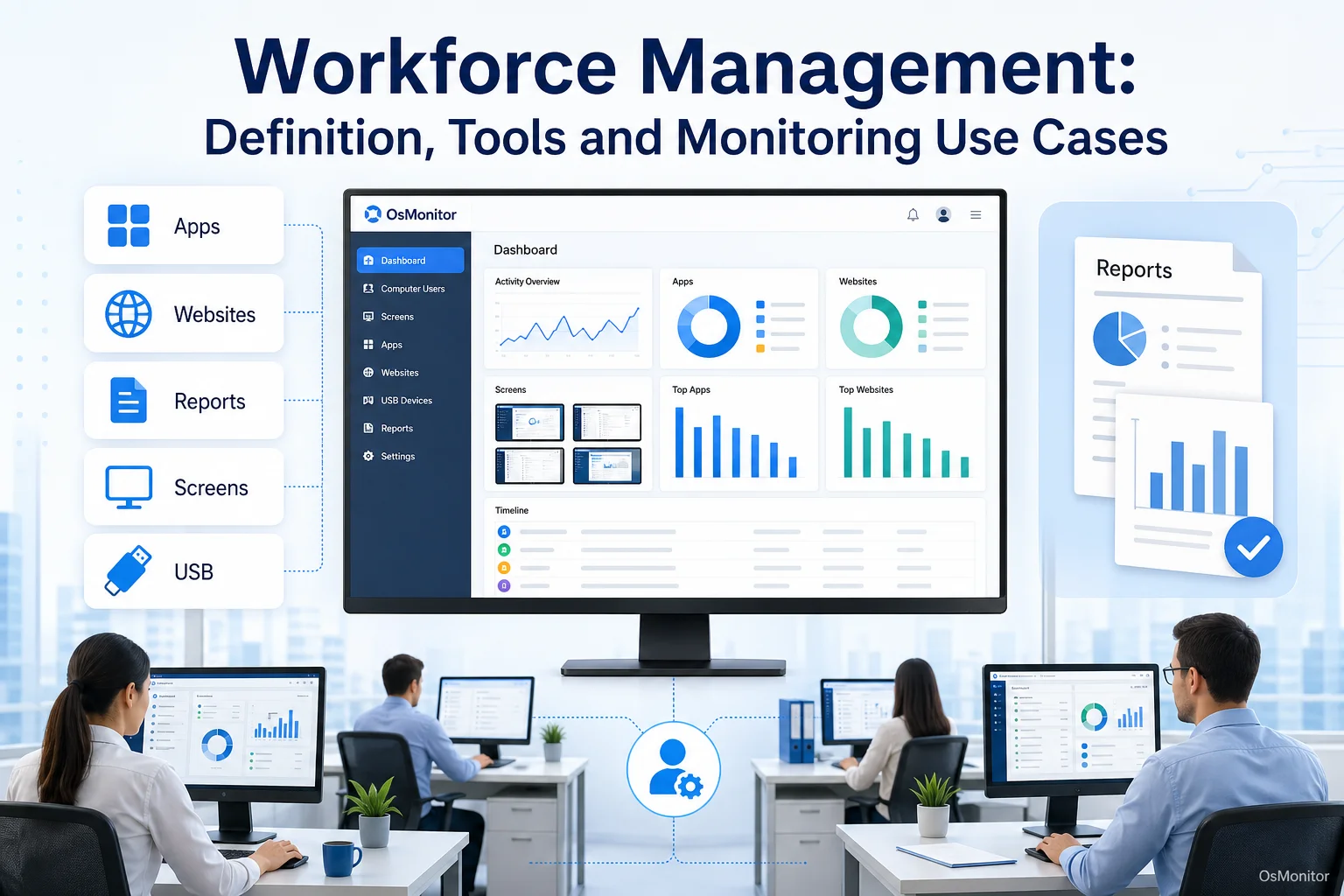
A practical overview of workforce management for workplace computer management.
What is Workforce Management and Why is it Important?
Workforce management is the set of processes, tools, and policies a business uses to plan, manage, and improve how employees work. In larger companies, a workforce management program may include scheduling, attendance, payroll coordination, forecasting, HR reporting, and workforce performance analysis.
For small and mid-sized businesses, the need is often more practical: how do we make sure work time, software, computers, and company resources are being used properly?
Some people search for “whats performance management” or “why is performance management important” when they are really trying to understand how to manage employee performance fairly. The simple answer is this: performance management helps a business set expectations, review results, coach employees, and improve workplace performance with facts instead of guesswork.
Workforce management can help answer questions such as:
- Are employees spending work hours in productive applications?
- Which websites and tools are used most during the day?
- Are distractions reducing workforce efficiency?
- Are company computer usage policies being followed?
- Which employees or departments may need training or support?
- How can coaches improve team performance with better data?
- What workplace data analytics can help managers make better decisions?
This is the practical application of performance management. It connects business goals with daily work patterns, helping managers improve employee performance in a fairer and more specific way.
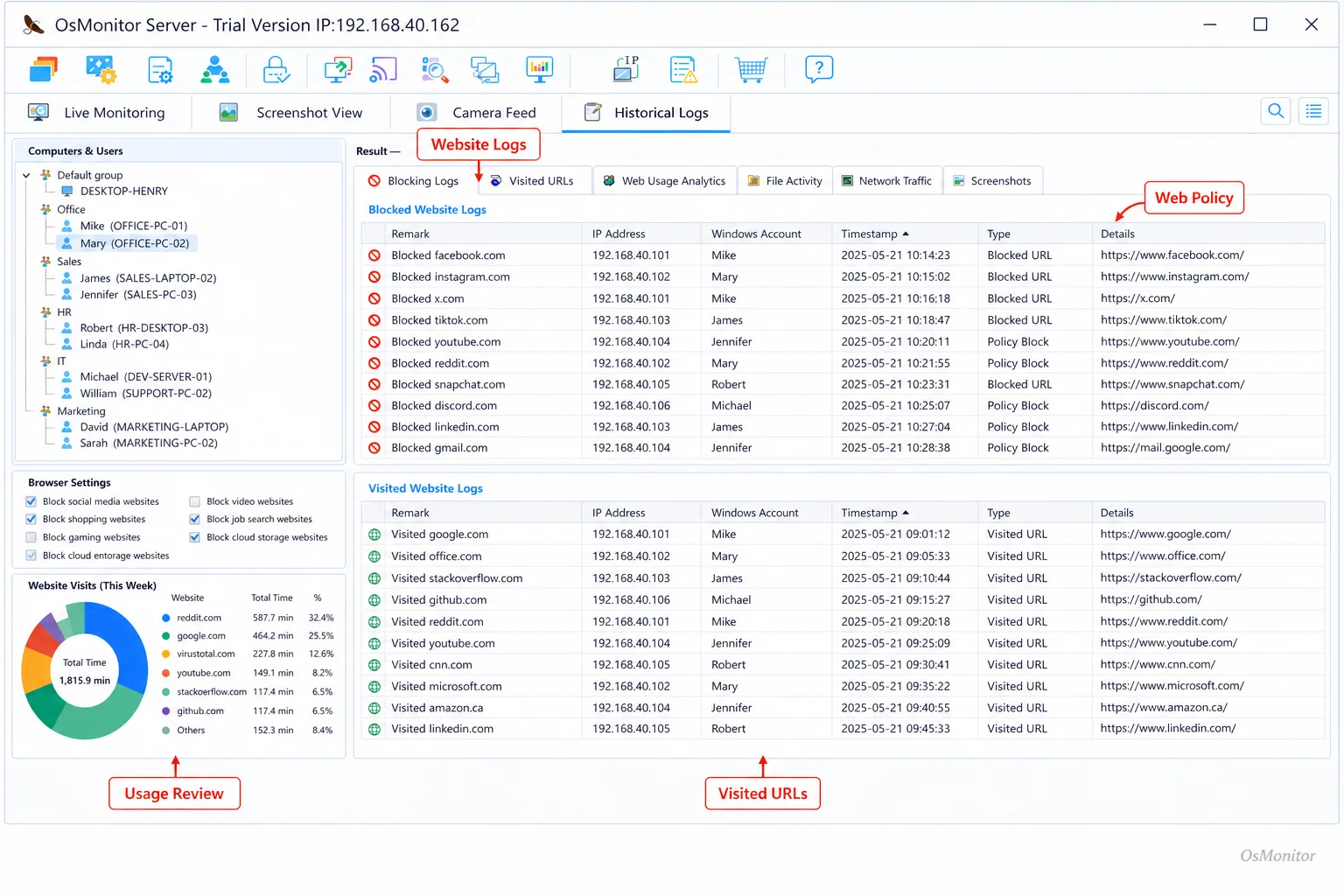
A real-product style screenshot highlighting website activity monitoring in OsMonitor.
A Practical Approach to Software Workforce Management
Many workforce management applications focus on scheduling, payroll, time clocks, HR workflows, or cloud based workforce management solutions. Those systems can be useful, especially for larger organizations with complex labor planning.
But many businesses need something more direct for day-to-day computer-based work. They need to know how company-owned Windows PCs are being used.
OsMonitor is workplace productivity and employee computer activity management software. It is designed to help managers and IT administrators review application usage, website activity, screen activity, activity timelines, and productivity reports from company-owned Windows computers.
This makes OsMonitor a practical workforce management tool for businesses that want clearer computer usage records without adopting a full HR suite.
It can help managers:
- Understand Work Patterns: Review which applications and websites employees use most often.
- Enforce Computer Policies: Limit access to non-work websites or applications according to company rules.
- Improve Accountability: Keep clear activity records for authorized management review.
- Support Employee Efficiency: Use reports to identify training needs, workflow problems, or recurring distractions.
- Manage Employee Performance: Review activity patterns with more context before coaching or making decisions.
OsMonitor can also act as an employee performance tracker for computer-based work, but it should not be treated as the whole performance picture. Good performance management also considers job role, output quality, workload, communication, customer results, and manager feedback.
This approach to software workforce management gives businesses a useful foundation for transparent, policy-based computer management.
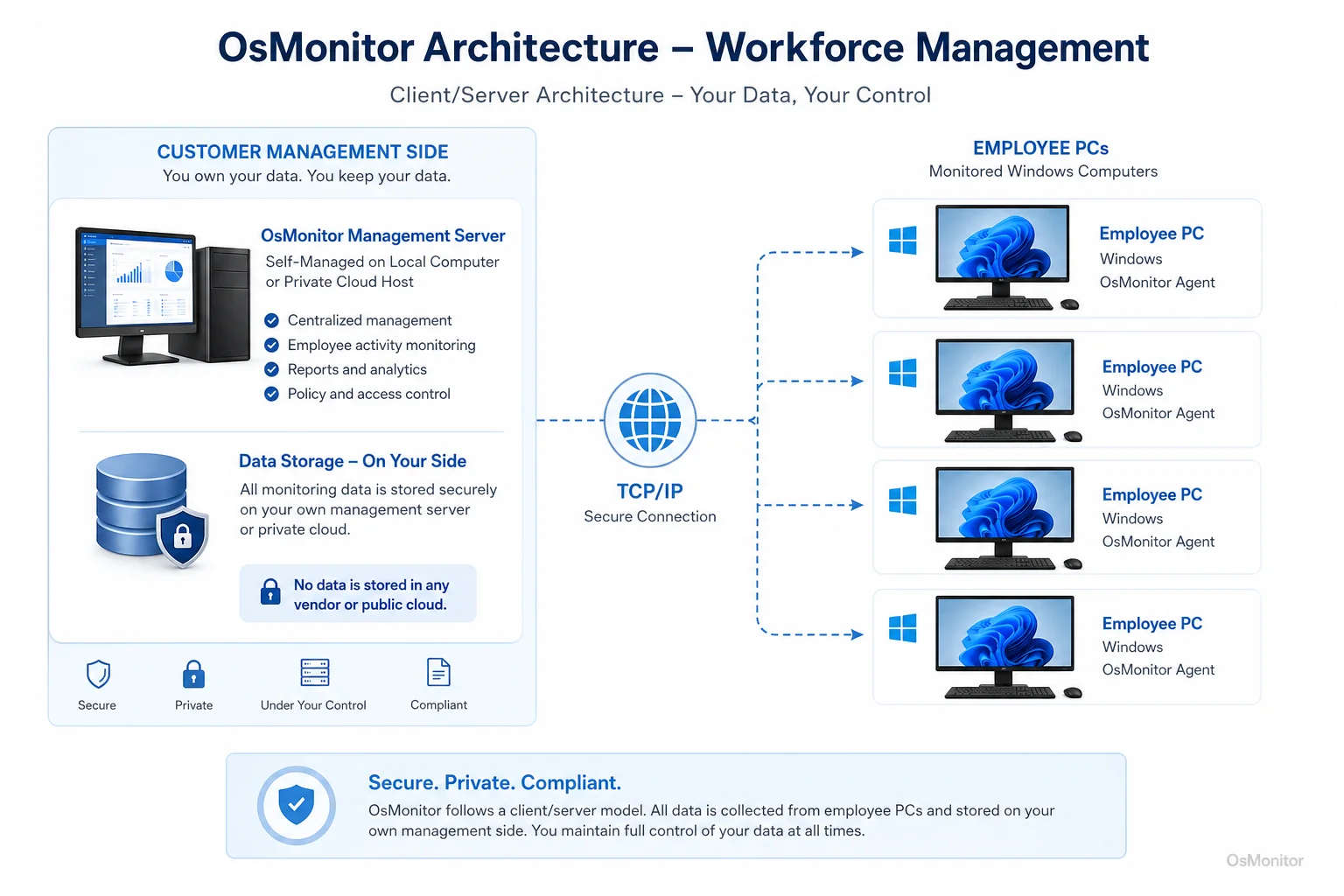
OsMonitor keeps monitoring data under the customer’s control on the management computer or self-managed server.
Core Features of a Workforce Management Tool
A practical workforce management tool should help managers see what is happening, understand trends, and support better decisions. OsMonitor focuses on the computer activity side of workforce management.
| Feature | Benefit for Workforce Management |
|---|---|
| Website & App Monitoring | Records websites visited and applications used, including time spent. Helps managers understand work patterns and reduce recurring distractions. |
| Real-time Screen Monitoring | Provides authorized live screen views when support, training, or activity review is needed. |
| Productivity Reports | Generates individual and department reports, turning computer activity into useful workplace data analytics for productivity review. |
| USB & Device Control | Helps manage USB drives and peripheral devices according to company policy. |
| Document Backup | Automatically backs up selected work documents from employee computers to a central server to reduce accidental data loss. |
| Remote Assistance | Allows IT administrators or authorized managers to remotely help employees troubleshoot computer issues. |
These features support practical workforce management reporting. Instead of relying only on memory, manual check-ins, or assumptions, managers can review computer usage records and spot patterns.
For example, if a department spends most of its time in CRM, accounting software, ticketing tools, design programs, or internal systems, that may support a positive productivity review. If reports show repeated use of unrelated websites during core hours, the manager may need clearer policy enforcement or coaching.
With tools like Employee Activity Monitoring Software, businesses can build a clearer picture of daily computer-based work.
On-Premise Data Control and System Architecture
Workforce management data can be sensitive. It may include website activity, application usage, screen records, productivity reports, and policy events. For that reason, some businesses prefer to keep this data under their own control instead of storing it in a vendor cloud.
OsMonitor uses an on-premise client/server architecture.
Here is how it works:
Server/Manager Console: The OsMonitor server program is installed on one central computer, such as a manager’s PC, administrator’s computer, or self-managed server. This is where settings are configured, reports are reviewed, and activity records are stored.
Client Program: A lightweight client is installed on each employee Windows computer that the business wants to manage.
Direct Communication: Client computers send activity records directly to the management console through the local area network, VPN, or approved network setup.
OsMonitor can work inside a LAN without requiring internet access for its core monitoring and reporting functions. This local-control model is one reason businesses choose On-Premise Employee Monitoring Software.
Compared with some workforce management services or cloud based workforce management solutions, OsMonitor is more focused. It does not try to handle every HR process. Instead, it gives businesses direct visibility into company-owned Windows PC activity while keeping normal monitoring data on customer-controlled hardware.
Limitations and Responsible Implementation
No single workforce management system solves every business problem. It is important to understand what OsMonitor does and does not do.
OsMonitor is designed for:
- Company-owned Windows computer management.
- Application and website usage reports.
- Productivity review.
- Screen activity review.
- Remote assistance.
- Policy-based computer management.
- Document backup.
- On-premise data control.
OsMonitor is not:
- A full HR platform.
- A payroll or benefits system.
- A complete scheduling system.
- A full AI workforce management forecasting platform.
- A replacement for antivirus, endpoint protection, or enterprise security software.
- A substitute for management judgment or legal advice.
Some workforce management trends involve AI workforce management, predictive scheduling, automated coaching, and advanced HR analytics. Those may be valuable for larger organizations, but many small businesses first need accurate computer usage records and practical reports.
Responsible implementation matters. Businesses should:
- Create a clear written computer and internet usage policy.
- Inform employees that company-owned computers may be managed and reviewed.
- Explain what data is collected and how it will be used.
- Use reports to improve employee performance, support coaching, and enforce policies fairly.
- Limit report access to authorized managers or IT staff.
- Review activity records with context.
- Consult qualified legal counsel to ensure compliance with local employment and privacy laws.
The best workforce management best practices are simple: be clear, be fair, use data responsibly, and focus on improving work rather than judging isolated events.
Frequently Asked Questions (FAQ)
What is workforce management?
Workforce management is the process of planning, managing, and improving how employees work. It can include scheduling, attendance, productivity review, performance management, reporting, and computer activity management. For office teams, it often means making sure company time, tools, and computers are used effectively.
What is a workforce management tool?
A workforce management tool is software that helps businesses manage employee work, performance, scheduling, reporting, or productivity. OsMonitor is a workforce management tool focused on company-owned Windows computer activity, including application usage, website activity, screen review, reports, and policy controls.
Why is performance management important?
Performance management is important because it helps businesses set expectations, measure progress, coach employees, and improve results. Without performance management, managers often rely on impressions. With better data, they can manage employee performance more fairly and identify where support or training is needed.
How can businesses improve employee performance?
Businesses can improve employee performance by setting clear goals, giving regular feedback, providing useful tools, removing workflow problems, offering training, and reviewing work patterns with context. For computer-based teams, application usage reports and website activity records can help managers understand where time is going.
Is workforce management legal for businesses?
In many regions, businesses may manage and review activity on company-owned computers for legitimate business purposes when a clear policy is in place and employees have been properly notified. However, laws vary by country, state, province, and industry. Businesses should consult qualified legal counsel before implementing workforce management or computer activity monitoring software.
Does OsMonitor require a client on employee computers?
Yes. OsMonitor uses a client/server model. The management console runs on a manager’s computer or self-managed server, and a lightweight client must be installed on each employee Windows computer the business wants to manage.
Where is OsMonitor monitoring data stored?
OsMonitor stores collected data on the customer’s own hardware, such as the management computer or a self-managed server. Normal activity records are not stored on an OsMonitor vendor cloud.
Can OsMonitor work without an internet connection?
Yes. OsMonitor can work inside a local area network without requiring internet access for its core monitoring, reporting, and management functions.
What Windows versions does OsMonitor support?
OsMonitor supports Windows 7, Windows 8, Windows 10, Windows 11, and Windows Server editions. It supports both 32-bit and 64-bit Windows systems.
What is the difference between HR workforce management and computer activity management?
HR workforce management usually focuses on scheduling, attendance, labor planning, payroll coordination, and HR reporting. Computer activity management focuses on how company-owned computers are used during work hours, including applications, websites, activity reports, and policy controls. OsMonitor focuses on the computer activity side.
Workforce management works best when managers combine clear expectations, useful tools, fair policies, and practical data. For computer-based teams, activity reports can help show where employees are focused, where distractions appear, and where better training or support may improve workplace performance.
Used transparently and responsibly, OsMonitor can support workforce management with application and website records, productivity reports, screen activity review, remote assistance, policy controls, and on-premise data storage. To learn more about setting up OsMonitor for your team, Read the Quick Start Guide.