Digital Employee Experience and Computer Usage Data
Digital employee experience becomes a real business problem when employees are working through computers all day, but managers and IT teams cannot clearly see where friction is happening. A team may be busy, but projects still move slowly. Remote employees may be online, but support issues take too long to solve. New software may be purchased, but nobody knows whether people actually use it.
For a business owner or IT manager, the question is simple: are workplace technologies helping employees do their jobs, or are they creating delays, distractions, and extra support work?
That is where computer usage data can support a stronger digital employee experience. It gives managers and IT teams practical signals from company-owned Windows PCs, including application usage, website activity, screen activity, remote support needs, and productivity reports.
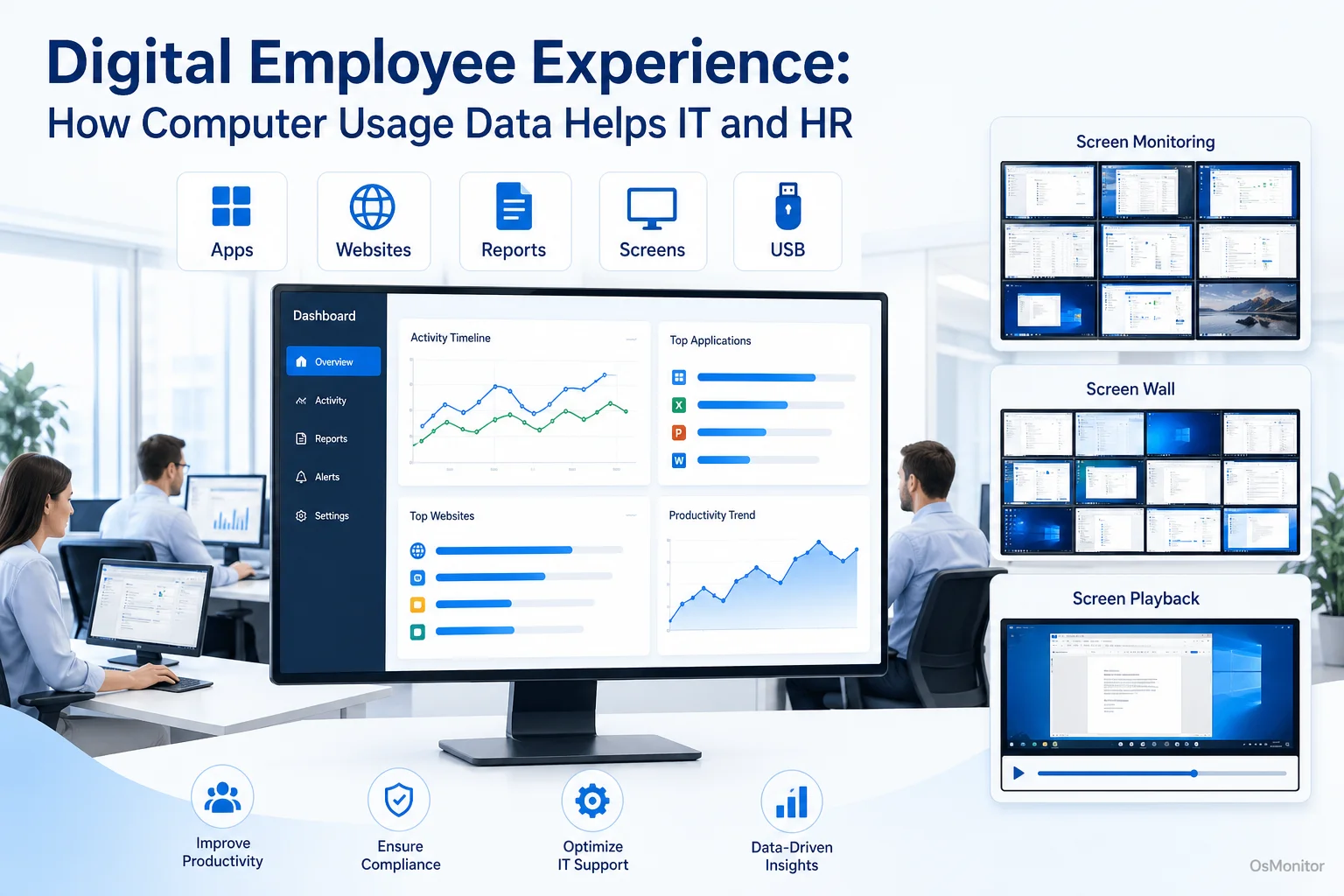
A practical overview of digital employee experience for workplace computer management.
What is Digital Employee Experience (DEX) and Why Does It Matter?
Digital employee experience, often shortened to digital employee experience DEX, refers to how employees experience the technology they use at work. This includes computers, applications, websites, internal systems, communication tools, remote access, support processes, and daily digital workflows.
A good digital employee experience means technology feels reliable, useful, and easy to work with. Employees can open the tools they need, finish tasks without unnecessary friction, get help quickly, and stay focused. A poor experience usually looks different: slow software, unclear workflows, too many tool switches, repeated IT problems, unused applications, and frustration that quietly reduces productivity.
For IT and HR, digital employee experience management matters because technology now affects almost every part of work.
- For IT teams: Better DEX can reduce support delays, improve troubleshooting, show which tools are actually used, and help prioritize fixes.
- For HR and managers: Better DEX can improve engagement, reduce frustration, support remote teams, and make digital workplace policies easier to apply fairly.
- For business owners: Better DEX can protect software investments, improve productivity, and make day-to-day operations more visible.
A digital employee experience strategy should not depend only on complaints or occasional surveys. Those are useful, but they often arrive late. Computer usage data adds another layer: what employees are actually doing with the tools provided to them.
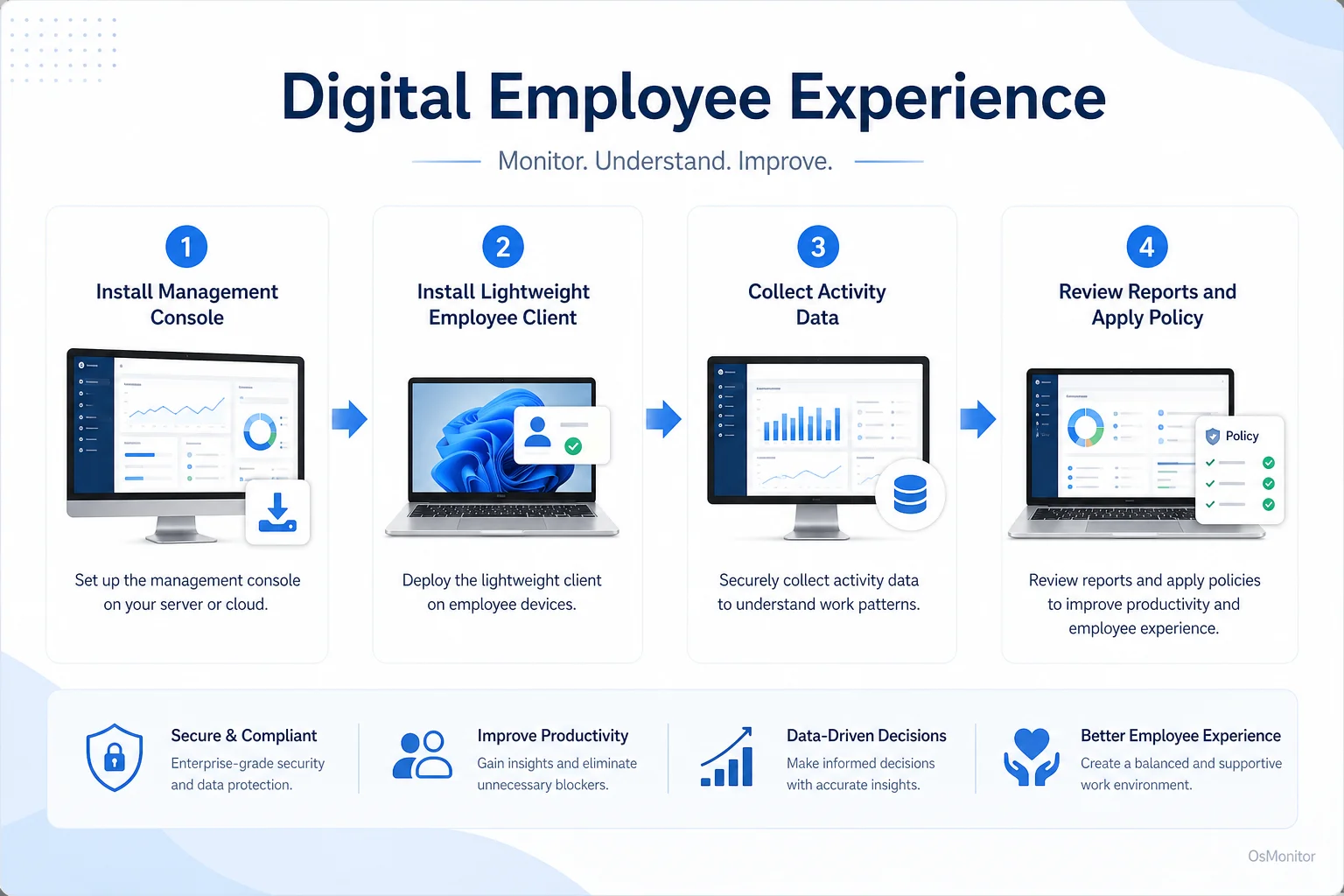
A simple workflow showing how workplace signals can support digital employee experience.
How Computer Usage Data Enhances Digital Employee Experience Management
To improve digital employee experience, businesses need to measure the right signals. That does not mean collecting data for its own sake. It means using practical workplace activity records to find where employees need better tools, clearer policies, faster IT support, or more focused workflows.
Computer usage data can help answer questions such as:
- Which applications are used every day, and which paid tools are rarely opened?
- Are employees spending too much time switching between tools?
- Are non-work websites or applications reducing focus during core hours?
- Are remote employees getting the same level of IT support as office employees?
- Are certain teams spending too much time in inefficient software?
- Are company-owned computers being used according to workplace policy?
- Can managers review progress without constantly interrupting employees for manual updates?
This is the practical side of digital employee experience monitoring. It connects employee experience with real workplace signals.
Some enterprise digital employee experience platforms focus heavily on device health, endpoint performance, employee sentiment, automation, and large-scale IT service workflows. Those can be valuable for larger organizations. But many small and mid-sized businesses first need something more direct: clear activity reports, application and website records, screen activity review, and remote assistance for company-owned Windows PCs.
That is where a focused digital employee experience tool can help.
OsMonitor: A Practical Digital Employee Experience Tool for SMBs
OsMonitor is workplace productivity and employee computer activity management software for company-owned Windows PCs. It is not a full enterprise DEX suite, and it is not a formal endpoint security platform. Instead, it gives managers and IT administrators practical computer usage data that can support digital employee experience solutions.
For small and mid-sized businesses, this can be more useful than a complex digital employee experience platform that requires a large IT department to operate. OsMonitor focuses on everyday questions:
- What applications are employees using?
- Which websites are being visited during work hours?
- Are employees active in approved business tools?
- Where might a worker need IT support?
- Which remote or office computers need closer policy management?
- Are important documents being protected through backup?
OsMonitor uses a client/server model. A management console is installed on a manager’s computer, administrator’s PC, or self-managed server. A lightweight client is installed on each employee Windows computer that the company wants to manage. Activity records are collected centrally for authorized review.
The important point is data control. OsMonitor stores monitoring data on the customer’s own management computer or self-managed server. Normal activity data is not stored on an OsMonitor vendor cloud. The system can also work inside a local area network without requiring internet access for core functions.
For companies that care about data privacy, internal control, and predictable deployment, this on-premise model can be an important advantage.
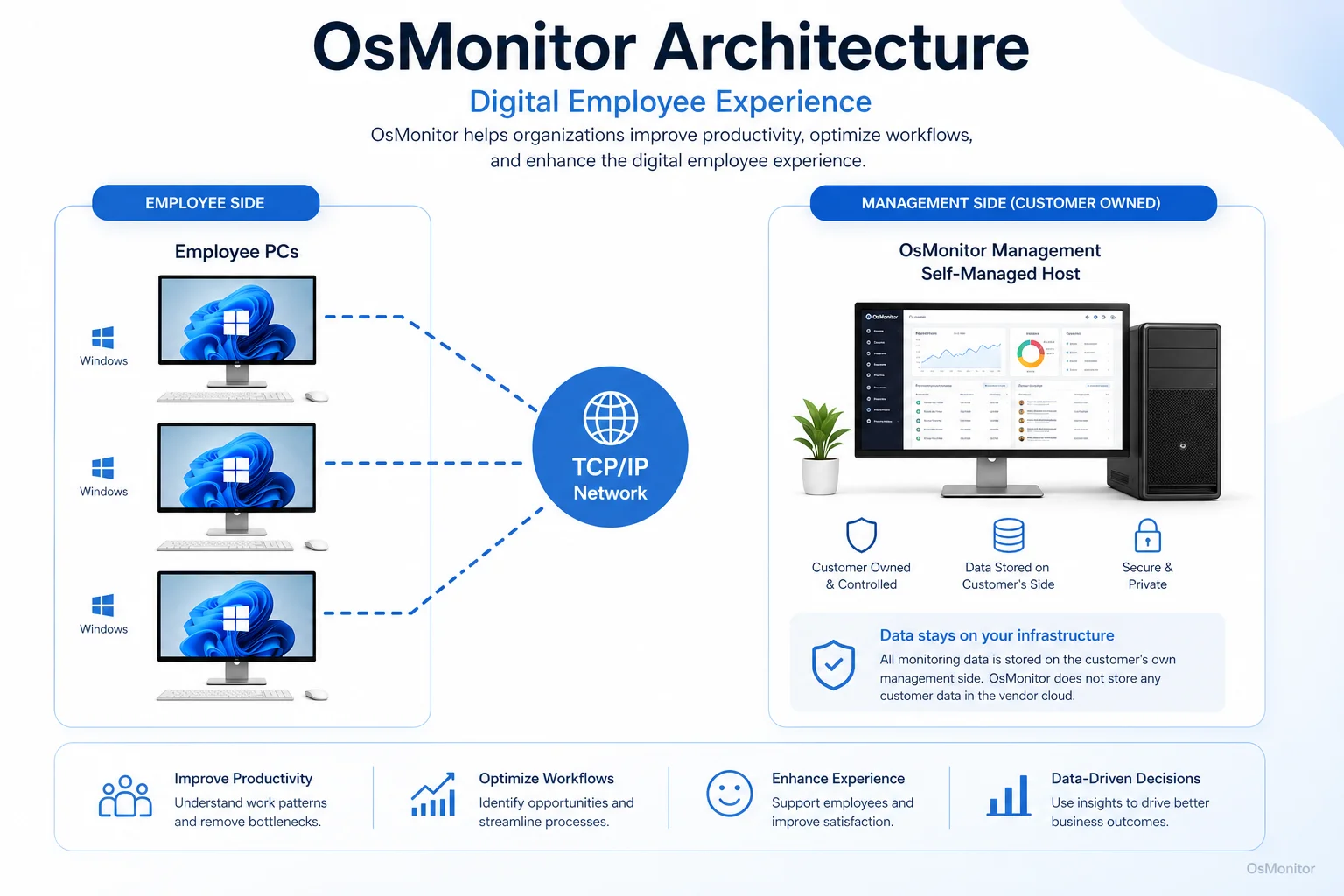
OsMonitor keeps monitoring data under the customer’s control on the management computer or self-managed server.
Core OsMonitor Features Supporting a DEX Strategy
A good digital employee experience strategy should help employees stay productive while giving managers and IT teams enough visibility to solve problems. OsMonitor supports that goal with practical activity records, reports, and support tools.
| DEX Challenge | OsMonitor Solution | Benefit |
|---|---|---|
| Lack of real-time project visibility | Live Screen Monitoring and centralized dashboard | Managers can review screen activity and understand progress without constant manual updates. |
| Slow IT issue resolution | Remote Assistance & Control | IT can help employees directly on their PCs, reducing downtime and long troubleshooting conversations. |
| Underutilized software licenses | Application Usage Reports | Managers can see which tools are actually used and where training or license adjustments may be needed. |
| Workplace distractions | Website & Application Blocking | Businesses can apply policy-based rules to reduce access to non-work websites and applications during work hours. |
| Uncertainty about productivity | Activity Timelines & Reports | Reports show how company computers are used, helping managers review work patterns more objectively. |
| Risk of losing important work | Real-time Document Backup | Selected documents can be backed up to a central server to reduce the risk of accidental loss. |
Key Features Explained:
Live Screen Monitoring: The Employee Screen Monitoring Software feature lets authorized managers or IT staff view employee desktops in real time, either one by one or in a grid-style computer activity overview. This can support training, workflow review, and faster assistance.
Application & Website Usage Analytics: OsMonitor records application usage and website activity, including time spent. These reports help managers understand software adoption, work habits, recurring distractions, and possible training needs.
Remote Assistance: IT administrators can remotely view or control an employee’s computer to solve technical issues. This can improve digital employee experience by reducing downtime and making support easier for office, hybrid, and remote workers.
Policy Enforcement: Businesses can block distracting websites, non-essential applications, or unauthorized USB devices according to written company policy. This helps create a more focused and consistent digital workplace.
Activity Timelines: Chronological activity records help managers understand the flow of a workday. This gives more context than a single screenshot or isolated event.
Document Backup: Important work files can be backed up to the central server, helping protect business documents and support continuity.
Some buyers search for terms such as “best digital employee experience software,” “digital employee experience products,” or “digital employee experience tools.” A practical way to compare tools is to ask what problem you need to solve first: device performance, employee surveys, IT service automation, computer activity reports, remote assistance, software usage visibility, or policy-based computer management.
Use Cases: Applying DEX Principles Across Different Teams
A digital employee experience strategy should match how the business actually works. A call center, school computer lab, accounting office, and remote sales team do not need the same workflow, but they all depend on working technology.
Corporate Offices & SMBs: Managers can review application usage, website activity, and productivity reports to understand whether teams have the tools and focus they need. IT can use remote assistance to support employees without walking desk to desk.
Call Centers: Supervisors can review whether agents are using CRM, ticketing, phone, and communication tools as expected. Screen activity review can also support training and quality improvement.
Educational Institutions: In computer labs, instructors can review student progress, broadcast screens for demonstrations, and help keep computers focused on approved learning activities.
Distributed & Remote Teams: For work-from-home staff or branch offices, OsMonitor can provide visibility into company-owned Windows PCs and help IT support employees more quickly. The right Remote Employee Monitoring Software for Work-from-Home Teams can help bridge the distance between remote employees and central management.
IT Support Teams: Remote assistance, screen review, and activity records can help IT understand problems faster and reduce repeated support delays.
Some people search for “how to measure digital employee experience in AVD.” In clearer terms, they want to know how to evaluate the employee experience in virtual desktop or remote desktop environments. Metrics may include login time, application responsiveness, session reliability, support tickets, user feedback, and application usage. OsMonitor is focused on managed Windows PC activity, so it is best used where the company controls the Windows endpoint and client installation.
Other search phrases, such as “1E digital employee experience management tools,” “1E digital employee experience management tools hybrid remote work solutions,” or “dex platforms workforce experience digital employee experience,” usually refer to enterprise DEX platforms and broader IT experience suites. OsMonitor is different: it provides a practical, on-premise computer activity management layer for businesses that want direct visibility into Windows PC usage.
Responsible Implementation and Limitations
Any digital employee experience monitoring tool should be used transparently and responsibly. Employees should understand what is being collected, why it is being collected, who can review it, and how the information will be used.
OsMonitor is designed for legal business use on company-owned Windows computers. Before deployment, businesses should create a clear computer and internet usage policy, notify employees, limit access to reports, and consult qualified legal counsel to ensure compliance with local employment and privacy laws.
It is also important to understand the scope of the software.
OsMonitor is useful for:
- Computer activity reports.
- Website and application usage records.
- Screen activity review.
- Remote assistance.
- Policy-based computer management.
- Document backup.
- On-premise data control.
OsMonitor is not:
- A full enterprise cybersecurity suite.
- A replacement for antivirus or endpoint protection.
- A full HR survey platform.
- A complete digital employee experience platform for device telemetry, sentiment, automation, and enterprise service management.
- A substitute for management judgment or legal advice.
A well-managed digital employee experience is not created by software alone. It comes from good tools, clear expectations, timely support, fair policies, and a willingness to improve how employees actually work.
To see how these features can fit into your digital employee experience strategy, you can View OsMonitor Pricing.
Frequently Asked Questions about Digital Employee Experience
What is digital employee experience (DEX)?
Digital employee experience is the overall experience employees have with workplace technology. It includes computers, applications, websites, internal systems, remote access, communication tools, and IT support. A positive DEX helps employees work efficiently instead of fighting with technology.
What is digital employee experience management?
Digital employee experience management is the process of measuring, improving, and supporting the technology experience employees have at work. It may include user feedback, device performance data, application usage, IT support quality, workflow analysis, and computer activity reports.
What is a digital employee experience platform?
A digital employee experience platform is usually a software system that helps organizations measure and improve employees’ technology experience. Some platforms focus on endpoint performance and IT automation. Others focus on surveys, analytics, application usage, or employee support. OsMonitor is not a full enterprise DEX platform; it is a practical computer activity management tool that can support a DEX strategy.
How can computer usage data improve digital employee experience?
Computer usage data can show which applications employees use, which websites consume time, where workflow problems appear, and where IT support may be needed. This helps managers and IT teams improve tools, training, policies, and support based on real workplace signals.
Is monitoring for digital employee experience legal for businesses?
In many regions, businesses may manage and review activity on company-owned computers for legitimate business purposes when they have a clear policy and employees are properly notified. However, laws vary by country, state, province, and industry. Businesses should consult qualified legal counsel before implementing monitoring or digital employee experience management tools.
Does OsMonitor require a client on employee computers?
Yes. OsMonitor uses a client/server architecture. The management console is installed on one computer or self-managed server, and a lightweight client must be installed on each employee Windows computer that the company wants to manage.
Where is OsMonitor monitoring data stored?
OsMonitor stores collected data on the customer’s own management computer or self-managed server. Normal monitoring data is not sent to or stored on an OsMonitor vendor cloud, giving the customer direct control over workplace activity records.
Can OsMonitor work without internet in a Local Area Network (LAN)?
Yes. OsMonitor can work inside a local area network without requiring internet access for its core monitoring, reporting, and management functions. This can be useful for offices with strict internal data control requirements.
What Windows versions does OsMonitor support?
OsMonitor supports Windows 7, Windows 8, Windows 10, Windows 11, and Windows Server editions. It supports both 32-bit and 64-bit Windows systems.
Digital employee experience is not only about buying more software. It is about understanding whether employees can use workplace technology smoothly, whether IT support is fast enough, and whether company tools are actually helping work get done.
Used transparently and responsibly, OsMonitor can support digital employee experience solutions with application and website reports, screen activity review, remote assistance, policy controls, document backup, and on-premise data storage. To compare licensing options, you can View OsMonitor Pricing.