Hybrid Workforce Solutions for Productivity and Visibility
Hybrid workforce solutions become important when office work no longer happens in one place. Some employees are at their desks in the office. Others work from home. A few may switch locations during the week. For managers, the challenge is not just communication. It is keeping productivity, computer usage policies, IT support, and data control consistent across all those locations.
A small business may notice that some company-owned computers are being used for games, video sites, entertainment websites, or other non-work activities during work hours. In the office, this may be easier to notice. In a hybrid workforce, it is much harder without clear computer activity records and a fair policy-based system.
That is where practical hybrid workforce solutions can help. The goal is not to manage people by guesswork. The goal is to give managers and IT teams useful visibility into company-owned Windows PCs, whether employees are working in the office or remotely.
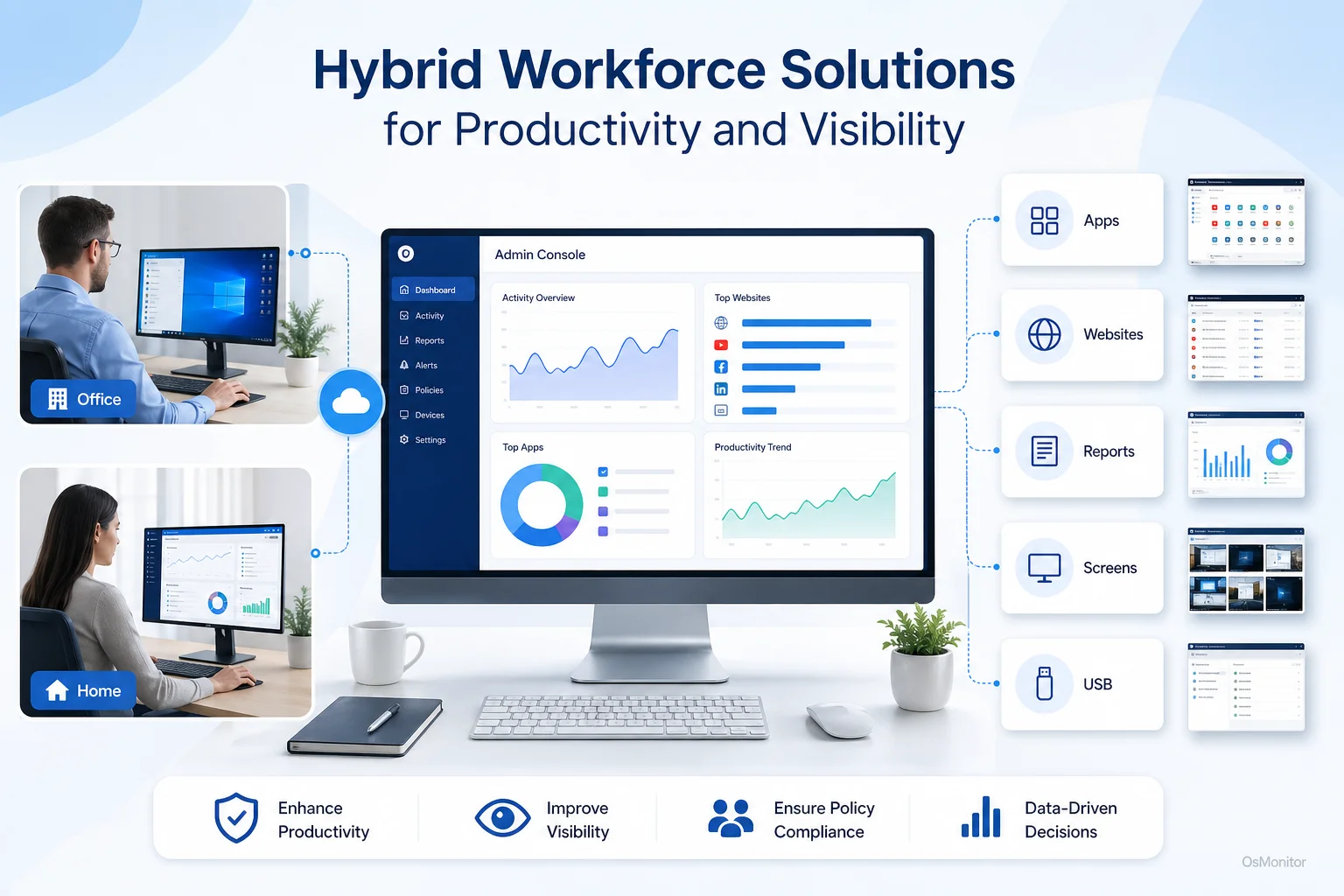
A practical overview of hybrid workforce solutions for workplace computer management.
Understanding Hybrid Workforce Solutions for Modern Teams
A simple hybrid workforce definition is this: a hybrid workforce includes employees who work partly from the office and partly from remote locations, such as home offices or branch offices.
Some people search for “hybrid workforce meaning” because the term can sound more complicated than it is. In practice, it means managers need to support two work environments at the same time: the controlled office environment and the less visible remote environment.
Hybrid workforce solutions are the software, policies, tools, and management practices that help businesses run this model consistently. They may include communication tools, remote access systems, HR policies, IT support tools, device management, activity reports, and hybrid work management software.
The main challenges of hybrid workforce management usually include:
- Productivity Gaps: Managers need to understand whether employees are focused on assigned work, regardless of location.
- Limited Visibility: Remote work can make it harder to review workflows, identify bottlenecks, and provide timely support.
- Policy Consistency: Company rules for websites, applications, USB devices, and business software should apply fairly to both office and remote employees.
- IT Support Delays: Remote employees may lose time waiting for help when software, network, or device issues occur.
- Fair Evaluation: Managers need objective computer usage records so in-office employees are not judged more favorably simply because they are physically visible.
OsMonitor is workplace productivity and employee computer activity management software for company-owned Windows PCs. It can support a hybrid workforce model by giving managers clear reports, website and application records, screen activity review, policy controls, and remote assistance.
It is best understood as hybrid work management software focused on computer activity visibility and policy-based management. It is not a full HR platform, not a cybersecurity suite, and not a replacement for good leadership. Its value is helping businesses understand how company-owned computers are being used across different work locations.
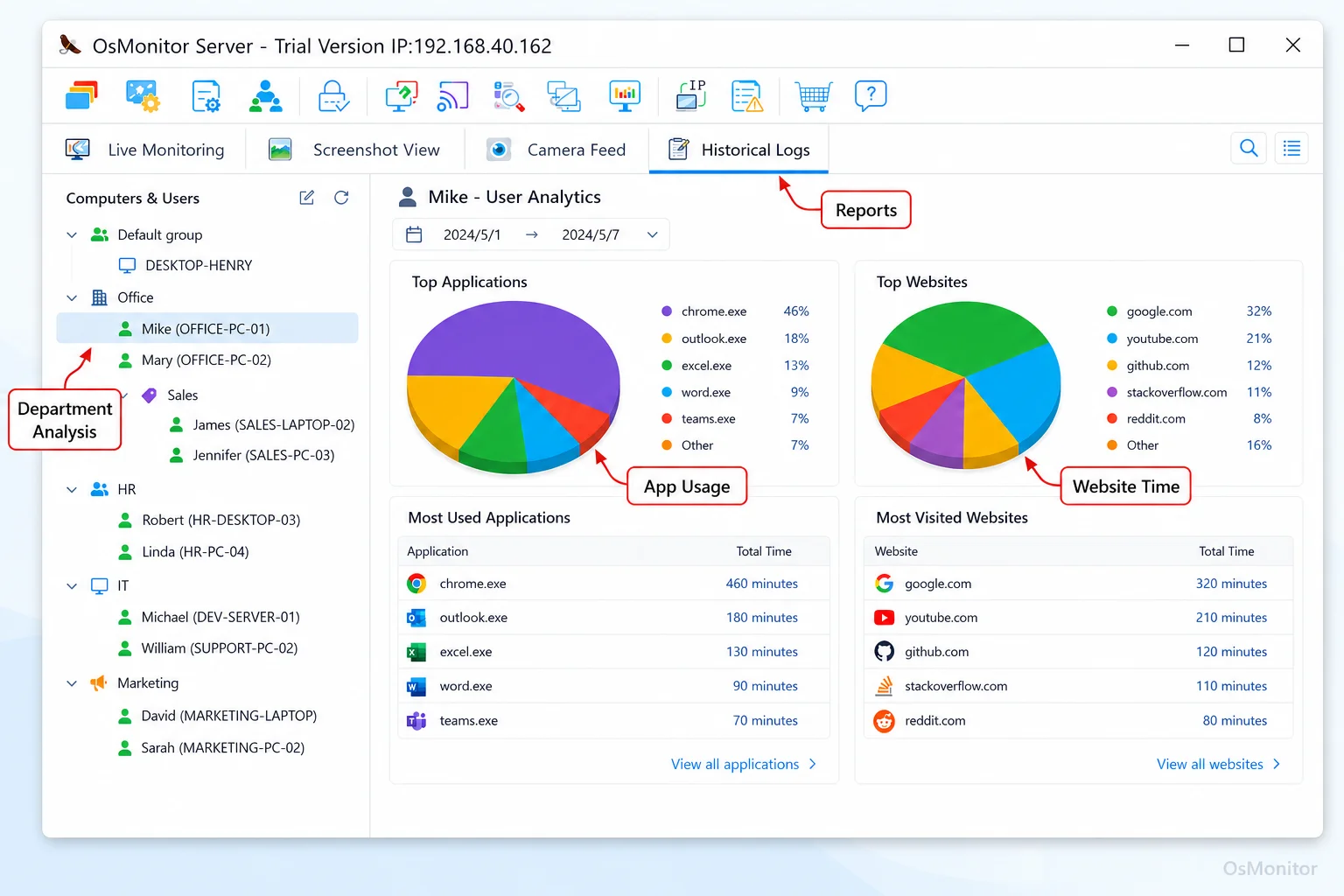
A real-product style screenshot highlighting application and productivity reports in OsMonitor.
How OsMonitor Provides a Practical Hybrid Workforce Tracking Solution
One of the biggest concerns in managing a hybrid workforce is data control. Many businesses want activity reports and policy management, but they do not want normal computer usage records stored on a vendor-controlled cloud.
OsMonitor uses a straightforward client/server architecture that keeps data under the customer’s control.
Here is how it works:
Management Console: The OsMonitor management console is installed on a manager’s computer, administrator’s PC, or self-managed server. This is where settings are configured, reports are reviewed, and activity records are stored.
Lightweight Client: A small client is installed on each company-owned Windows computer that the business wants to manage. The client records activity, applies policies, and communicates with the management console.
On-Premise Data Storage: Website logs, application usage records, activity reports, and related management data are stored on the customer’s own management computer or self-managed server. Normal monitoring data is not stored on OsMonitor’s vendor cloud.
This makes OsMonitor a practical On-Premise Employee Monitoring Software option for businesses that want direct control over workplace computer activity records.
For office employees, the system can work through the local area network. For remote employees, the company can use a VPN or other approved network configuration so remote Windows PCs can communicate with the management console. This allows businesses to keep computer usage policies and reports more consistent across locations.
Some buyers search for phrases such as “hybrid workforce tracking solution flexible schedules.” A clearer way to say it is that companies need computer activity management tools that support flexible work arrangements while still keeping policy enforcement, productivity review, and IT support consistent.
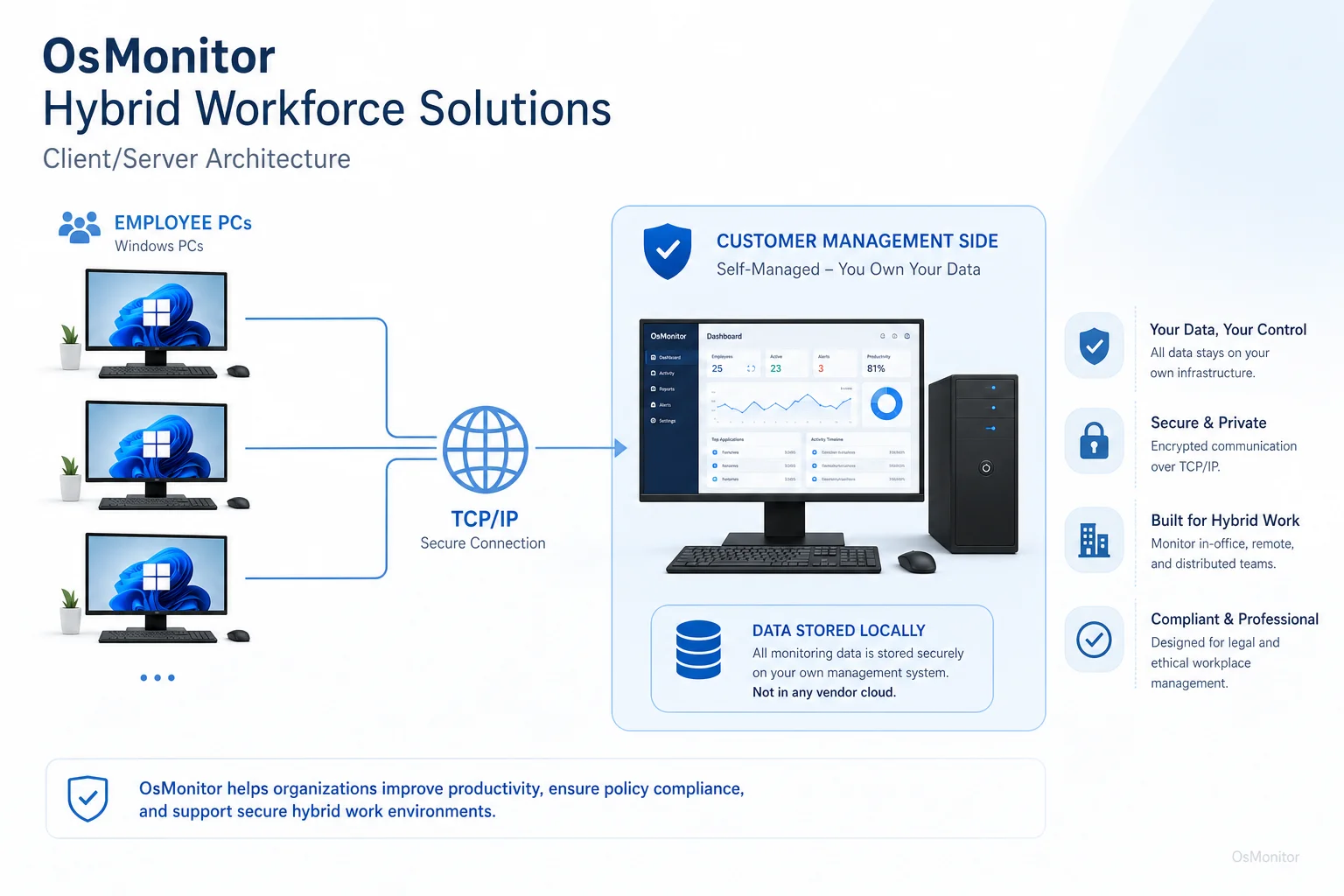
OsMonitor keeps monitoring data under the customer’s control on the management computer or self-managed server.
Core Features for Managing a Hybrid Workforce Productively
Useful hybrid workforce technology should help managers answer practical questions: Are people using the right tools? Are company computer policies being followed? Are remote employees getting timely help? Are distractions affecting productivity? Are reports fair across locations?
| Feature | Benefit for Hybrid Workforce Management |
|---|---|
| Website & Application Blocking | Helps enforce company policies by limiting access to non-work websites or unauthorized applications on managed company computers. |
| Activity & Productivity Reports | Provides reports on application usage, website visits, active time, and bandwidth consumption so managers can review work patterns more fairly. |
| Real-Time Screen Monitoring | Allows authorized managers or IT staff to view employee screens when support or review is needed. This is a core component of effective Employee Screen Monitoring Software. |
| USB & Device Control | Helps manage USB drives and peripheral devices according to company policy, which is especially useful for remote and branch-office computers. |
| Document Backup & Tracking | Backs up selected work documents to the server when they are created, changed, or copied, helping protect important business files. |
| Remote Assistance | Allows IT administrators to help employees troubleshoot issues, install approved software, or solve computer problems without physical access. |
These features support practical hybrid workforce management. They help businesses keep office and remote employees under the same computer usage policy, while still giving managers and IT staff enough information to provide support.
People often ask, “how does hybrid work affect productivity?” or “does hybrid work increase productivity?” The honest answer is: it depends on the company, role, tools, management style, and employee habits. Hybrid work can improve productivity when employees have fewer interruptions, better flexibility, and strong support. It can reduce productivity when expectations are unclear, distractions increase, or managers lose visibility.
That is why hybrid work productive: strategies for peak performance usually include clear policies, good communication, measurable work expectations, reliable IT support, and practical reporting. OsMonitor helps with the computer activity and policy-management side of that strategy.
Strategies for Hybrid Workforce Culture Alignment
A hybrid workforce strategy should not be built only around software. Culture, trust, communication, and fairness matter just as much.
When using any hybrid workforce solution that collects computer activity records, transparency is essential. Employees should understand what is being managed, why it is being managed, who can review the records, and how the data will be used.
Here are practical strategies for hybrid workforce culture alignment:
Develop a Clear Policy: Create a written computer and internet usage policy. Explain acceptable use, restricted activities, data collection, report access, and employee responsibilities.
Focus on Work Patterns, Not Physical Presence: Hybrid work should not reward people simply because they are visible in the office. Use reports to understand work patterns, not to favor one location over another.
Apply Rules Consistently: Website rules, application policies, USB controls, and productivity expectations should be fair for both remote and office employees using company-owned computers.
Use Data to Improve Support: If reports show that employees are stuck in one application, switching tools too often, or waiting for IT help, the solution may be better training or faster support.
Protect Employee Well-Being: A hybrid worker well-being platform or hybrid worker fitness platform may focus on health, wellness, and work-life balance. OsMonitor is not that type of platform, but its reports can still help managers notice workload problems, repeated overtime patterns, or support needs when used responsibly.
Review Trends with Context: A single website visit or idle period should not be judged without understanding the employee’s role, task, schedule, and workload.
The challenges of hybrid workforce management are not solved by one tool. But the right hybrid workforce technology can reduce confusion, improve support, and make policies easier to apply fairly.
Frequently Asked Questions (FAQ)
What are hybrid workforce solutions?
Hybrid workforce solutions are software tools, technologies, policies, and management practices that help companies manage teams working across office and remote locations. They may include communication tools, remote support, device management, activity reports, policy controls, and hybrid work management software.
What is a hybrid workforce?
A hybrid workforce is a team where some employees work in the office, some work remotely, and some split their time between both. The hybrid workforce model gives businesses flexibility, but it also requires clear communication, consistent policies, and reliable management tools.
Is using hybrid workforce solutions legal for businesses?
In many regions, businesses may manage and review activity on company-owned computers for legitimate business purposes when employees are properly notified and a clear policy is in place. However, laws vary by country, state, province, and industry. Businesses should consult qualified legal counsel before implementing monitoring or computer activity management software.
Does OsMonitor require a client on employee computers?
Yes. OsMonitor uses a client/server model. The management console runs on a manager’s computer or self-managed server, and a lightweight client must be installed on each company-owned Windows computer the business wants to manage.
Where is OsMonitor monitoring data stored?
OsMonitor stores monitoring data on the customer’s own management computer or self-managed server. Normal activity records are not stored on a vendor-controlled cloud, giving the business more direct control over its computer usage data.
Can OsMonitor work without internet in a LAN?
Yes. OsMonitor can work inside a local area network without requiring internet access for its core monitoring, reporting, and management functions. For remote employees, the company can use a VPN or another approved network setup so managed computers can connect to the server.
What Windows versions does OsMonitor support?
OsMonitor supports Windows 7, Windows 8, Windows 10, Windows 11, and Windows Server editions. It supports both 32-bit and 64-bit Windows systems.
What are hybrid workforce best practices?
Hybrid workforce best practices include clear communication, written computer usage policies, fair performance expectations, consistent rules for office and remote employees, reliable IT support, secure access to company systems, and regular review of productivity and workload patterns.
How can businesses manage a hybrid workforce productively?
Start with a clear hybrid workforce strategy. Define which roles can work remotely, what tools employees should use, how performance is measured, how IT support is provided, and how company-owned computers are managed. For Windows PC environments, OsMonitor can support this process with activity reports, policy controls, remote assistance, and on-premise data storage.
Hybrid workforce solutions work best when they support both flexibility and accountability. Employees need the freedom to work effectively across locations, while managers need enough visibility to protect company resources, provide support, and keep productivity on track.
Used transparently and responsibly, OsMonitor can help businesses manage a hybrid workforce with website and application records, productivity reports, real-time screen activity review, remote assistance, policy controls, and customer-controlled data storage. To explore licensing options, you can View OsMonitor Pricing and see how it may fit your team.