Workforce Optimization Software: Improve Output With Better Visibility
Workforce optimization usually starts with a very practical problem: the team is busy, but output still feels lower than it should be. For a small business, that may mean too much work time is going into video sites, games, entertainment websites, online shopping, or other non-work activities on company-owned computers.
The answer is not just “work harder.” Managers need clear policies, fair expectations, and a reliable way to review computer usage records. Without that visibility, workforce optimization becomes guesswork.
That is where workforce optimization software can help. It gives managers and IT administrators practical data about application usage, website activity, bandwidth consumption, screen activity, and policy compliance, so daily computer use can better match business goals.
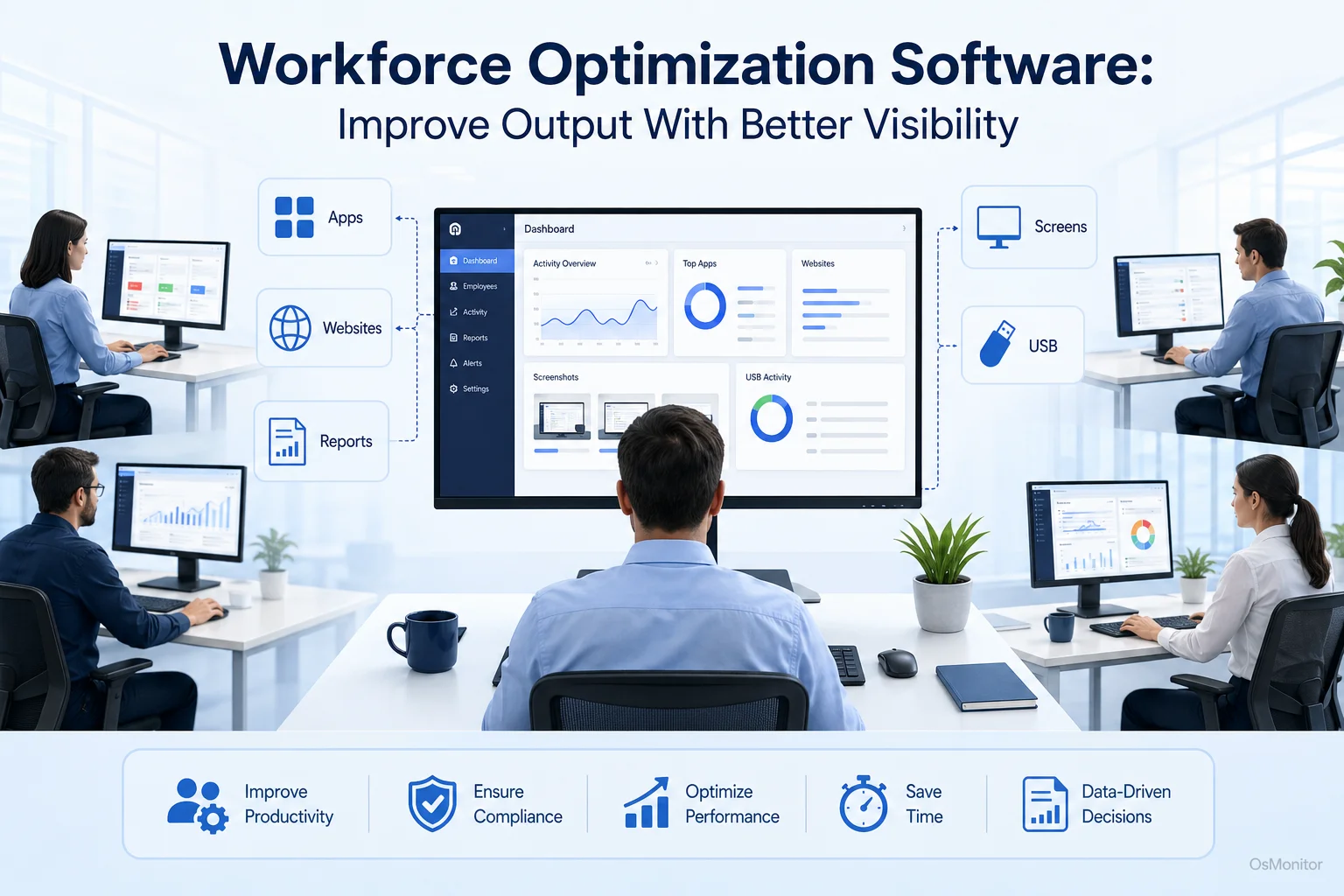
A practical overview of workforce optimization for workplace computer management.
What is Workforce Optimization and Who Needs It?
A simple workforce optimization definition is this: workforce optimization is the process of improving how people, tools, time, and business resources are used to produce better results.
Some people search for “what is workforce optimization” or “wfo workforce optimization” because the term is often used in different ways. In large companies, WFO may include scheduling, forecasting, quality management, performance analytics, and customer service operations. In a smaller office, workforce optimization may be more direct: making sure employees are focused, using approved tools, following computer policies, and getting support when work is blocked.
Workforce optimization is often discussed in call center workforce optimization and contact center workforce optimization. That makes sense because call centers depend heavily on schedules, agent performance, CRM usage, response time, and service quality. But the same idea also applies to back office workforce optimization, schools, sales teams, administrative offices, support departments, and remote teams using company-owned computers.
At its core, workforce optimization helps answer practical questions:
- Are employees using work time and company resources effectively?
- Are the right applications being used for assigned tasks?
- Are distracting websites or non-work applications affecting focus?
- Are there workflow bottlenecks that managers should fix?
- Are company policies being followed consistently?
- Do managers have enough information to improve training and support?
Businesses that benefit from workforce optimization strategies include:
- Small and Medium Businesses: Teams that need practical computer usage visibility without building a large IT department.
- Call Centers and Support Teams: Groups that rely on CRM, ticketing, phone, chat, and communication tools.
- Office Teams with Company-Owned PCs: Businesses that need to protect company resources and improve productivity.
- Educational Institutions: Schools and computer labs that need to keep users focused on approved learning tools.
- Distributed or Remote Teams: Companies that need consistent computer activity records and policy-based management across locations.
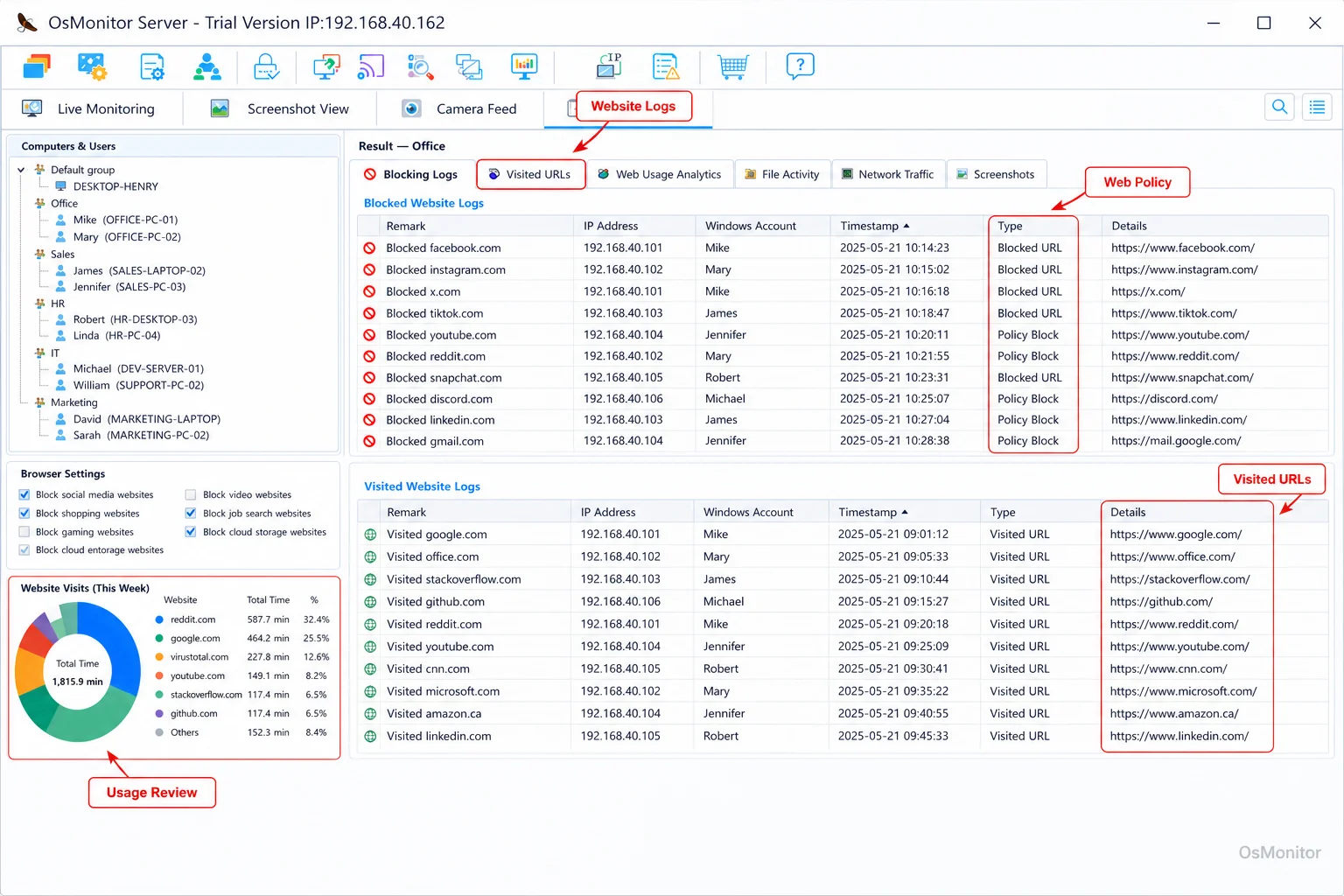
A real-product style screenshot highlighting website activity monitoring in OsMonitor.
A Practical Approach to Workforce Optimization with OsMonitor
Many workforce optimization solutions are built for large enterprises. Some include advanced scheduling, forecasting, quality scoring, or predictive workforce optimization systems. Those can be useful in complex contact centers or global operations, but many small and mid-sized businesses need something more focused.
OsMonitor provides a practical workforce optimization solution for company-owned Windows PCs. It helps managers and IT administrators understand how office computers are being used through website activity records, application usage reports, real-time screen review, bandwidth monitoring, policy controls, and remote assistance.
This makes OsMonitor useful for the computer activity side of workforce optimization. It is not a full HR suite, not a formal audit system, and not a replacement for management judgment. Its purpose is to help businesses reduce operational inefficiency by turning computer usage into clear, reviewable records.
For example:
- If employees spend most of the day in CRM, accounting, design, ticketing, or business software, managers can see that work is aligned with job duties.
- If one department spends too much time on unrelated websites during core hours, managers can adjust policies or provide clearer expectations.
- If employees struggle with certain applications, usage reports and screen activity can reveal training needs.
- If network bandwidth is being consumed by non-work activities, IT can address the issue before it affects the whole office.
Some people search for “workforce optimization tools reduce operational inefficiency.” In clearer business language, that means using practical workforce optimization tools to find where time, software, network resources, or management attention is being wasted.
How OsMonitor’s Client/Server Architecture Works
OsMonitor uses a straightforward client/server architecture. This is important because many businesses want workforce optimization technology without sending normal computer activity records to a vendor-controlled cloud.
The system has two main parts:
The Management Console: This is installed on a manager’s computer, administrator’s PC, or self-managed server. It is used to review activity records, generate reports, configure policies, and manage computers.
The Lightweight Client: This is installed on each employee Windows computer that the business wants to manage. It collects computer activity records and sends them to the management console through the company network.
This setup supports on-premise deployment. Monitoring data is stored on your own management computer or self-managed server. OsMonitor can also work inside a local area network without requiring internet access for its core monitoring and reporting functions.
For remote teams, the server component can be placed on a self-managed host or reachable server, depending on the company’s network design. This can help businesses manage company-owned computers across branch offices or remote locations while keeping control over their data.
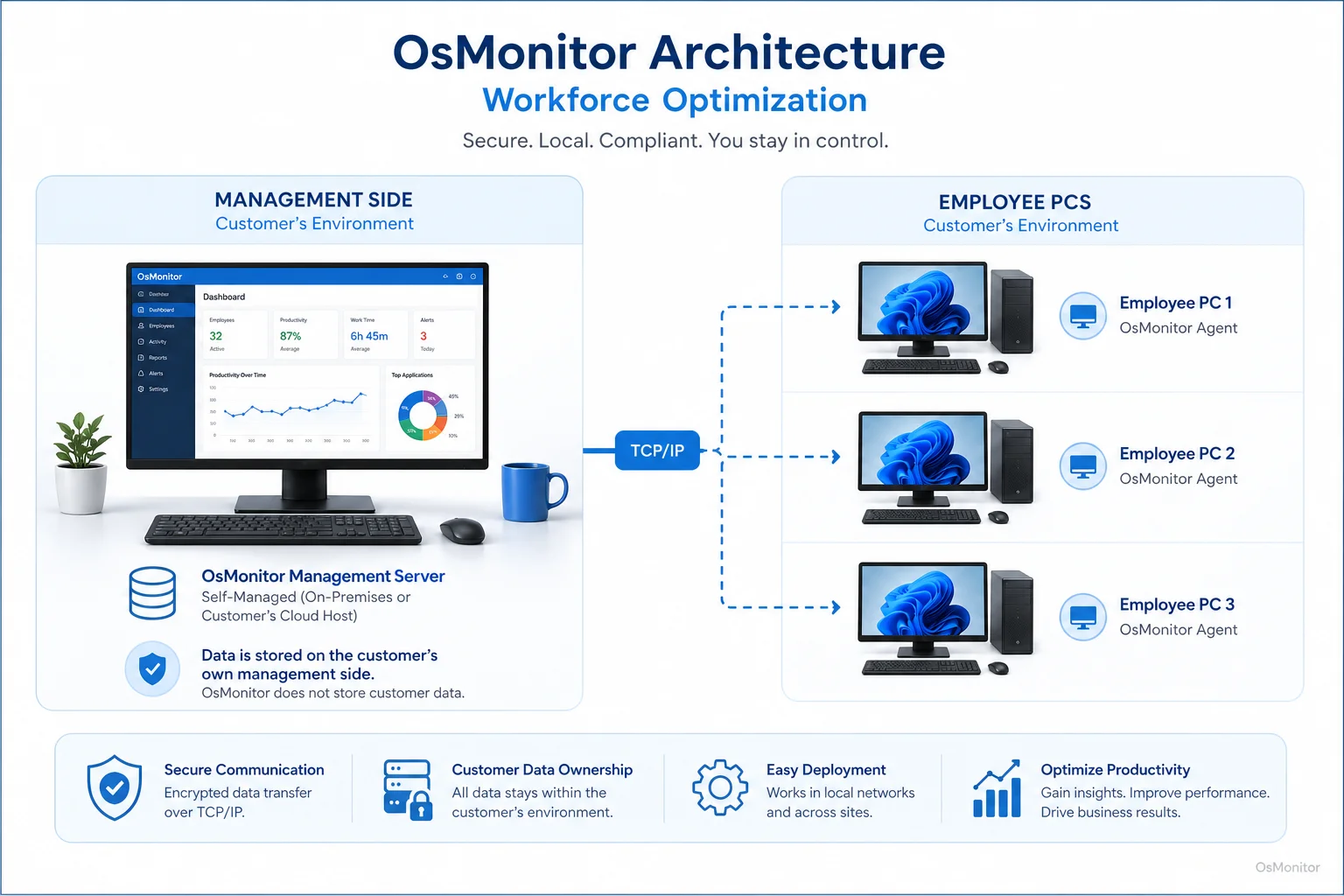
OsMonitor keeps monitoring data under the customer’s control on the management computer or self-managed server.
Core Features for Optimizing Workplace Computer Use
A useful workforce optimization system should help managers see what is happening, understand patterns, and apply policies consistently. OsMonitor focuses on the computer activity side of that process.
Visibility and Reporting
Real-Time Screen Monitoring: View authorized employee screens in real time to understand current work activity and provide support when needed.
Website and Application Usage Records: Record websites visited and applications used, along with active time. This helps identify productive work patterns, recurring distractions, and possible training needs.
Detailed Reports: Generate reports by individual, department, or the whole company. These reports can support workforce optimization analytics and long-term productivity review. Our Employee Activity Monitoring Software provides the activity records behind these insights.
Policy Enforcement and Controls
Website and Application Blocking: Limit access to distracting websites or non-work applications during work hours according to company policy.
USB Device Control: Manage USB drive usage, such as blocking devices or setting read-only access where appropriate.
Bandwidth Monitoring: Review network usage and identify activities that consume excessive bandwidth, such as large downloads or video streaming.
Data Management and Support
Document Backup: Automatically back up selected work files from employee computers to the server to reduce the risk of accidental data loss.
Remote Assistance: Help employees remotely when they face technical issues, need guidance, or are blocked by a software problem.
| Aspect | Manual Oversight | Software-Assisted Optimization |
|---|---|---|
| Productivity Tracking | Relies on self-reporting, visual observation, and project completion times. | Provides computer usage records showing application and website activity duration. |
| Policy Enforcement | Depends on manual checks and inconsistent follow-up. | Applies website and application rules according to company policy. |
| Reporting | Often time-consuming, incomplete, and subjective. | Generates readable reports for productivity review and workforce optimization analytics. |
| IT Support | Requires physical access or separate remote desktop tools. | Includes remote assistance for faster problem resolution. |
Workforce management vs workforce optimization is also worth clarifying. Workforce management usually focuses on scheduling, attendance, staffing, and labor planning. Workforce optimization goes further by improving how work is performed, how tools are used, how policies are applied, and how operational efficiency can be improved.
OsMonitor is best understood as a workforce optimization application for computer-based work environments. It supports visibility, policy management, reporting, and IT assistance for company-owned Windows PCs.
System Requirements and Responsible Use
OsMonitor is designed for Windows-based business environments. It supports Windows 7 and later versions, including Windows 10, Windows 11, and Windows Server editions, with both 32-bit and 64-bit compatibility. As a dedicated Windows Employee Monitoring Software, it is built for organizations that manage Windows office computers.
The client is lightweight and designed to run without creating unnecessary performance issues. No special hardware is required for normal deployment. Businesses can install the management console on an existing manager’s PC, administrator’s computer, or self-managed server.
Responsible use is important for any workforce optimization tool. Businesses should:
- Create a clear written computer and internet usage policy.
- Inform employees that company-owned computers may be managed and reviewed.
- Use the software for productivity, IT support, policy management, and protection of company resources.
- Limit report access to authorized managers or IT staff.
- Review patterns with context instead of judging isolated activity.
- Consult qualified legal counsel to ensure compliance with local employment and privacy laws.
Some keyword phrases, such as “best workforce optimization software 2025,” “most recommended workforce optimization solutions,” or “solutions for global workforce optimization,” are common search terms. For a buyer, the better approach is to compare tools based on deployment model, reporting depth, platform support, data storage, ease of use, policy controls, and whether the software fits your actual workplace.
Terms such as “ServiceNow workforce optimization,” “strategic headquarters consolidation and workforce optimization,” and “predictive workforce optimization systems” usually refer to broader enterprise planning or service operations. OsMonitor is more focused: it helps businesses manage and optimize computer activity on company-owned Windows PCs.
Frequently Asked Questions (FAQ)
What is workforce optimization?
Workforce optimization is the process of improving how employees, tools, time, and business resources are used to achieve better results. In a computer-based workplace, it may include reviewing application usage, website activity, productivity reports, policy compliance, and IT support needs.
What is workforce optimization software?
Workforce optimization software helps businesses improve productivity, efficiency, and policy management through data and practical tools. Some platforms focus on scheduling and forecasting, while OsMonitor focuses on workplace computer activity management for Windows PCs.
What is the difference between workforce management and workforce optimization?
Workforce management usually focuses on staffing, schedules, attendance, and labor planning. Workforce optimization includes those ideas but also looks at productivity, tool usage, process improvement, reporting, and policy enforcement. In simple terms, workforce management asks whether people are scheduled correctly; workforce optimization asks whether work is being done efficiently.
Is workforce optimization legal for businesses?
In many regions, businesses may manage and review activity on company-owned computers for legitimate business purposes when they have a clear policy and employees have been properly notified. However, laws vary by country, state, province, and industry. Businesses should consult local legal counsel before implementing workforce optimization software or computer activity monitoring.
Does OsMonitor require a client on employee computers?
Yes. OsMonitor uses a client/server model. A lightweight client application must be installed on each employee Windows computer that the company wants to manage. The client sends activity records to the central management console.
Where is OsMonitor monitoring data stored?
OsMonitor stores data on the customer’s own management computer or self-managed server. Normal monitoring data is not stored on a vendor-controlled cloud, giving businesses more direct control over their computer activity records.
Can OsMonitor work without an internet connection?
Yes. OsMonitor can work inside a local area network without requiring internet access for its core monitoring, reporting, and management features. This is useful for offices with restricted network access or internal-only environments.
Is OsMonitor suitable for call center workforce optimization?
Yes, OsMonitor can support call center workforce optimization when agents use company-owned Windows PCs. It can help managers review CRM usage, website activity, application activity, screen activity, and policy compliance. It is especially useful for practical activity visibility, although it is not a full contact center scheduling or forecasting platform.
Can OsMonitor help with back office workforce optimization?
Yes. Back office teams often use accounting systems, ERP software, document tools, CRM platforms, and internal applications. OsMonitor can help managers understand whether those tools are being used effectively and whether distractions or workflow issues are affecting productivity.
What Windows versions does OsMonitor support?
OsMonitor supports Windows 7 and later versions, including Windows 10, Windows 11, and Windows Server editions. It supports both 32-bit and 64-bit Windows systems.
Workforce optimization works best when it connects policy, visibility, and practical action. Managers need to know how company computers are being used, where time is being lost, and where employees may need better tools or support.
Used transparently and responsibly, OsMonitor can help businesses improve workforce optimization with computer usage reports, website and application records, remote assistance, policy controls, and on-premise data storage. To see how these features work in practice, you can Read the Quick Start Guide and explore the software’s capabilities.