Workforce Planning Analytics: Metrics for Better Staffing Decisions
Workforce planning analytics is useful when a manager needs more than a feeling that “the team is busy” or “productivity is slipping.” The real question is usually more specific: are employees spending enough time in the tools that actually move the business forward, and do current staffing levels match the work being done?
For many small and mid-sized offices, this becomes obvious when deadlines start slipping. A manager may suspect that too much time is going into video sites, games, entertainment websites, or unrelated browsing during work hours. But suspicion alone does not help much. To make better staffing and productivity decisions, the business needs clear computer usage records, practical reports, and a fair way to review workplace activity.
That is where workforce planning analytics can help. It turns daily computer activity data into useful management insight, so staffing decisions, software planning, and productivity reviews are based on facts rather than guesswork.
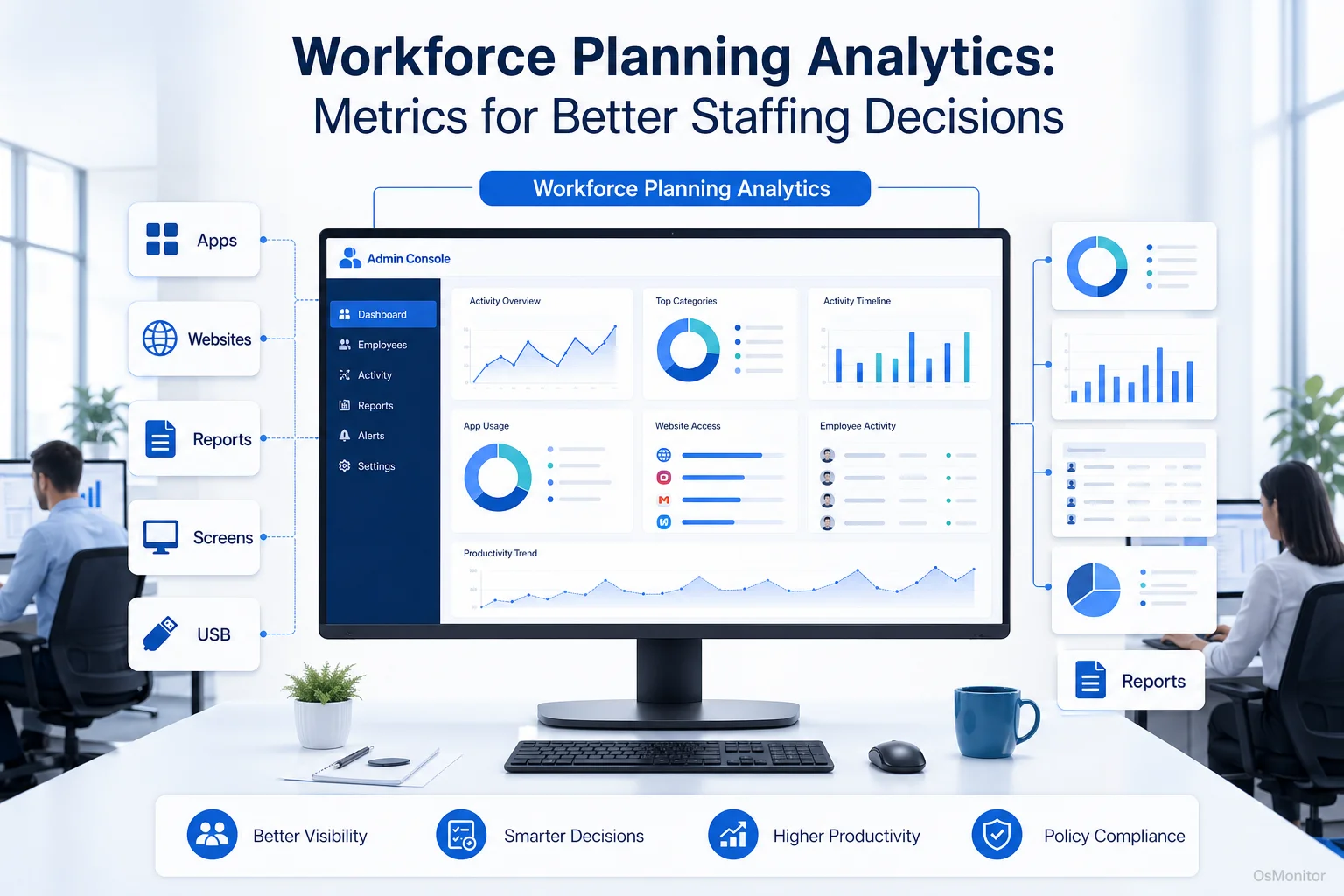
A practical overview of workforce planning analytics for workplace computer management.
What is Workforce Planning Analytics?
Workforce planning analytics is the process of using workforce and operational data to understand staffing needs, productivity patterns, resource usage, and work capacity. In plain English, it helps answer questions such as: do we have the right people, using the right tools, spending time on the right work?
Traditional workforce planning often focuses on headcount, schedules, hiring plans, and labor costs. That is important, but it does not always show what happens during the workday. For office teams that depend heavily on Windows PCs, computer activity records can add practical context.
This data-driven approach can help answer questions like:
- Which applications are truly essential for daily work?
- How much time is spent on work-related tasks compared with distractions?
- Are certain teams overloaded or underused?
- Are employees losing time because of inefficient workflows or too many software tools?
- Do current staffing levels match the real workload?
- Are software licenses being used effectively?
For the manager dealing with excessive entertainment website visits, workforce planning and analytics provides concrete evidence. Instead of making a vague complaint, the manager can review website activity patterns, create a written computer usage policy, and apply the same rules consistently across the team.
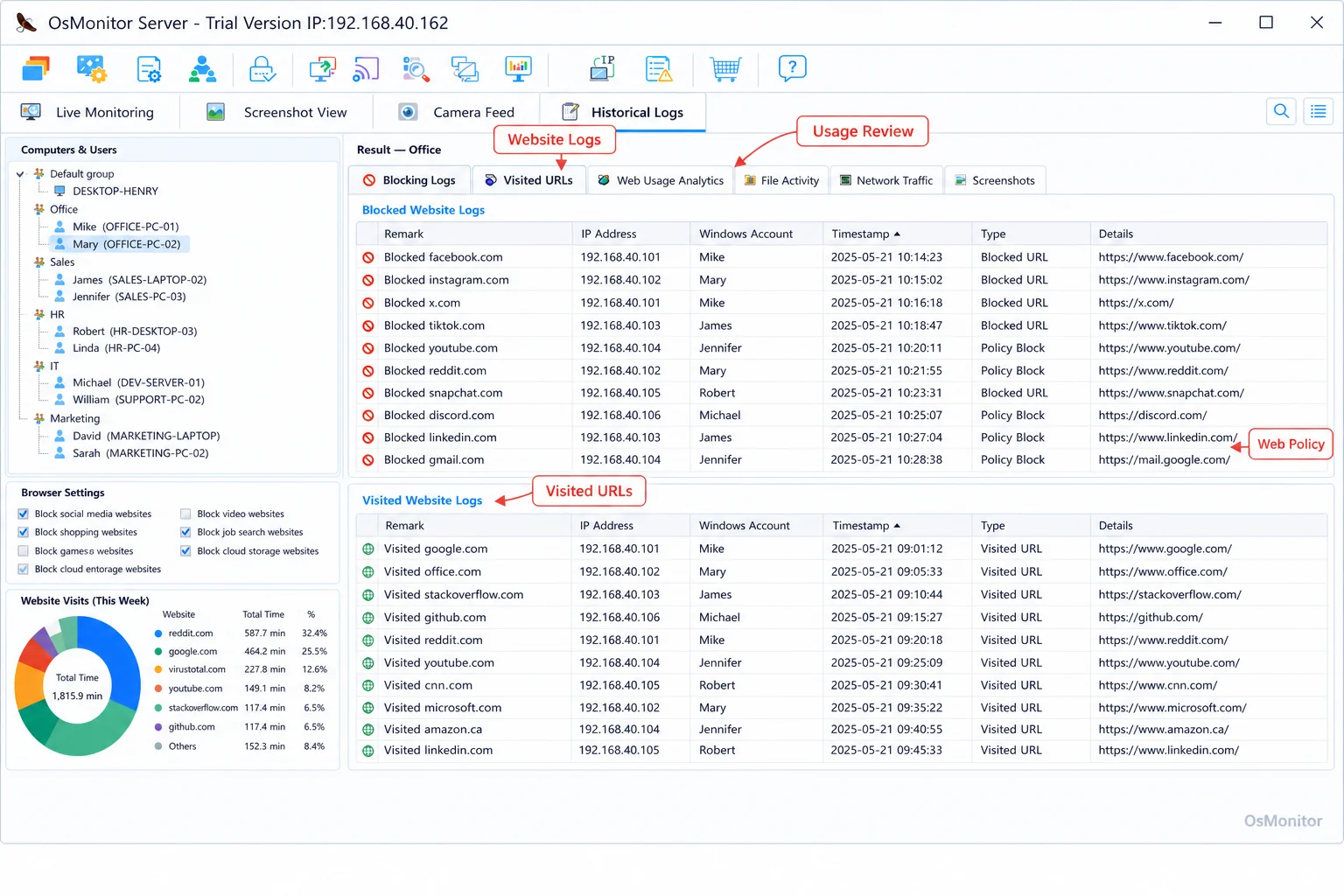
A real-product style screenshot highlighting website activity monitoring in OsMonitor.
A Practical Tool for Workforce Planning and Analytics
Some ai-driven workforce planning and analytics tools focus on high-level HR forecasting, talent planning, compensation modeling, or enterprise workforce scenarios. Those platforms can be useful for large organizations, but many smaller businesses need something more direct: a way to understand how company-owned computers are actually being used day to day.
OsMonitor fits that more practical use case. It is workplace productivity and employee computer activity management software for Windows office environments. It helps managers collect the baseline activity data needed for workforce planning analytics, including application usage, website visits, bandwidth usage, screen activity records, and department-level reports.
This makes it useful for businesses that want to connect staffing discussions with real work patterns. For example, if one department is spending most of its time inside CRM, accounting, ticketing, or design software, that may support the case for more staff, better training, or more software licenses. If another team shows repeated long periods on unrelated websites during core hours, the issue may be policy enforcement rather than hiring.
OsMonitor is designed for authorized workplace monitoring on company-owned computers. It is not a formal HR forecasting suite, and it is not a replacement for management judgment. Its value is in providing clear computer usage reports that managers can use as part of a wider workforce planning and analytics process.
The software uses a client/server model. A central management console collects data from lightweight clients installed on employee Windows PCs. As an On-Premise Employee Monitoring Software, OsMonitor stores information on your own management computer, local server, or self-managed host instead of sending normal monitoring data to a vendor-controlled cloud.
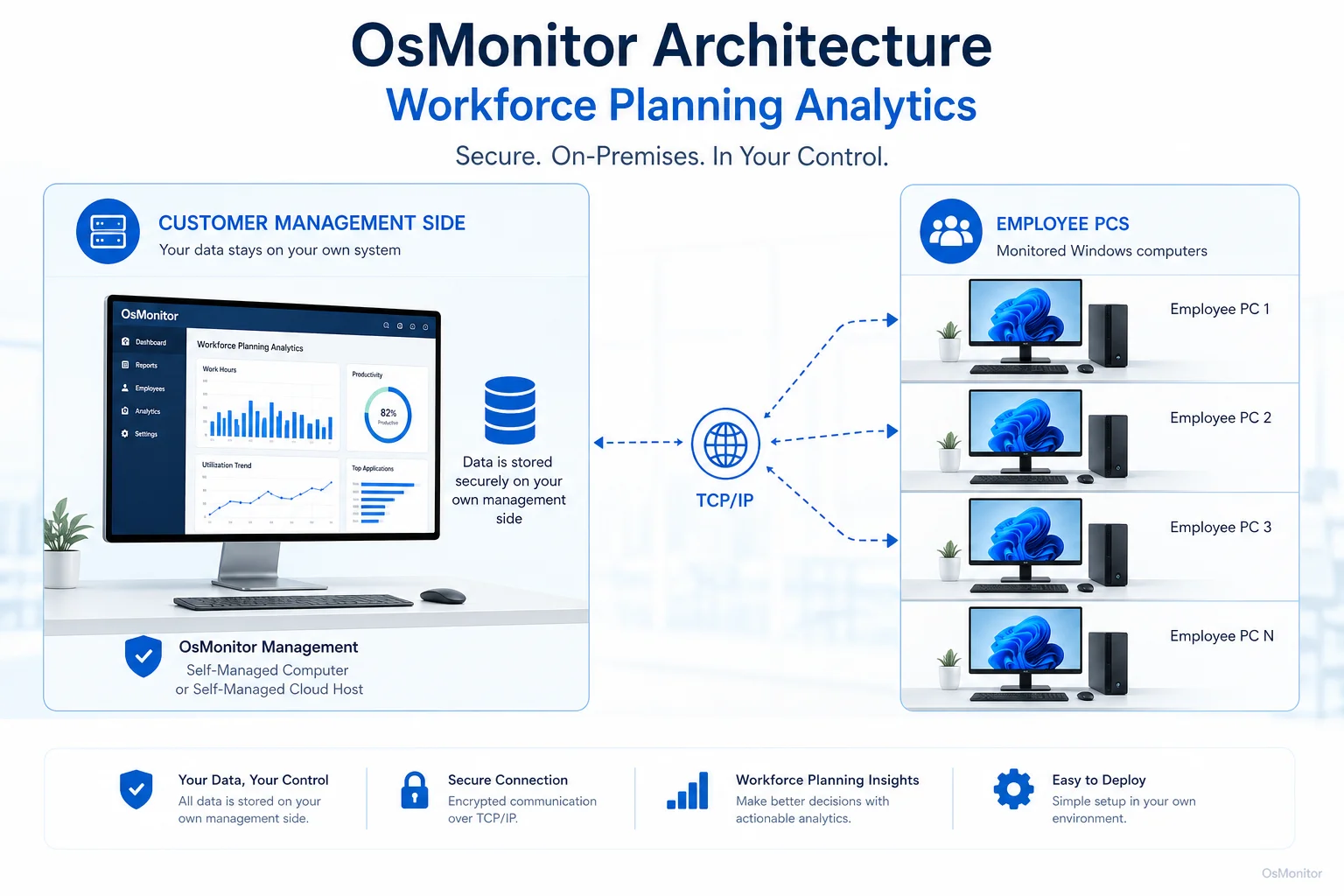
OsMonitor keeps monitoring data under the customer’s control on the management computer or self-managed server.
Core Features for Data-Driven Staffing Decisions
Good workforce planning analytics depends on useful data. For office teams, that means knowing which applications people use, which websites consume time, how departments spend their workday, and whether company resources are being used according to policy.
| Feature | Description | Benefit for Workforce Planning Analytics |
|---|---|---|
| Website & App Monitoring | Records websites visited and applications used, along with active time spent on each. | Shows which tools are central to each role, which websites may be distracting, and whether software licenses are being used effectively. |
| Activity Reports | Generates reports by individual, group, or department for application usage, website activity, and bandwidth consumption. | Gives managers measurable data for productivity review, staffing discussions, training needs, and workload analysis. |
| Screen Monitoring | Provides real-time screen views or historical screenshots of employee computers for authorized review. | Adds visual context to activity records, helping managers understand workflows and resolve activity-related questions more accurately. |
| USB & Device Control | Helps manage USB drives and other peripheral devices according to company policy. | Supports internal data policies and helps ensure company resources are used in approved ways. |
| Document Backup | Automatically backs up specified file types from employee computers to the central server. | Helps protect important work files and supports business continuity when key documents need to be recovered. |
Together, these features help create a clearer picture of how office computers are being used. Managers can see which tools support productive work, where time is being lost, and whether current staffing assumptions match daily activity.
This kind of Employee Activity Monitoring Software can provide the practical baseline data needed before a business makes larger decisions about hiring, scheduling, training, or software investment.
Use Cases Across Different Business Environments
Workforce planning analytics is not only for large enterprises. Any organization that relies on computers for daily work can benefit from better visibility into how time and digital resources are used.
Small & Medium Businesses: SMBs can use activity reports to understand whether lean teams are focused on core work. This can help support hiring decisions, identify productivity gaps, and reduce time spent on non-work activities.
Offices & Call Centers: In environments where employees depend on CRM, ticketing systems, communication tools, or internal platforms, workforce planning and analytics can show whether work time aligns with job responsibilities.
Schools & Computer Labs: Educational institutions can review computer usage, limit access to games or inappropriate websites, and understand which learning applications are actually being used.
Distributed & Remote Teams: For employees using company-owned Windows PCs in branch offices or remote locations, OsMonitor can provide consistent computer usage reports and policy-based activity records.
For many managers, the value is not in having more data for its own sake. The value is being able to compare staffing plans with actual work patterns. If the data shows a department is consistently overloaded with real work activity, that supports one type of decision. If the data shows time is being lost to unrelated activity, that supports a different conversation.
Responsible Implementation and Limitations
Any workplace computer monitoring system should be implemented carefully. Clear policy, employee notification, and fair use of the data are essential.
Before using workforce planning analytics based on computer activity records, businesses should explain what is being collected, why it is being collected, who can review it, and how long records are retained. This should be part of a written IT policy or employee computer usage agreement.
OsMonitor is designed for legal business use on company-owned computers. It is important to understand its scope:
- Platform: It is a dedicated Windows Employee Monitoring Software solution and does not support macOS, Linux, or mobile devices.
- Focus: It is a workplace productivity and computer activity management tool. It is not an antivirus, firewall, or full enterprise security platform.
- Data Storage: Monitoring data is stored on your own hardware, which gives your organization direct control and also responsibility for protecting that data.
- Management Use: Reports should be used with context. A single website visit or application record should not be treated the same as a long-term activity pattern.
Workforce planning analytics works best when it supports better decisions, not when it replaces human judgment. Computer usage records can show patterns, but managers still need to consider job roles, project requirements, employee workload, and local legal requirements.
FAQ on Workforce Planning Analytics
What is workforce planning analytics?
Workforce planning analytics is the practice of using workforce and operational data to make better decisions about staffing, productivity, resource allocation, and workload planning. In an office computer environment, it may include reviewing application usage, website activity, active time, department reports, and other computer usage records.
How does workforce planning analytics help small businesses?
It helps small businesses understand whether employees are spending work time on core tasks, whether departments are properly staffed, and whether software and computer resources are being used effectively. This makes staffing and productivity conversations more practical and less dependent on guesswork.
What is the difference between workforce planning analytics and employee monitoring?
Workforce planning analytics focuses on using data to make staffing and resource decisions. Employee monitoring focuses on collecting activity records from company-owned computers. When used responsibly, employee computer activity data can become one useful input for workforce planning and analytics.
Are ai-driven workforce planning and analytics tools necessary for every business?
No. Some large companies may need ai-driven workforce planning and analytics tools for forecasting, talent planning, and complex HR modeling. Smaller businesses may first need clear computer usage reports, application records, website activity summaries, and department-level productivity data before moving into advanced forecasting.
Is workforce planning analytics legal for businesses?
In many regions, businesses may review activity on company-owned computers for legitimate business purposes when there is a clear policy and employees have been properly notified. However, laws vary by country, state, province, and industry. Businesses should consult qualified legal counsel before implementing monitoring or analytics practices.
Does OsMonitor require a client on employee computers?
Yes. OsMonitor uses a client/server architecture. A lightweight client program must be installed on each employee Windows computer that will be monitored. The management console then collects and displays the activity data for authorized review.
Where is OsMonitor monitoring data stored?
OsMonitor stores data on the customer’s own management computer, local server, or self-managed host. The monitoring data is not stored on a vendor-controlled cloud for normal operation, which gives businesses more direct control over their activity records.
Can OsMonitor work without internet in a LAN?
Yes. OsMonitor can work within a local area network without requiring an internet connection for its core monitoring, data collection, and reporting functions. This is useful for offices with restricted network access or internal-only environments.
What Windows versions does OsMonitor support?
OsMonitor supports Windows 7 and later versions, including Windows 10, Windows 11, and Windows Server editions. It supports both 32-bit and 64-bit Windows systems.
Workforce planning analytics becomes much more useful when it is connected to real workplace data. For office teams, computer usage reports can show where time goes, which tools matter, where distractions appear, and whether staffing decisions match actual workloads.
Used transparently and responsibly, OsMonitor can help businesses review workplace computer activity, support policy-based management, and make more practical staffing decisions. Read the Quick Start Guide to learn about the setup process.