Computer Activity Log: What Businesses Should Track
I had a coffee recently with a founder who was incredibly frustrated. Her team was hitting deadlines, but the office network was constantly bottlenecked, and when she walked the floor, she noticed an awful lot of non-work screens being quickly minimized. She wanted to know how to stop the endless video streaming and gaming during work hours without turning into a micromanager. To fix this, you don’t need a heavy hand; you just need objective data. You need a clear way to understand usage patterns and keep website access records so you can verify that company hardware is actually being used for business. Building a solid activity log is the data-driven foundation for this type of transparent workplace management.
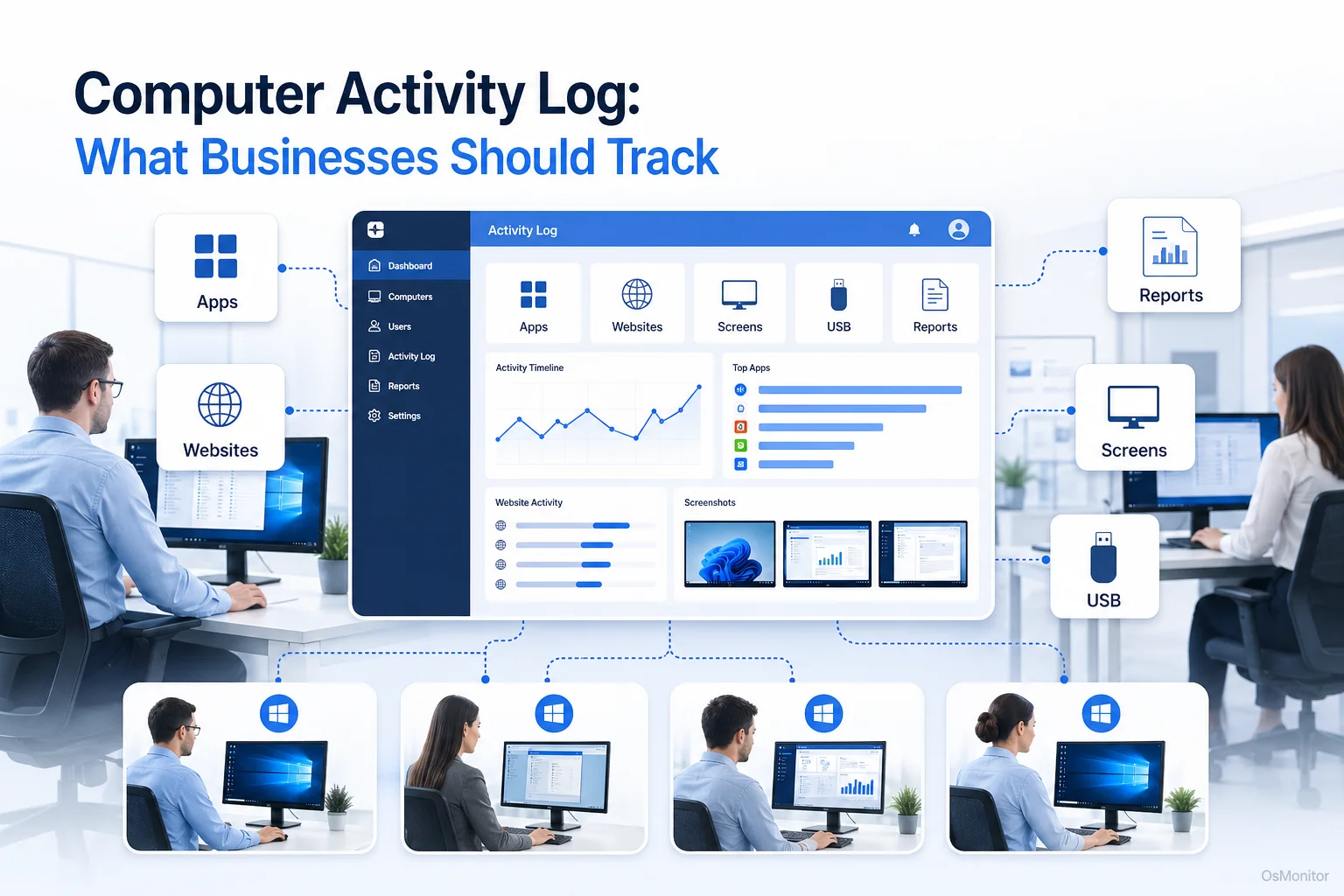
A practical overview of activity log for workplace computer management.
What is a Computer Activity Log and Why Do Businesses Use It?
A computer activity log is simply a systematic, chronological record of what happens on a company-owned machine. People sometimes search for a program to monitor computer activity thinking it’s about surveillance, but it’s really about IT administration. This log captures the hard facts: which applications are executed, which URLs are visited, active session durations, and what files are accessed.
For IT and business leaders, the primary reasons for maintaining a robust computer activity record are:
- Productivity Analysis: By viewing exactly how time is allocated across different apps and sites, you can spot workflow inefficiencies and distractions. The goal of any software to monitor computer activity is to ensure work hours are dedicated to work tasks.
- Policy Compliance: Most companies have an Acceptable Use Policy (AUP). An activity log my activity review helps verify that these policies are respected—for instance, ensuring staff aren’t installing unauthorized software or hitting restricted sites.
- Resource Management: Good user activity tracking reveals underutilized software licenses that can be canceled, saving money. It also helps IT spot the exact machines causing network bandwidth bottlenecks.
- Security and Accountability: If a data breach occurs, a user activity tracking and log provides a critical audit trail. It tells your IT team exactly what happened, what files moved, and which accounts were involved.
A well-managed computer activity tracker removes emotion from performance conversations. You aren’t guessing anymore; you have data-backed insights.
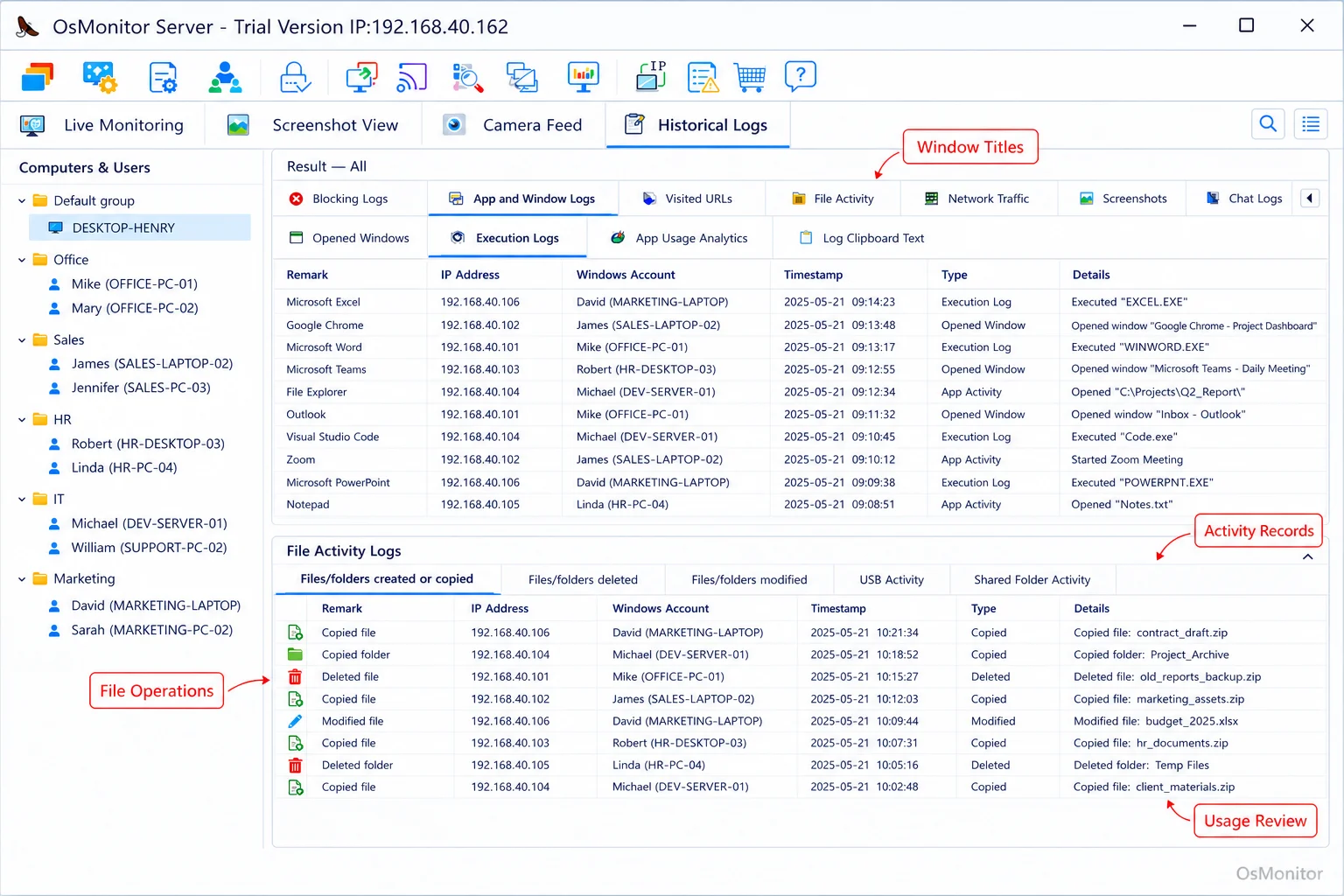
A real-product style screenshot highlighting computer activity records in OsMonitor.
Key Metrics to Track in a Computer Activity Log
A solid computer activity monitor doesn’t just hoover up endless, irrelevant data; it collects the right data. Drowning your IT admin in useless logs is just as bad as having no logs at all. You need to focus on metrics that directly correlate with productivity and security.
Here are the most important metrics to track:
1. Application Usage
This metric tracks which software executables are launched and how long they remain the active window. It answers critical questions:
- Are employees actively using the CRM or CAD tools they need for their roles?
- How much active time is bleeding into games or non-work apps?
- Are there unauthorized, potentially harmful programs installed?
Effective application usage monitoring for employee computers & tools gives you a crystal-clear picture of daily software workflows.
2. Website and URL Visits
If you want to know how to track computer activity for productivity, start with the browser. Key data points include:
- URL Visited: The exact web address accessed.
- Time Spent: The active duration of the visit.
- Category: Grouping sites (e.g., streaming, news, CRM) helps generate clean summary reports.
This is the backbone of web activity tracking, essential for enforcing internet policies and finding massive distractions.
3. File Operations
Monitoring document access is non-negotiable for data security. An activity log software suite should record:
- File Access: Which documents were opened, modified, or renamed.
- File Transfers: Files copied to USB thumb drives, external disks, or network shares.
- Print Jobs: A hard record of documents sent to the printer.
This creates the audit trail you need to protect sensitive company information.
4. Bandwidth Consumption
If the office internet is crawling, a program that tracks computer activity can pinpoint exactly which machines or apps are hogging the bandwidth—usually due to massive downloads, streaming, or unauthorized P2P software.
| Metric Tracked | Business Implication | Example Scenario |
|---|---|---|
| Application Active Time | Measures focus on core work tools vs. distractions. | A report shows an employee spent 4 hours on a game and 2 hours on their primary work software. |
| Website Visit Duration | Identifies time spent on non-productive websites. | An activity log reveals 10+ hours per week spent on video streaming sites across a department. |
| File Transfers to USB | Highlights potential data security risks. | A log shows sensitive client files being copied to a personal USB drive, violating company policy. |
| Network Bandwidth Usage | Pinpoints sources of network slowdowns. | A single computer is found to be using 80% of the office bandwidth due to continuous P2P downloads. |
When to Use Software vs. When to Adjust Policies
When managers ask me how to monitor computer activity, I always remind them: technology is a tool to support your policy, not a replacement for it.
Policy and Process First:
Before deploying any software that tracks computer activity, write a clear Acceptable Use Policy. State explicitly what is acceptable on company hardware. This sets expectations and forms the ethical and legal basis for your monitoring.
Software as a Support Tool:
Once your policy is published, computer activity monitoring software is used to:
- Verify Compliance: Objectively confirm the rules are followed.
- Gather Data for Discussion: Give managers concrete data for 1-on-1 performance reviews.
- Automate Enforcement: Robust tools can automatically block access to distracting sites or unauthorized apps, enforcing the policy for you.
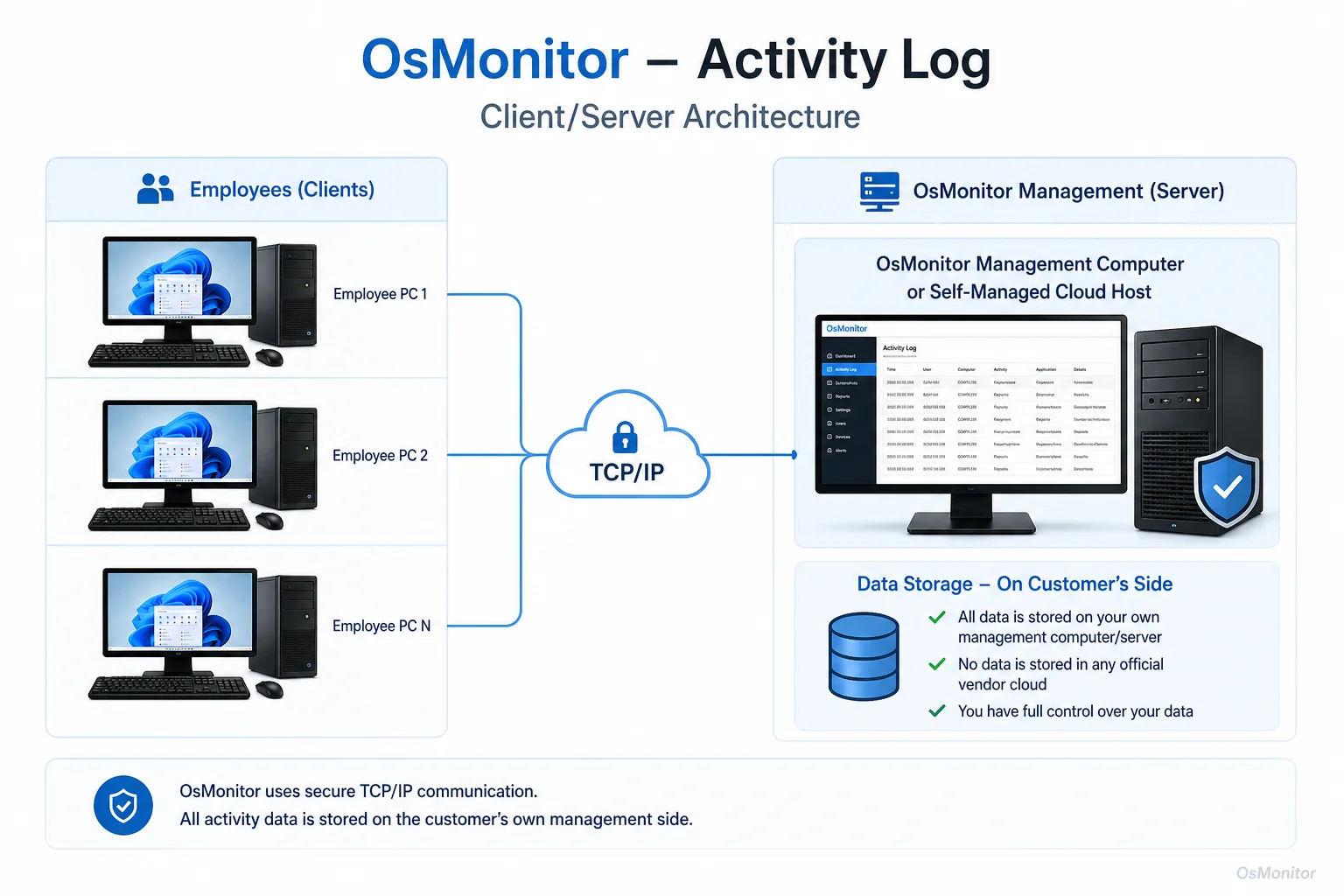
OsMonitor keeps monitoring data under the customer’s control on the management computer or self-managed server.
How OsMonitor Helps Manage Computer Activity Logs
OsMonitor is a classic, highly stable client/server-based system designed for businesses that need a comprehensive view of tracking computer activity. It installs a lightweight client on your Windows PCs, which securely transmits all data back to a central management console on your own server. Your data stays in your building.
Here’s how OsMonitor handles computer activity tracking:
- Comprehensive Activity Records: It builds a detailed log of all major actions, including monitor computer activity metrics like app usage, URL visits, file operations, and print jobs.
- Website and Application Blocking: It goes beyond logging. You can actively block non-productive websites and applications, enforcing your AUP directly.
- Detailed Reporting: The system aggregates the raw logs into readable reports for individuals or departments, highlighting exact time spent on tasks and flagging policy violations.
- Real-Time Alerts: If someone tries to access a blocked site or plug in an unauthorized USB drive, OsMonitor fires an immediate alert to the management console.
As a dedicated employee activity monitoring software platform, OsMonitor gives you the tools to turn raw data into smart management decisions.
Legal and Ethical Considerations for Activity Tracking
Whenever you deploy software to track computer activity, you must do it ethically and legally. Transparency is mandatory.
- Inform Employees: Always notify your staff that you are monitoring computer activity on company-owned hardware. Put it in the employee handbook.
- Focus on Company Assets: Restrict your monitoring strictly to company-owned devices, and only for legitimate business purposes (security, productivity, policy enforcement).
- Respect Privacy: Good software that monitors computer activity focuses on workflow metadata, not capturing highly sensitive personal data like passwords.
- Consult Legal Counsel: Employment and privacy laws vary heavily by region. Always consult local legal counsel to ensure your monitoring policy is fully compliant.
Frequently Asked Questions (FAQ)
What is an activity log?
In IT, an activity tracking app or log is a chronological record of events occurring on a computer system. For businesses, it means tracking user actions—like application usage, websites visited, and file access—on company-issued hardware to ensure productivity and network security.
Is creating an activity log legal for businesses?
In most jurisdictions, yes. Employers have the right to monitor their own property for legitimate business reasons. However, you must establish a clear written policy and inform your employees. Always consult local legal counsel before deployment.
Does OsMonitor require a client on employee computers?
Yes. OsMonitor utilizes a secure client/server architecture. A lightweight client application must be installed on each endpoint you intend to manage so it can communicate with your central server console.
Where is OsMonitor monitoring data stored?
Your data stays with you. It is stored exclusively on your own management PC or your self-managed server. We do not push your sensitive logs to a vendor cloud.
Can OsMonitor work without internet in a LAN?
Absolutely. It is fully designed to function perfectly inside a closed Local Area Network (LAN) without any internet connection, making it ideal for high-security environments.
What Windows versions does OsMonitor support?
It supports Windows 7, 8, 10, and 11, along with Windows Server editions (both 32-bit and 64-bit).
If you are ready to stop guessing and start managing your network with hard data, a robust logging tool is the answer. Download OsMonitor Free Trial to test these features securely within your own environment.