Capacity Planning: How Activity Data Helps Team Planning
Capacity planning becomes difficult when managers plan with scheduled hours but do not know how work time is actually being used. A team may look fully booked on paper, yet projects still slip. Another team may appear busy, but activity reports may show time lost to games, video streaming, entertainment websites, or other non-work browsing during office hours.
That gap matters. If you assume every employee has eight fully productive hours each day, your project timelines, staffing plans, and workload estimates will often be wrong.
A practical capacity planning process needs more than a calendar. It needs real activity data, clear policies, and a fair way to understand how company-owned computers are used during the workday.
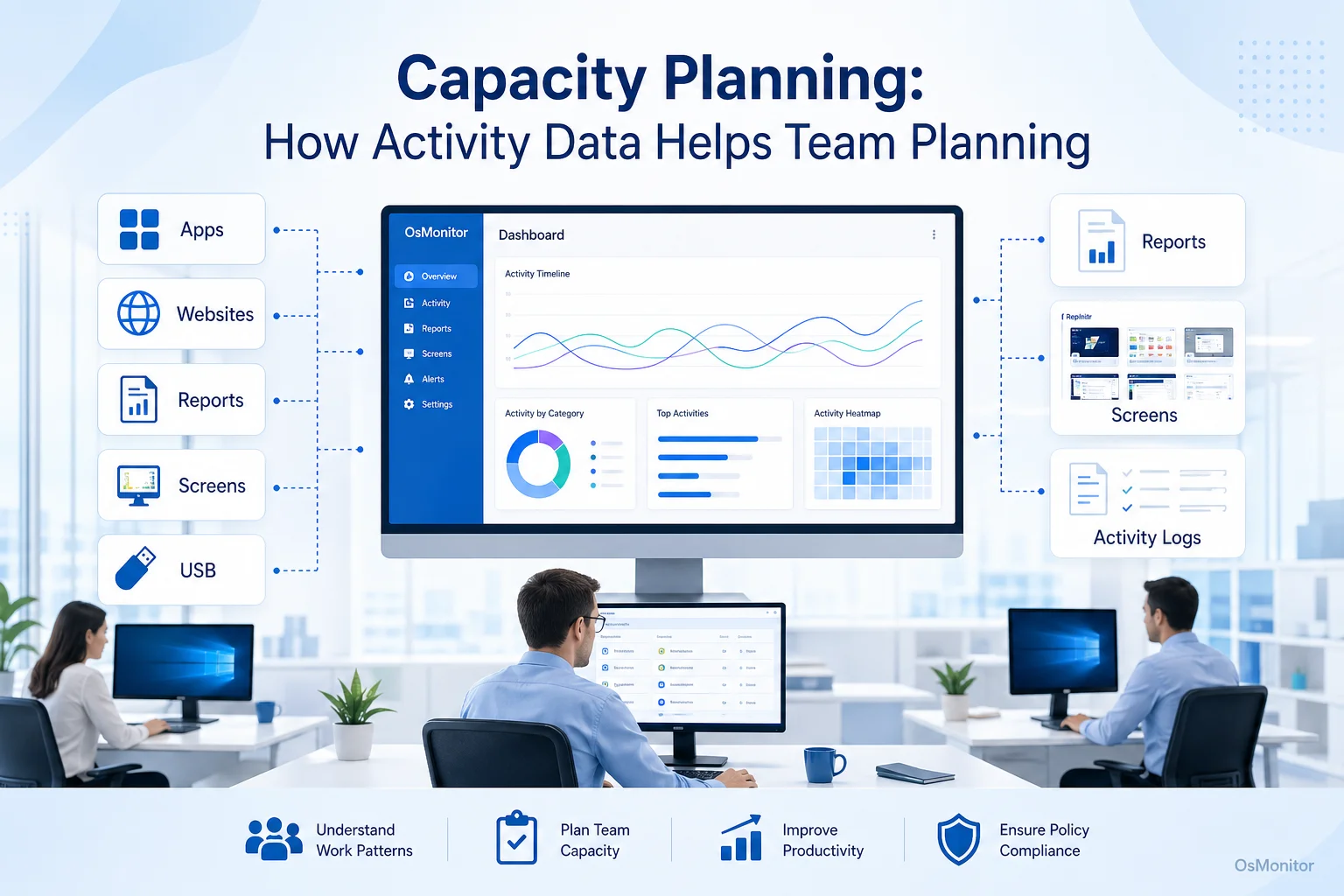
A practical overview of capacity planning for workplace computer management.
What is Workforce Capacity Planning and Why Does it Matter?
Workforce capacity planning is the process of matching available employee time, skills, and resources with the work your business needs to complete. In simple terms, it helps answer this question: do we have enough real capacity to finish the work on time?
Staff capacity planning is not only about headcount. It also includes workload, skill fit, software usage, interruptions, workflow problems, and the difference between scheduled time and useful work time.
The benefits of capacity planning include:
- More realistic project timelines.
- Better workload distribution.
- Fewer last-minute staffing surprises.
- Less risk of employee overload.
- Better software and resource planning.
- Clearer justification for hiring or process changes.
- More accurate employee capacity planning.
One of the biggest capacity planning challenges is using theoretical numbers. For example, five employees working eight hours a day may look like 40 hours of capacity. But meetings, breaks, support requests, low-focus time, non-work browsing, and inefficient tools can reduce the real available capacity.
That is why activity data matters. Computer usage records can help managers understand how work time is actually spent, rather than relying only on estimates.
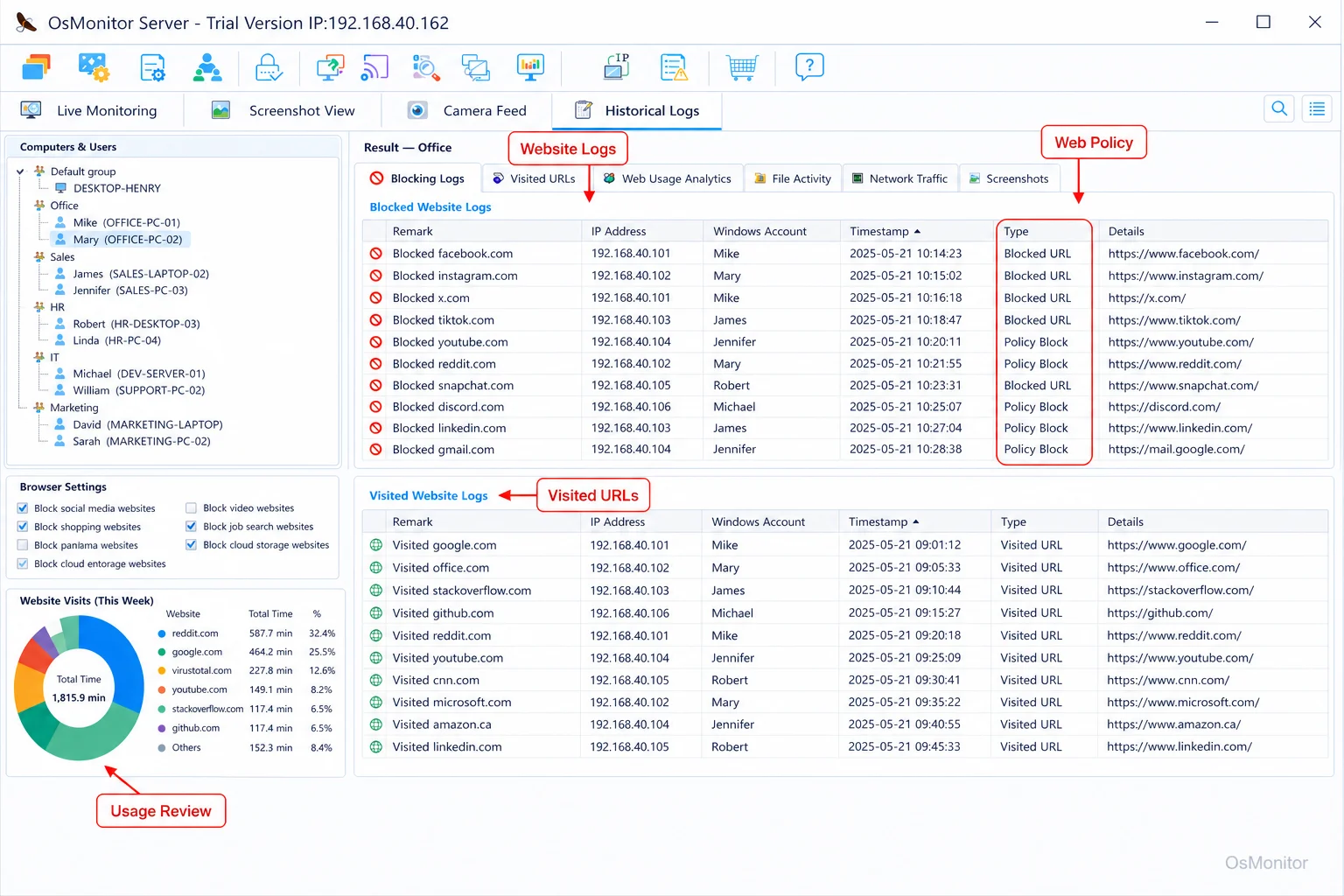
A real-product style screenshot highlighting website activity monitoring in OsMonitor.
Using Activity Data to Refine Your Capacity Planning Formula
A basic capacity planning formula often looks like this:
Total Capacity = Number of Employees × Working Hours per Employee × Utilization Rate
The hard part is the utilization rate.
A team may be scheduled for 40 hours, but that does not mean all 40 hours are available for focused project work. Some time is spent in meetings. Some time goes to IT problems. Some time may be lost to unrelated websites or applications. Some roles require research, communication, or waiting for customer responses.
This is where a capacity planning calculation becomes more useful when it includes real workplace data.
For example:
- An employee is logged in for 8 hours.
- Reports show 5.8 hours in core business applications.
- 0.7 hours are spent in communication tools.
- 0.5 hours are idle.
- 1 hour is spent on unrelated websites.
That does not automatically mean the employee is underperforming. Context matters. But it does give managers a more realistic starting point than assuming a perfect 8-hour productive day.
A more practical capacity planning formula might be:
Effective Work Capacity = Scheduled Work Hours − Meetings − Breaks − Idle Time − Non-Work Activity − Known Support or Admin Time
For computer-based teams, activity reports from Employee Activity Monitoring Software can help estimate those variables more accurately. This is especially useful for workload capacity planning, because managers can compare planned capacity with actual work patterns.
OsMonitor as a Resource Capacity Planning Tool
OsMonitor is workplace productivity and employee computer activity management software for company-owned Windows PCs. It is not a full project management suite, HR system, or resource capacity planning software platform. Instead, it provides practical activity data that can support your existing planning process.
Think of OsMonitor as one of your resource capacity planning tools for understanding the computer activity side of work.
It can help managers answer questions such as:
- Which applications are employees using most?
- Which websites are consuming work time?
- Are employees spending enough time in required business tools?
- Are some departments consistently overloaded?
- Are some employees underused or blocked?
- Are non-work activities reducing available capacity?
- Are company computer policies being followed?
- Is there enough evidence to support a headcount capacity planning request?
OsMonitor uses a client/server model. A central management console is installed on a manager’s computer, administrator’s PC, or self-managed server. A lightweight client is installed on each employee Windows computer that the business wants to manage. Activity records are collected centrally for authorized review.
This gives managers clearer data for workforce capacity planning software needs without sending normal activity records to a vendor-controlled cloud.
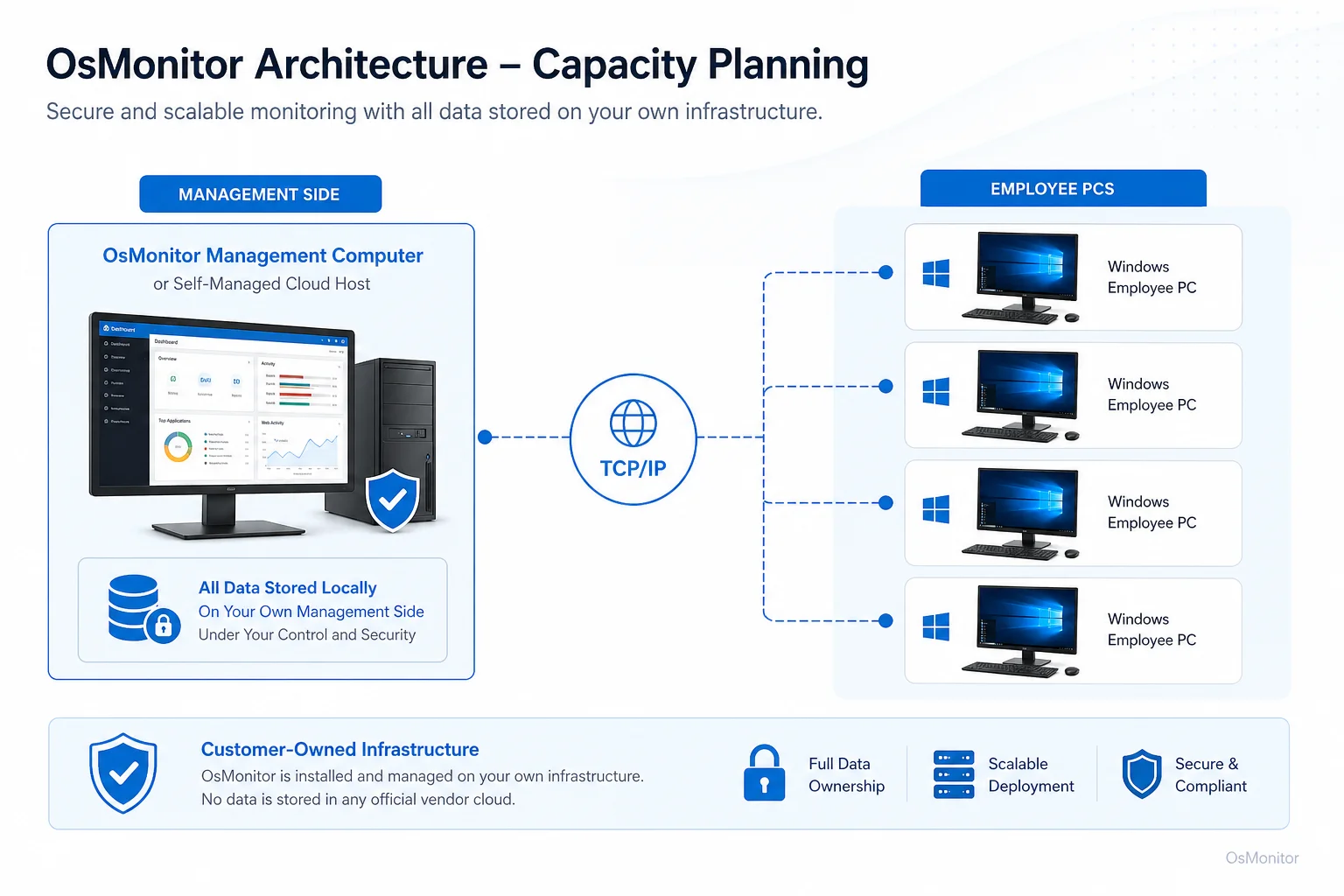
OsMonitor keeps monitoring data under the customer’s control on the management computer or self-managed server.
Core Features Supporting Staff Capacity Planning
Capacity planning tools are most useful when they show both time and context. A raw number of hours is not enough. Managers need to understand what those hours were spent on.
OsMonitor supports staff capacity planning with practical computer activity records. It can also support broader workforce management capacity planning when managers need to connect workload, productivity, and computer usage.
Here’s how its features translate into better planning:
| Feature | Description | Benefit for Capacity Planning |
|---|---|---|
| Website & App Usage Reports | Records time spent on websites and applications by employee, group, or department. | Helps estimate real utilization and identify productive vs. non-work activity patterns. |
| Activity Timelines | Shows computer activity across the workday. | Helps managers understand workflow rhythm, low-activity periods, and possible bottlenecks. |
| Website & Application Blocking | Restricts non-work websites or applications according to company policy. | Helps reduce avoidable distractions and protect available work capacity. |
| Document Operation Records | Logs file access, modification, copying, and printing on managed computers. | Provides context for document-heavy work and supports workload capacity planning. |
Integrating this kind of data is one practical part of Workforce Management Software: Where Monitoring Fits. A project management tool may show assigned tasks. OsMonitor can show how company computers are actually being used while that work happens.
Addressing Common Capacity Planning Challenges
Capacity planning workforce management often fails because the inputs are too optimistic. Managers assume too much available time, underestimate interruptions, or miss workflow problems until deadlines are already at risk.
Activity data can help address common capacity planning challenges.
Inaccurate Forecasting: Historical application and website usage reports can help managers build more realistic project timelines.
Hidden Time Sinks: Reports may show that certain websites, tools, or workflows consume more time than expected.
Uneven Workload Distribution: If one employee shows consistently heavy core application usage while another shows repeated idle time or unrelated browsing, the team workload may need review.
Weak Hiring Justification: Headcount capacity planning is easier when managers can show current workload patterns, utilization trends, and real activity data.
Training Gaps: If employees avoid important tools or spend too much time in manual workarounds, the issue may be training or software usability.
Policy Issues: If non-work website activity is reducing available capacity, managers can update policies and use reports to apply rules more consistently.
Capacity planning also looks different by environment. Contact center capacity planning may focus on CRM usage, ticketing tools, communication software, and after-call work. Capacity planning in labs may focus on scheduled computer access, approved software, student activity, or shared resources. Back-office teams may focus on accounting systems, ERP tools, spreadsheets, documents, and internal applications.
Some teams begin with capacity planning tools free of charge, such as spreadsheets or free capacity planning tools. That can work for simple headcount or project estimates. But spreadsheets usually depend on manual input. When managers need real computer usage data, they need a tool that can collect activity records from managed computers.
On-Premise Data Control and Security
Capacity planning data can be sensitive because it may include application usage, website records, activity timelines, document activity, and productivity reports. Businesses should handle this information carefully.
OsMonitor uses an on-premise client/server model. Monitoring data is stored on the customer’s own management computer or self-managed server. Normal activity data is not stored on an OsMonitor vendor cloud.
This gives businesses several practical advantages:
- Customer-Controlled Storage: Activity records stay on your own hardware or self-managed environment.
- LAN-Only Operation: OsMonitor can work inside a local area network without requiring internet access for core monitoring and reporting functions.
- Access Control: Your organization controls who can view reports and how records are retained.
- Predictable Deployment: Businesses can use existing Windows office computers or a self-managed server without special hardware.
This model is useful for organizations that want capacity planning support from computer activity data while keeping sensitive records under their own control.
Responsible use is still important. Businesses should create a written computer and internet usage policy, notify employees, limit access to reports, review data with context, and consult qualified legal counsel to ensure compliance with local employment and privacy laws.
FAQ: Capacity Planning and Monitoring Tools
What is capacity planning?
Capacity planning is the process of estimating whether a business has enough people, time, skills, tools, and resources to meet future work demand. In workforce capacity planning, it means understanding whether employees have enough real available work capacity to complete projects, serve customers, and meet deadlines.
What is the difference between capacity planning and workforce planning?
Workforce planning is broader. It looks at headcount, skills, roles, hiring, training, and future staffing needs. Capacity planning focuses more specifically on whether current or future resources can handle expected workload. Employee capacity planning is one part of workforce planning.
What is a basic capacity planning formula?
A simple capacity planning formula is: Total Capacity = Number of Employees × Working Hours × Utilization Rate. For better accuracy, managers should adjust for meetings, breaks, idle time, support work, non-work activity, and other real-world factors.
How can activity data improve capacity planning?
Activity data can show how work time is actually spent on company-owned computers. Application usage, website activity, idle time, active time, and document activity can help managers estimate real utilization, identify distractions, find workflow problems, and make better staffing decisions.
Is using activity data for capacity planning legal?
In many regions, businesses may review activity on company-owned computers for legitimate business purposes when there is a clear policy and employees have been properly notified. However, laws vary by country, state, province, and industry. Businesses should consult qualified legal counsel before implementing computer activity monitoring or capacity planning practices.
Does OsMonitor require a client on employee computers?
Yes. OsMonitor uses a client/server architecture. A lightweight client must be installed on each employee Windows computer the business wants to manage. The management console collects activity records and provides reports for authorized review.
Where is OsMonitor monitoring data stored?
OsMonitor stores collected data on the customer’s own management computer or self-managed server. Normal monitoring data is not sent to or stored on an OsMonitor vendor cloud, giving the business direct control over its activity records.
Can OsMonitor work without an internet connection?
Yes. OsMonitor can work inside a private local area network without requiring internet access for its core monitoring, reporting, and management functions.
What Windows versions does OsMonitor support?
OsMonitor supports Windows 7, Windows 8, Windows 10, Windows 11, and Windows Server editions. It supports both 32-bit and 64-bit Windows systems.
Capacity planning is much more accurate when it is based on real work patterns instead of optimistic assumptions. For computer-based teams, application usage, website activity, active time, idle time, and document records can help managers understand true available capacity.
Used transparently and responsibly, OsMonitor can support workforce capacity planning with practical activity reports, policy controls, and on-premise data storage. To see how real activity data can improve your team’s planning, you can Download OsMonitor Free Trial and explore its features.