What Is Workforce Analytics? A Practical Guide
If you are searching for “what is workforce analytics,” you probably want a clear answer, not a textbook definition. In real business use, workforce analytics means using work-related data to understand how employees, tools, time, and company resources are being used.
For a small business, the question may be very practical: the team looks busy, but projects are still late. Maybe too much time is going into games, video sites, entertainment websites, or other non-work browsing during office hours. Without clear records, managers are left with opinions and awkward conversations.
Workforce analytics helps replace guesswork with facts. In a computer-based workplace, that often means reviewing application usage, website activity, active time, bandwidth usage, document activity, and policy-related events from company-owned computers.
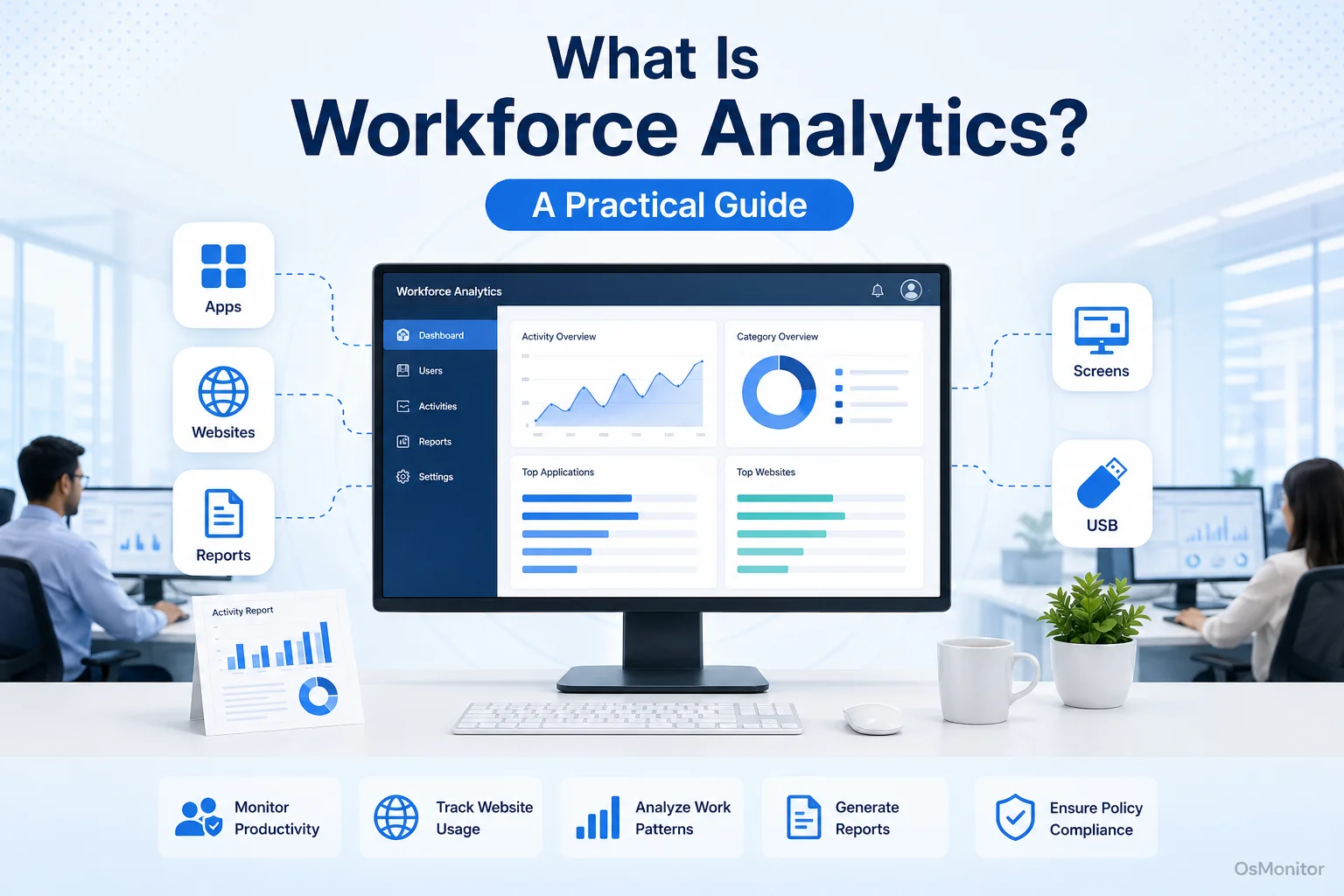
A practical overview of what is workforce analytics for workplace computer management.
Understanding Workforce Analytics in Practice
So, what is workforce analytics in practical terms?
Workforce analytics is the process of collecting and analyzing workplace data to improve business decisions. It can include HR data such as hiring, turnover, attendance, engagement, and retention. But for many small and mid-sized businesses, the most useful starting point is simpler: how are company computers actually being used during the workday?
Computer activity data can help managers answer questions such as:
- What software are employees using to complete their work?
- How much time is spent in core business applications?
- Which websites are visited during work hours?
- Are there repeated distractions that affect productivity?
- Are expensive software licenses being used enough?
- Are employees following the company’s computer and internet usage policy?
- Are there workflow problems that need better tools, training, or support?
This makes workforce analytics useful because it connects daily work behavior with management decisions. Instead of saying, “I think productivity is low,” a manager can review computer usage reports and say, “Here are the patterns we need to understand.”
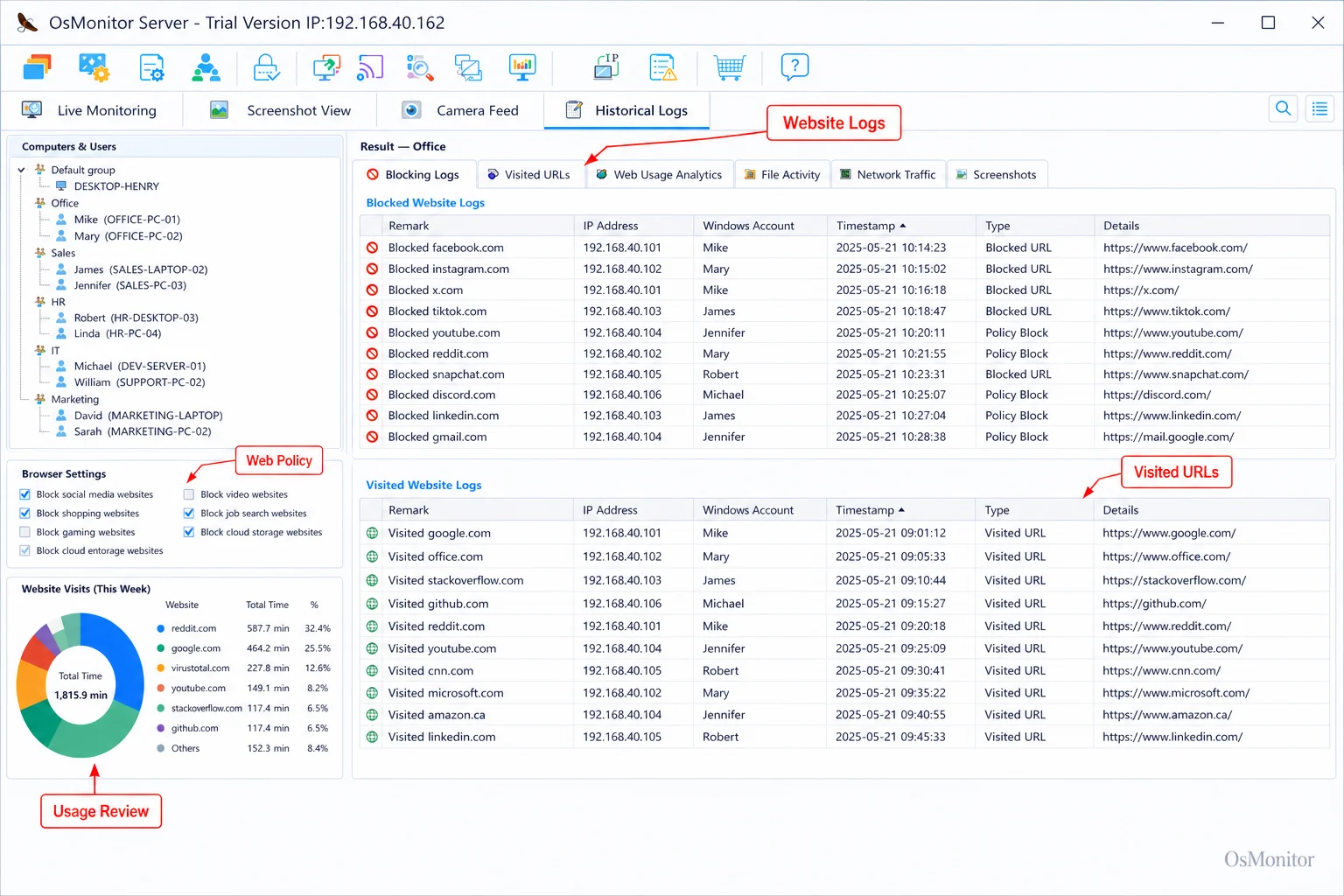
A real-product style screenshot highlighting website activity monitoring in OsMonitor.
What Problems Does Workforce Analytics Solve?
Businesses do not need workforce analytics just to collect more data. They need it because certain problems are hard to solve without clear activity records.
1. Unclear Productivity Patterns
A manager may feel that a team is underperforming, but feelings are not enough. Workforce analytics provides objective reports that show how work computers are used during the day.
For example, reports may show whether employees spend most of their time in CRM, accounting software, design tools, ticketing systems, documents, or communication platforms. They may also show long periods on unrelated websites or applications during core work hours.
This does not mean every activity record should be judged in isolation. Job role and context matter. But the reports give managers a better starting point for productivity review.
2. Inefficient Workflows and Tools
Sometimes low output is not caused by poor effort. It may be caused by weak tools, confusing processes, or a lack of training.
Application usage reports can reveal whether employees are using the software the company expects them to use. If an expensive tool is rarely opened, the business may need training, configuration changes, or a different solution. If employees spend too much time switching between small tools, the workflow itself may need improvement.
Workforce analytics helps managers see these patterns before they become long-term performance problems.
3. Policy Compliance and Security
Most businesses have rules about how company computers and internet access should be used. But a written policy is hard to enforce fairly without records.
Workforce analytics can help show whether employees are visiting restricted websites, using unauthorized applications, transferring large files, or consuming too much network bandwidth. These records support policy-based computer management and help IT teams protect company resources.
The goal is not to create a tense work environment. The goal is to make expectations clear and apply rules consistently.
4. Fair and Objective Performance Reviews
Performance conversations are easier when managers have facts. Instead of relying only on impressions, managers can review application usage, website activity, active time, and department-level reports.
For example, one employee may appear quiet but spend most of the day working in required business software. Another may appear busy but spend large blocks of time on unrelated browsing. Workforce analytics helps reveal the difference.
Used responsibly, this data can make productivity reviews more fair, practical, and specific.
Key Metrics You Can Gather from Computer Activity
Effective workforce analytics depends on collecting useful data, not just more data. For computer-based teams, workplace productivity and employee computer activity management software can provide the raw records needed for meaningful reports.
Tools like Employee Activity Monitoring Software can help collect application usage, website activity, bandwidth usage, active time, and related computer activity records for later review.
Here are some useful metrics:
| Metric Category | Example Data Point | Business Insight |
|---|---|---|
| Application Usage | Time spent in excel.exe vs. chrome.exe |
Shows whether employees are using the right tools for their roles. |
| Website Activity | Visits to youtube.com during work hours |
Helps review internet usage patterns and policy compliance. |
| Network Bandwidth | Top 10 PCs by data transfer | Identifies computers causing network slowdowns or unusual data usage. |
| Active/Idle Time | Ratio of active keyboard/mouse time to total login time | Helps understand general work patterns and activity levels. |
| Document Activity | Logs of file access on a shared network drive | Shows access or changes to important company documents. |
These metrics should be reviewed with common sense. For example, browser time may be productive for sales, marketing, support, or research roles. Video websites may be work-related for training or marketing teams. The value of workforce analytics comes from combining data with role context and clear policy.
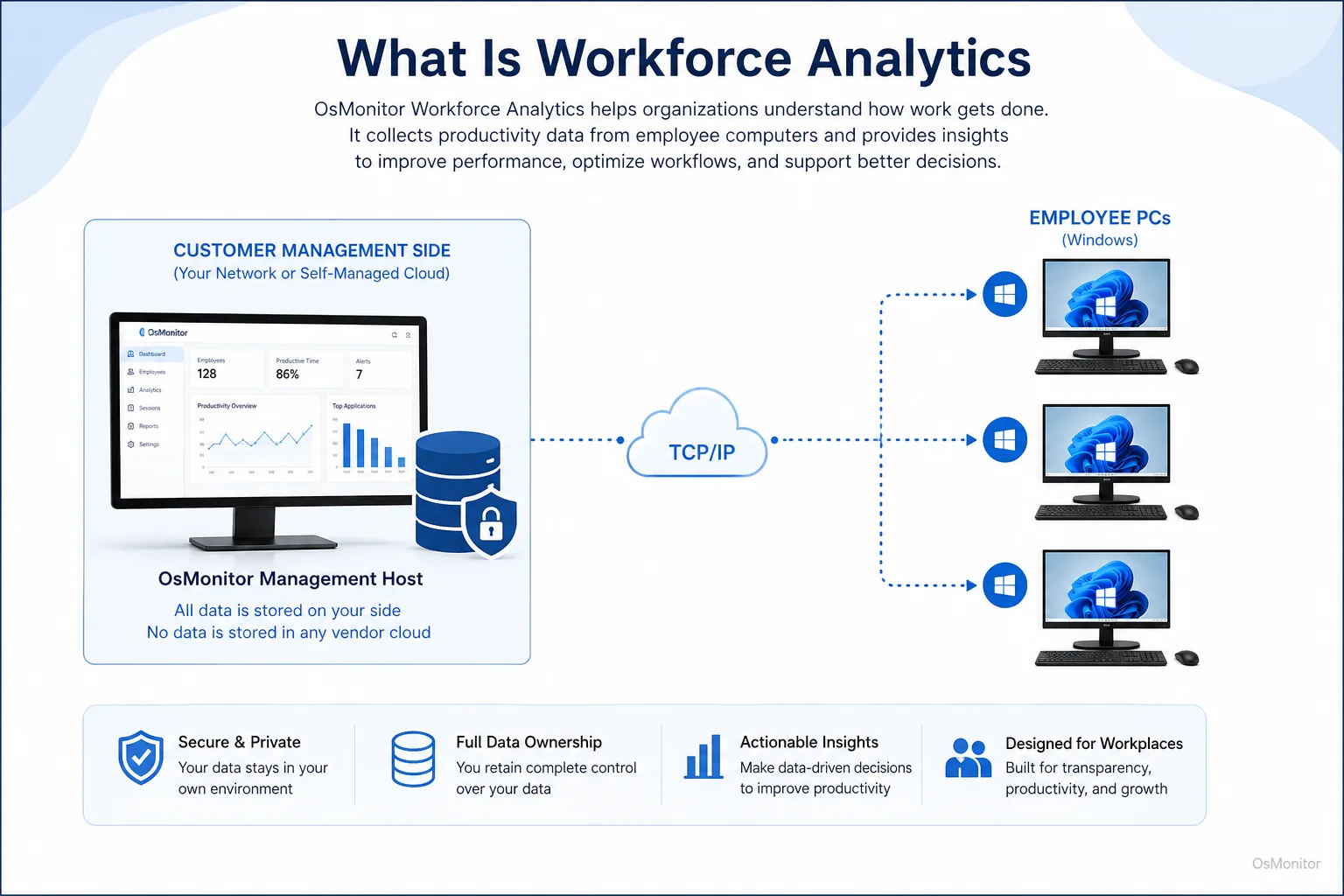
OsMonitor keeps monitoring data under the customer’s control on the management computer or self-managed server.
When to Use Software vs. When to Adjust Policy
Workforce analytics software can show what is happening, but it should not be treated as the whole management solution. The best results come when data, policy, and process work together.
Software Provides the “What”: A tool like OsMonitor can show that a department spends a large share of browser time on social media, video websites, or other non-work sites. It can also show which business applications are heavily used or ignored.
Policy Provides the “Why” and “Should”: The company policy explains what is acceptable. Social media may be normal for a marketing role but unnecessary for an accounting role. A written policy gives managers a fair standard.
Process Provides the “How”: If reports show that employees avoid a new CRM system, the answer may not be blocking other tools. It may be better training, cleaner workflows, or asking employees why the new system is hard to use.
This is especially important for On-Premise Employee Monitoring Software, where the business keeps activity records on its own management computer or self-managed server. Data control is useful, but the company still needs clear rules for access, retention, review, and employee notification.
Workforce analytics should help managers ask better questions. It should not replace judgment, communication, or good leadership.
A Note on Transparency and Legal Use
Workforce analytics should be implemented transparently and responsibly. Employees should understand that company-owned computers may be managed and reviewed for legitimate business purposes such as productivity, IT support, policy compliance, and protection of company resources.
Best practices include:
Create a Clear Policy: Write a formal computer and internet usage policy that explains what may be reviewed and why.
Notify Employees: Inform employees that company-owned computers may be monitored according to company policy.
Focus on Business Outcomes: Use reports to improve productivity, support employees, enforce policy fairly, and identify workflow problems.
Limit Report Access: Only authorized managers or IT staff should be able to review activity records.
Review Data with Context: Avoid making decisions based on one isolated event without understanding the employee’s role, task, and workload.
Consult Legal Counsel: Employment and privacy laws vary by country, state, province, and industry. Businesses should consult qualified legal counsel before implementing monitoring or workforce analytics practices.
A transparent approach is easier to explain and easier to manage. It also helps employees understand that the purpose is responsible workplace computer management, not unfair micromanagement.
FAQ about Workforce Analytics
What is workforce analytics?
Workforce analytics is the practice of collecting and analyzing workplace data to improve business decisions. In a computer-based workplace, it may include reviewing application usage, website activity, active time, bandwidth usage, document activity, and policy-related computer records.
How is workforce analytics different from basic employee monitoring?
Basic employee monitoring focuses on collecting activity records. Workforce analytics uses those records to identify patterns, improve productivity, support policy decisions, plan training, and make better management decisions. In simple terms, monitoring collects the data; analytics helps explain what the data means.
What kind of data is useful for workforce analytics?
Useful data may include application usage, website visits, active and idle time, bandwidth usage, file activity, screen activity, policy events, and department-level reports. The most useful metrics depend on the employee’s role and the company’s goals.
Is workforce analytics legal for businesses?
In many regions, businesses may review activity on company-owned computers for legitimate business purposes when they have a clear policy and employees have been properly notified. However, laws vary by location and industry. Businesses should consult qualified legal counsel before implementing workforce analytics or computer activity monitoring.
Does OsMonitor require a client on employee computers?
Yes. OsMonitor uses a client/server model. The management console is installed on a manager’s computer, administrator’s PC, or self-managed server. A lightweight client must be installed on each employee Windows computer the business wants to manage.
Where is OsMonitor monitoring data stored?
OsMonitor stores collected data on your own hardware, such as the management computer or a self-managed server. The client programs send data directly to your OsMonitor server through the local network, VPN, or approved network setup. Normal monitoring data is not stored on a vendor-controlled cloud.
Can OsMonitor work without internet in a LAN?
Yes. OsMonitor can work inside a local area network without requiring internet access for its core monitoring, reporting, and management functions.
What Windows versions does OsMonitor support?
OsMonitor supports Windows 7 and later versions, including Windows 10, Windows 11, and Windows Server editions. It supports both 32-bit and 64-bit Windows systems.
Workforce analytics is most useful when it helps managers understand real work patterns and make better decisions. For computer-based teams, application usage, website activity, active time, and policy records can show where focus is strong, where distractions appear, and where better tools or training may be needed.
Used transparently and responsibly, OsMonitor can help businesses turn workplace computer activity into practical workforce analytics while keeping data under customer control. To see how you can start collecting these insights on your own network, Read the Quick Start Guide to set up a management console and test clients.