Remote Workforce Management Software for Computer Activity Visibility
Managing a distributed team across branch offices and home setups is tough. The biggest operational gap is losing visibility into daily computer-based work. Without that direct oversight, it becomes incredibly difficult to gauge real productivity, ensure your IT policies are being followed, and deploy timely helpdesk support. To fix this, you don’t need endless Zoom check-ins; you need a structured way to centralize monitoring for all your company-owned Windows PCs, regardless of where they are plugged in. That is exactly what remote workforce management software does—it bridges the physical distance by providing clear, real-time insights into network activity, keeping IT and management seamlessly connected to their teams.
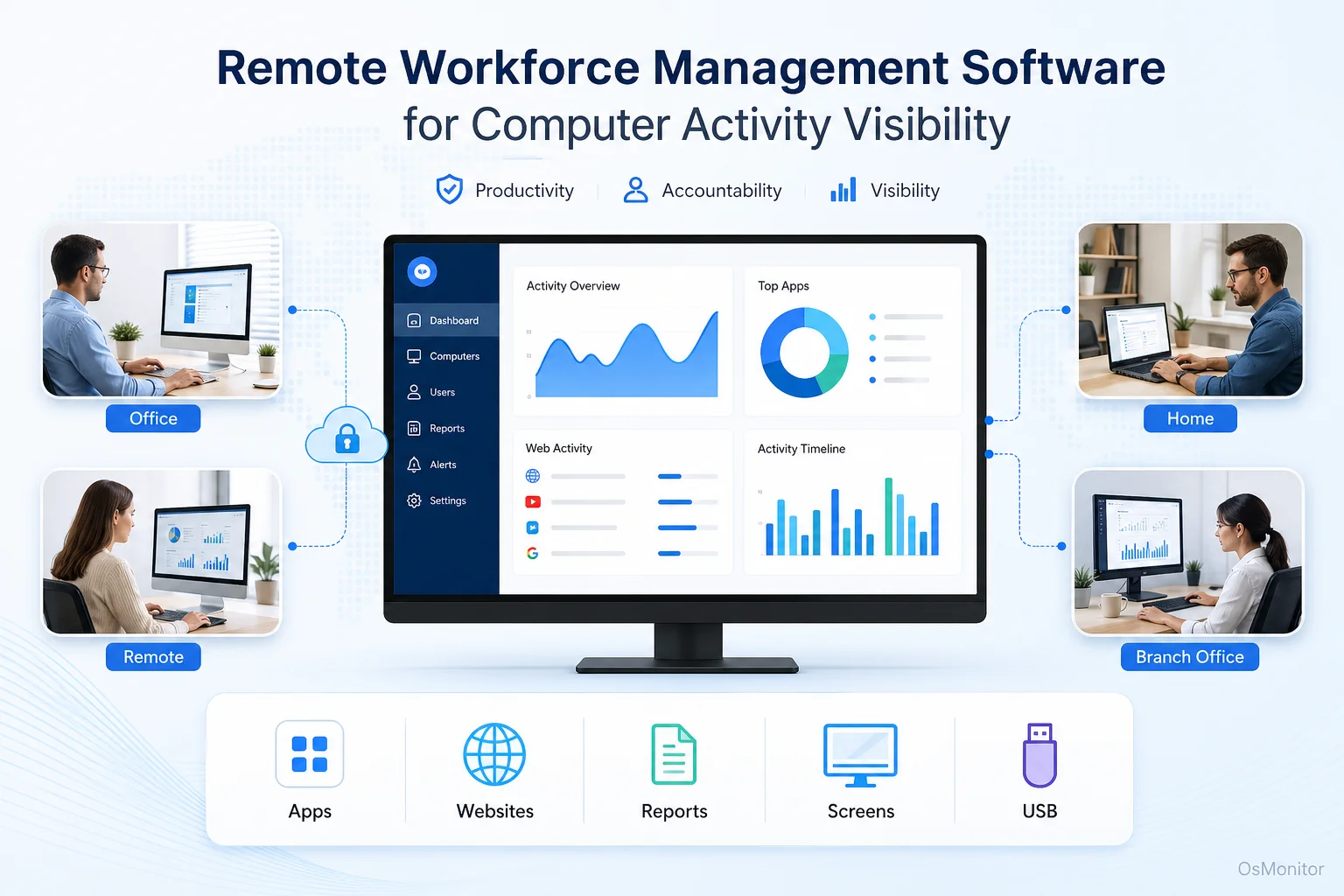
A practical overview of remote workforce management software for workplace computer management.
What is Remote Workforce Management Software?
When we talk about remote work management software, we aren’t talking about project boards or HR scheduling apps. In the IT context, this is a dedicated category of tools designed to monitor, manage, and analyze the computer activities of staff operating outside the central office. Its entire purpose is to hand managers and IT administrators the same level of oversight they rely on in a traditional, hardwired office setting.
This is achieved by deploying remote workforce management software behavior tracking to monitor core metrics: application usage time, website browsing histories, and idle versus active periods.
For example, a manager running a distributed team can pull up a “screen wall” dashboard to view all employee desktops simultaneously. This eliminates the need to constantly ping staff for status updates. You can instantly see who is deep into a spreadsheet, who might be stuck on an error message, and who is watching Netflix. For organizations with field agents or heavy work-from-home policies, a system providing remote workforce management software with behavior tracking is mandatory for smart resource allocation and policy enforcement.
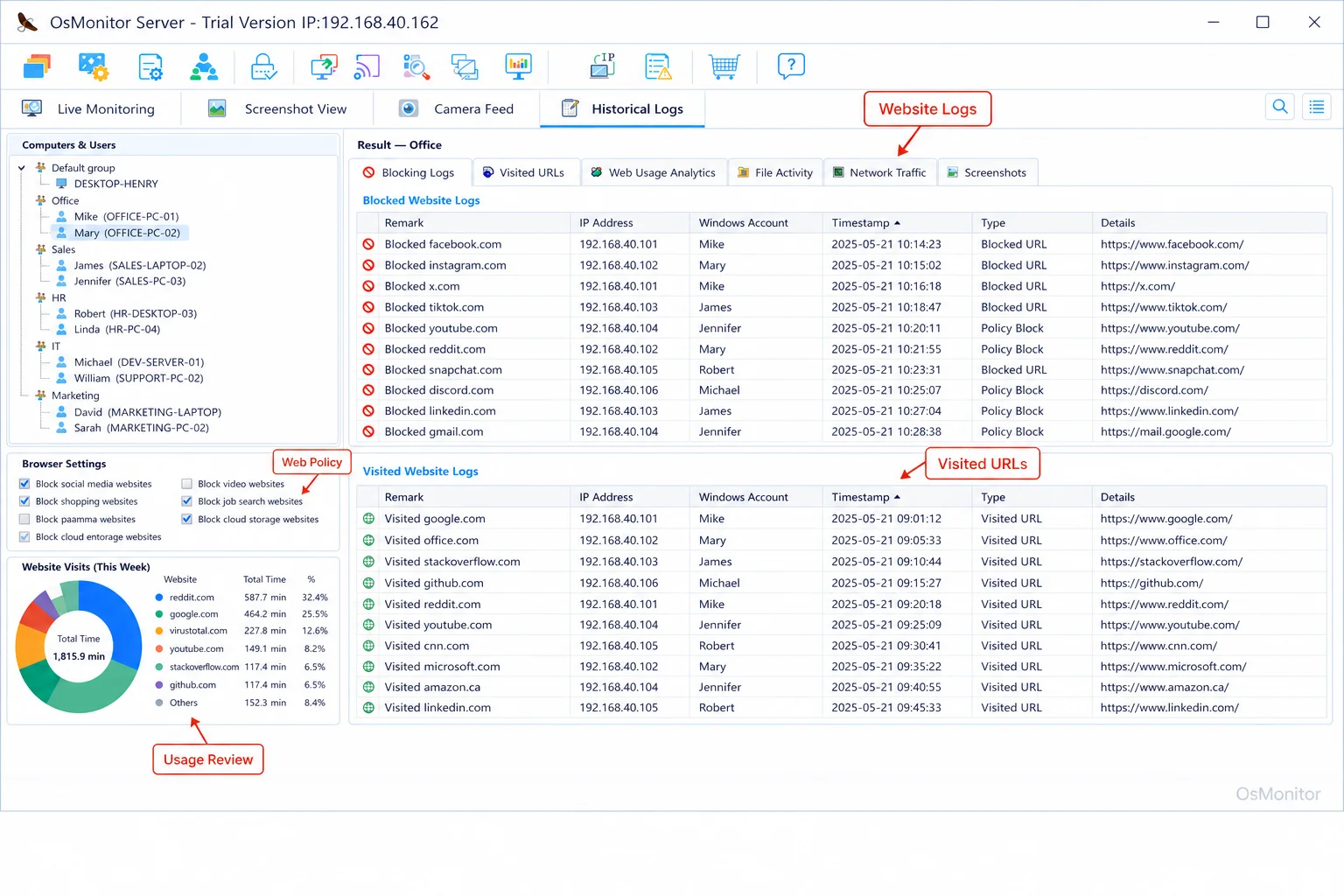
A real-product style screenshot highlighting website activity monitoring in OsMonitor.
OsMonitor: Focused on Productivity and Transparent Management
Let’s be clear about OsMonitor’s positioning: it is a dedicated employee computer monitoring and IT management tool. It is not an enterprise cybersecurity firewall or a forensic audit appliance. The design philosophy is hyper-focused on providing practical, reliable tools for legal workplace productivity management. It is built for transparent use on company-owned Windows PCs.
OsMonitor focuses strictly on the metrics that drive business goals:
- Productivity Analysis: Delivering hard data on which apps and sites actually dominate the workday.
- Policy Compliance: Ensuring your staff adheres to internal AUPs regarding internet and software restrictions.
- Operational Efficiency: Spotting workflow bottlenecks and allowing IT to deploy remote support instantly.
It is built for business owners who want to move away from guesswork and use data to maintain a productive, secure environment for their remote teams.
How OsMonitor’s Client/Server Architecture Works for Remote Teams
OsMonitor utilizes a classic, highly stable client/server architecture. This is a massive advantage when managing a remote workforce because it guarantees your data stays entirely under your control.
The system relies on two pieces: a single management console (the server) and a lightweight client pushed to each employee endpoint.
For remote deployments, you install the management server on an IT machine in your main office (with a static IP), or for total flexibility, you host it on a self-managed private cloud instance (like AWS, Azure, or Google Cloud). The remote employees’ computers run the tiny OsMonitor client, which connects back to your central server securely over the internet or your corporate VPN.
The critical detail here is that all your sensitive internal logs are transmitted directly to your server, never to a third-party SaaS vendor’s cloud. This self-hosted architecture is the only way to guarantee absolute data privacy.
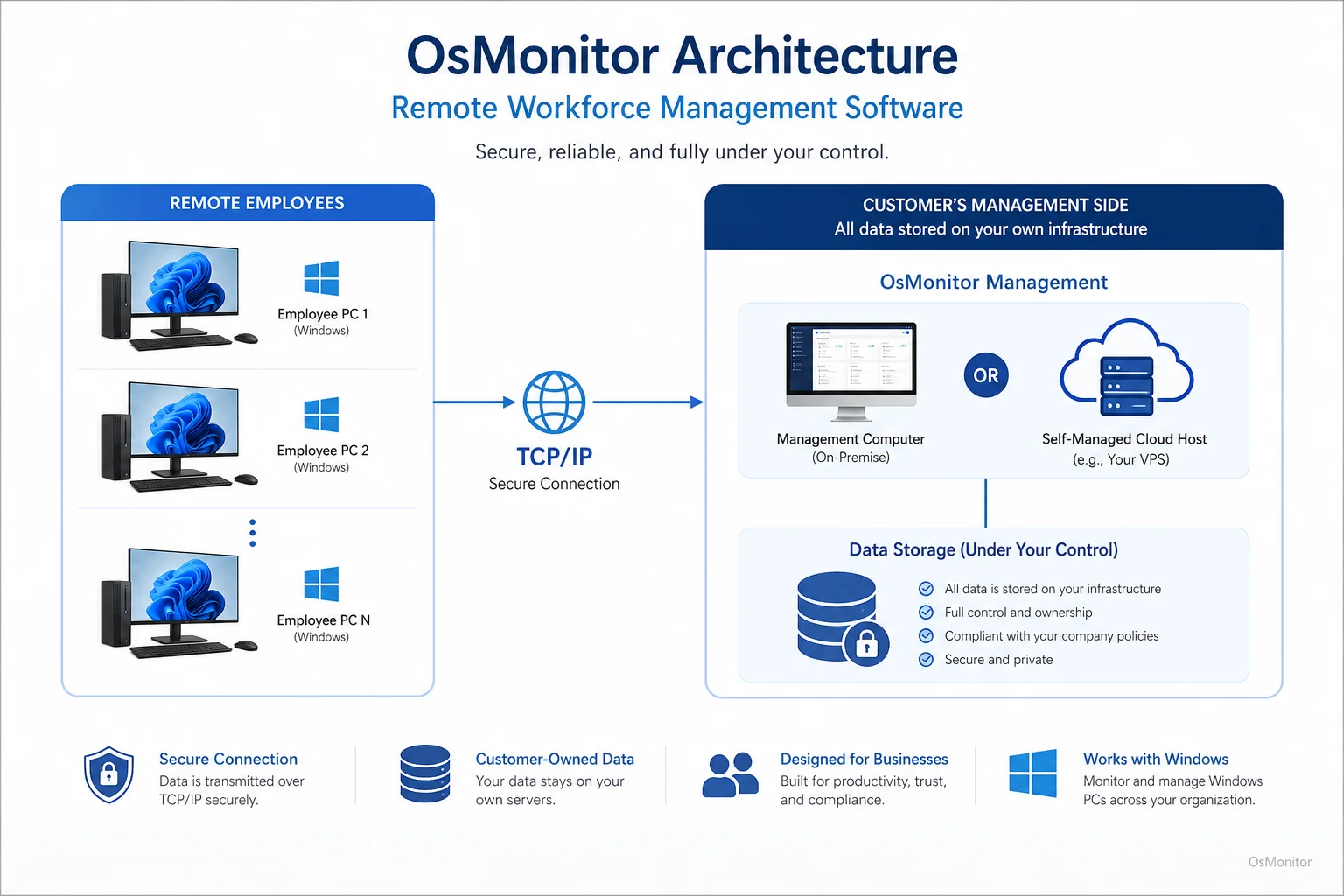
OsMonitor keeps monitoring data under the customer’s control on the management computer or self-managed server.
Core Features for Managing a Distributed Workforce
OsMonitor includes a comprehensive toolkit built to solve the specific headaches of remote management.
Real-Time Screen Monitoring and Multi-Computer Dashboards
Stop guessing what your team is doing. The multi-screen dashboard allows you to view live thumbnail feeds of dozens of remote employee desktops simultaneously. You can also click into any single screen for full-detail, real-time viewing to provide instant feedback or support.
Website and Application Usage Tracking
The system automatically logs every single website visited and application launched, tracking the exact active duration for each. This is the only way to accurately identify time-wasting activities and see which expensive software licenses are actually being used. This deep logging is the foundation of effective Employee Activity Monitoring Software.
Policy Enforcement with Website and App Blocking
Don’t just watch distractions happen—stop them. You can easily build blacklists to block access to non-work sites (social media, streaming, gaming) and prevent the execution of unauthorized or risky applications, keeping remote devices secure.
Comprehensive Activity Reports and Analytics
Raw data is useless without context. The reporting engine generates clean, readable summaries on work hours, application active time, web histories, and file transfers for individuals or entire departments. These analytics provide the factual basis for your performance reviews.
USB Device Control and Document Management
Data leaks are a massive risk with remote laptops. OsMonitor lets you lock down USB ports remotely—blocking thumb drives entirely or forcing them into a safe, read-only mode. It also logs document operations (copying, printing, deleting) to create a strict audit trail.
Remote Assistance and File Transfer
When a remote worker has a tech issue, IT needs to fix it immediately. The built-in remote assistance tool allows an admin to take control of the remote employee’s mouse and keyboard to troubleshoot, force updates, or transfer files directly, without needing a separate, expensive remote desktop subscription.
On-Premise Data Control: Your Data Stays Yours
In the current IT landscape, data ownership is everything. Unlike cloud-based SaaS tools that hoard your internal logs on their vendor servers, OsMonitor ensures your data remains 100% yours. This self-hosted model is non-negotiable for organizations handling sensitive client data or operating under strict compliance regulations.
You have two simple deployment options:
- Internal LAN: For secure, single-office environments, OsMonitor functions perfectly offline within a closed network.
- Self-Managed Server: For distributed teams, install the server on a machine you own (a physical box or your own AWS instance).
This approach gives you absolute authority over who accesses your data and how long it is retained.
Compatibility and Lightweight Deployment
OsMonitor is engineered to drop into your existing IT infrastructure without demanding expensive hardware upgrades.
- Windows Compatibility: It fully supports Windows 7, 8, 10, and 11, including Windows Server editions (32-bit and 64-bit). You can explore this further in our Windows Employee Monitoring Software guide.
- Lightweight Client: The endpoint client is tiny (under 2MB). It runs silently and consumes almost zero system resources, ensuring it never slows down an employee’s workflow.
- Simple Installation: Deployment is incredibly straightforward, allowing a single IT admin to roll out the system across a distributed network in an afternoon.
Practical Use Cases for Remote Workforce Management
This software adapts seamlessly to the specific challenges of different business models.
| Industry / Team Type | Primary Challenge | How OsMonitor Helps |
|---|---|---|
| Small & Medium Businesses | Ensuring remote productivity with a tiny IT budget. | Provides a single, affordable platform for monitoring, blocking, and remote IT support. |
| Call Centers | Maintaining agent focus and strict call handling protocols. | Tracks active app time to keep agents in the CRM; live screens allow for instant QA. |
| Design & Development | Protecting intellectual property and auditing billable hours. | Locks down USB ports, tracks source code file movement, and logs exact software usage. |
| Educational Institutions | Keeping remote students focused during digital learning. | Blocks gaming/streaming sites and provides instructors with a live view of student screens. |
Limitations and Responsible Use Guidelines
OsMonitor is a powerful IT administration tool for Windows PCs. It is not an enterprise antivirus or a dedicated SIEM platform.
To deploy it successfully and legally, you must:
- Develop a Clear Policy: Write an Acceptable Use Policy (AUP) detailing exactly what is monitored and why.
- Inform Employees: Transparency is mandatory. Ensure all staff know their company-issued hardware is monitored.
- Comply with Local Laws: Always consult local legal counsel to ensure your deployment complies with regional labor and privacy laws.
When used transparently, this software builds accountability rather than anxiety.
Frequently Asked Questions (FAQ)
What is remote workforce management software?
In this context, it refers to IT management tools that allow administrators to track, secure, and manage the computer activity of staff working outside a central office. It includes screen monitoring, app tracking, URL blocking, and remote helpdesk features.
Is using remote workforce management software legal for businesses?
In most jurisdictions, yes. Employers have the right to monitor the use of company-owned hardware. However, privacy laws vary heavily by region. You must maintain transparency, establish a written policy, and consult legal counsel before deployment.
Does OsMonitor require a client to be installed on employee computers?
Yes. It uses a highly stable client/server model. A lightweight client application must be installed on each Windows endpoint you intend to manage.
Where is the monitoring data from OsMonitor stored?
Your data stays with you. All logs and recordings are stored exclusively on your own management computer or your self-managed server. We never use third-party vendor clouds.
Can OsMonitor monitor employees working from home without an office VPN?
Yes. As long as the employee’s PC can connect to your self-hosted OsMonitor server over the internet (using a static IP or dynamic DNS), a VPN is not strictly required for the monitoring to function.
What versions of Windows does OsMonitor support?
It supports Windows 7, 8, 10, and 11, along with Windows Server editions (both 32-bit and 64-bit).
If you are ready to stop guessing and start managing your distributed team with clear, objective data, a self-hosted solution is the best path forward. Download OsMonitor Free Trial to test the full suite of features securely within your own network.