Remote Employee Engagement: Signals, Risks and Practical Metrics
Remote employee engagement is harder to understand because managers lose the everyday visibility they normally get in an office. You cannot easily see who is focused, who is stuck, who needs help, or who is quietly drifting away from the team.
For a small business, the warning signs may be practical. A remote employee may spend more work time on games, video sites, entertainment websites, shopping sites, or other non-work browsing. Projects may slow down. Communication may become thinner. A manager may feel something is off, but without clear website access records, application usage reports, or computer activity data, the discussion quickly becomes guesswork.
The goal is not to pressure remote employees every minute. The goal is to understand work patterns, support people faster, reduce avoidable distractions, and keep company-owned computers aligned with business priorities.
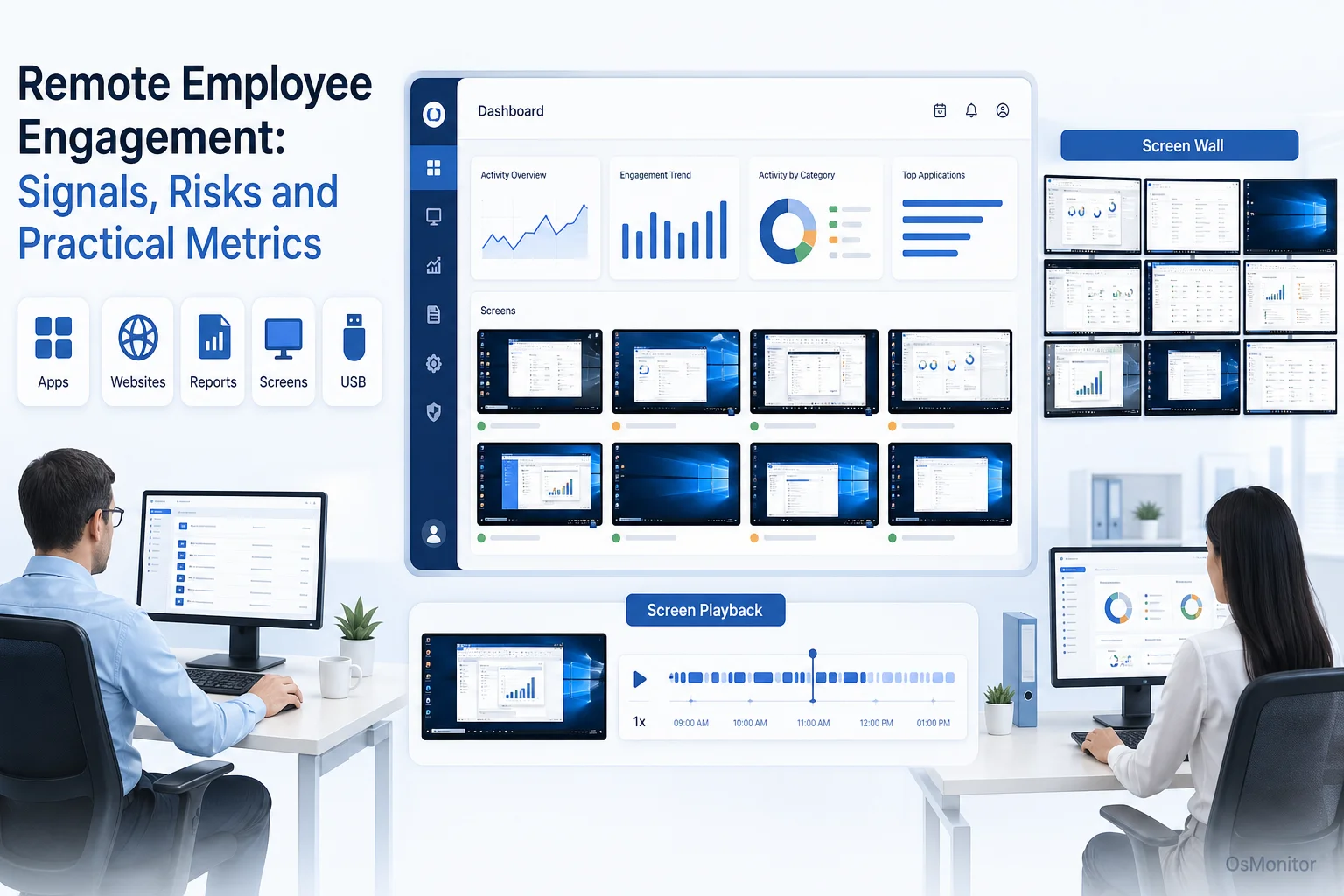
A practical overview of remote employee engagement for workplace computer management.
Understanding Remote Employee Engagement Signals
Remote employee engagement means the level of focus, commitment, connection, and ownership an employee brings to work while working away from the office. It is not just whether someone is online. It is whether they understand the work, use the right tools, communicate when blocked, and stay connected to the team’s goals.
Remote work makes engagement signals less visible. In the office, a manager may notice if someone looks overwhelmed, confused, isolated, or distracted. In a remote setup, those signals may appear only through project delays, weak communication, lower output, or changes in computer activity.
Traditional engagement methods still matter. Surveys and one-on-one meetings can reveal how employees feel. But they are usually periodic and subjective. Computer activity signals can add a practical daily layer, especially for company-owned Windows PCs.
Useful remote employee engagement signals may include:
- Productivity Patterns: Are employees using core business applications regularly?
- Website and App Usage: Are non-work websites or applications becoming a repeated distraction?
- Workload Balance: Are there signs of overload, underuse, or long inactive periods?
- Communication and Collaboration: Are employees using team tools as expected?
- Support Needs: Are technical issues or confusing workflows slowing people down?
- Policy Alignment: Are company computer usage policies being followed consistently?
These signals do not prove engagement or disengagement by themselves. They help managers ask better questions and respond earlier.
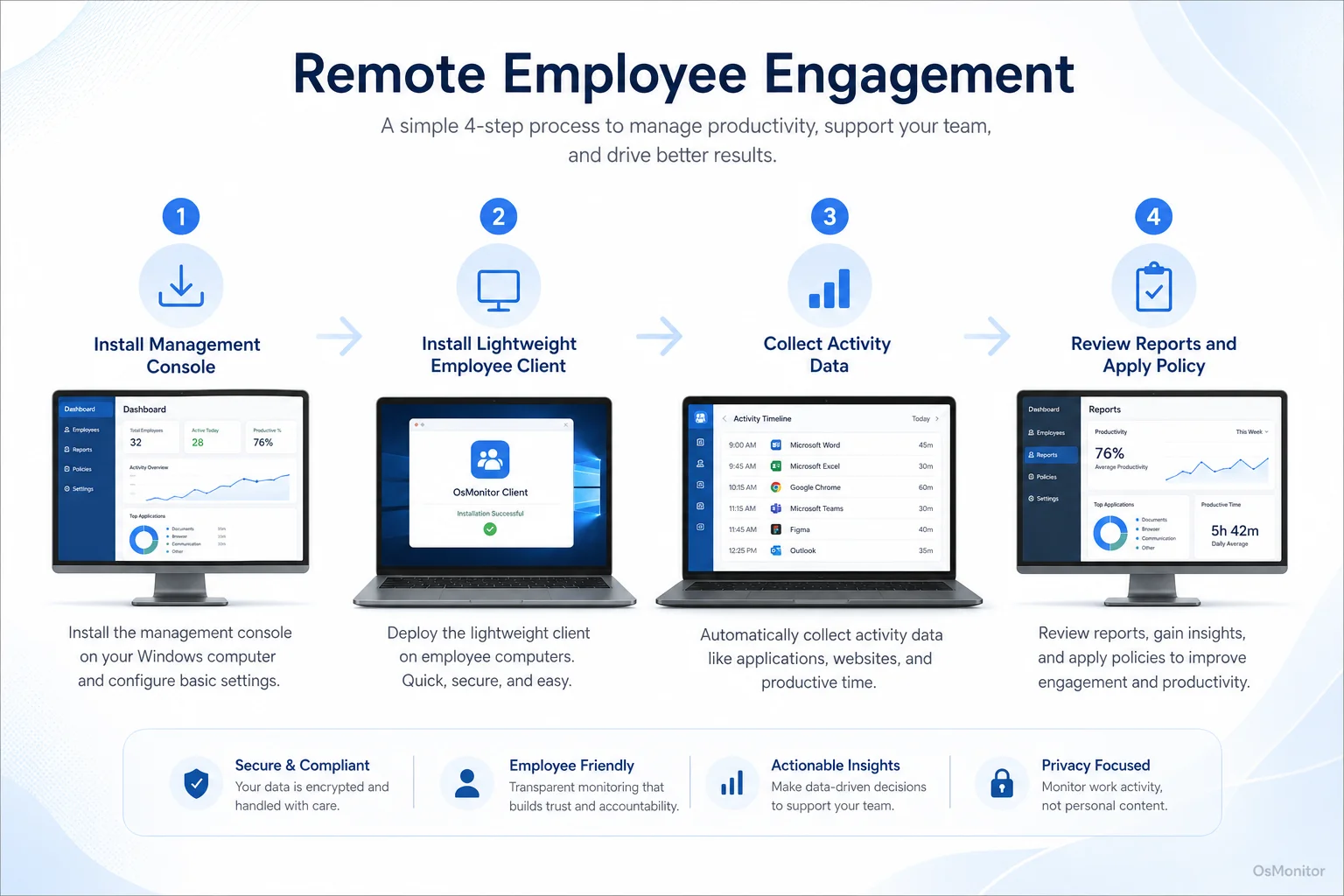
A simple workflow showing how workplace signals can support remote employee engagement.
A Practical Framework for Managing Remote Teams with OsMonitor
OsMonitor is workplace productivity and employee computer activity management software for company-owned Windows PCs. It can support remote employee engagement by helping managers understand computer usage patterns, review productivity reports, provide remote assistance, and apply computer usage policies consistently.
It is not a full HR engagement platform, not a survey tool, and not a complete cybersecurity suite. Its role is more practical: giving managers and IT administrators clearer visibility into how managed Windows computers are being used.
OsMonitor uses a client/server model:
- Management Console: Installed on a manager’s computer, administrator’s PC, or self-managed server. This is where reports are reviewed and policies are configured.
- Lightweight Client: Installed on each employee Windows computer the company wants to manage. The client sends activity records to the management console through the approved network setup.
For remote employees, the company can use VPN or another approved network configuration so remote computers can connect to the management console. This gives managers a centralized view of office and remote computer activity while keeping normal monitoring data under company control.
This approach makes OsMonitor a practical Employee Activity Monitoring Software option for organizations that need operational visibility, productivity reports, and responsible workplace computer management.
Core Features for Enhancing Remote Engagement and Productivity
Remote engagement improves when employees have clear expectations, useful tools, fast support, and fair accountability. OsMonitor supports the computer activity side of that process.
Key Management Capabilities
Live Screen Monitoring: Authorized managers or IT staff can view managed employee screens in a centralized view when support, training, coordination, or activity review is needed. This can provide the kind of general awareness managers normally have in an office, but it should be used transparently and according to company policy.
Application and Website Usage Reports: OsMonitor can generate reports showing which applications and websites are used, and how long they are used. These reports help managers understand work patterns, repeated distractions, software adoption, and department-level activity.
Remote Assistance: IT staff or authorized managers can remotely help an employee troubleshoot computer issues, install approved software, or provide hands-on support. Faster support can reduce frustration and downtime, which directly helps remote employee engagement.
Document and File Tracking: OsMonitor can record file operations such as copying, moving, deleting, and printing on managed computers. This can support internal document policies and help businesses understand how important work files are handled.
Policy-Based Computer Management: Businesses can apply website, application, USB, and device rules according to written company policy. This helps remote and office employees follow the same standards.
Comparing Engagement Measurement Methods
| Method | Data Provided | Frequency | Use Case |
|---|---|---|---|
| Employee Surveys | Sentiment, morale, workload concerns, management feedback | Quarterly or annually | High-level engagement review and culture planning. |
| 1-on-1 Meetings | Personal context, blockers, goals, feedback | Weekly or bi-weekly | Coaching, support, workload review, and relationship building. |
| Computer Activity Data | Application usage, website activity, active time, work patterns | Real-time or daily | Daily operational visibility, productivity review, and proactive support. |
The strongest approach combines all three. Surveys show how people feel. One-on-one meetings explain context. Computer activity records show how work tools are actually being used.
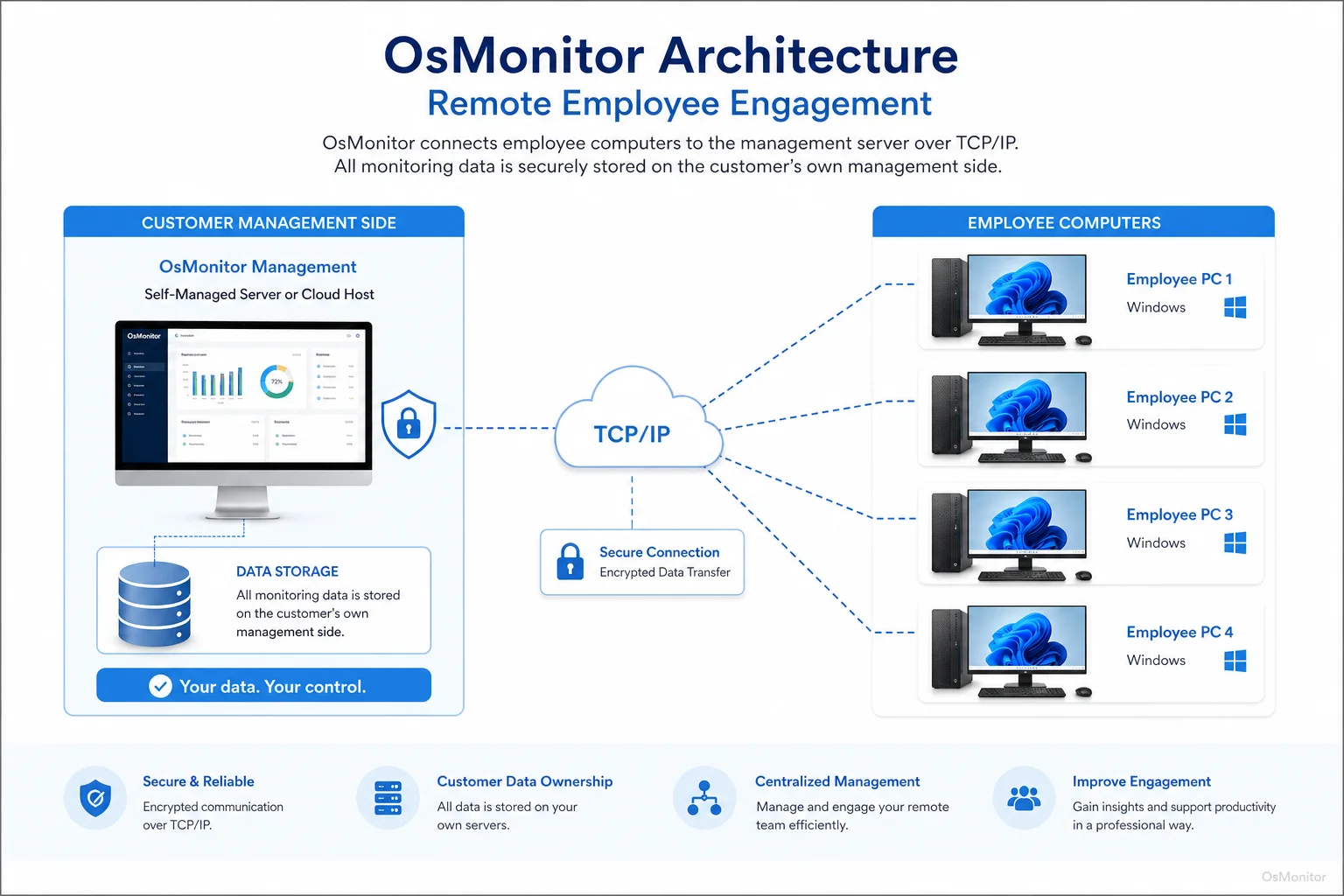
OsMonitor keeps monitoring data under the customer’s control on the management computer or self-managed server.
On-Premise Deployment and Complete Data Control
Remote employee engagement data can be sensitive. It may include website activity, application usage, screen activity, activity timelines, and policy records. Businesses should handle that data carefully.
OsMonitor is designed as On-Premise Employee Monitoring Software. Collected data is stored on the customer’s own management computer or self-managed server. Normal monitoring data is not stored on an OsMonitor vendor cloud.
This model offers several practical benefits for remote teams:
- Data Control: Your company controls where activity records are stored, who can access them, and how long they are retained.
- LAN or VPN Operation: OsMonitor can work inside a local area network or through an approved VPN setup for remote employees.
- Reduced Vendor Cloud Dependence: Normal computer activity records stay under your own control instead of being placed in a third-party cloud dashboard.
- Predictable Costs: OsMonitor uses a one-time purchase model, which can be easier for businesses that want to avoid recurring subscription fees.
- Consistent Management: Office and remote Windows PCs can be reviewed under the same reporting and policy framework.
This is useful for companies that want remote employee engagement insights without giving up control over workplace activity records.
Responsible Use and Legal Considerations
Computer activity data should support remote employees, not damage trust. If employees feel that reports are used unfairly, engagement will get worse, not better.
Before using any remote computer activity management system, businesses should:
- Create a clear written computer and internet usage policy.
- Inform employees that company-owned computers may be managed and reviewed.
- Explain what data is collected, why it is collected, who can review it, and how it will be used.
- Use reports for legitimate business purposes such as productivity review, IT support, policy consistency, and protection of company resources.
- Avoid judging employees based on one website visit, one idle period, or one unusual day.
- Limit report access to authorized managers or IT staff.
- Review activity patterns with role context and workload context.
- Consult qualified legal counsel to ensure compliance with local employment and privacy laws.
OsMonitor is intended for legal business use on company-owned Windows computers. It should be part of a transparent management process that includes communication, clear expectations, and fair support.
It is also important to understand its scope. OsMonitor is a workplace productivity and computer activity management tool. It does not replace antivirus software, firewalls, endpoint protection, HR engagement surveys, or good management.
Frequently Asked Questions (FAQ)
What is remote employee engagement?
Remote employee engagement is the level of focus, commitment, connection, and ownership an employee has while working outside the traditional office. It includes productivity, communication, use of work tools, team connection, and alignment with company goals.
How can managers improve remote employee engagement?
Managers can improve remote employee engagement by setting clear goals, holding regular one-on-one meetings, supporting remote team communication, providing useful tools, resolving IT issues quickly, recognizing good work, and reviewing work patterns with context.
Can computer activity data measure remote employee engagement directly?
No. Computer activity data cannot directly measure motivation or emotional commitment. It can show useful signals such as application usage, website activity, active time, idle time, and changes in work patterns. Managers should use those signals as conversation starters, not final proof.
Is monitoring remote employees legal for businesses?
In many regions, businesses may manage and review activity on company-owned computers for legitimate business purposes when employees have been properly notified and a clear written policy is in place. However, laws vary by country, state, province, and industry. Businesses should consult qualified legal counsel before implementing remote computer activity monitoring.
Does OsMonitor require a client on employee computers?
Yes. OsMonitor uses a client/server model. A lightweight client program must be installed on each employee Windows computer the company wants to manage. The management console collects activity records for authorized review.
Where is OsMonitor monitoring data stored?
OsMonitor stores collected data on the customer’s own management computer or self-managed server. Normal monitoring data is not sent to or stored on an OsMonitor vendor cloud, giving the business direct control over workplace activity records.
Can OsMonitor work without internet in a LAN?
Yes. OsMonitor can work inside a local area network without requiring internet access for its core monitoring, reporting, and management functions. For remote employees, the company can use VPN or another approved network setup so managed computers can connect to the management console.
What Windows versions does OsMonitor support?
OsMonitor supports Windows 7 and later versions, including Windows 10, Windows 11, and Windows Server editions. It supports both 32-bit and 64-bit Windows systems.
Remote employee engagement depends on more than software. It depends on clear goals, useful tools, manager communication, fast support, fair policies, and trust.
Used transparently and responsibly, OsMonitor can help managers support remote teams with application and website reports, screen activity review, remote assistance, policy controls, and on-premise data storage. To see how these features work in a real-world setting, you can Read the Quick Start Guide and explore the software’s capabilities.