Performance Management System vs Employee Monitoring Software
A performance management system can mean two very different things, depending on what a business is trying to fix. HR may think of goal setting, annual reviews, feedback forms, and employee development. A small business owner may have a more immediate problem: employees are spending too much time on games, video sites, entertainment websites, or other non-work browsing during office hours.
Both problems relate to performance, but they need different tools.
If your goal is to run formal reviews, manage objectives, and support career development, a traditional HR performance platform may be the right fit. If your goal is to review website access records, understand application usage, reduce distractions, and manage company-owned Windows computers, you need a more practical computer activity management tool.
This article explains the difference, so you can choose the right system instead of buying software that solves the wrong problem.
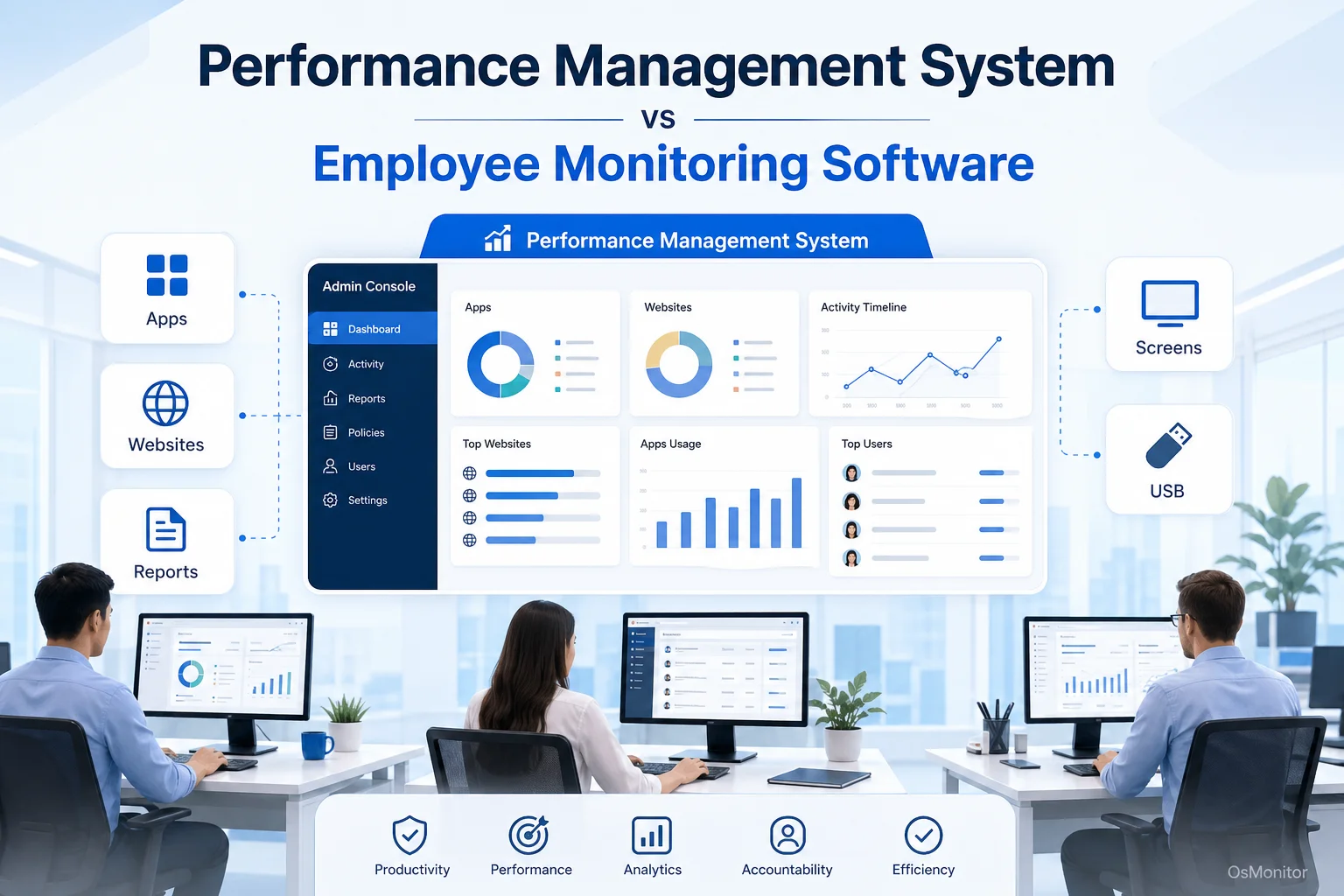
A practical overview of performance management system for workplace computer management.
Key Selection Criteria for Workplace Management Tools
Before comparing tools, start with the business problem. Are you trying to improve formal employee reviews, manage daily computer activity, reduce non-work website use, support IT troubleshooting, or enforce company computer policies?
The right performance management system depends on your answer.
Here are the key factors to review:
Deployment Model: Some systems are cloud-based SaaS platforms. Others are installed on your own management computer or self-managed server. Cloud tools are convenient, while on-premise systems give the business more direct control over data.
Data Ownership: Where are reports, activity records, screenshots, or employee data stored? With a cloud platform, data usually sits on the vendor’s servers. With on-premise software, data stays on your own hardware or self-managed environment.
Operating System Support: If your company uses mostly Windows PCs, dedicated Windows support is important. A tool that works well for web surveys may not help with Windows computer activity management.
Reports and Analytics: A useful system should provide clear reports. For computer activity management, that means application usage, website visits, active time, idle time, department reports, and policy events.
Controls and Policies: Some tools only report data. Others allow managers or IT administrators to apply policies, such as blocking specific websites, limiting applications, or controlling USB devices.
Pricing Clarity: Many HR platforms and SaaS tools charge monthly or annual subscription fees. Some on-premise tools use a one-time license model. For small businesses, predictable pricing can be a major advantage.
The benefits of a performance management system depend on whether the tool matches the actual use case. A great HR review platform will not block distracting websites. A computer monitoring tool will not replace career development conversations or compensation reviews.
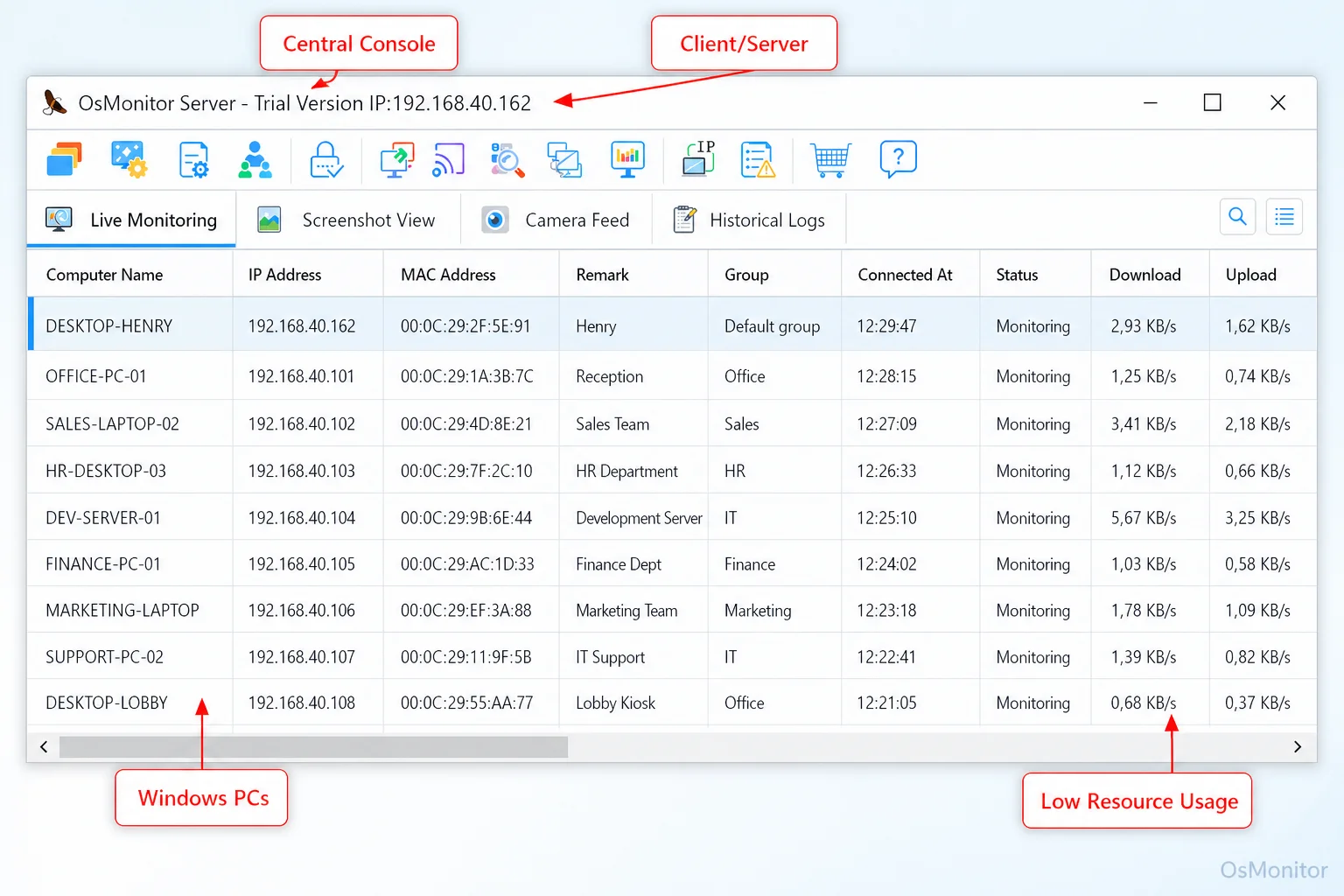
A real-product style screenshot highlighting centralized computer monitoring in OsMonitor.
Comparison of Management Tool Types
| Feature | HR Performance Platform | Time Tracker | Project Management Tool | On-Premise Monitoring |
|---|---|---|---|---|
| Primary Goal | Goal setting, reviews | Billable hours, attendance | Task completion, deadlines | Computer activity management |
| Deployment | Cloud SaaS | Cloud SaaS / On-Premise | Cloud SaaS | On-Premise / Client-Server |
| Data Storage | Vendor’s Cloud | Vendor’s Cloud or Local | Vendor’s Cloud | Customer’s Server |
| Website Blocking | No | No | No | Yes |
| App Usage Logs | No | Limited | No | Yes |
| Data Control | Low | Varies | Low | High |
| Best For | Annual reviews, HR | Freelancers, agencies | Team collaboration | IT/Ops management |
Common Types of Performance and Productivity Tools
The software market uses similar wording for very different products. That is why comparing tool categories is more useful than comparing names alone.
Cloud SaaS HR Platforms: These systems usually handle goal setting, feedback, performance reviews, employee development, and sometimes compensation planning. They are useful for HR teams, but they usually do not provide detailed computer activity records or website blocking.
Time Tracking Software: These tools record working hours, attendance, billable time, and sometimes task time. They are useful for agencies, contractors, and project billing. Some include light app tracking, but they are not usually built for policy-based workplace computer management.
Project Management Tools: Tools like Asana, Jira, Trello, or ClickUp help teams organize work, assign tasks, and track deadlines. They measure project progress, but they do not usually show how employees use company computers during the workday.
On-Premise Computer Monitoring Software: This category focuses on company-owned computer activity. These tools can record website visits, application usage, screen activity, active time, idle time, file activity, and policy events. They may also allow website blocking, application blocking, USB control, remote assistance, and document backup.
For many small businesses, the phrase “performance management system” is really being used to describe the fourth category. The business does not only need a review form. It needs visibility into daily computer usage and a way to manage workplace policies.
Where OsMonitor Fits: On-Premise Computer Monitoring
OsMonitor is workplace productivity and employee computer activity management software for company-owned Windows PCs. It fits into the on-premise computer monitoring category.
It is not a full HR performance platform. It does not manage payroll, compensation, career paths, or annual review workflows. Its role is more practical: helping managers and IT administrators understand how company computers are being used.
OsMonitor can help businesses review:
- Website activity.
- Application usage.
- Active and idle time.
- Screen activity.
- Department-level productivity reports.
- USB and device usage.
- Document activity.
- Policy events.
- Remote assistance needs.
The system uses a client/server model. The management console is installed on a manager’s computer, administrator’s PC, or self-managed server. A lightweight client is installed on each employee Windows computer that the company wants to manage.
This architecture gives the business direct control over its data. Normal monitoring data is stored on the customer’s own management computer or self-managed server, not on an OsMonitor vendor cloud.
That is one of the main performance management system advantages for businesses that care about internal data control, predictable deployment, and on-premise storage.
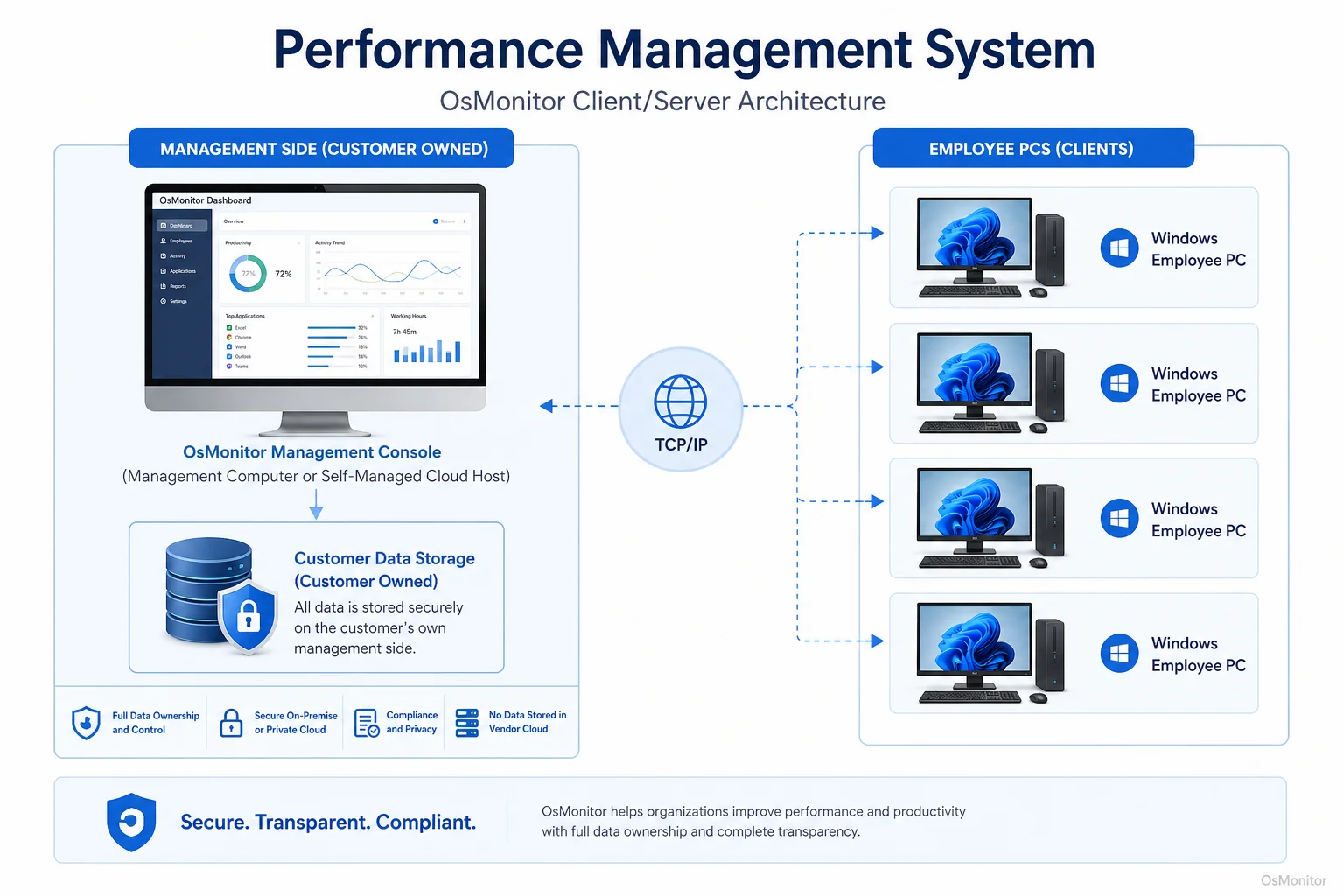
OsMonitor keeps monitoring data under the customer’s control on the management computer or self-managed server.
Core Features of a Practical Performance Management System
For daily workplace productivity, a practical performance management system should provide both visibility and useful controls. Managers need to understand what is happening, but they also need a fair way to apply policy and support employees.
OsMonitor includes several features that support this kind of operational performance management:
Screen Monitoring: Authorized managers or IT staff can view employee screens in real time or review historical screenshots where appropriate. This can support training, troubleshooting, workflow review, and task coordination.
Website and Application Controls: Businesses can block non-work websites or applications according to company policy. This may include entertainment sites, video streaming, games, or unauthorized applications during work hours.
Activity Logs and Reports: The Employee Activity Monitoring Software component provides reports on websites visited, applications used, active time, idle time, and computer activity trends. This helps managers understand work patterns instead of relying only on impressions.
USB and Device Controls: Companies can manage USB drives and other devices according to internal policy, such as blocking access or setting read-only permissions.
Remote Assistance: IT staff or authorized managers can remotely help employees solve computer problems, reducing downtime and support delays.
Document Backup: Selected work documents can be backed up from employee computers to the central server, helping protect important files from accidental loss.
The benefits of a performance management system like this are practical. Managers can review activity patterns, reduce recurring distractions, support IT troubleshooting, protect company resources, and enforce computer usage policies more consistently.
For businesses that prioritize privacy and internal control, an On-Premise Employee Monitoring Software solution can provide a self-contained way to manage these records.
Limitations and Ideal Use Cases
No system should be presented as the answer to every performance problem. OsMonitor is designed for a specific use case: workplace computer activity management on company-owned Windows PCs.
OsMonitor is a strong fit for:
- Companies that mainly use Windows business computers.
- Small and mid-sized businesses that need practical activity reports.
- IT and operations managers who need computer usage policy controls.
- Organizations that want monitoring data stored on their own hardware.
- Businesses that prefer a one-time software purchase over a recurring SaaS subscription.
- Offices that need website blocking, application reports, screen review, USB control, remote assistance, or document backup.
OsMonitor is not designed to replace:
- HR performance review platforms.
- Payroll or benefits software.
- Compensation planning tools.
- Career development systems.
- Project management software.
- Legal advice or management judgment.
A good performance management process still needs clear expectations, regular feedback, fair policies, coaching, and human communication. Computer activity data can support that process, but it should not become the whole process.
Used properly, OsMonitor can help managers move from “I think productivity is down” to “Here are the activity patterns we should review.” That is a much better starting point for a professional conversation.
Frequently Asked Questions (FAQ)
What is a performance management system?
A performance management system is software or a process used to review and improve employee performance. In HR, it often means goal setting, feedback, reviews, and development planning. In workplace computer management, it may mean software that reports website activity, application usage, active time, screen activity, and computer policy events.
What are the benefits of a performance management system?
The benefits of performance management system software depend on the type of tool. HR systems can improve goal setting and review consistency. Computer activity management systems can provide clearer productivity reports, website access records, application usage data, policy controls, and IT support visibility.
How is employee monitoring software different from an HR performance platform?
An HR performance platform focuses on reviews, goals, feedback, development, and HR workflows. Employee monitoring software focuses on computer activity, such as websites visited, applications used, active time, idle time, screen activity, device usage, and policy enforcement on company-owned computers.
Is using a performance management system legal for businesses?
In many regions, businesses may manage and review activity on company-owned computers for legitimate business purposes when employees have been properly notified and a clear policy is in place. However, laws vary by country, state, province, and industry. Businesses should consult qualified legal counsel before implementing computer activity monitoring.
Does OsMonitor require a client on employee computers?
Yes. OsMonitor uses a client/server architecture. The management console runs on one computer or self-managed server, and a lightweight client program must be installed on each employee Windows computer the business wants to manage.
Where is OsMonitor monitoring data stored?
OsMonitor stores collected data on the customer’s own management computer or self-managed server. Normal monitoring data is not sent to an OsMonitor vendor cloud, giving the business direct control over workplace computer activity records.
Can OsMonitor work without internet in a LAN?
Yes. OsMonitor can work inside a local area network without requiring internet access for its core monitoring, reporting, and management functions.
What Windows versions does OsMonitor support?
OsMonitor supports Windows 7 and later versions, including Windows 10, Windows 11, and Windows Server editions. It supports both 32-bit and 64-bit Windows systems.
Choosing the right performance management system starts with the real problem. If you need HR reviews and career development, choose an HR platform. If you need to manage computer use, review website activity, reduce distractions, and keep data under your own control, a dedicated on-premise computer activity management tool may be the better fit.
To get started with OsMonitor, you can download a trial and see how it works in your environment. Read the Quick Start Guide to learn more about the setup process.