Employee Surveillance Software: Legal, Ethical and Practical Considerations
I was recently talking to a small business owner who was incredibly frustrated. He knew his team’s productivity had taken a dive, and he strongly suspected that games, video streaming, and non-stop social media browsing were to blame. But he didn’t want to stand over people’s shoulders all day to prove it. What he needed was a practical way to restrict access to obvious time-wasters and gather objective computer activity records to understand where the hours were going. This scenario perfectly highlights why so many IT admins and business owners start researching employee surveillance software—not to be a dictator, but to find a data-driven way to balance productivity with a healthy work environment.
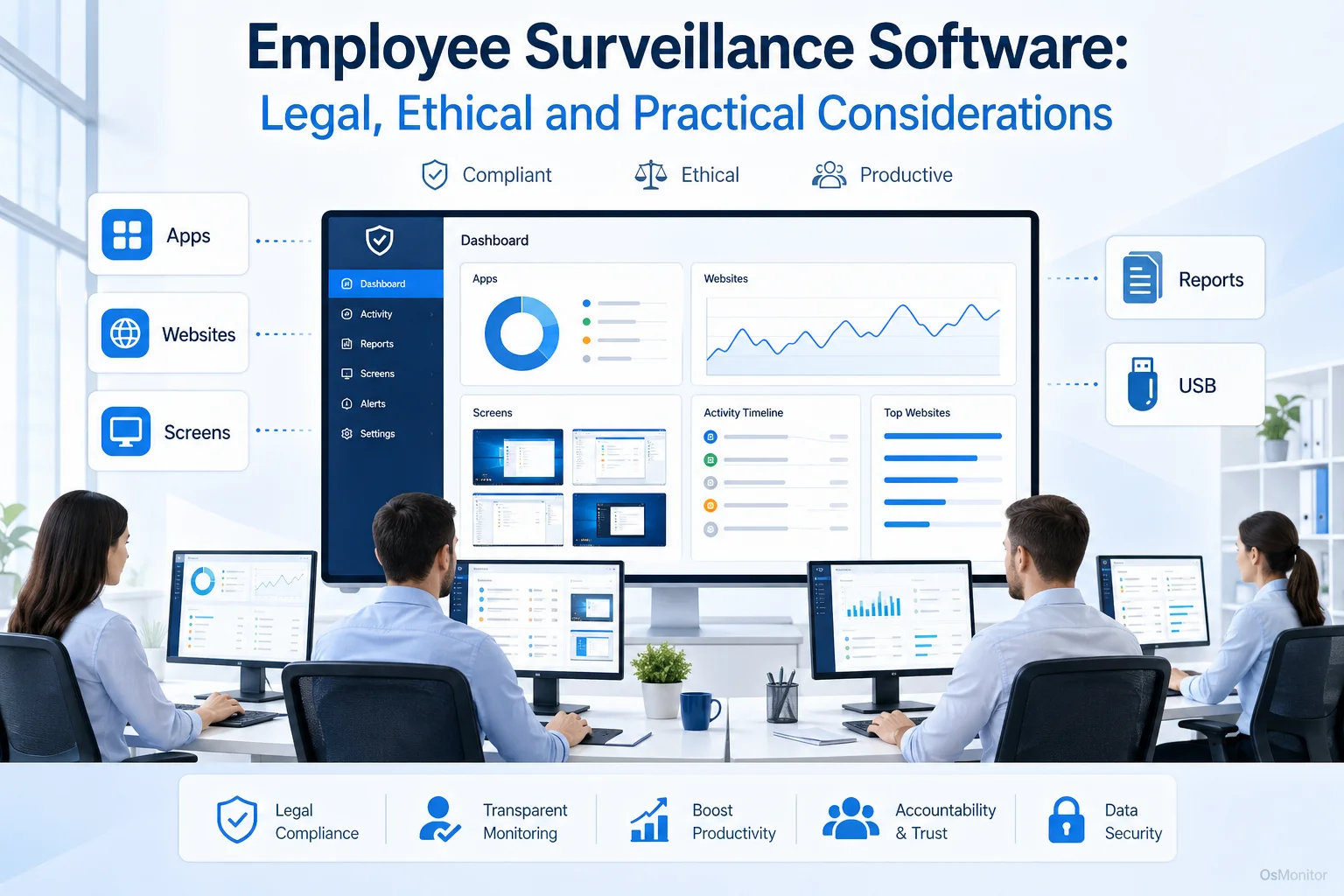
A practical overview of employee surveillance software for workplace computer management.
Understanding Employee Surveillance Software in a Business Context
Let’s clear the air on terminology. The term employee surveillance can sound intimidating, but in a business context, it refers to IT management tools designed to track and administer computer activity on company-owned hardware. The goal is to enforce acceptable use policies and improve operational efficiency. The employee surveillance monitoring software market is flooded with options, ranging from invasive, cloud-based subscriptions to secure, locally hosted IT tools.
OsMonitor is built specifically as a transparent, legal workplace management tool. It is not a massive enterprise cybersecurity appliance or a forensic audit platform. Instead, it provides managers and IT departments with the exact visibility required to:
- Ensure expensive company hardware is actually being used for work.
- Spot workflow bottlenecks and identify where more training might be needed.
- Enforce hard policies regarding which applications and websites are allowed.
- Lock down data transfers via USB drives to protect intellectual property.
- Gather objective, undeniable data for fair performance reviews.
When rolled out transparently and backed by clear HR policies, this software simply becomes part of standard IT administration, rather than a contentious issue.
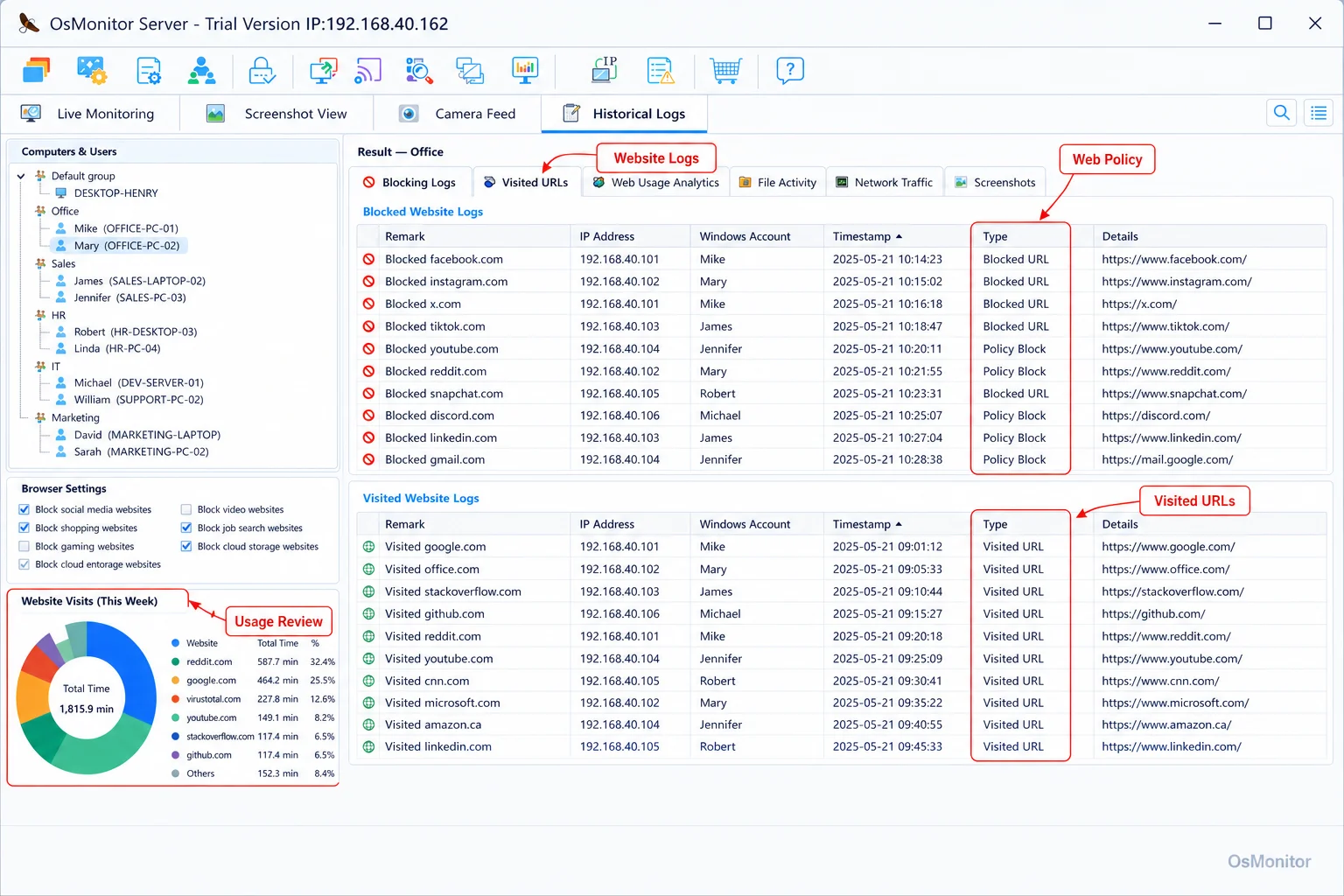
A real-product style screenshot highlighting website activity monitoring in OsMonitor.
How OsMonitor’s Client/Server Architecture Works
OsMonitor doesn’t rely on fragile web dashboards; it utilizes a rock-solid client/server model. This architectural choice is intentional because it prioritizes your data control and network stability above all else.
Here is how the setup works:
- Server/Management Console: You install the server program on a single PC or dedicated server in your office. This becomes your command center where you view activity, set blocking rules, and pull reports.
- Client Program: A tiny, highly efficient client is pushed to every Windows PC you intend to manage. It runs silently in the background, logging activity and enforcing your policies locally.
This architecture means the entire system can operate flawlessly inside a closed Local Area Network (LAN) with zero internet access required. All your sensitive logs stay on your hardware. If you manage remote staff, you can host the server on a self-managed private cloud instance (like AWS) or have users connect via VPN. This makes it an incredibly secure, flexible On-Premise Employee Monitoring Software that bends to your specific infrastructure needs.
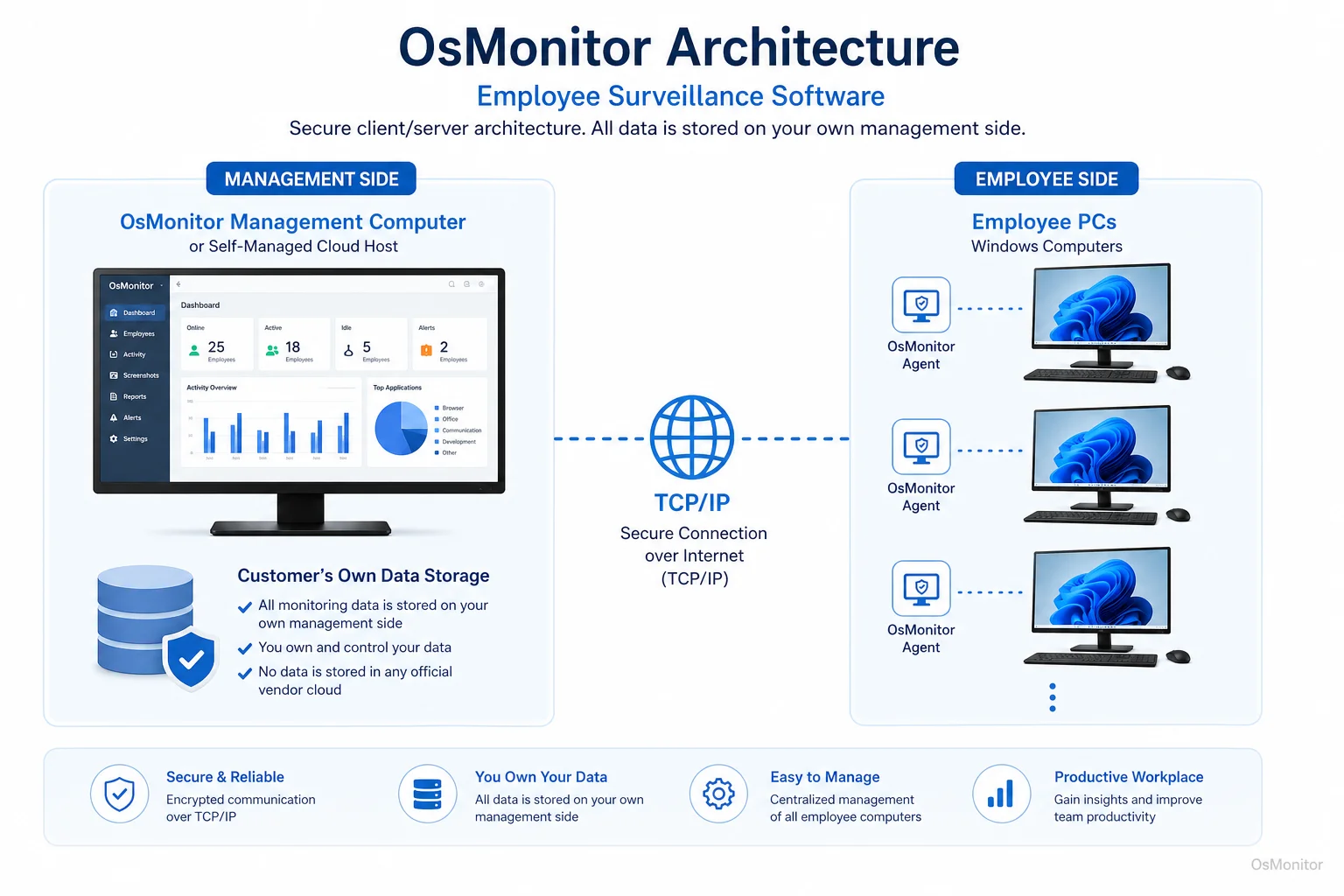
OsMonitor keeps monitoring data under the customer’s control on the management computer or self-managed server.
Core Features for Practical Workplace Management
Effective network administration requires the right tools to manage usage without relying on guesswork. OsMonitor provides a comprehensive toolkit for practical business management.
Website and Application Monitoring
You need to know where the time goes. The software logs exactly which executables are run and which URLs are visited, tracking the active duration for each. This provides undeniable data on productivity. Better yet, managers can actively block specific websites (like streaming or gaming) to kill distractions at the source. This is the cornerstone of any solid Employee Activity Monitoring Software setup.
Screen Monitoring and Playback
For roles where context matters, visual oversight is invaluable. OsMonitor lets managers view a live, multi-screen wall of employee desktops. Furthermore, it records screen history, allowing you to play back past activity like a DVR. This is crucial for QA in call centers, training new hires, or investigating exactly how a workflow error occurred.
Policy Enforcement and Controls
Don’t just watch the problem—fix it. OsMonitor allows administrators to:
- Block Websites: Deploy blacklists to kill access to non-productive or risky sites.
- Block Applications: Stop staff from running unauthorized software, peer-to-peer clients, or games.
- Control USB Devices: Lock down USB ports entirely or force them into read-only mode to stop employees from walking out with sensitive files.
Reporting and Analytics
Raw logs are useless if you can’t read them. The system generates clean, detailed reports on attendance, app usage, and web history for specific users or entire departments. These reports provide the objective data needed to optimize workflows and justify expensive software renewals.
Document Management and Backup
To protect critical work, OsMonitor features a quiet backup tool. It automatically saves copies of specified file types directly from the employee endpoints to your central server, creating a safety net against accidental deletion or sudden hardware failure.
Navigating Legal and Ethical Boundaries
Rolling out this kind of software requires you to navigate ethical and legal boundaries. A responsible implementation is the only way to maintain a positive company culture.
Best Practices for Responsible IT Management:
- Create a Clear Policy: Write a formal Acceptable Use Policy (AUP) that details exactly what is allowed on company hardware.
- Notify Employees: Do not hide the software. Transparency is paramount. Tell your staff that company-owned laptops are monitored for security and productivity.
- Limit Monitoring to Business Needs: Only monitor company-owned devices during business hours. Do not install this on personal (BYOD) hardware.
- Secure the Data: Ensure your management console is password-protected and accessible only to authorized IT or management staff.
Disclaimer: This is technical advice, not legal counsel. Always consult with a local employment lawyer to ensure your policies comply with regional privacy laws.
| Aspect | Responsible Use (Transparent) | Irresponsible Use (Intrusive) |
|---|---|---|
| Policy | A clear, written AUP is distributed to all staff. | No policy exists, or rules are made up as you go. |
| Communication | Staff are explicitly notified that hardware is monitored. | Software is deployed secretly without employee knowledge. |
| Scope | Monitoring is strictly limited to company-owned devices. | Monitoring bleeds onto personal devices or tracks private non-work accounts. |
| Data Access | Logs are secured and restricted to authorized managers. | Data is poorly secured or shared improperly. |
| Purpose | The goal is network security, policy enforcement, and efficiency. | The goal is to micromanage every mouse click and create anxiety. |
Frequently Asked Questions (FAQ)
What is employee surveillance software?
In IT, it is a suite of management tools used to track and administer computer activity on company-owned hardware. The goal is to gather objective data on app and web usage to improve efficiency, enforce IT policies, and secure network assets.
Is employee surveillance software legal for businesses?
In almost all jurisdictions, yes. Employers have the right to monitor the use of their own property. However, privacy laws vary heavily by region. You must establish a written policy, notify your employees, and consult local legal counsel before deployment.
Does OsMonitor require a client on employee computers?
Yes. OsMonitor utilizes a highly secure client/server architecture. A lightweight client application must be installed on each Windows endpoint you intend to manage.
Where is OsMonitor monitoring data stored?
Your data stays with you. All logs and screen recordings are stored exclusively on your own management PC or internal server. We do not use third-party vendor clouds.
Can OsMonitor work without internet in a LAN?
Absolutely. It is fully designed to operate flawlessly within a closed Local Area Network (LAN) without any internet connection, which is vital for high-security environments.
What Windows versions does OsMonitor support?
As a dedicated Windows Employee Monitoring Software, it supports Windows 7, 8, 10, and 11, along with Windows Server editions (both 32-bit and 64-bit).
If you are ready to stop guessing and start managing your network with clear, objective data, OsMonitor provides the tools you need. Read the Quick Start Guide to see how straightforward it is to deploy this solution on your own hardware.