Operational Efficiency: How to Find Wasted Time in Workflows
Operational efficiency becomes a real problem when a business is spending time, money, and effort, but the output still feels lower than it should be. Projects move slowly. Employees look busy. Managers suspect that games, video sites, entertainment websites, or other non-work browsing may be taking too much time during office hours, but they do not have clear records to confirm what is happening.
Without visibility, improving operational efficiency turns into guessing. You may know something is slowing the business down, but you cannot tell whether the issue is distraction, poor workflow, weak tools, unclear policies, or lack of support.
For computer-based teams, a practical first step is to review how company-owned PCs are actually being used. Website activity, application usage, screen activity, active time, idle time, and department reports can help managers find wasted time and improve workplace efficiency with facts instead of assumptions.
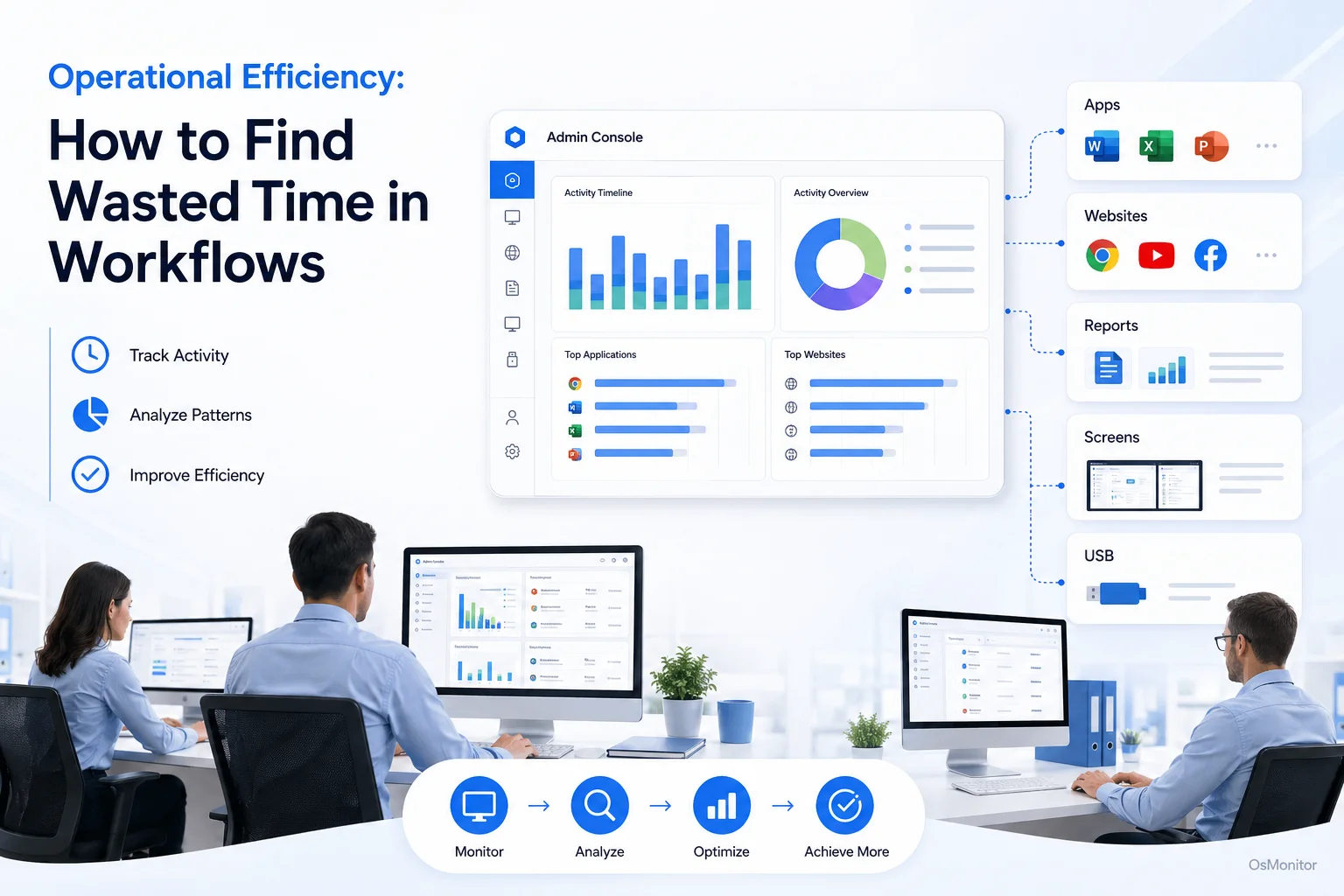
A practical overview of operational efficiency for workplace computer management.
What is Operational Efficiency and Why Does It Matter?
A simple operational efficiency definition is this: operational efficiency means getting better output from the time, money, tools, people, and resources your business already uses.
Some people search for “what is operational efficiency,” “operational efficiency meaning,” or “what is operational efficiency in management.” In plain business language, it means reducing waste while keeping quality high. If a process takes too much time, uses too many tools, creates too many mistakes, or distracts employees from core work, operational efficiency suffers.
Business efficiency is closely related. To define business efficiency, think of it as how well a company turns resources into results. Better business operational efficiency usually means lower waste, better productivity, faster workflows, and more consistent outcomes.
The benefits of improving operational efficiency include:
- Reduced Costs: Less wasted time, fewer repeated tasks, and better use of software and hardware.
- Higher Productivity: Employees can spend more time on useful work and less time fighting poor processes or distractions.
- Better Resource Allocation: Managers can see which tools, teams, and workflows need attention.
- Improved Quality: Cleaner processes often reduce mistakes and rework.
- Stronger Workplace Efficiency: Teams can complete more work with the same resources when bottlenecks are removed.
Another word for operational efficiency may be productivity improvement, process efficiency, workflow optimization, or business efficiency. The wording may change, but the goal is the same: make the business run with less waste and better results.
To enhance operational efficiency, managers need visibility into daily work. That is where objective data from Employee Activity Monitoring Software can help.
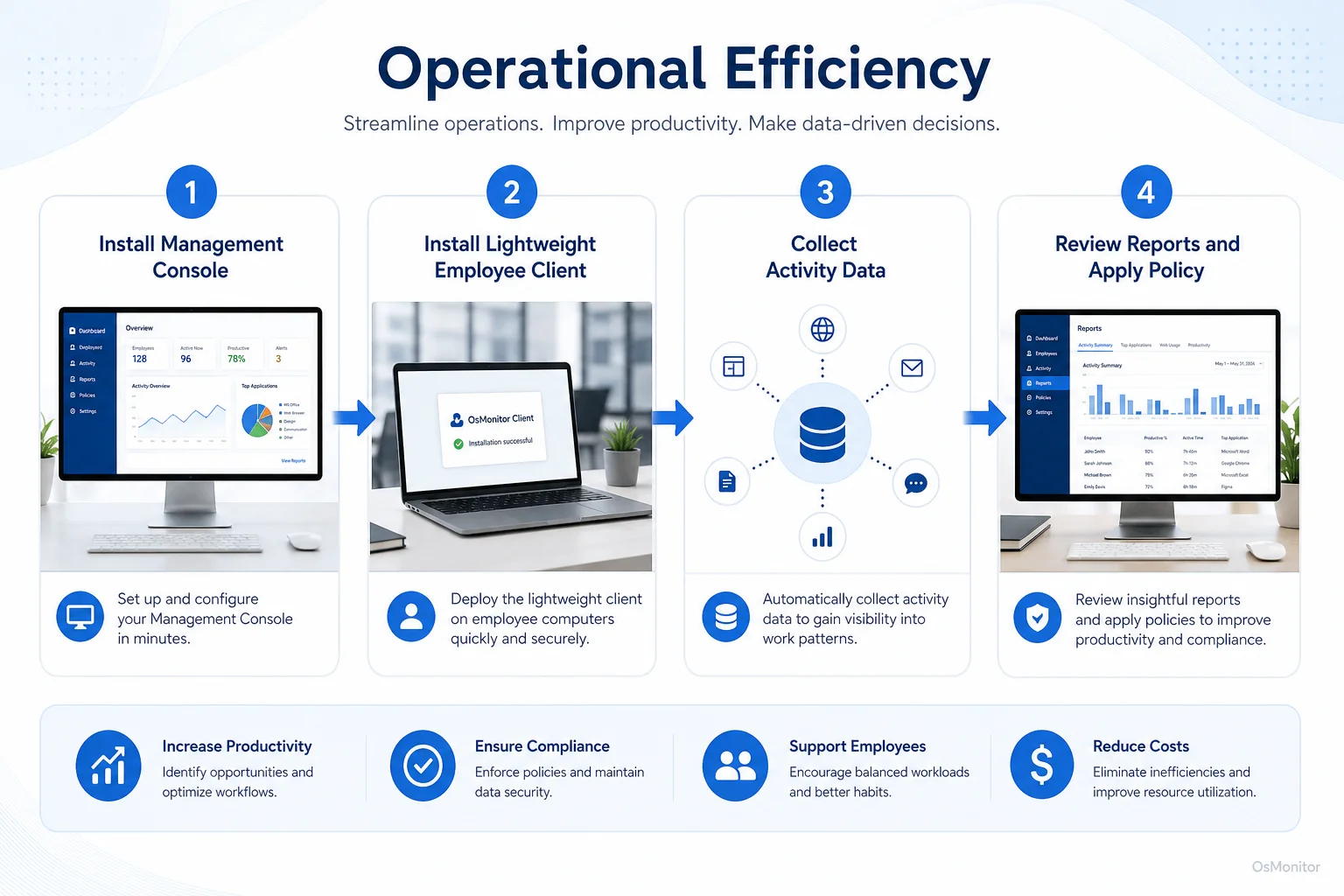
A simple workflow showing how workplace signals can support operational efficiency.
Strategies to Enhance Operational Efficiency with OsMonitor
OsMonitor is workplace productivity and employee computer activity management software for company-owned Windows PCs. It helps managers understand computer usage patterns, apply workplace policies, review productivity reports, and identify possible workflow problems.
It is not a full enterprise security platform, not a formal audit system, and not a replacement for good management. Its role is more focused: giving businesses practical activity records that can support operational efficiency strategies.
Here are several ways OsMonitor can help improve business efficiency.
1. Identify and Measure Wasted Time
You cannot fix wasted time if you cannot see where it goes. OsMonitor records application usage and website activity, helping managers understand how much time is spent in business tools compared with non-work websites or applications.
This creates a baseline for measuring operational efficiency. For example, reports may show that a department spends most of the day in CRM, accounting, design, ticketing, or communication tools. That may support a positive productivity review. Reports may also show repeated time spent on entertainment sites or unrelated applications during core hours, which may point to a policy or workload problem.
Useful operational efficiency metrics may include:
- Time spent in core business applications.
- Time spent on non-work websites.
- Active time compared with idle time.
- Department-level application usage.
- Bandwidth usage by computer.
- Policy violation counts.
- Repeated workflow delays or tool switching.
These metrics give managers a clearer starting point for improving operational efficiency.
2. Set Clear Workplace Policies
Once managers understand the activity patterns, they can set clearer rules. OsMonitor can block specific websites and applications according to company policy. This may include gaming sites, video streaming sites, entertainment websites, or unauthorized applications during work hours.
Policy controls are not only about restriction. They help make expectations consistent. If one manager allows certain activity and another manager does not, employees become confused. A written policy supported by software rules can improve fairness and reduce repeated distractions.
This is one practical way to increase business efficiency without relying on reminders alone.
3. Analyze Workflow Bottlenecks
Operational efficiency is not only about reducing non-work browsing. Sometimes the real problem is the workflow itself.
For example:
- Employees may spend too much time switching between several tools.
- A department may rely on manual copy-and-paste work.
- A new application may be underused because employees do not understand it.
- IT issues may keep employees idle or blocked.
- One team may spend far more time in administrative software than expected.
Activity reports can help managers find these patterns. If employees are constantly moving between the same three applications, the issue may be poor integration. If a tool is rarely used, the business may need training or a better solution.
These are practical examples of operational efficiency in daily office work.
4. Provide Targeted Support
Improving operational efficiency should not mean blaming employees for every delay. Activity data can also show where support is needed.
If a person spends long periods in the same application but output is low, they may need training. If idle time rises after a software change, there may be a technical issue. If several employees avoid the same tool, the process may be poorly designed.
A practical Computer Monitoring Software solution can give managers enough context to ask better questions and provide support instead of reacting blindly.
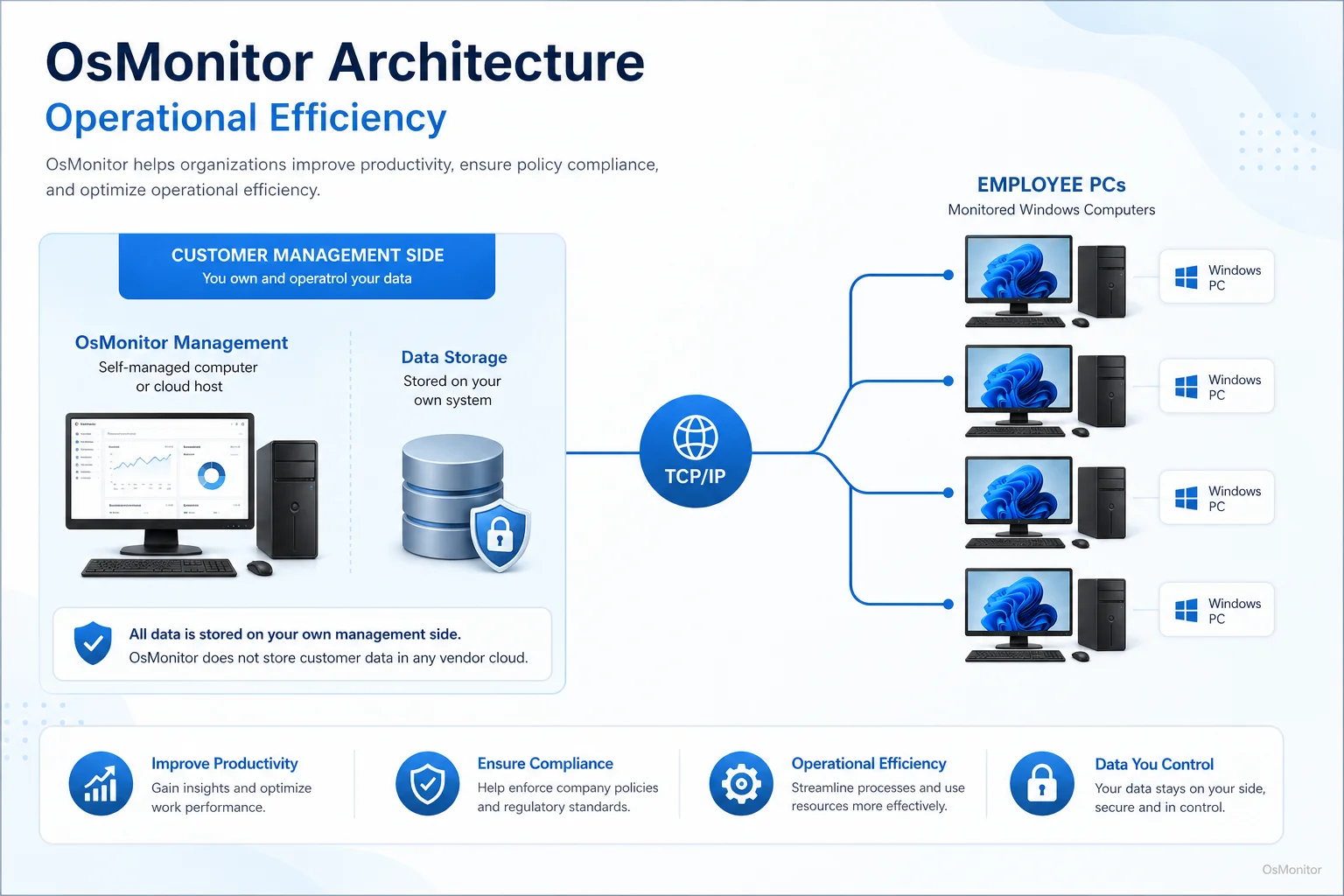
OsMonitor keeps monitoring data under the customer’s control on the management computer or self-managed server.
How OsMonitor’s On-Premise Architecture Works
OsMonitor uses a client/server architecture. This model is useful for businesses that want workplace activity records but prefer to keep data under their own control.
The system has two main parts:
Server or Management Console: This is installed on a manager’s computer, administrator’s PC, or self-managed server. Managers use it to configure settings, review reports, apply policies, and manage computers.
Client Program: A lightweight client is installed on each employee Windows computer that the business wants to manage. The client collects activity records and sends them to the management console through the company network.
The key advantage is data control. OsMonitor stores collected data on the customer’s own management computer or self-managed server. Normal activity data is not stored on an OsMonitor vendor cloud.
OsMonitor can also work inside a local area network without requiring internet access for core monitoring and reporting functions. For businesses with strict internal data policies, this can be an important part of an operational efficiency strategy.
Practical Use Cases for Improving Workplace Efficiency
Operational efficiency looks different in every business. But the basic idea is the same: find waste, understand the cause, and improve the workflow.
| Common Time Waster | OsMonitor Solution | Impact on Operational Efficiency |
|---|---|---|
| Excessive social media, video site, or entertainment website use | Website filtering and time tracking | Reduces distractions and helps recover productive work time. |
| Unauthorized software installation | Application blocking | Reduces resource drain and helps keep computers aligned with company policy. |
| Manual process bottlenecks | Activity reports and usage analysis | Helps identify inefficient workflows that need better tools or training. |
| Unclear task focus | Screen activity review with employee notice | Provides context for daily work patterns, support, and productivity review. |
| Misuse of company resources | USB device control | Helps protect data and reduce non-work file transfers. |
Operational Efficiency in Retail and Construction
Operational efficiency in retail often depends on scheduling, inventory, point-of-sale systems, customer service, and back-office administration. Even if front-line work happens in stores, the support teams still rely on computers for accounting, purchasing, reporting, and communication.
Operational efficiency in construction also depends heavily on back-office work. Project managers, estimators, accountants, and coordinators use computers for schedules, bids, procurement, drawings, documents, and client communication. If administrative computer time is wasted, field operations can also be affected.
OsMonitor can help these businesses review how office computers are used, especially for administrative and support teams.
Operational Efficiency in Manufacturing
Operational efficiency in manufacturing is often associated with production lines, equipment, inventory, and quality control. But office and back-office computer work still matters. Planning, procurement, shipping, accounting, HR, and customer service all affect manufacturing performance.
Computer usage reports can help managers find workflow delays, software underuse, or non-work activity that reduces support-team efficiency.
Small and Medium Businesses
For SMBs, every hour matters. A small team cannot easily absorb wasted time, repeated IT delays, or unclear work habits.
OsMonitor provides a practical business efficiency solution for Windows-based offices. It helps business owners review computer usage, set policies, and understand where work time is going without requiring a large IT department.
Call Centers and Offices
In call centers and office teams, workplace efficiency often depends on focus and consistency. Supervisors may need to know whether employees are using CRM, ticketing tools, communication software, or other approved systems properly.
Activity reports can help managers identify strong work patterns, recurring distractions, and training opportunities.
FAQ: Understanding Operational Efficiency
What is operational efficiency?
Operational efficiency means using time, money, people, tools, and resources in a way that produces better results with less waste. In a computer-based workplace, it may involve reducing distractions, improving workflows, using software more effectively, and reviewing productivity patterns.
What is the definition of operational efficiency in management?
In management, operational efficiency refers to improving business processes so the company can produce goods or services with less wasted time, cost, effort, or resources while maintaining quality. It includes workflow review, resource allocation, performance measurement, and process improvement.
How can a business improve operational efficiency?
A business can improve operational efficiency by identifying wasted time, simplifying workflows, training employees, removing unnecessary steps, setting clear policies, improving IT support, reviewing software usage, and measuring operational efficiency with practical data.
What are examples of operational efficiency?
Examples of operational efficiency include reducing time spent on non-work websites, automating manual reporting, improving software training, reducing repeated data entry, speeding up IT support, controlling bandwidth-heavy non-work activity, and improving document workflows.
How can companies measure operational efficiency?
Companies can measure operational efficiency with metrics such as output per labor hour, task completion time, software usage, active time, idle time, error rates, rework rates, bandwidth usage, project delay frequency, and policy compliance records. The right metrics depend on the business process being reviewed.
Is it legal to use software to improve workplace efficiency?
In many regions, businesses may manage and review activity on company-owned computers for legitimate business purposes when employees have been properly notified and a clear policy is in place. However, laws vary by country, state, province, and industry. Businesses should consult qualified legal counsel before implementing computer activity monitoring software.
Does OsMonitor require software installation on employee computers?
Yes. OsMonitor uses a client/server model. A lightweight client must be installed on each employee Windows computer that the business wants to manage. The central management console is installed on a manager’s computer or self-managed server.
Where is the monitoring data from OsMonitor stored?
OsMonitor stores collected data on the customer’s own management computer or self-managed server. Normal activity records are not stored on an OsMonitor vendor cloud, giving the business direct control over workplace computer activity data.
Can OsMonitor function in a local network without an internet connection?
Yes. OsMonitor can work inside a local area network without requiring internet access for its core monitoring, reporting, and management functions.
What versions of Windows are compatible with OsMonitor?
OsMonitor supports Windows 7 and later versions, including Windows 10, Windows 11, and Windows Server editions. It supports both 32-bit and 64-bit Windows systems.
Operational efficiency is not about squeezing more work out of people without context. It is about finding waste, improving workflows, using tools better, and helping employees stay focused on useful work.
Used transparently and responsibly, OsMonitor can help businesses improve workforce operational efficiency with application usage reports, website activity records, screen activity review, policy controls, remote assistance, and on-premise data storage. To learn more about setting up OsMonitor for your team, Read the Quick Start Guide.