How to Measure Employee Engagement With Surveys and Work Signals
When managers ask how to measure employee engagement, they usually want more than a survey score. They want to understand whether employees are focused, motivated, supported, and actually connected to the work.
For a small business, the warning signs may be very practical. Projects slow down. Communication becomes weaker. More work time goes into games, video sites, entertainment websites, social media, or other non-work browsing during office hours. The immediate concern is productivity, but the deeper question is engagement.
To measure employee engagement properly, managers need both sides of the picture: what employees say and what work patterns show. Surveys and one-on-one conversations explain feelings and opinions. Computer activity records can show practical signals such as application usage, website activity, active time, idle time, and changes in work habits.
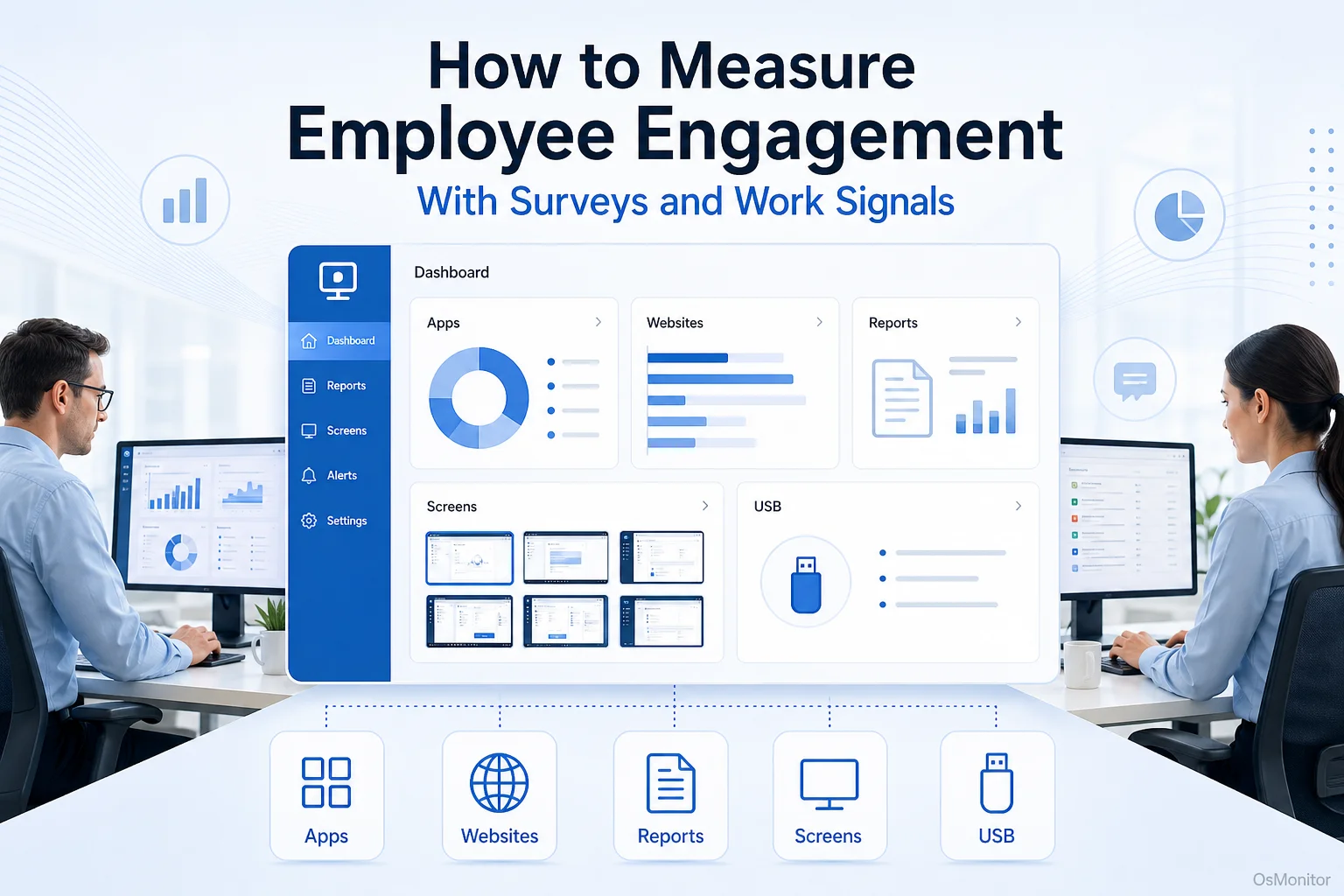
A practical overview of how to measure employee engagement for workplace computer management.
Why Traditional Methods Only Tell Part of the Story
Surveys are still one of the most common ways to measure employee engagement. They can ask employees about motivation, manager support, communication, workload, career growth, recognition, and company culture.
That matters. Employees know things that software cannot show. A survey may reveal poor management communication, lack of recognition, unclear priorities, burnout, or frustration with company tools.
But surveys also have limits:
- Point-in-Time Data: A survey captures how employees feel at one moment. It may not reflect normal daily work patterns.
- Survey Fatigue: If employees are asked too often, responses may become rushed or less thoughtful.
- Response Bias: Some employees may avoid honest answers if they worry about confidentiality.
- Missing Behavior Context: Surveys can show that people feel distracted or disengaged, but they do not show how work time is actually being used.
- Delayed Action: By the time survey results are reviewed, the problem may already have affected productivity.
This is why measuring employee engagement should not depend on surveys alone. Work signals can add useful context. For computer-based teams, those signals may include website activity, application usage, active and idle time, collaboration tool usage, and changes in activity patterns over time.
The best approach is not “survey data or computer activity data.” It is both, used carefully and transparently.
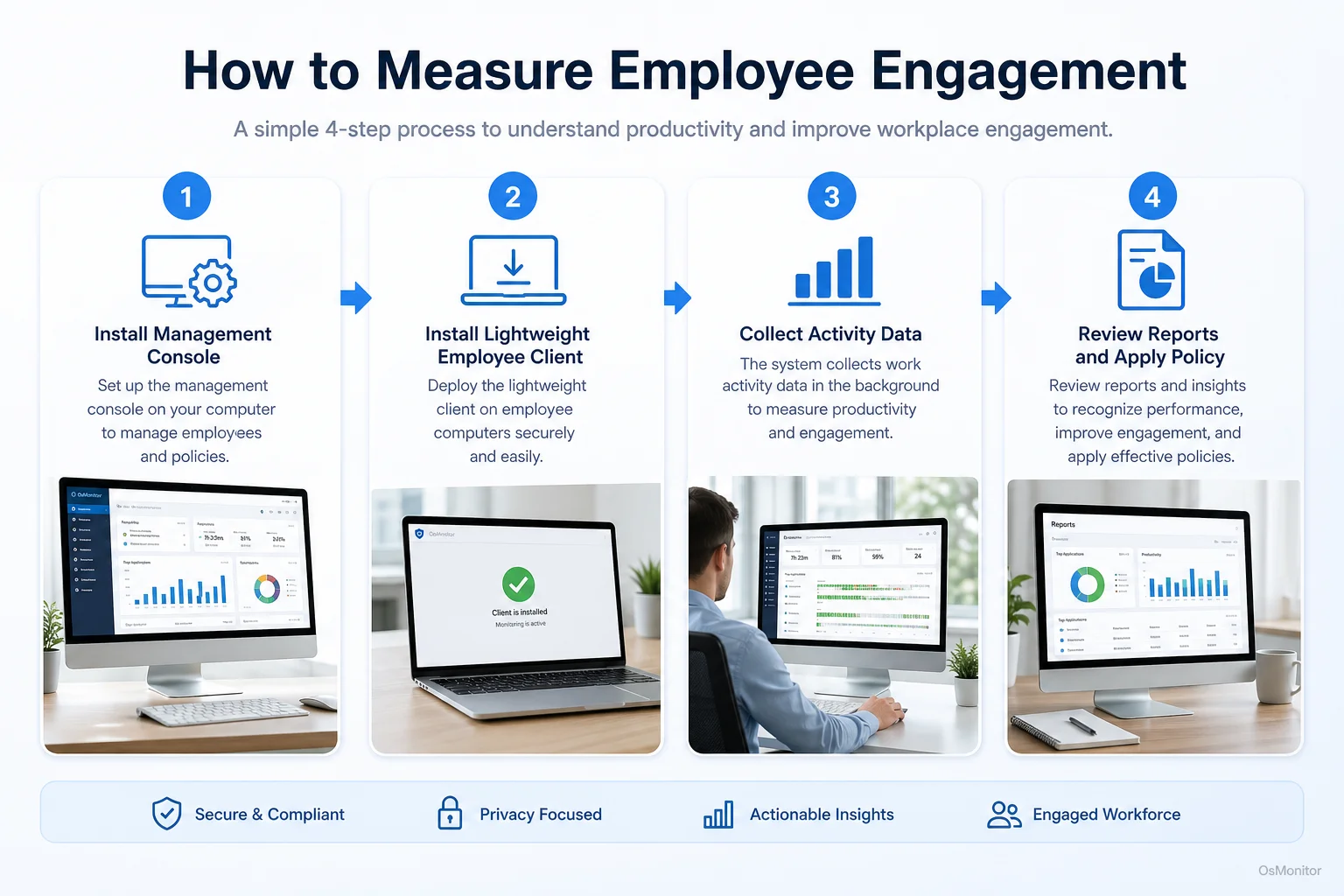
A simple workflow showing how workplace signals can support how to measure employee engagement.
Key Metrics to Measure Employee Engagement from Work Signals
When using work signals to measure employee engagement, the goal is to look for patterns. One slow afternoon, one idle period, or one website visit does not mean much by itself. Repeated trends over several weeks are more useful.
Workplace productivity and employee computer activity management software can help collect these signals from company-owned computers.
Application and Website Usage
Application and website usage is one of the clearest work signals for computer-based teams. It can show whether employees are spending time in tools that match their roles.
For example:
- A sales employee should usually spend meaningful time in CRM, email, communication tools, and customer-related platforms.
- An accountant may spend much of the day in accounting software, spreadsheets, and document systems.
- A support agent may use ticketing software, knowledge bases, chat tools, and remote support systems.
- A designer or engineer may spend most active time in specialized professional software.
If activity shifts away from core tools and toward unrelated websites, that may suggest distraction, unclear priorities, underuse, disengagement, or burnout. It is not proof. It is a signal worth reviewing.
Useful application and website metrics include:
- Time spent in core business applications.
- Time spent on work-related websites.
- Time spent on non-work websites.
- Frequency of switching between unrelated tools.
- Changes in core application usage over time.
- Department-level differences in application and website patterns.
An Employee Activity Monitoring Software solution can generate reports that make these trends easier to review.
Active vs. Idle Time
Active time and idle time can help managers understand general computer activity patterns. Active time usually means keyboard or mouse activity. Idle time means no interaction with the computer for a period.
This metric must be used carefully. Idle time does not always mean low engagement. Employees may be in meetings, on phone calls, reading printed documents, thinking through a problem, or doing work away from the computer.
Still, repeated patterns can be useful. Consistently high idle time during core work hours may suggest unclear tasks, blocked work, low workload, lack of focus, or a need for manager support.
Work Session Patterns
Work session patterns can show when employees start work, stop work, and how activity flows through the day.
Useful signals include:
- Sudden changes in start or end times.
- Long unexplained gaps during core hours.
- Activity that becomes fragmented or inconsistent.
- Heavy after-hours activity that may suggest overload.
- A gradual drop in work-related activity compared with earlier weeks.
Again, context matters. Flexible schedules may be normal for some teams. A remote worker may work in blocks. A parent may shift hours with manager approval. The value comes from comparing patterns with expectations and role requirements.
Comparing Engagement Measurement Methods
| Method | Pros | Cons | Best For |
|---|---|---|---|
| Employee Surveys | Gathers direct feedback about motivation, culture, workload, and management. Anonymous options may encourage honesty. | Point-in-time data. Can suffer from survey fatigue or response bias. Does not show actual daily work patterns. | Understanding employee sentiment, satisfaction, and workplace concerns. |
| One-on-One Meetings | Allows personal discussion, coaching, and context. Builds trust when managers listen well. | Time-consuming. Quality depends heavily on the manager’s skill and consistency. | Understanding individual concerns, workload, growth goals, and support needs. |
| Work Signal Analysis | Provides continuous, objective activity patterns from company-owned computers. Helps validate or clarify survey results. | Can be misread without context. Requires transparency, policy, and responsible use. | Identifying productivity patterns, digital workflow issues, policy concerns, and support needs. |
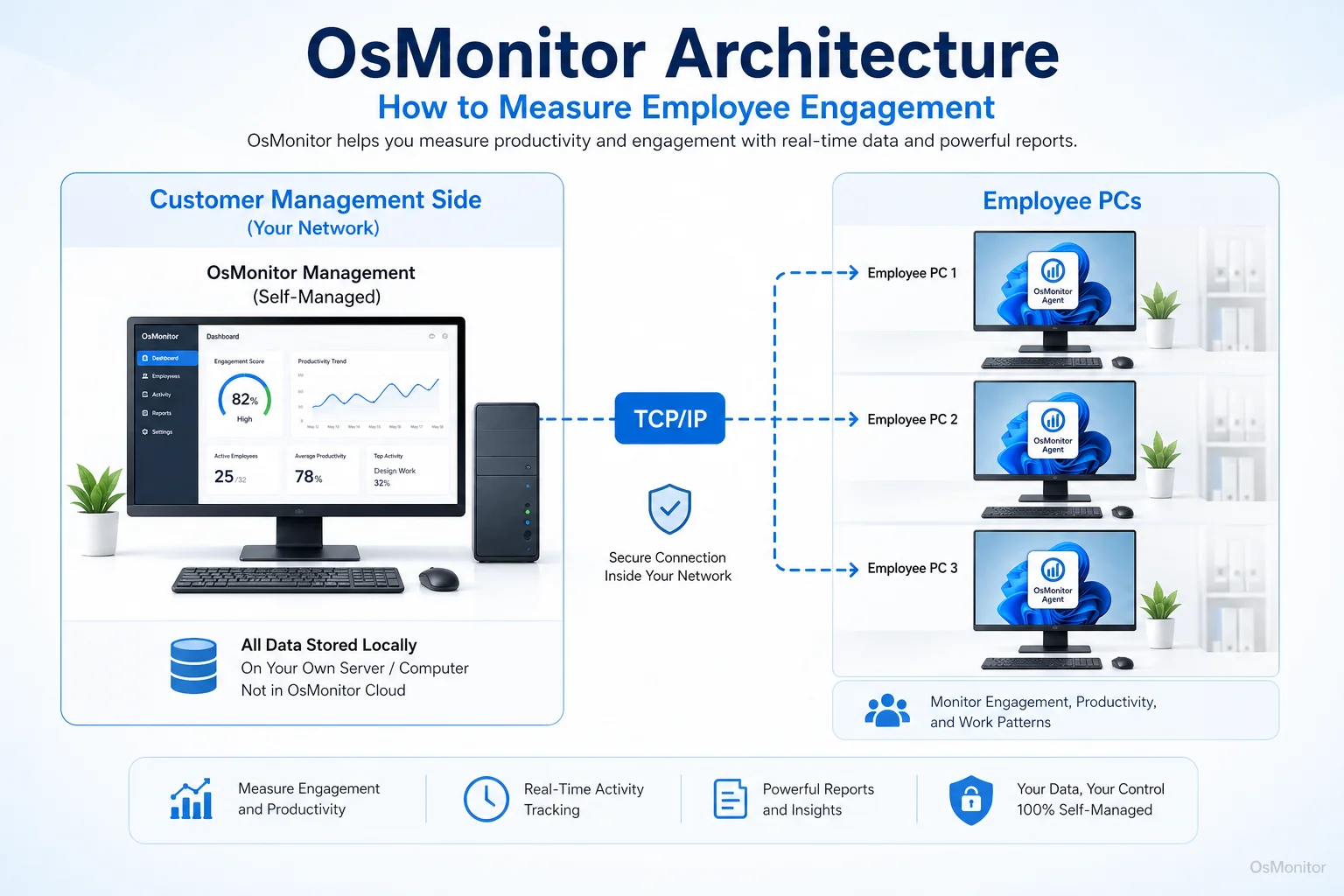
OsMonitor keeps monitoring data under the customer’s control on the management computer or self-managed server.
How to Measure Employee Engagement Without Surveys
Some businesses ask how to measure employee engagement without surveys because they want more objective or continuous signals. That is possible, but it should be done carefully. Without employee feedback, managers may see behavior but miss the reason behind it.
A practical approach looks like this:
Establish a Baseline: Review normal activity patterns for each role or department. A developer, salesperson, accountant, support agent, and designer will not have the same computer usage profile.
Identify Meaningful Changes: Look for trends, not single events. A sharp drop in core tool usage, repeated non-work browsing, or more idle time than usual may deserve attention.
Compare Signals with Outcomes: Activity data should be compared with real business results. Are projects on time? Is work quality strong? Are customers satisfied? Are deadlines slipping?
Review Team-Level Patterns: If an entire department shows lower activity in core tools, the issue may be workload, unclear priorities, poor software, weak process design, or low morale.
Use Data to Start Conversations: Reports should help managers ask better questions. For example: “I noticed the team is spending less time in the CRM this month. Did the workflow change, or is something making the tool harder to use?”
Avoid Oversimplified Scores: Engagement is not just active time or app usage. A person can be active but disengaged, or quiet but highly productive. Use several signals together.
Useful metrics to measure employee engagement without surveys may include:
- Core application usage.
- Work-related website usage.
- Non-work website trends.
- Active and idle time.
- Collaboration tool usage.
- Activity consistency.
- Project tool activity.
- Document creation and file activity.
- Policy event trends.
- Output quality and deadlines.
You can learn more about relevant data points in Employee Engagement Metrics: What to Track and What to Avoid.
The Importance of Transparency and Legal Use
Measuring employee engagement with computer activity data requires trust. Employees should understand what data is collected, why it is collected, who can review it, and how it will be used.
OsMonitor is designed for legal business use on company-owned Windows computers. It supports transparent workplace computer management, productivity review, IT support, and policy-based computer management.
Best practices include:
- Create a clear written computer and internet usage policy.
- Inform employees that company-owned computers may be managed and reviewed.
- Explain what data is collected and why.
- Use reports to improve productivity, support employees, and apply policies fairly.
- Limit report access to authorized managers or IT staff.
- Review patterns with context instead of judging isolated events.
- Avoid using activity data as the only measure of engagement.
- Consult qualified legal counsel to ensure compliance with local employment and privacy laws.
OsMonitor stores monitoring data on the customer’s own management computer or self-managed server. As an On-Premise Employee Monitoring Software, it helps businesses keep normal activity records under their own control instead of storing them on a vendor-controlled cloud.
Frequently Asked Questions (FAQ)
What does it mean to measure employee engagement?
Measuring employee engagement means evaluating how connected, motivated, focused, and committed employees are to their work and the organization. This can include surveys, one-on-one feedback, retention trends, productivity patterns, and computer activity signals.
How do I measure employee engagement in a small business?
Start with simple methods: short surveys, regular one-on-one meetings, retention trends, work quality, project progress, and basic computer activity reports. For company-owned Windows PCs, activity records can show application usage, website activity, active time, idle time, and changes in work patterns.
What are common metrics to measure employee engagement?
Common metrics include survey scores, eNPS, retention rate, absenteeism, participation in feedback programs, productivity trends, collaboration activity, core application usage, website activity, active and idle time, and project completion quality.
How can you measure employee engagement without surveys?
You can measure employee engagement without surveys by reviewing work signals such as application usage, website activity, active time, collaboration tool usage, project progress, retention trends, absenteeism, and manager observations. However, without direct employee feedback, the data may miss important context.
Is measuring employee engagement with software legal?
In many regions, businesses may manage and review activity on company-owned computers for legitimate business purposes when employees have been properly notified and a clear policy is in place. However, laws vary by country, state, province, and industry. Businesses should consult qualified legal counsel before implementing computer activity monitoring.
Does OsMonitor require a client on employee computers?
Yes. OsMonitor uses a client/server architecture. The management console runs on a manager’s computer or self-managed server, and a lightweight client program is installed on each company-owned Windows PC the business wants to manage.
Where is OsMonitor monitoring data stored?
OsMonitor stores collected data on your own management computer or self-managed server. Normal monitoring data is not stored on an OsMonitor vendor cloud, giving your business direct control over workplace activity records.
Can OsMonitor work without an internet connection?
Yes. OsMonitor can work entirely inside a local area network without requiring internet access for its core monitoring, reporting, and management functions.
What Windows versions does OsMonitor support?
OsMonitor supports Windows 7 and later versions, including Windows 10, Windows 11, and Windows Server editions. It supports both 32-bit and 64-bit systems.
A balanced approach gives the clearest answer. Surveys tell you how employees feel. One-on-one meetings explain context. Work signals show how daily computer activity is changing.
Used transparently and responsibly, OsMonitor can help businesses measure employee engagement with practical activity reports, website and application records, policy controls, and customer-controlled data storage. To see how OsMonitor can help you gather objective work signals, Read the Quick Start Guide to learn more about its features and setup.