Employee Engagement Metrics: What to Track and What to Avoid
Employee engagement metrics are useful when managers need to understand why work is slowing down, not just whether employees look busy. In a small business, one early warning sign may be more time spent on games, video sites, entertainment websites, social media, or other non-work browsing during office hours.
That does not automatically mean employees are disengaged. It may point to unclear priorities, light workload, poor tools, burnout, weak policies, or simple distraction. But without reliable employee engagement data, managers are left guessing.
The right approach is to track practical work-related signals, review them with context, and avoid collecting data that feels unnecessary or too personal.
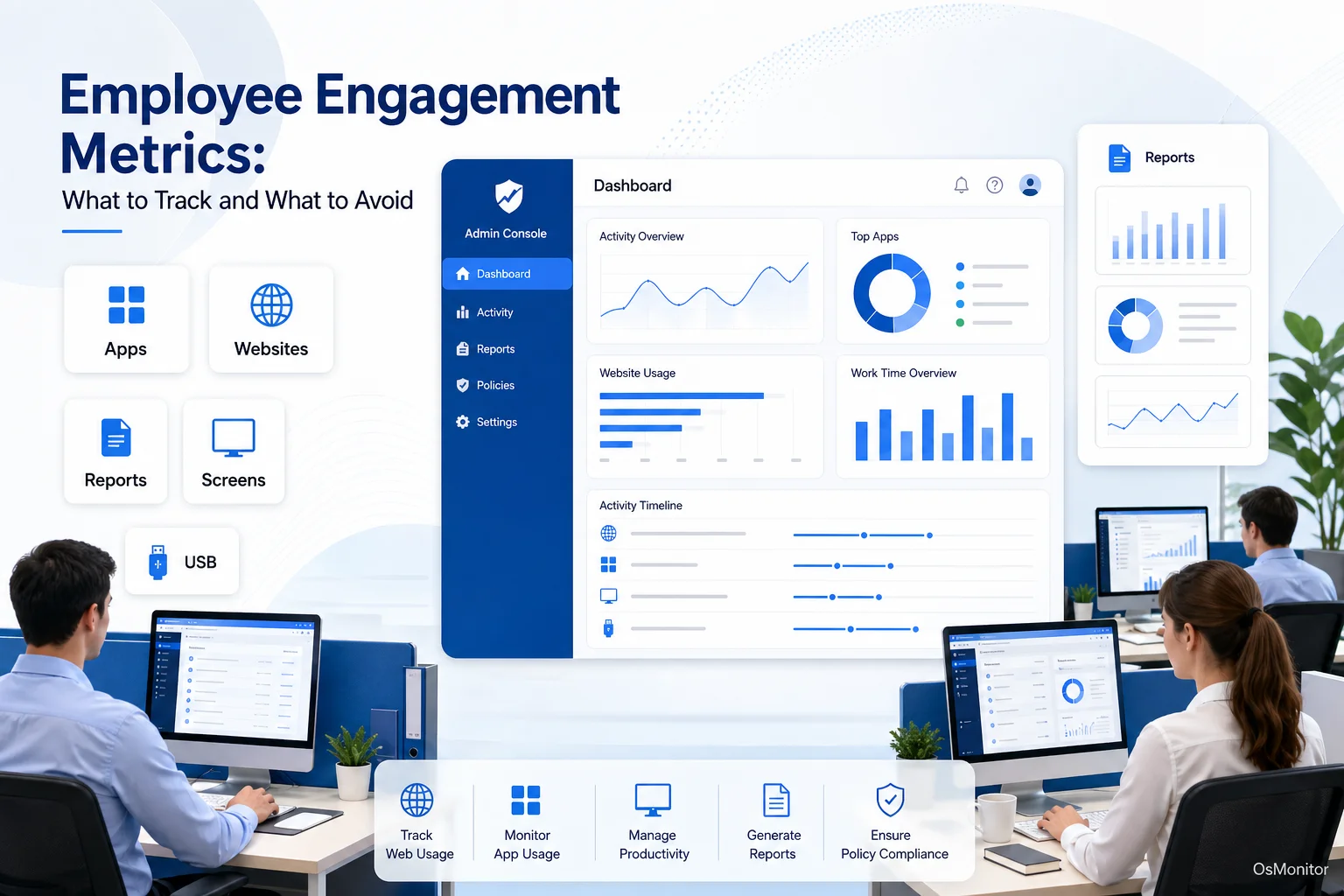
A practical overview of employee engagement metrics for workplace computer management.
What Are Employee Engagement Metrics and Why Do They Matter?
Employee engagement metrics are data points that help managers understand how connected, focused, and involved employees are in their work. Traditional engagement metrics often come from surveys, one-on-one conversations, retention rates, absenteeism, and manager feedback.
For computer-based teams, employee engagement data can also include work signals from company-owned PCs, such as application usage, website activity, active time, idle time, document activity, and department-level computer usage reports.
These metrics should not be used to judge every small action. They are meant to help managers see patterns and ask better questions.
Good employee engagement metrics can help businesses:
- Identify Trends: Are certain websites, applications, or workflow patterns repeatedly pulling attention away from core work?
- Improve Workflows: Are employees spending too much time switching between tools or working around inefficient software?
- Provide Better Support: Does a drop in activity suggest that someone may be blocked, overloaded, underused, or in need of training?
- Review Policies Fairly: Do website and application records show that computer usage policies need to be clarified or updated?
- Understand Team Patterns: Is the issue limited to one employee, or is the whole department showing similar activity changes?
The goal is simple: use data to support better management decisions, not to replace human judgment.
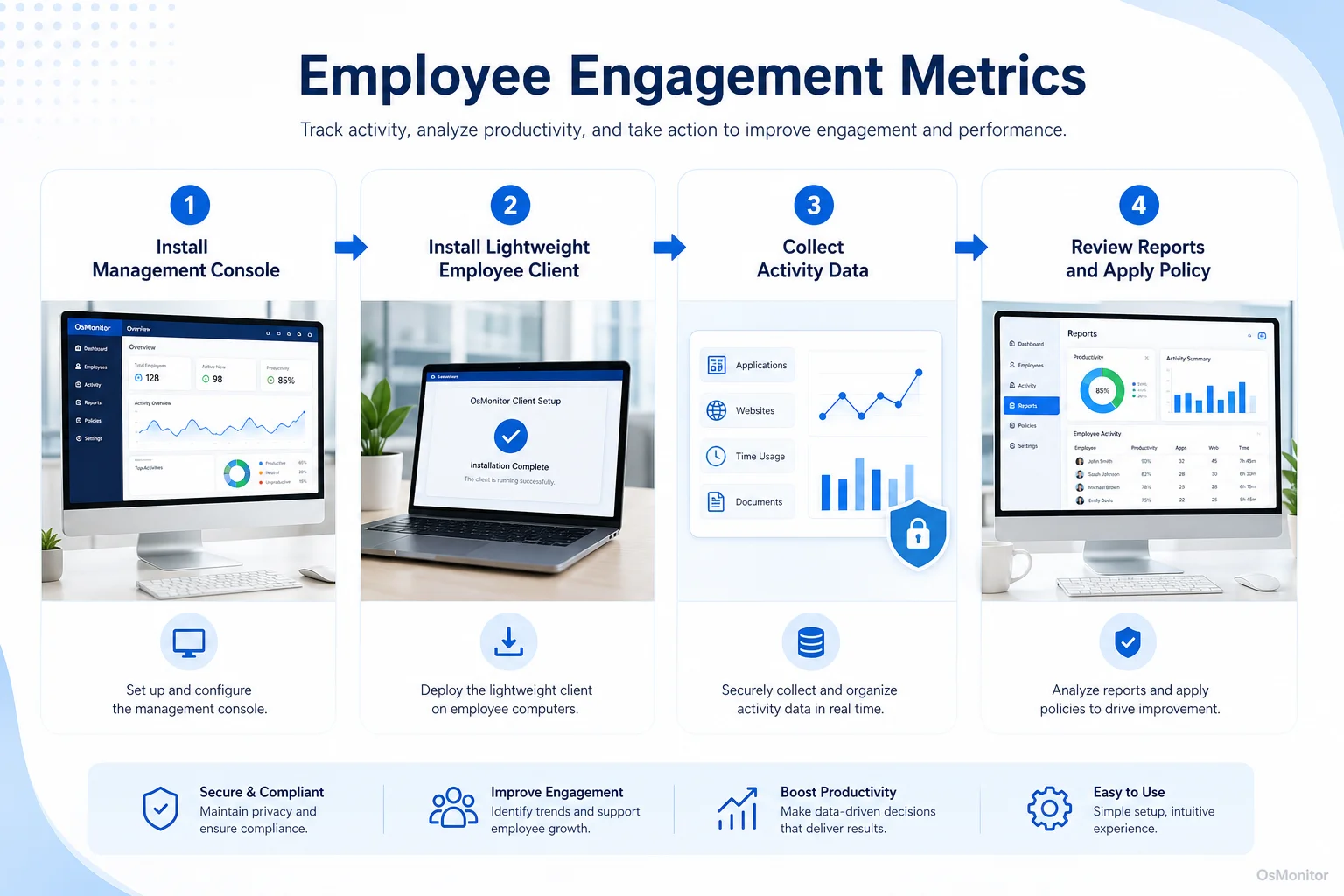
A simple workflow showing how workplace signals can support employee engagement metrics.
A Practical Approach to Collecting Employee Engagement Data
OsMonitor is workplace productivity and employee computer activity management software for company-owned Windows PCs. It helps businesses collect practical employee engagement data from computer activity, including website usage, application usage, activity timelines, file activity, bandwidth usage, and department reports.
It is not a full HR engagement platform, not a survey tool, and not a formal cybersecurity suite. Its role is more focused: helping managers and IT administrators understand how company computers are being used during the workday.
OsMonitor uses a client/server model. A central management console is installed on a manager’s computer, administrator’s PC, or self-managed server. A lightweight client is installed on each employee Windows computer that the company wants to manage.
This structure gives businesses direct control over their data. Activity records are stored on the customer’s own management computer or self-managed server, not on an OsMonitor vendor cloud. The system can also work inside a local area network without requiring internet access for its core monitoring and reporting functions.
This approach to Employee Activity Monitoring Software is useful for companies that want practical workplace reports while keeping normal activity records under their own control.
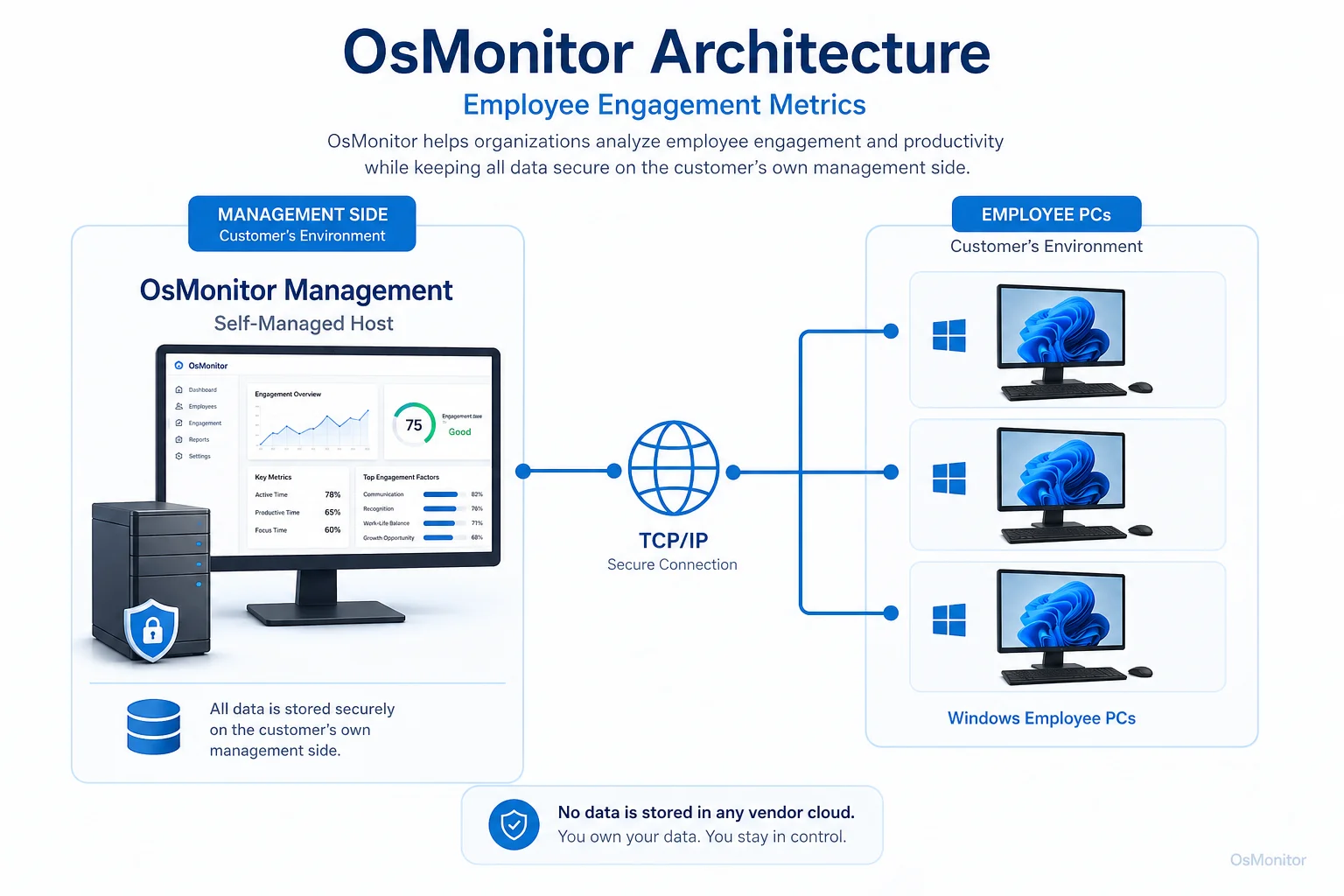
OsMonitor keeps monitoring data under the customer’s control on the management computer or self-managed server.
Key Metrics You Can Track with OsMonitor
The best employee engagement metrics are not the most detailed ones. They are the ones that help managers understand work patterns without creating unnecessary pressure.
Application and Website Usage
Application and website usage is one of the clearest signals for computer-based work. OsMonitor can record which applications are used, which websites are visited, and how long each activity lasts.
This can help managers understand:
- Whether employees are spending time in core business applications.
- Whether approved tools are being used properly.
- Whether non-work websites are becoming a repeated distraction.
- Whether a new software tool is being ignored because employees need training.
- Whether a department’s work pattern matches its responsibilities.
For example, a sales employee may spend much of the day in CRM, email, web research, and communication tools. An accountant may spend time in accounting software and spreadsheets. A support agent may use ticketing software, knowledge bases, and remote support tools.
The point is not to label every website or application as good or bad. The point is to compare activity with the employee’s role and company policy.
Activity Timelines and Idle Time
Activity timelines show how computer usage changes across the workday. Active and idle time reports can help managers understand general work rhythms.
This data can be useful, but it must be interpreted carefully. Idle time does not always mean low engagement. Employees may be on phone calls, in meetings, reading printed material, thinking through a problem, or doing work away from the computer.
Useful questions include:
- Is idle time unusually high compared with the employee’s normal pattern?
- Is the employee blocked by unclear tasks or technical issues?
- Is a department showing long low-activity periods during core hours?
- Is someone working for long stretches without breaks, which may suggest overload?
- Did activity change suddenly after a new policy, tool, or manager change?
A tool like Computer Monitoring Software can provide the data, but managers still need context before making decisions.
Document and File Operations
Document and file activity can provide useful work signals for roles that depend on documents, spreadsheets, reports, designs, or project files.
OsMonitor can record file operations such as creating, copying, moving, deleting, and printing documents. It can also support document backup for selected file types.
This data may help managers understand:
- Whether project files are being worked on regularly.
- Whether important documents are being created or updated.
- Whether document-heavy workflows are taking more time than expected.
- Whether backup rules should be adjusted to protect important work files.
This should be used for legitimate business needs and company-owned data, not personal files.
Bandwidth Monitoring
Bandwidth usage can affect the whole office. If one or two computers are consuming large amounts of network traffic through video streaming, large downloads, or other non-work activity, everyone else may feel the slowdown.
OsMonitor can help IT administrators review bandwidth usage by computer. This can support policy enforcement, troubleshooting, and network planning.
Useful engagement-related signals may include:
- Heavy video streaming during core work hours.
- Repeated large downloads unrelated to work.
- Bandwidth spikes that slow down business tools.
- Department-level network patterns that suggest workflow or policy issues.
Bandwidth data is not an engagement score by itself. But it can help explain why productivity, network performance, or focus may be suffering.
Metrics to Avoid: The Pitfalls of Over-Monitoring
More data is not always better. Collecting the wrong data can damage trust, create anxiety, and make employees feel that management does not respect them.
A responsible employee engagement data strategy should focus on work-related activity and avoid unnecessary personal information.
| Productive Metrics (Focus on Work) | Metrics to Avoid (Too Personal or Unnecessary) |
|---|---|
| Time spent on work-related applications | Collecting private login details or personal account information |
| Websites visited during work hours on company-owned computers | Reading personal email or private personal messages |
| Idle time vs. active time analysis | Recording every second without a clear business reason |
| File operations on company documents | Reviewing activity during approved breaks or personal time |
| Network bandwidth usage by computer or application | Using webcam or microphone access for routine productivity review |
OsMonitor is designed for legal business use on company-owned Windows computers and focuses on work-related computer activity records. The goal is to manage workplace assets, support productivity review, apply policies fairly, and improve efficiency.
Before collecting employee engagement metrics from computer activity, businesses should:
- Create a clear written computer and internet usage policy.
- Inform employees that company-owned computers may be managed and reviewed.
- Explain what data is collected and why.
- Limit report access to authorized managers or IT staff.
- Review trends with context instead of judging isolated events.
- Avoid collecting unnecessary personal information.
- Consult qualified legal counsel to ensure compliance with local employment and privacy laws.
Used well, employee engagement data can help managers support teams better. Used poorly, it can reduce trust and make engagement worse.
Frequently Asked Questions (FAQ)
What are employee engagement metrics?
Employee engagement metrics are data points used to understand how focused, motivated, and connected employees are to their work. They may include survey results, retention trends, absenteeism, manager feedback, application usage, website activity, active time, idle time, and other work-related signals.
What is employee engagement data?
Employee engagement data is information that helps a business understand employee motivation, focus, work patterns, and connection to the organization. It can come from surveys, one-on-one meetings, HR records, project systems, or computer activity reports from company-owned devices.
Which employee engagement metrics should a small business track?
A small business can track survey feedback, one-on-one notes, retention trends, project completion, work quality, application usage, website activity, active and idle time, and department-level computer usage reports. The right metrics depend on the role and business goal.
Can computer activity data measure engagement directly?
No. Computer activity data cannot directly measure motivation or emotional commitment. It can show useful work patterns, such as tool usage, website activity, idle time, and changes in behavior. Managers should use those patterns as conversation starters, not final proof.
Is tracking employee engagement data legal for businesses?
In many regions, businesses may manage and review activity on company-owned computers for legitimate business purposes when there is a clear policy and employees have been properly notified. However, laws vary by country, state, province, and industry. Businesses should consult qualified legal counsel before implementing computer activity monitoring.
Does OsMonitor require a client on employee computers?
Yes. OsMonitor uses a client/server architecture. The management console is installed on a manager’s computer or self-managed server, and a lightweight client program must be installed on each employee Windows computer the business wants to manage.
Where is OsMonitor monitoring data stored?
OsMonitor stores collected data on the customer’s own management computer or self-managed server. Normal activity records are not uploaded to OsMonitor vendor servers or a third-party cloud service, giving the business direct control over its data.
Can OsMonitor work without an internet connection?
Yes. OsMonitor can work inside a local area network without requiring internet access for its core monitoring, reporting, and management functions.
What Windows versions does OsMonitor support?
OsMonitor supports Windows 7 and later versions, including Windows 10, Windows 11, and Windows Server editions. It supports both 32-bit and 64-bit systems.
Employee engagement metrics are most useful when they help managers understand patterns, support employees, and improve the work environment. They should not be used as a shortcut for judgment or communication.
Used transparently and responsibly, OsMonitor can help businesses collect practical employee engagement data through application usage reports, website activity records, activity timelines, bandwidth reports, and on-premise data storage. To learn more about setting up and using these features, Read the Quick Start Guide.