Employee Time Tracking Software vs Computer Activity Monitoring
One of the most common issues I hear from department heads is the struggle to gauge team progress without acting like a micromanager. You want to see who is working on what, but pinging everyone on Slack for manual updates just kills their momentum. Often, managers start searching for a central dashboard to get a real-time read on the room, which usually leads them to search for time tracking software for employees.
Here is the catch: that search term covers a massive, confusing range of tools. Some are literally just digital stopwatches. Others provide the deep, live computer activity insights that managers are actually looking for. If you want to fix productivity, understanding the difference between a simple timer and a full activity monitor is step one.
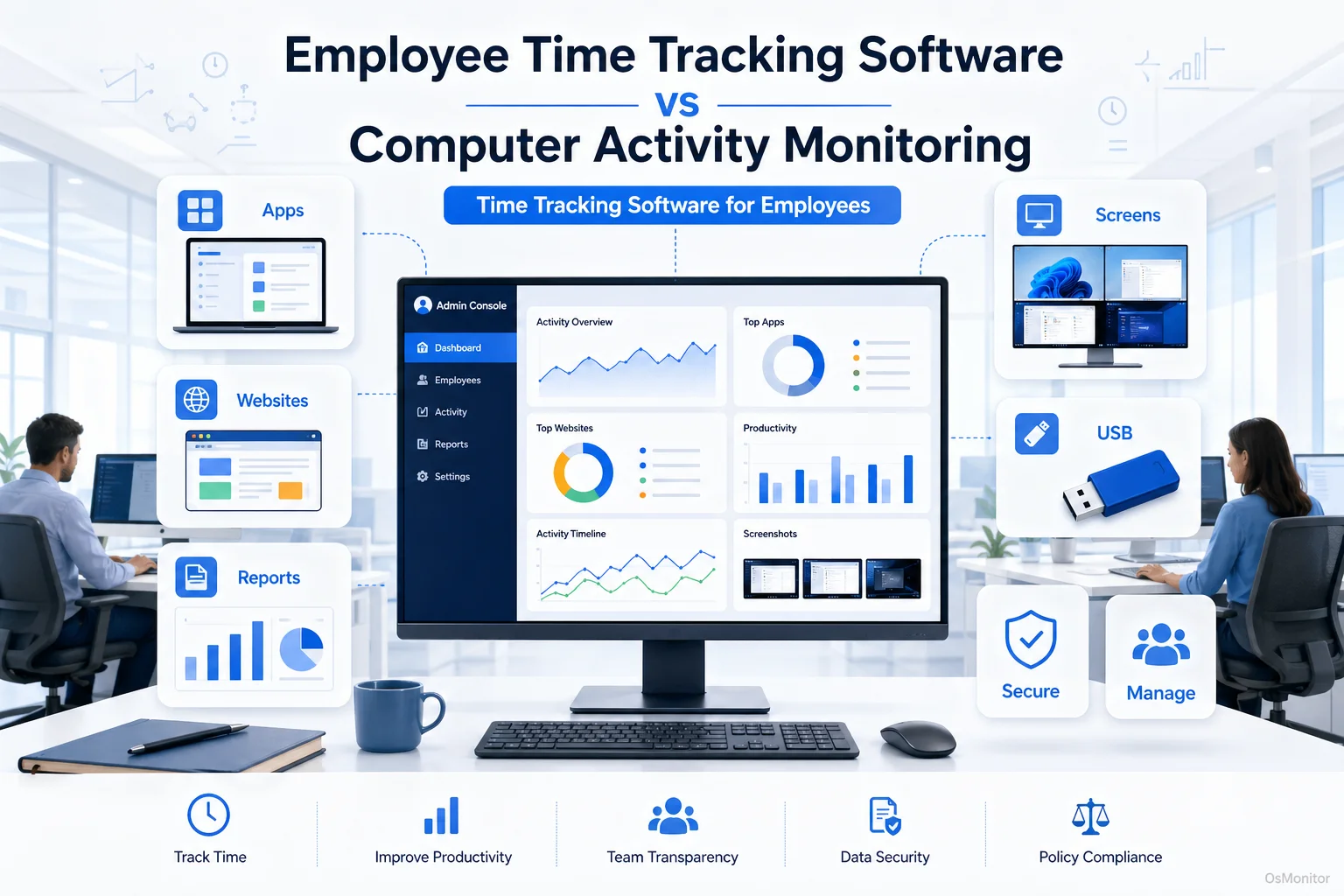
A practical overview of time tracking software for employees for workplace computer management.
What’s the Difference? Time Tracking vs. Activity Monitoring
When someone asks me for an employee time tracking program, I always ask them what problem they are trying to solve. Choosing the wrong tool leads to useless data.
Simple Time Trackers
A basic time tracking system for employees is just a stopwatch. Your staff manually clicks “start” when they begin a task and “stop” when they finish.
- Function: Logs billable hours and project duration.
- Data Source: 100% manual employee input.
- Pros: Perfect for freelancers billing clients by the hour.
- Cons: Highly prone to human error (everyone forgets to hit stop). More importantly, it provides zero context on how that time was spent. If someone runs a timer for 4 hours, you have no idea if they were in Excel or on Twitter.
Computer Activity Monitoring
This category replaces the stopwatch with automation. An employee monitoring & time tracking software suite automatically records how time is actually spent on company hardware. It logs exact active application time, URLs visited, and idle periods.
- Function: Provides an undeniable, verifiable record of computer usage and workflow patterns.
- Data Source: Automated data collection directly from the operating system.
- Pros: Delivers objective data for true productivity analysis, highlights workflow bottlenecks, and is perfect for remote employee time tracking where you lack physical visibility.
- Cons: Requires clear communication. You must have a transparent IT policy in place to ensure team trust.
For the IT manager who needs a centralized dashboard to see real-time screens and detailed application logs, a basic stopwatch app is useless. They need true software employee time tracking powered by activity monitoring.
Key Selection Criteria for Workplace Management Software
When evaluating any time tracking software for employee management, you have to look under the hood.
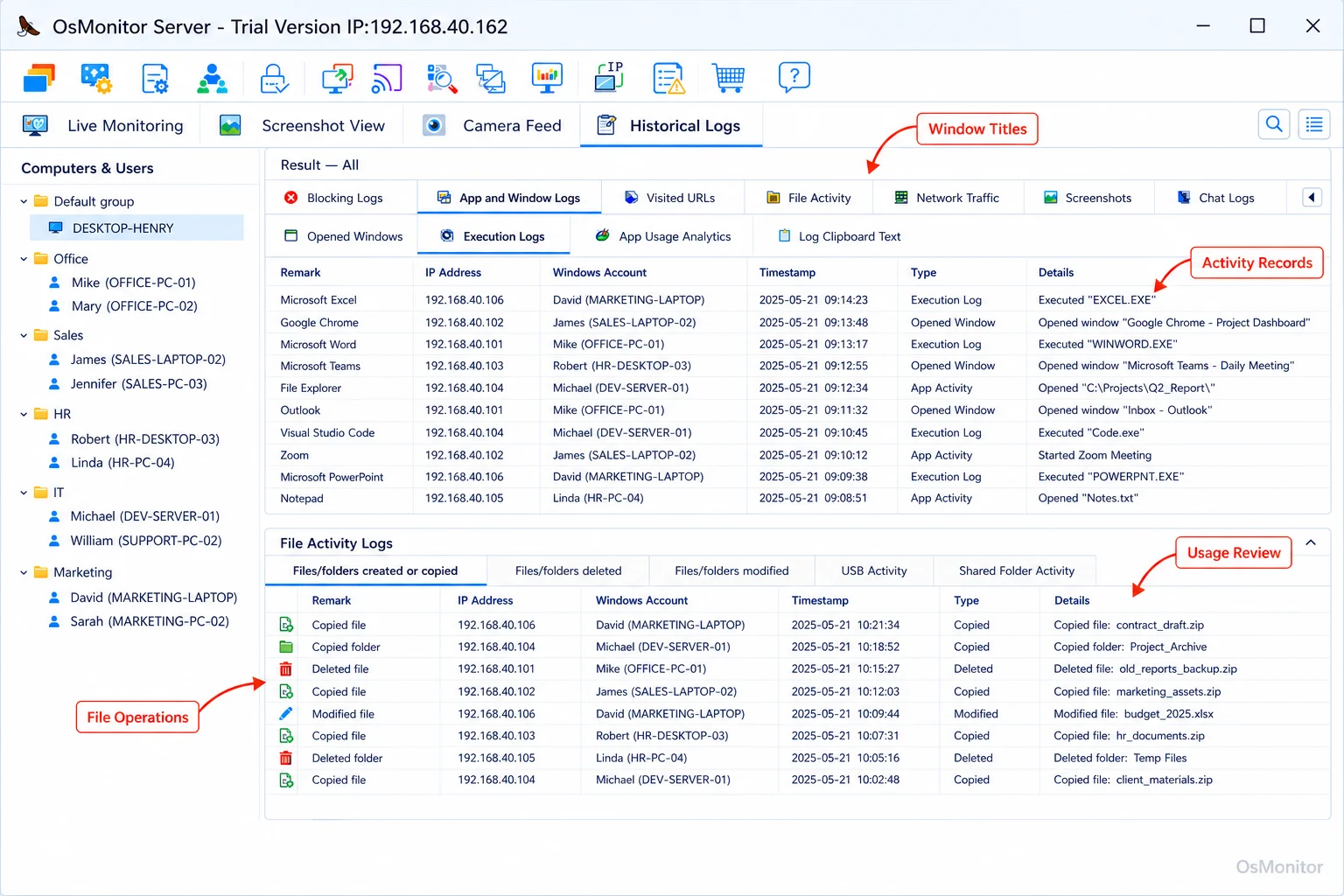
A real-product style screenshot highlighting computer activity records in OsMonitor.
Deployment Model and Data Ownership
This is the most critical question I ask vendors: Where does my data live?
- Cloud SaaS: Most trendy online time tracking for employees apps are cloud-based. You pay a monthly fee, and your internal company data sits on their servers. If you stop paying, you lose your historical data.
- On-Premise/Self-Hosted: You install the software on your own server. Your data stays in your building. For any business dealing with sensitive client info, an On-Premise Employee Monitoring Software setup is non-negotiable. You own the data outright.
Operating System Compatibility
Most of the business world runs on Windows. If you are deploying software for employee time tracking, ensure it is built natively for your OS. A dedicated Windows application will always be more stable and provide deeper system insights than a generic, cross-platform web app.
Reporting and Analytics
Data is useless if you can’t read it. A powerful system should offer:
- Application & Website Usage Reports: See exactly how much active time is spent in productive tools versus distracting websites.
- Department & Individual Summaries: Compare output trends across teams.
- Alerts & Violation Logs: Get notified instantly if a user tries to access blocked sites or plug in unauthorized USB drives.
Pricing and Licensing
- Subscription (SaaS): Recurring monthly fees per user. The costs compound aggressively as your team scales.
- One-Time Purchase: You buy it once. This model, used by tools like OsMonitor, provides a highly predictable IT budget and eliminates subscription fatigue.
Common Types of Employee Time Management Tools
The market for employees time tracking is crowded. Here is how they stack up.
Cloud-Based Time Trackers
Tools like Toggl or Harvest. They are built for manual project logging. They offer simple employee time tracking but lack the automated activity data required for deep productivity analysis or serious time tracking for remote employees.
Project Management Suites
Platforms like Asana or Jira include basic timers. Again, they track the lifecycle of a task, but they won’t tell you if the hours logged were spent productively or idly browsing the web.
On-Premise Computer Monitoring Software
This is where OsMonitor shines. It is a comprehensive time tracking employee software suite designed for businesses that need the full picture. It combines automated time tracking with application logging, screen viewing, policy enforcement, and remote IT administration.
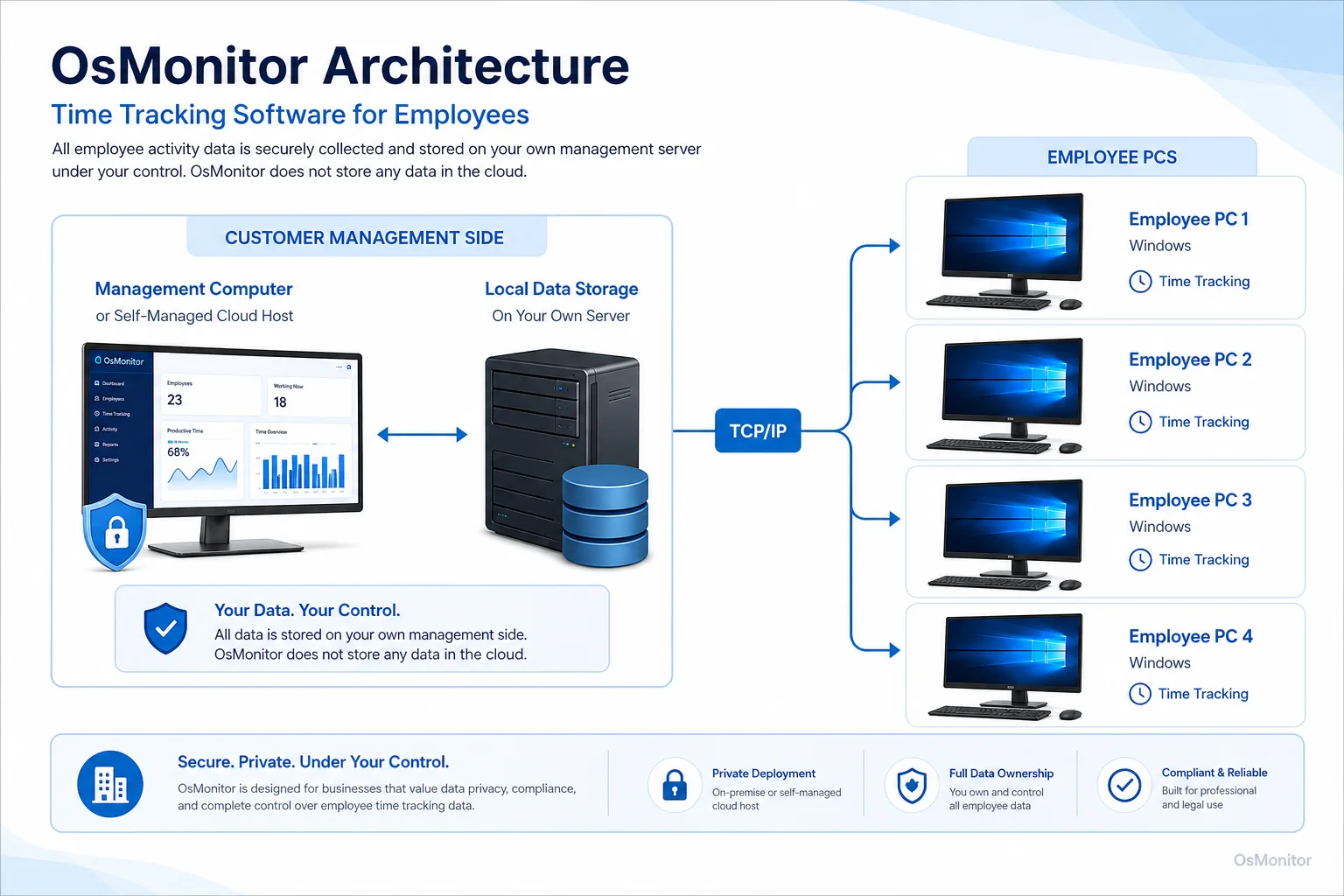
OsMonitor keeps monitoring data under the customer’s control on the management computer or self-managed server.
Where OsMonitor Fits: On-Premise Computer Management
OsMonitor isn’t a cloud-based stopwatch. It is a robust, client/server-based system built for transparent workplace management.
It is designed for IT departments that demand:
- Data Control: All logs are stored on your local server or self-managed private cloud. We don’t use vendor clouds.
- Detailed Insights: It automatically tracks exact app and web usage, providing the objective data manual timers can’t.
- Proactive Management: It includes active IT controls like website blocking, USB port lockdowns, and remote desktop assistance.
- Windows Environments: As a dedicated Windows Employee Monitoring Software, it integrates deeply into standard business networks.
OsMonitor is the right app for employee time tracking when your goal is to optimize how company time is spent, not just count the hours.
Core Features of a Comprehensive Time Tracking Program
Here is what you actually get when you deploy a full employee time tracking softwares suite instead of a basic timer.
| Feature | Description | Benefit for Time & Productivity Management |
|---|---|---|
| Real-Time Screen Monitoring | View live screens individually or via a multi-screen dashboard. | Provides immediate visual context into workflow, letting managers spot bottlenecks instantly. |
| Application & Website Logs | Automatically records every app run and URL visited, tracking active duration. | Yields hard, undeniable data on what tools are driving your business and what sites are distractions. |
| Productivity Reports | Generates detailed charts summarizing activity by user or department. | Replaces “gut feeling” performance reviews with objective, data-driven facts. |
| USB & Device Controls | Allows IT to block or set read-only access for external drives. | Secures company data from theft, ensuring your network remains locked down. |
| Remote Assistance | Lets IT take control of an employee’s mouse/keyboard to fix issues. | Drastically reduces technical downtime, keeping your staff productive. |
| Document Backup | Automatically backs up vital files to the central server. | Protects critical work from accidental deletion or sudden hardware failure. |
Limitations and Ideal Use Cases
No tool does everything. Here is where OsMonitor is designed to fit.
- Windows-Only: It is built exclusively for Windows (Windows 7 and up, including Server editions). It does not support Mac or Linux.
- Client Installation Required: This is not agentless. A lightweight client must be installed on the company-owned PC to enforce policies and collect data.
- Best for Self-Managed IT: It is perfect for businesses that have their own servers (or self-managed clouds) and refuse to hand their data over to a SaaS vendor.
OsMonitor is the premier choice for organizations that need a powerful, self-hosted time tracking software for remote employees and in-office staff.
Frequently Asked Questions (FAQ)
What is time tracking software for employees?
It is a broad term. It ranges from simple manual stopwatch apps used for client billing to advanced computer activity monitoring systems that automatically log application and web usage to provide deep productivity analytics.
Is using an employee time tracking system legal for businesses?
In most jurisdictions, yes. Employers have the right to monitor company-owned hardware. However, privacy laws vary heavily by region. You must maintain transparency, establish a clear written policy, and consult local legal counsel before deployment.
Does OsMonitor require a client on employee computers?
Yes. It uses a highly stable client/server model. You install the management console on your PC, and push a lightweight client to each endpoint you want to manage.
Where is OsMonitor monitoring data stored?
Your data stays with you. It is stored exclusively on your own management computer or internal server. We do not use third-party vendor clouds.
Can OsMonitor work without an internet connection?
Absolutely. It is designed to function perfectly within a closed Local Area Network (LAN) without any internet access, which is crucial for high-security facilities.
What Windows versions does OsMonitor support?
It supports Windows 7, 8, 10, and 11, along with Windows Server editions (both 32-bit and 64-bit).
If you are tired of relying on inaccurate manual timesheets and need clear, objective data on how your network is being utilized, Download OsMonitor Free Trial to test a full computer activity management system on your own hardware.