Employee Experience Management: Add Workplace Activity Signals
Employee experience solutions are often discussed from the HR side: surveys, engagement scores, onboarding, communication, and culture. Those are important. But for many office teams, the daily employee experience is also shaped by something much more practical: whether the computer, software, network, and workflow actually help people get work done.
A manager may not want another long survey. They may simply need a centralized computer activity overview to understand what is happening across company-owned PCs. Are employees stuck in inefficient tools? Are remote workers getting timely IT support? Are teams spending too much time on websites that do not support their work? Are company applications being used as expected?
That is where workplace activity signals can support employee experience solutions. They add objective computer usage records to the usual feedback process, helping managers improve the digital workplace employee experience with clearer data and faster action.
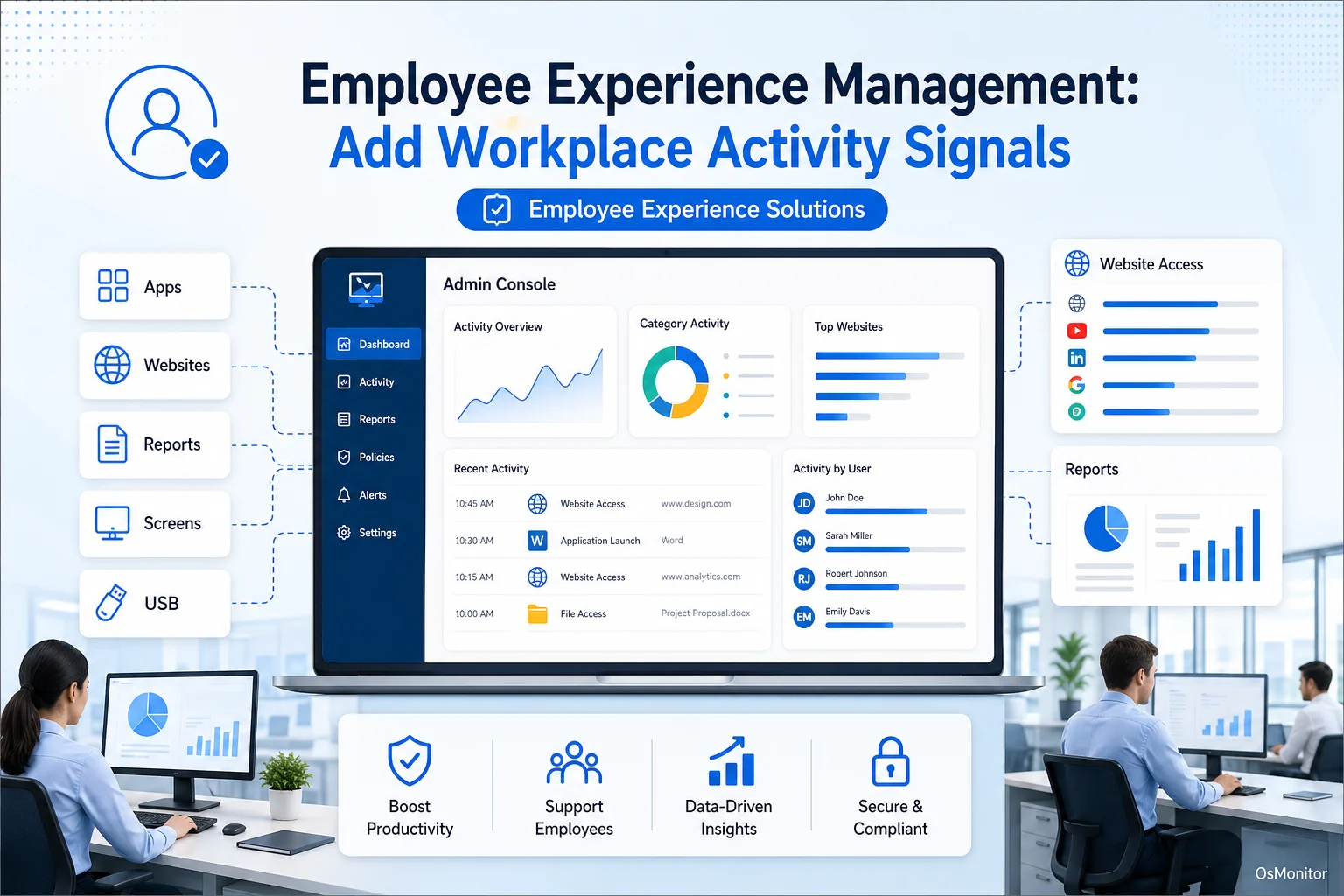
A practical overview of employee experience solutions for workplace computer management.
What Are Employee Experience Solutions and Why Add Activity Signals?
Employee experience solutions are tools, systems, and processes that help companies improve how employees interact with their workplace. This can include HR systems, communication platforms, onboarding tools, feedback surveys, IT support systems, and digital workplace software.
The digital workplace employee experience has become especially important. For many employees, the computer is the workplace. If the software is slow, support is delayed, approved tools are hard to use, or workflow problems go unnoticed, the employee experience suffers even if the company culture looks good on paper.
Traditional employee experience management software often focuses on qualitative feedback. Surveys, pulse checks, interviews, and sentiment analysis can tell managers how employees feel. That matters, but it does not always show what is happening during the workday.
Common gaps include:
- Subjective feedback: Employees may report frustration, but the reason may not be obvious.
- Delayed discovery: A monthly survey may find a problem weeks after productivity has already dropped.
- Missing technical context: Employees may not know whether the issue is software usage, workflow design, network load, or training.
- Limited visibility for remote teams: Remote worker employee experience can be hard to support when managers and IT teams cannot see what is happening on company-owned PCs.
Workplace activity signals help fill that gap. Application and website usage records, activity reports, screen activity views, and remote support data can help managers understand how work is actually happening. When combined with employee feedback, these signals create a more holistic employee experience.
A strong employee experience program should not rely on one type of data. It should combine what employees say with what workplace systems show.
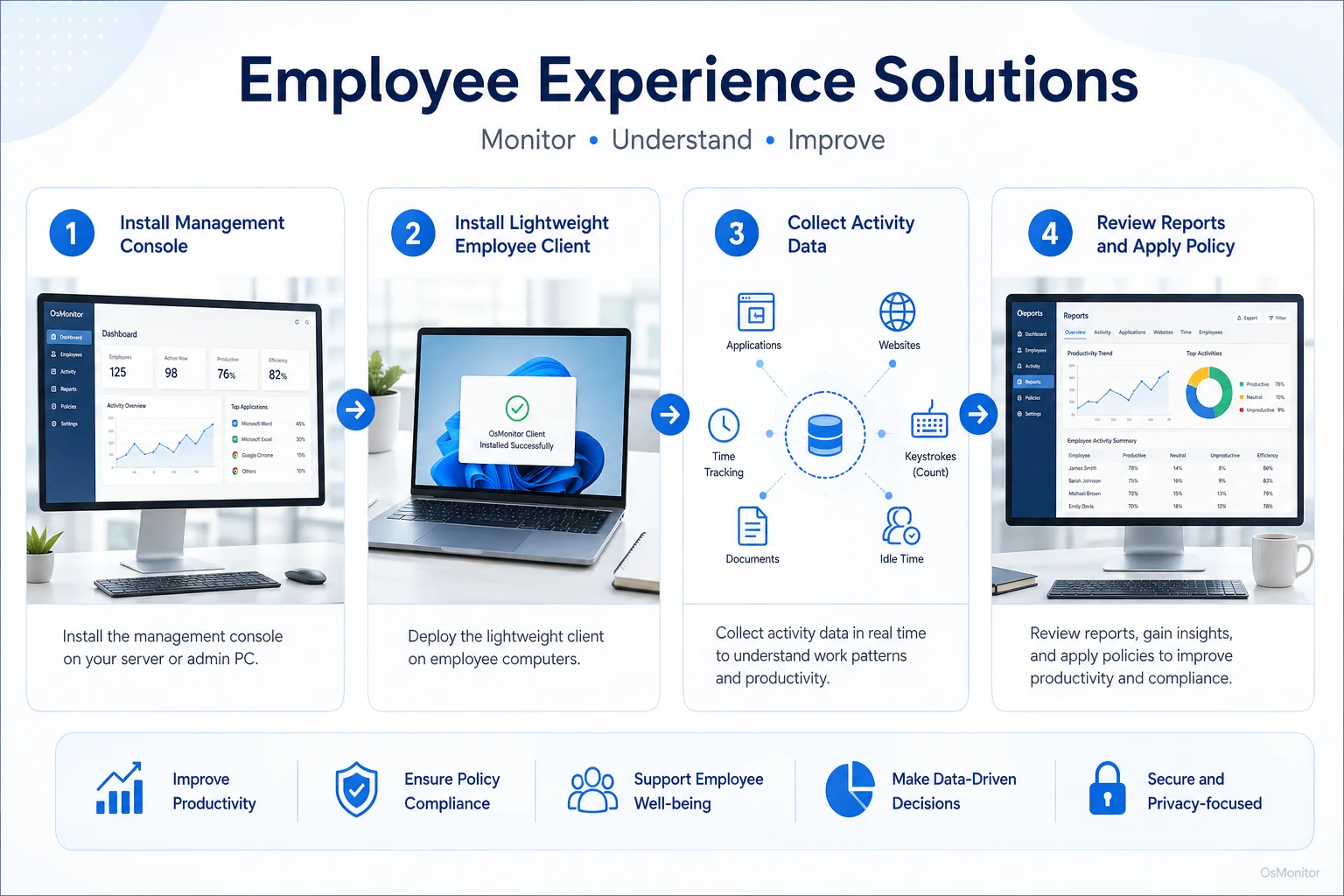
A simple workflow showing how workplace signals can support employee experience solutions.
OsMonitor’s Role in Your Employee Experience Program
OsMonitor is workplace productivity and employee computer activity management software for company-owned Windows PCs. It is not a full employee experience management platform in the HR sense, and it is not a survey tool. Instead, it provides practical workplace activity signals that can support your broader employee experience program.
Many employee experience companies focus on engagement surveys, journey mapping, HR workflows, or enterprise DEX platforms. Those tools can be valuable, especially in larger organizations. But small and mid-sized businesses often need something more direct: clear computer usage reports, centralized screen activity review, website and application records, and remote assistance for IT support.
OsMonitor helps provide those signals. It can show which applications are being used, which websites are consuming time, where employees may need support, and how digital work patterns differ across departments or locations.
This makes it useful for employee experience enablement. When IT and management can see workplace activity more clearly, they can respond faster, reduce friction, improve policy-based computer management, and make better decisions about software, training, and support.
OsMonitor is designed for authorized workplace monitoring on company-owned computers. It should be used transparently, with a clear policy and proper employee notification.
How OsMonitor Delivers Actionable Employee Experience Metrics
OsMonitor uses a client/server architecture. A central management console is installed on a management computer or self-managed server, while a lightweight client is installed on employee Windows PCs. This allows the business to collect and review workplace activity signals centrally without relying on a vendor-controlled cloud.
For companies building employee experience metrics around digital work, this can provide useful operational data.
Core Features for a Holistic Employee Experience
OsMonitor provides focused tools that help managers and IT teams understand the digital workplace more clearly.
Real-Time Screen Monitoring
Real-time screen monitoring gives managers or IT support staff immediate visual context when support or review is needed. This can be useful when an employee is stuck in a business application, when a team lead needs to understand workflow status, or when IT needs to help solve a problem quickly.
For remote employee experience and hybrid employee experience, this can reduce back-and-forth communication. Instead of asking an employee to describe every screen or error, authorized support staff can see the issue and respond more efficiently.
Used responsibly, this feature supports faster assistance and clearer team activity review.
Application and Website Usage Analytics
Application and website usage records are useful employee experience analytics because they show how digital tools are actually being used.
For example:
- Are employees using the licensed tools the company pays for?
- Are important applications being underused because employees need training?
- Are certain websites or applications consuming too much work time?
- Are teams switching between too many tools to complete simple tasks?
- Are remote workers using the same core applications as office-based employees?
These records help connect employee experience digital transformation with real workplace behavior. Instead of assuming that a new tool is helping, managers can review whether employees actually use it during daily work.
Some buyers search for phrases such as “dex platforms workforce experience employee experience analytics.” In clearer business language, this usually means tools that help companies evaluate the digital employee experience through technology usage, workflow signals, and employee experience analytics.
Productivity and Activity Reports
Activity reports turn daily computer usage into readable summaries. Managers can review application usage, website visits, bandwidth activity, active time, and department-level patterns.
These reports can support employee experience metrics such as:
- Time spent in core business applications.
- Frequency of non-work website activity during core hours.
- Department-level computer usage patterns.
- Remote worker activity trends.
- Common workflow interruptions.
- Software adoption and usage.
This is where an employee experience tool like OsMonitor can support more practical management decisions. It does not replace HR employee experience digital platforms, but it can add workplace computer activity data that many HR-focused tools do not capture.
Our Employee Activity Monitoring Software provides detailed logs and reports that can support this kind of operational visibility.
Remote Assistance and IT Enablement
A poor IT support experience can quickly damage the employee experience. When an employee cannot access a tool, cannot solve a software issue, or loses time waiting for help, productivity and morale both suffer.
OsMonitor includes remote assistance features that allow IT staff to help users directly on company-owned Windows PCs. This supports employee experience enablement by reducing downtime and making support more practical.
For remote and hybrid teams, this can be especially useful. A fast support session can be better than a long chain of screenshots, messages, and phone calls.
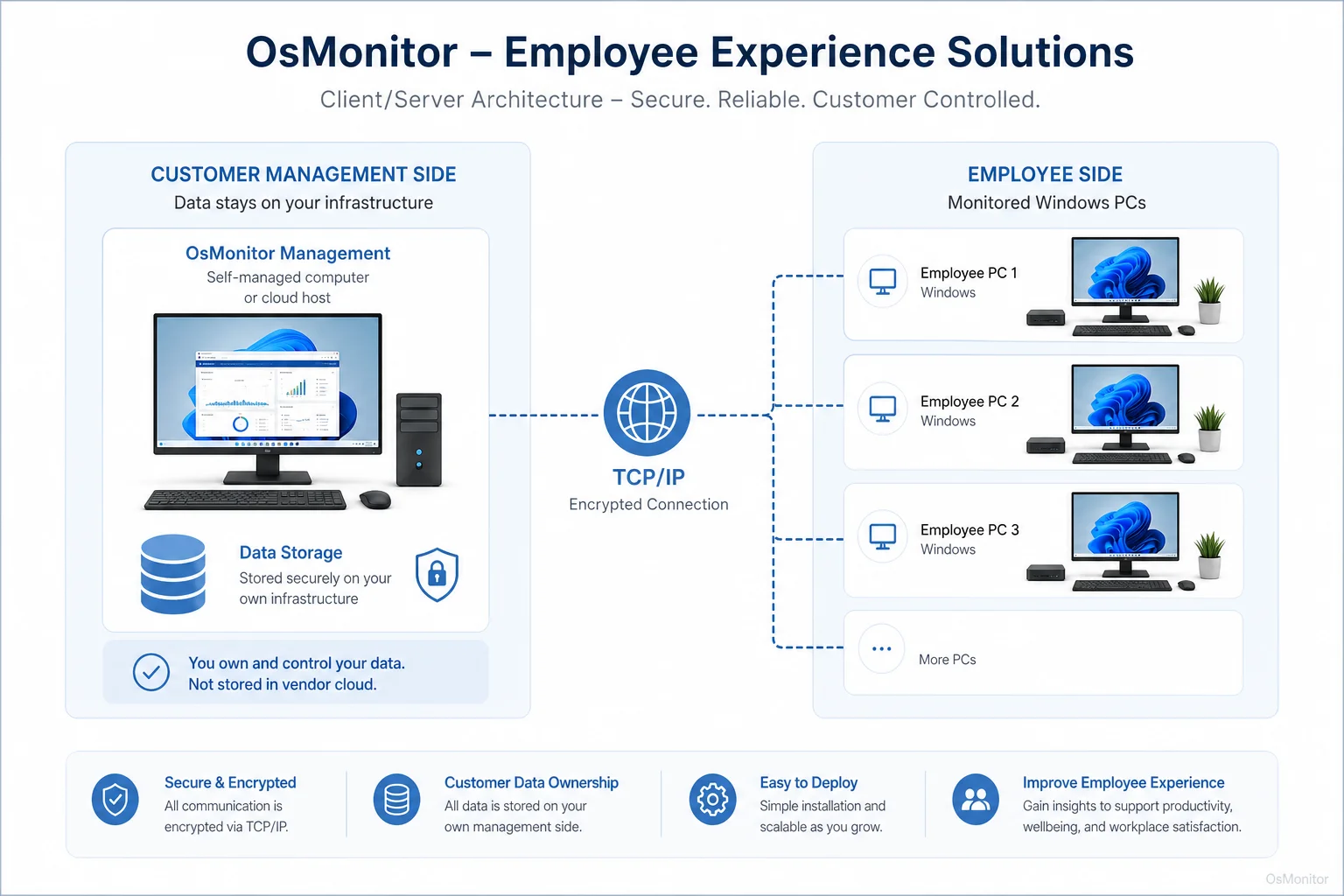
OsMonitor keeps monitoring data under the customer’s control on the management computer or self-managed server.
On-Premise Data Control: A Cornerstone of Your Digital Transformation
Many employee experience management tools are cloud-based. That can be convenient, but it is not always the right fit for every company. Some organizations prefer to keep workplace computer activity records inside their own infrastructure.
OsMonitor uses an on-premise model. Monitoring data is stored on the customer’s own management computer or self-managed server. For businesses that care about data ownership, internal control, and predictable costs, this is an important difference.
This approach offers several practical advantages:
- Full Data Control: Workplace activity records stay on your own hardware or self-managed environment.
- Internal Network Operation: OsMonitor can work inside a local area network without requiring internet access for core functions.
- Reduced Vendor Cloud Dependence: Normal monitoring data does not need to be stored on a vendor-controlled cloud.
- Predictable Budgeting: A one-time purchase model can be easier for some businesses than ongoing subscription fees.
- Better Fit for Controlled Environments: Offices with strict internal data policies may prefer local storage and local management.
This makes OsMonitor a practical On-Premise Employee Monitoring Software option for companies that want employee experience solution data to remain under their own control.
Practical Use Cases for Improving Workplace Experience
Different organizations define employee experience in different ways. For some, it means better HR communication. For others, it means faster IT support, clearer workflow, more focused computer usage, and fewer digital distractions.
| Business Type | EX Challenge | OsMonitor Solution |
|---|---|---|
| Small & Medium Businesses | Limited IT staff and the need for simple, practical employee experience management tools. | Centralized PC activity review, website and application reports, and remote assistance for faster support. |
| Call Centers | Keeping agents focused on approved CRM, ticketing, and communication software. | Application usage reports, website filtering, and real-time screen monitoring for training and workflow review. |
| Hybrid & Remote Teams | Supporting remote worker employee experience while maintaining consistent computer usage policies. | Screen activity review, remote assistance, and activity reports for company-owned Windows PCs. |
| Educational Institutions | Keeping computer lab users focused on approved learning tools and websites. | Website and application blocking, screen broadcasting, and centralized activity review. |
A holistic employee experience is not only about whether employees are happy. It is also about whether they have the tools, support, and environment to do their work well.
That is why workplace activity signals can be useful. They help managers see where support is needed, where training may help, and where policy-based computer management should be improved.
Responsible Use and Implementation Guidelines
Employee experience solutions should build trust, not damage it. When workplace activity signals are involved, transparency is essential.
Businesses should use OsMonitor responsibly and follow these guidelines:
Develop a Clear Policy: Create a written policy that explains how company computers and internet access may be used.
Inform Employees: Let employees know that company-owned computers may be reviewed for productivity, IT support, security, and policy compliance purposes.
Comply with Local Laws: Employment and privacy laws vary by location. Consult qualified legal counsel before implementing any monitoring or employee experience management software.
Focus on Patterns and Support: Use activity records to identify workflow problems, training needs, support issues, and policy trends. Avoid judging isolated activity without context.
Limit Access to Reports: Only authorized managers or IT staff should review employee activity records.
Protect Stored Data: Since OsMonitor data is stored on your own hardware, your organization is responsible for securing access, backups, and retention policies.
Some people search for “what is an employee experience manager” when researching this topic. In many companies, an employee experience manager helps improve the systems, processes, tools, and workplace conditions that shape how employees work. If computer activity data is used, that person should work closely with IT, HR, legal, and department managers to keep the program fair and transparent.
Frequently Asked Questions (FAQ)
What is an employee experience solution?
An employee experience solution is a tool, system, or process that helps improve how employees interact with their workplace. This may include HR platforms, communication tools, onboarding systems, IT support tools, feedback surveys, and digital workplace management software.
What is employee experience management software?
Employee experience management software helps organizations measure, manage, and improve employee experience. Some tools focus on surveys and HR workflows. Others, such as OsMonitor, provide workplace activity signals from company-owned computers that can support digital workplace employee experience improvement.
How can computer activity signals improve employee experience?
Computer activity signals can show which applications employees use, where workflow delays appear, which websites consume work time, and where IT support may be needed. This helps managers improve tools, training, policies, and support instead of relying only on opinions or delayed feedback.
Is using employee experience management software legal for businesses?
In many regions, businesses may monitor activity on company-owned computers for legitimate business purposes when they have a clear policy and employees have been properly notified. However, laws vary by country, state, province, and industry. Businesses should consult local legal counsel before implementing any monitoring program.
Does OsMonitor replace a full employee experience management platform?
No. OsMonitor is not a full HR employee experience digital platform or survey-based employee experience management platform. It is a practical employee computer activity management tool that can provide workplace activity records, reports, and support features as part of a broader employee experience program.
Are DEX platforms and employee experience tools the same thing?
Not exactly. DEX platforms usually focus on the digital employee experience, such as device performance, application usage, IT issues, and technology friction. Employee experience tools may cover a wider area, including HR, engagement, onboarding, communication, and workplace culture.
How should a company evaluate DEX platforms or employee experience analytics tools?
Some buyers search for phrases like “evaluate the DEX platforms company Workday on employee experience analytics.” A clearer approach is to compare tools by asking what data they collect, where data is stored, how reports are used, whether employees are notified, and whether the tool fits your HR, IT, and compliance needs.
Does OsMonitor require a client on employee computers?
Yes. OsMonitor requires a lightweight client application to be installed on each employee Windows computer that the company wants to manage or review.
Where is OsMonitor monitoring data stored?
OsMonitor stores collected data on the customer’s own management computer or self-managed server. The data is not sent to OsMonitor or a third-party vendor cloud for normal operation.
Can OsMonitor work without an internet connection?
Yes. OsMonitor can operate inside a private local area network without requiring an internet connection for its core monitoring, reporting, and management functions.
What Windows versions does OsMonitor support?
OsMonitor supports Windows 7 and later versions, including Windows 10, Windows 11, and Windows Server editions. It supports both 32-bit and 64-bit Windows systems.
Employee experience solutions become more useful when they combine employee feedback with practical workplace signals. Surveys can tell you how people feel. Computer usage reports can show where digital work is smooth, where support is needed, and where company tools or policies may need improvement.
Used transparently and responsibly, OsMonitor can help businesses improve digital workplace employee experience through clearer activity records, faster IT support, practical reports, and on-premise data control. To explore these features in your own office environment, you can Download OsMonitor Free Trial and see how workplace activity signals can support your employee experience program.