Employee Engagement Initiatives That Actually Improve Daily Work
Employee engagement initiatives sound nice in theory, but many small businesses need something more practical than posters, slogans, or another team lunch. They need employees to stay focused, use the right tools, follow computer usage policies, and feel supported enough to do good work every day.
For example, a manager may notice more time being spent on games, video streaming, entertainment websites, or other non-work browsing during office hours. The issue is not only “how do we block these websites?” A better question is: why is this happening, how often is it happening, and what can we change so the team is more focused and engaged?
To answer that fairly, managers need clear website access records, application usage reports, and a workplace policy that employees understand.
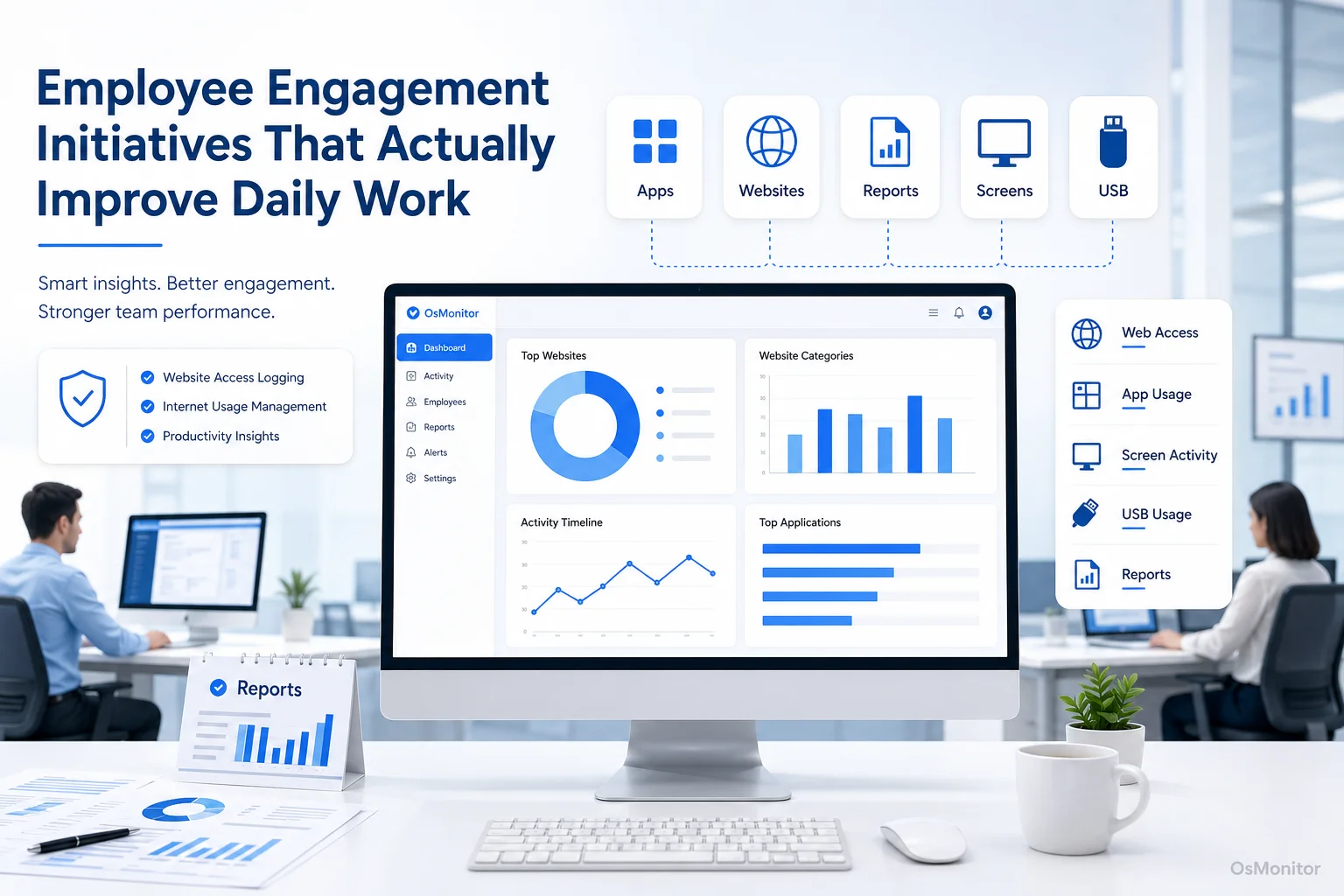
A practical overview of employee engagement initiatives for workplace computer management.
What Are Employee Engagement Initiatives in Practice?
Employee engagement initiatives are the actions a company takes to help employees stay focused, motivated, supported, and connected to their work. In plain business terms, they are the practical steps that make it easier for people to do good work and harder for distractions, confusion, or frustration to take over.
Good initiatives are not only about morale. They also deal with daily work problems such as unclear tasks, poor tools, weak communication, unbalanced workload, and inconsistent computer usage policies.
In a computer-based workplace, low engagement may show up through work habits such as:
- Spending repeated time on non-work websites during core hours.
- Using core business software less than expected.
- Showing long idle periods with no clear work context.
- Switching constantly between unrelated applications.
- Avoiding collaboration tools or project systems.
- Missing deadlines because priorities are unclear.
These patterns do not prove disengagement by themselves. They are signals. A manager still needs context, conversation, and judgment.
Effective employee engagement initiatives should help managers answer practical questions:
- Are employees clear about what they should be working on?
- Do they have the right software and training?
- Are distractions becoming a pattern?
- Are people overloaded, underused, or blocked?
- Are company computer policies fair and clear?
- Are managers using data to support the team, not just criticize it?
The goal is a more focused, fair, and productive workplace.
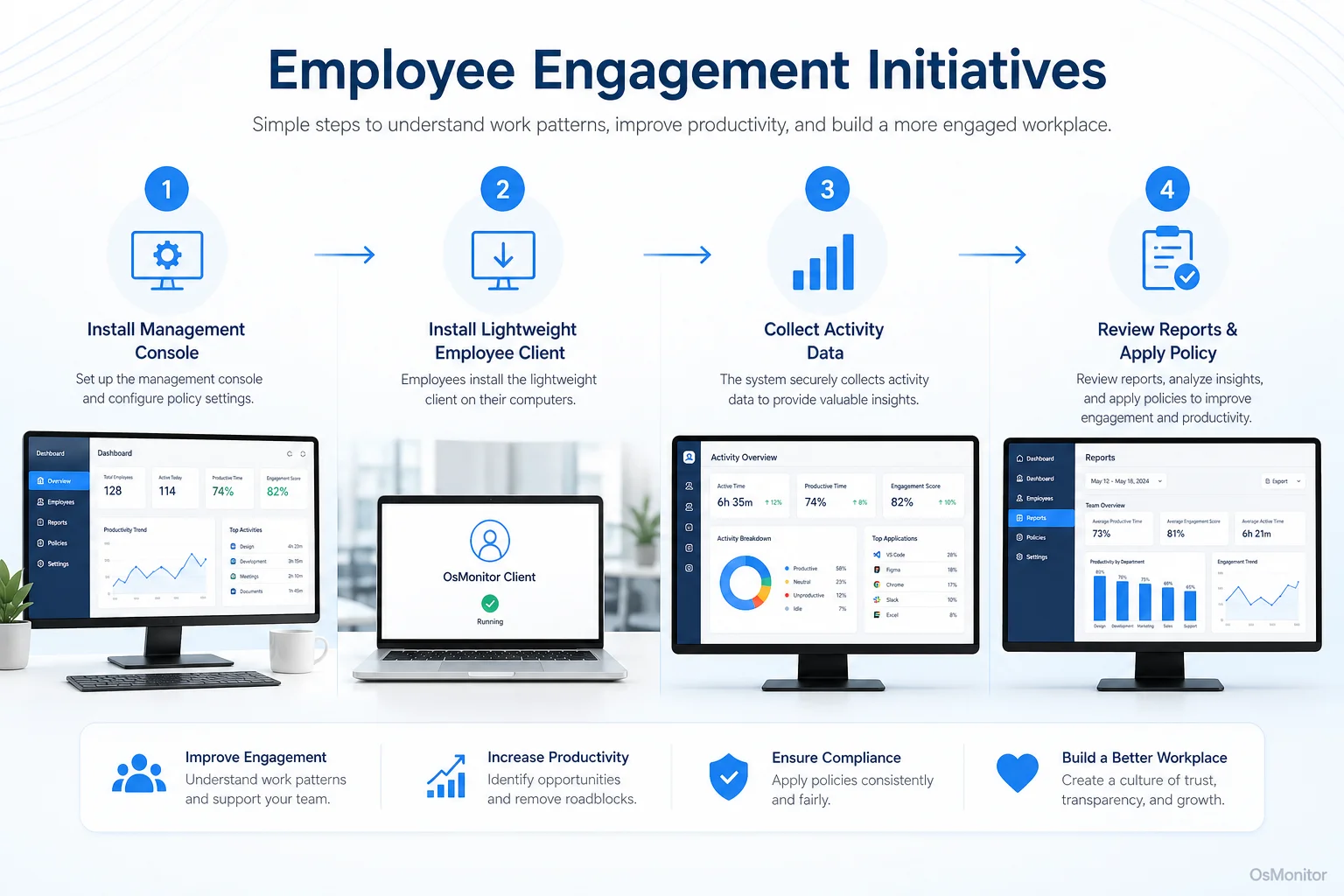
A simple workflow showing how workplace signals can support employee engagement initiatives.
Using Workplace Signals to Inform Engagement Strategies
Employee engagement initiatives work better when they are based on real work patterns instead of guesswork. Surveys and one-on-one conversations are useful, but they do not always show what happens during the workday.
Computer activity records can provide practical workplace signals. For company-owned Windows PCs, these signals may include application usage, website activity, active time, idle time, file activity, and department-level computer usage reports.
This is where Employee Activity Monitoring Software can help. It gives managers a clearer view of how work computers are being used, so engagement initiatives can be more specific.
For example, high non-work website usage may suggest distraction. But it may also suggest that employees have unclear tasks, light workload, poor tools, or too much repetitive work. Low usage of core software may suggest disengagement, but it may also mean the software is hard to use or employees need training.
Here are common workplace signals and what they may indicate:
| Signal Observed from Computer Activity | Potential Insight for Engagement Initiatives |
|---|---|
| High usage of non-work websites such as social, video, or games | Possible distraction, boredom, unclear priorities, or weak computer usage policy. |
| Low usage of core business software such as CRM, ERP, or design tools | Possible training need, poor tool adoption, workflow problem, or blocked work. |
| Frequent and rapid switching between different tasks | Possible overload, interruptions, unclear priorities, or inefficient workflow. |
| Consistent idle time during peak work hours | Possible workload imbalance, technical blocker, underuse, or burnout risk. |
| Use of unauthorized or personal file-sharing applications | Possible gap in approved tools or need for stronger data handling policies. |
The value of these signals is not that they give managers a final answer. The value is that they help managers ask better questions.
Instead of saying, “You are wasting time,” a manager can say, “I noticed the team is spending less time in the CRM and more time outside core tools this month. Is the workflow unclear, or is something slowing everyone down?”
That kind of conversation is much more useful.
When to Use Software and When to Focus on Policy
Technology can show what is happening, but it cannot fix engagement by itself. The strongest employee engagement initiatives combine software, policy, and management action.
Software’s Role:
Workplace productivity and employee computer activity management software can provide the objective records needed to identify trends. It can help answer questions such as:
- Which websites are most frequently visited during work hours?
- Which applications are used most by each department?
- Are employees using required business tools?
- Are there repeated periods of inactivity during core hours?
- Are non-work activities increasing over time?
- Are policy rules being followed consistently?
A practical Computer Monitoring Software solution can help managers understand digital workflows, review productivity patterns, and support fair policy enforcement.
Policy and Management’s Role:
Once managers have data, the next step is not always blocking everything. Policy and management judgment matter.
A practical approach may include:
Communicate a Clear Policy: Employees should know what is acceptable on company-owned computers, what may be reviewed, and why.
Hold Constructive Conversations: Use reports as a starting point for discussing priorities, workload, focus, and support needs.
Analyze Workload: If employees are underused, give clearer priorities. If they are overloaded, adjust workload before disengagement grows.
Improve Tools and Training: If employees avoid core software, the issue may be usability, training, or workflow design.
Apply Rules Consistently: Website and application policies should be fair across teams and roles.
Recognize Good Work: Engagement improves when employees feel that strong work is noticed and valued.
A good initiative should not make employees feel pressured every minute. It should help create a work environment where expectations are clear, tools are useful, and distractions are handled fairly.
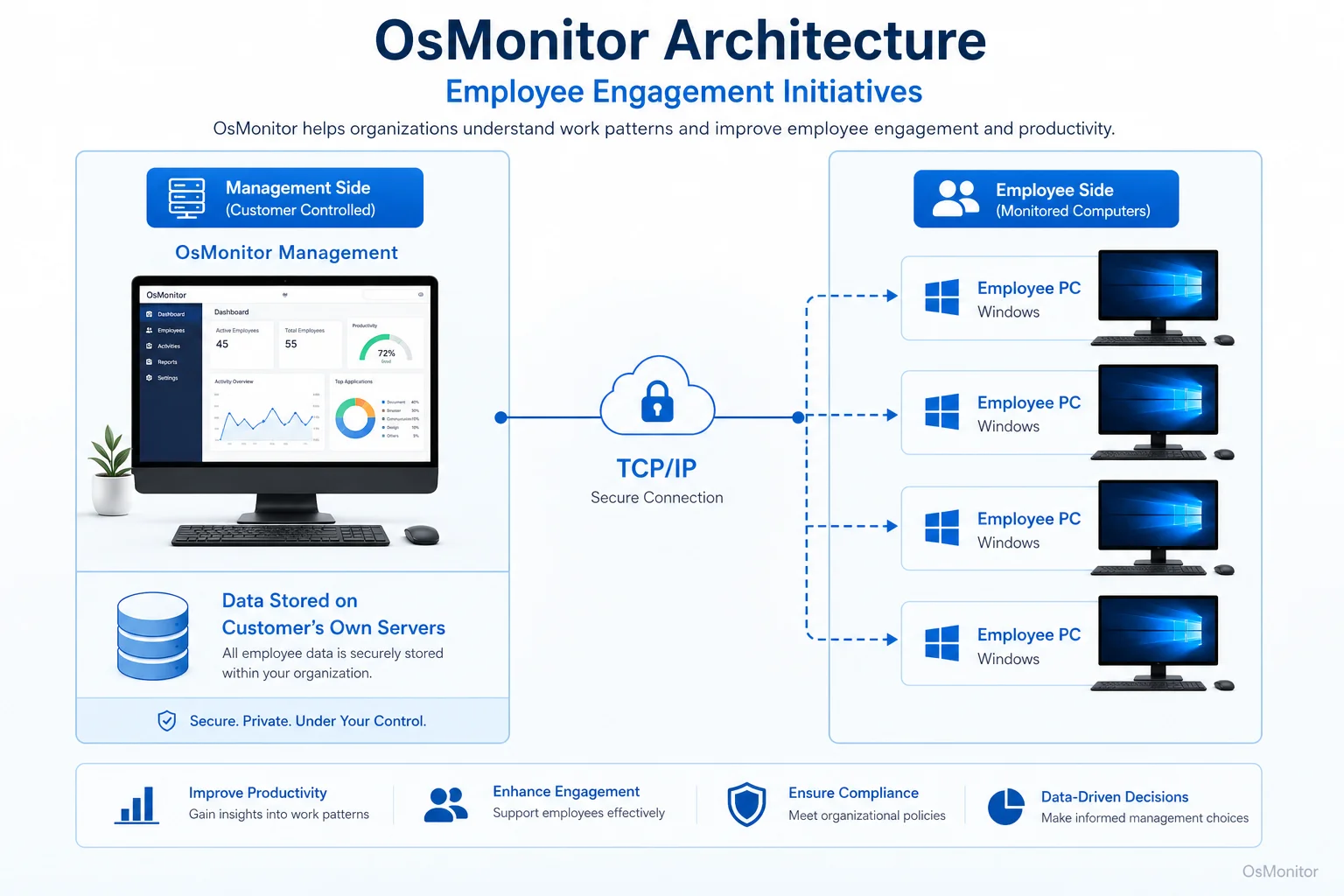
OsMonitor keeps monitoring data under the customer’s control on the management computer or self-managed server.
How OsMonitor Supports Practical Engagement Initiatives
OsMonitor is workplace productivity and employee computer activity management software for company-owned Windows PCs. It helps businesses collect activity records that can support practical employee engagement initiatives.
It is not a full HR engagement platform, not a survey tool, and not a replacement for good management. Its role is more focused: helping managers and IT administrators understand how company computers are used during daily work.
OsMonitor can support engagement initiatives through:
Website and Application Usage Records: OsMonitor records websites visited and applications used on managed employee computers. This helps identify repeated distractions, underused business tools, and possible training needs.
Department and Individual Reports: Managers can review trends by employee, group, or department. This makes it easier to see whether an issue is isolated or team-wide.
Activity Timelines: Timeline reports can show how computer usage changes throughout the day, helping managers understand work rhythms, idle periods, and possible workflow issues.
Website and Application Blocking: Businesses can block non-work websites or applications according to written company policy. This helps reduce repeated distractions and apply rules consistently.
Remote Assistance: IT staff or authorized managers can help employees solve computer problems more quickly, reducing downtime and frustration.
On-Premise Data Storage: Monitoring data is stored on the customer’s own management computer or self-managed server. Normal activity records are not stored on an OsMonitor vendor cloud.
Client/Server Architecture: The management console runs on a manager’s computer or self-managed server, while lightweight clients run on employee Windows PCs. OsMonitor can work inside a local area network without requiring internet access for core monitoring and reporting functions.
This makes OsMonitor useful for businesses that want practical workplace visibility while keeping data under their own control.
A Note on Transparency and Legal Use
Employee engagement initiatives should build trust, not damage it. If computer activity data is involved, transparency is essential.
Businesses should:
- Create a clear written computer and internet usage policy.
- Inform employees that company-owned computers may be managed and reviewed.
- Explain what data is collected and how it will be used.
- Use reports for productivity review, IT support, policy consistency, and workplace improvement.
- Limit report access to authorized managers or IT staff.
- Review patterns with context instead of judging isolated events.
- Avoid collecting unnecessary personal information.
- Consult qualified legal counsel to ensure compliance with local employment and privacy laws.
OsMonitor is intended for legal business use on company-owned Windows computers. The goal should be responsible workplace computer management, not unfair micromanagement.
When employees understand the policy and managers use the data professionally, computer activity reports can support better engagement conversations.
Frequently Asked Questions (FAQ)
What are employee engagement initiatives?
Employee engagement initiatives are practical actions a company takes to improve employee focus, motivation, communication, support, and connection to work. They may include better communication, clearer goals, recognition, training, workload review, improved tools, and responsible use of workplace activity data.
How can computer activity data support employee engagement initiatives?
Computer activity data can show application usage, website activity, active time, idle time, and department-level work patterns on company-owned computers. These signals can help managers identify distractions, training needs, workflow problems, workload imbalance, or policy issues.
Are employee engagement initiatives that involve monitoring legal?
In many regions, businesses may manage and review activity on company-owned computers for legitimate business purposes when there is a clear written policy and employees have been properly notified. However, laws vary by country, state, province, and industry. Businesses should consult qualified legal counsel before implementing computer activity monitoring.
Does OsMonitor require a client on employee computers?
Yes. OsMonitor uses a client/server model. A lightweight client must be installed on each employee Windows computer the company wants to manage. The management console runs on a manager’s computer or self-managed server.
Where is OsMonitor monitoring data stored?
OsMonitor stores collected data on the customer’s own management computer or self-managed server. Normal monitoring data is not uploaded to an OsMonitor vendor cloud, giving the business direct control over workplace activity records.
Can OsMonitor work without an internet connection in a LAN?
Yes. OsMonitor can work inside a local area network without requiring internet access for its core monitoring, reporting, and management functions.
What Windows versions does OsMonitor support?
OsMonitor supports Windows 7 and later versions, including Windows 10, Windows 11, and Windows Server editions. It supports both 32-bit and 64-bit systems.
Employee engagement initiatives work best when they are practical, fair, and connected to daily work. Managers need clear expectations, useful tools, honest conversations, and reliable data about work patterns.
Used transparently and responsibly, OsMonitor can support employee engagement initiatives with website and application records, productivity reports, policy controls, remote assistance, and on-premise data storage. To see how you can gather the data needed to support your team, Read the Quick Start Guide and learn more about setting up a transparent management process.