Employee Engagement: Signals Businesses Can Actually Observe
Employee engagement is hard to manage when all you have are delayed updates, scattered messages, and a rough feeling that some people are focused while others may be drifting. For many business owners and managers, the real problem is simple: they need to understand team activity without interrupting everyone every hour for a manual status update.
In a computer-based workplace, engagement often leaves practical signals. Employees use business applications, communicate with customers, work on documents, visit websites, stay active during core hours, or request help when something blocks their work. These signals do not replace conversations, surveys, or good leadership, but they can help managers see what is happening more clearly.
That is where responsible computer activity management can support employee engagement. A centralized overview of company-owned PCs can help managers understand work patterns, identify support needs, reduce distractions, and make employee engagement discussions more factual.
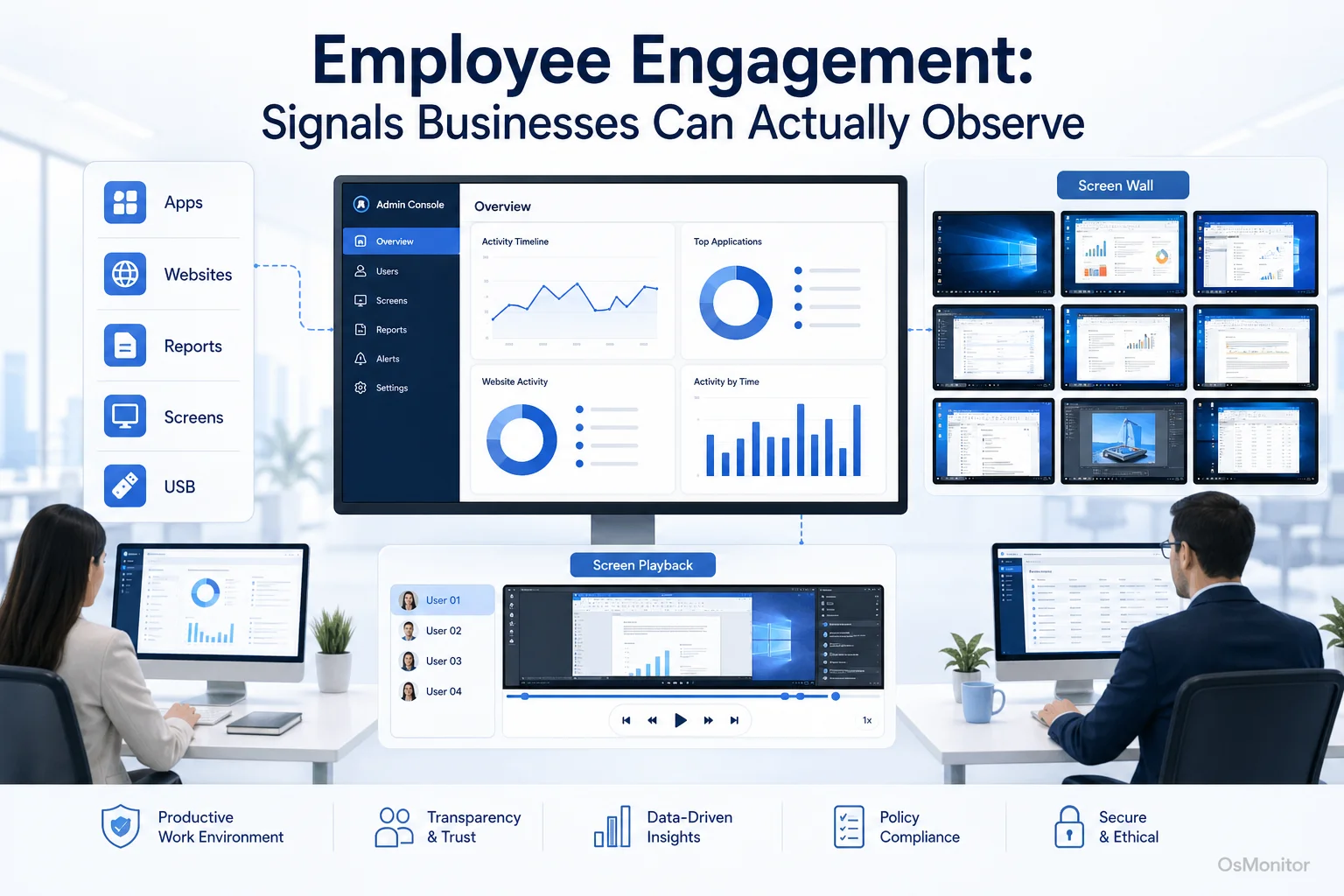
A practical overview of employee engagement for workplace computer management.
What Does Employee Engagement Mean in a Digital Workplace?
To define employee engagement in a practical business setting, think beyond slogans, posters, and annual surveys. Employee engagement means employees are mentally involved in their work, understand what matters, and are willing to put real effort into helping the business succeed.
Some people search for “what does employee engagement mean” or “employee engagement description” because the term can feel vague. In plain language, engaged employees usually show focus, ownership, consistency, and willingness to solve problems. Disengagement may show up as low output, frequent distractions, slow response, repeated policy issues, or poor use of company time and tools.
Employee engagement and employee retention are closely connected. When people feel supported, equipped, and fairly managed, they are usually more likely to stay. But managers often struggle with employee engagement challenges because traditional signals are incomplete.
Surveys can help. An employee engagement score, employee engagement index, or employee engagement scorecard can give HR and leadership a useful snapshot. Employee engagement quotes from surveys may reveal frustration, motivation, or workplace concerns. But surveys alone have limits. They are usually subjective, periodic, and sometimes too late to explain what is happening during the workday.
In a digital workplace, employee engagement also depends on the employee digital experience. Are employees using the right tools? Are they stuck in inefficient workflows? Are remote employees staying connected and supported? Are distractions getting in the way of focused work?
This is where workforce engagement and computer activity signals can add useful context. They help managers compare what employees say with what workplace systems show.
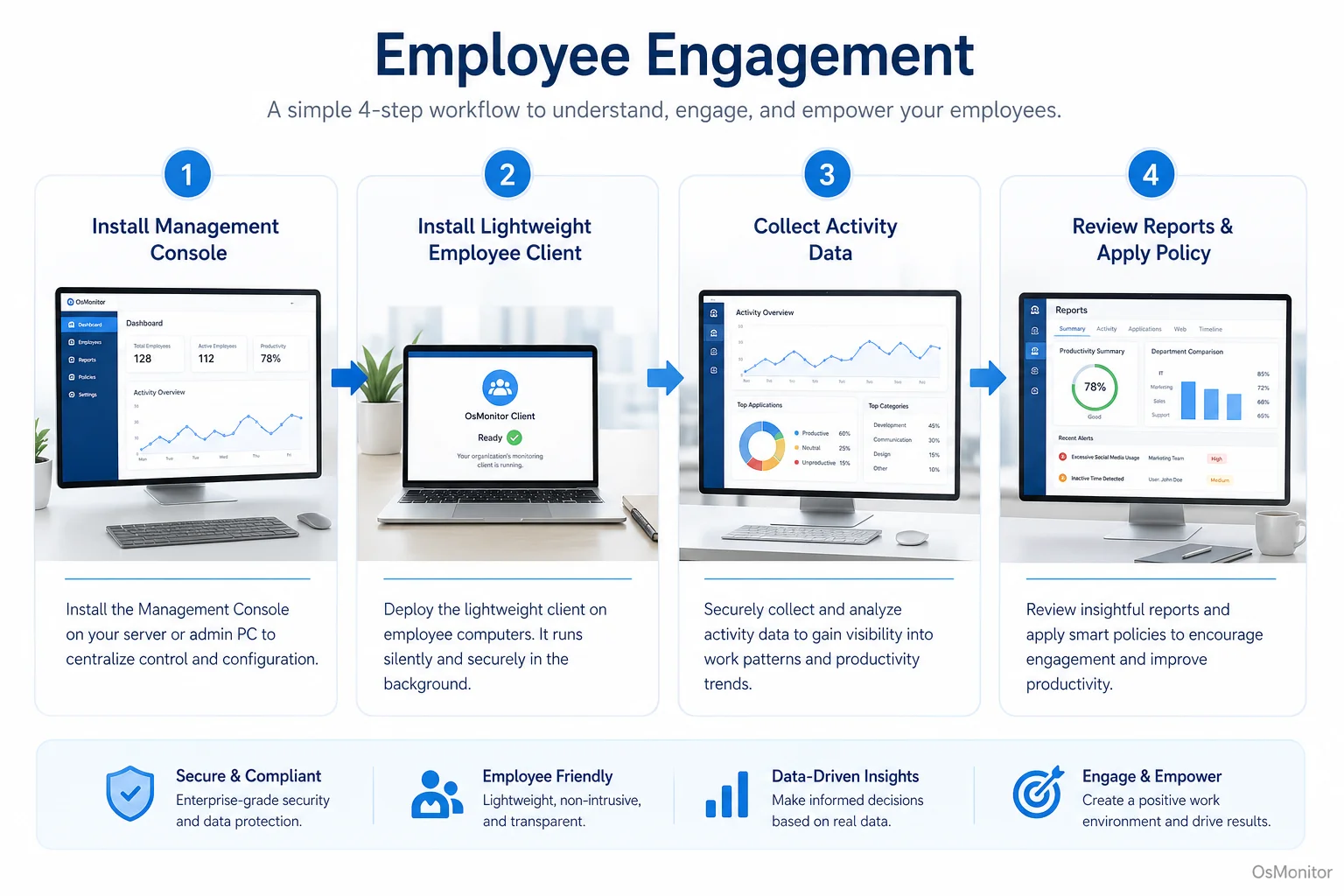
A simple workflow showing how workplace signals can support employee engagement.
Observing Engagement Signals with OsMonitor
OsMonitor is workplace productivity and employee computer activity management software for company-owned Windows PCs. It helps managers and IT administrators review how work computers are being used, including application usage, website activity, screen activity, activity timelines, and reports.
It is not a replacement for leadership, HR, or employee conversations. It is also not a full workforce engagement management software platform in the enterprise HR sense. Instead, OsMonitor provides practical digital workplace signals that can support a broader workforce engagement strategy.
The system uses a client/server model. A management console runs on a manager’s PC or self-managed server, while a lightweight client is installed on each employee Windows computer that the company wants to manage. This gives managers a centralized computer activity overview without relying on constant manual updates.
For an employee engagement manager, department head, or business owner, this can be useful. Instead of guessing whether a team is focused, overloaded, distracted, or stuck, managers can review objective activity records and then follow up with better questions.
For example:
- If an employee spends most of the day in approved business software, that may support a positive productivity review.
- If a team repeatedly shifts between many tools to complete simple tasks, the problem may be workflow design.
- If remote employees show long idle periods or frequent non-work website activity, the issue may require clearer expectations or support.
- If someone appears stuck on a task, remote assistance may solve the problem faster than waiting for a meeting.
This kind of direct visibility is part of effective Employee Screen Monitoring Software when used transparently and responsibly.
Core Features for Measuring and Supporting Engagement
Employee engagement cannot be reduced to one number. The levels of employee engagement across a team are usually shaped by workload, tools, management, communication, support, and individual motivation.
Still, digital activity signals can help managers understand patterns more clearly.
| Traditional Metric | Observable Digital Signal with OsMonitor |
|---|---|
| Survey Responses | Application and website usage patterns from company-owned PCs |
| 1-on-1 Feedback | Screen activity, active time, and workflow context |
| Project Milestones | Document creation, file activity, and use of business applications |
| Team Collaboration | Use of communication, CRM, ticketing, and productivity software |
Key Features Include:
Live Screen Monitoring: Managers can view multiple desktops in a centralized overview when authorized. This helps them understand real-time activity, task progress, and possible support needs.
Application & Website Usage Reports: OsMonitor generates reports showing which applications and websites employees use most. This can help identify productive work patterns, training needs, and recurring distractions.
Activity Timelines: Chronological activity records show how computer usage changes throughout the day. This gives managers context before making assumptions about productivity or engagement.
Remote Assistance: IT staff or authorized managers can help employees who are stuck on a task or facing a technical problem. This improves the employee digital experience by reducing downtime.
Website & Application Blocking: Businesses can set policy-based rules to limit distracting websites or non-work applications during core hours.
Document Backup & Tracking: Important work files can be backed up to a central server, helping protect company assets and support business continuity.
These features can support corporate employee engagement when they are used as part of a fair management process. The goal should be to understand patterns, improve support, and create a more focused work environment—not to judge every isolated action without context.
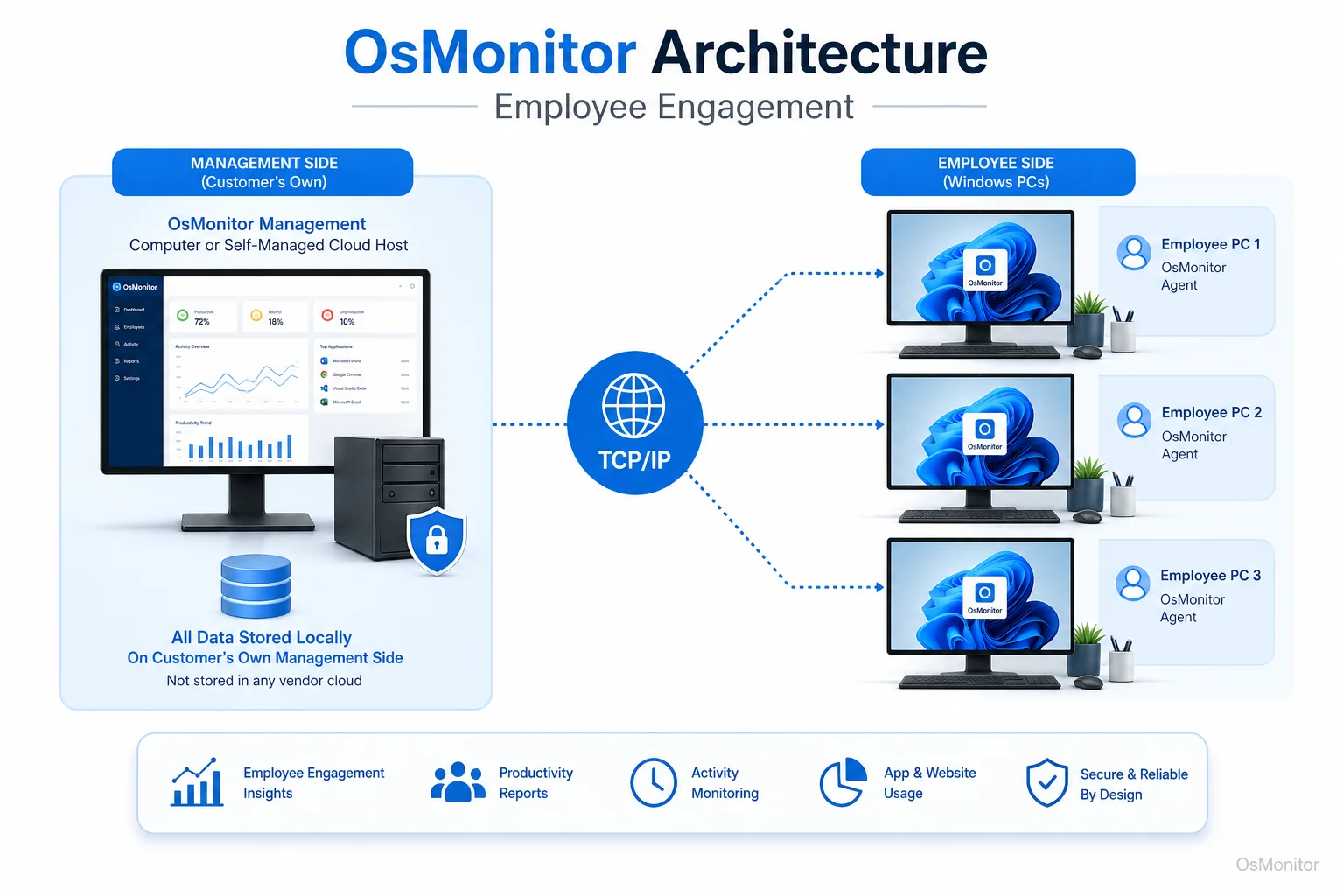
OsMonitor keeps monitoring data under the customer’s control on the management computer or self-managed server.
On-Premise Data Control and Security
Data ownership matters when employee activity records are involved. Many apps for employee engagement and workforce engagement management tools are cloud-based. That can be convenient, but not every organization wants workplace computer activity records stored on a vendor-controlled cloud.
OsMonitor is designed as On-Premise Employee Monitoring Software. Monitoring data is stored on the customer’s own management computer or self-managed server. Normal activity records are not sent to OsMonitor’s vendor servers.
This architecture offers two practical advantages:
Complete Data Control: Your company keeps workplace activity records inside your own infrastructure or self-managed environment.
LAN-Only Operation: OsMonitor can run inside a local area network without requiring internet access for its core monitoring and reporting functions.
For organizations with strict internal data policies, this local-control model can be easier to manage. It also gives the business direct responsibility for access control, backups, retention rules, and data protection.
Practical Use Cases for Workforce Engagement Management
Workforce engagement management is about helping people stay focused, supported, and aligned with business goals. Some people search for “what is workforce engagement management” because the phrase sounds complicated. In practice, it means using processes, managers, and tools to improve how employees work and stay engaged.
OsMonitor can act as a workforce engagement solution for businesses that need practical visibility into company-owned Windows PCs.
Small and Medium Businesses: Owners and managers can review team activity, understand whether company resources are being used appropriately, and identify training or support needs without building a complex HR system.
Remote and Hybrid Teams: Employee engagement for remote employees can be difficult when managers have little visibility. OsMonitor can help review activity on company-owned remote PCs through proper network configuration, such as VPN or a server with a reachable address.
Call Centers: Supervisors can confirm that agents are using CRM, ticketing, phone, and communication tools correctly. This supports service quality and consistent workflow.
Educational Institutions: In computer labs, instructors can review student progress, provide remote assistance, and help keep computers focused on approved learning activities.
IT Support Teams: Remote assistance and screen activity review can reduce troubleshooting time and improve employee engagement and wellness by lowering technology frustration.
Successful employee engagement programs usually combine several elements: clear expectations, good managers, useful tools, fair policies, feedback channels, and practical support. Computer activity records are only one part of that picture, but they can make the picture clearer.
Frequently Asked Questions (FAQ)
What is the difference between employee engagement and employee satisfaction?
Employee satisfaction is about how content an employee feels with their job, pay, benefits, or work environment. Employee engagement goes deeper. It reflects commitment, focus, effort, and willingness to contribute to the company’s goals. A satisfied employee may be comfortable, but an engaged employee is actively invested in doing good work.
What is workforce engagement management?
Workforce engagement management is the practice of using management processes, workplace data, and software tools to improve employee focus, productivity, support, and alignment with business goals. In a computer-based workplace, it may include activity reports, application usage records, website activity records, remote assistance, and productivity review.
How can a business measure employee engagement?
A business can measure employee engagement through surveys, employee engagement benchmarks, retention rates, manager feedback, performance trends, and workplace activity signals. In digital work environments, computer usage reports can add useful context by showing how employees use business applications, websites, and company resources.
What is an employee engagement score?
An employee engagement score is usually a numerical result from surveys or an employee engagement index. It may reflect how connected, motivated, or committed employees feel. Computer activity data should not replace this score, but it can provide additional context for understanding daily work patterns.
What does an employee engagement manager do?
An employee engagement manager usually helps improve employee motivation, communication, retention, and workplace experience. This role may work with HR, IT, department managers, and leadership to build engagement programs, review feedback, and improve the employee experience.
Does OsMonitor require software on employee computers?
Yes. OsMonitor operates on a client/server model. The management console runs on a manager’s computer or self-managed server, and a lightweight client must be installed on each company-owned Windows computer the business wants to manage.
Where is the monitoring data stored?
All data collected by OsMonitor is stored on the customer’s own hardware, such as the central management computer or a self-managed server. The data is not stored on OsMonitor’s vendor servers for normal operation.
Can OsMonitor monitor remote employees who are not in the office?
Yes, OsMonitor can support remote employee computer management when the network is configured correctly. Common approaches include using a VPN or setting up the server component on a machine that remote clients can reach. This is useful for employee engagement for remote employees and hybrid teams using company-owned Windows PCs.
What versions of Windows does OsMonitor support?
OsMonitor supports Windows 7 and later versions, including Windows 10, Windows 11, and Windows Server editions. It supports both 32-bit and 64-bit systems.
How should a company improve employee engagement?
Some people search for “how to employee engagement,” but the clearer question is how to improve employee engagement. Start with clear expectations, good communication, fair policies, useful tools, timely support, and regular feedback. For computer-based teams, activity reports and remote assistance can also help managers understand where support or policy improvements are needed.
Employee engagement is not something a dashboard can fully explain. It depends on trust, management quality, workload, communication, tools, and workplace culture. But in a digital workplace, computer activity signals can help managers see patterns they would otherwise miss.
Used transparently and responsibly, OsMonitor can support workforce engagement management by giving businesses clearer computer usage reports, centralized activity review, remote assistance, and on-premise data control. To see how these features work in practice, you can Read the Quick Start Guide and begin a trial.