Employee Engagement Tools: Surveys, Analytics and Activity Signals
An employee engagement tool can mean very different things depending on what a business is trying to solve. HR may want survey feedback. A department manager may want to understand team focus. IT may need computer usage reports and policy controls. A business owner may simply want to know why work is falling behind when everyone appears busy.
For a small business, the need is often practical. Employees may be spending too much time on games, video sites, entertainment websites, or other non-work browsing during office hours. Managers want clear website access records, application usage reports, and a fair way to review activity on company-owned computers.
That is one part of employee engagement. It is not the whole picture, but it is an important signal. Good employee engagement tools should help a company understand both what employees feel and how work is actually happening.
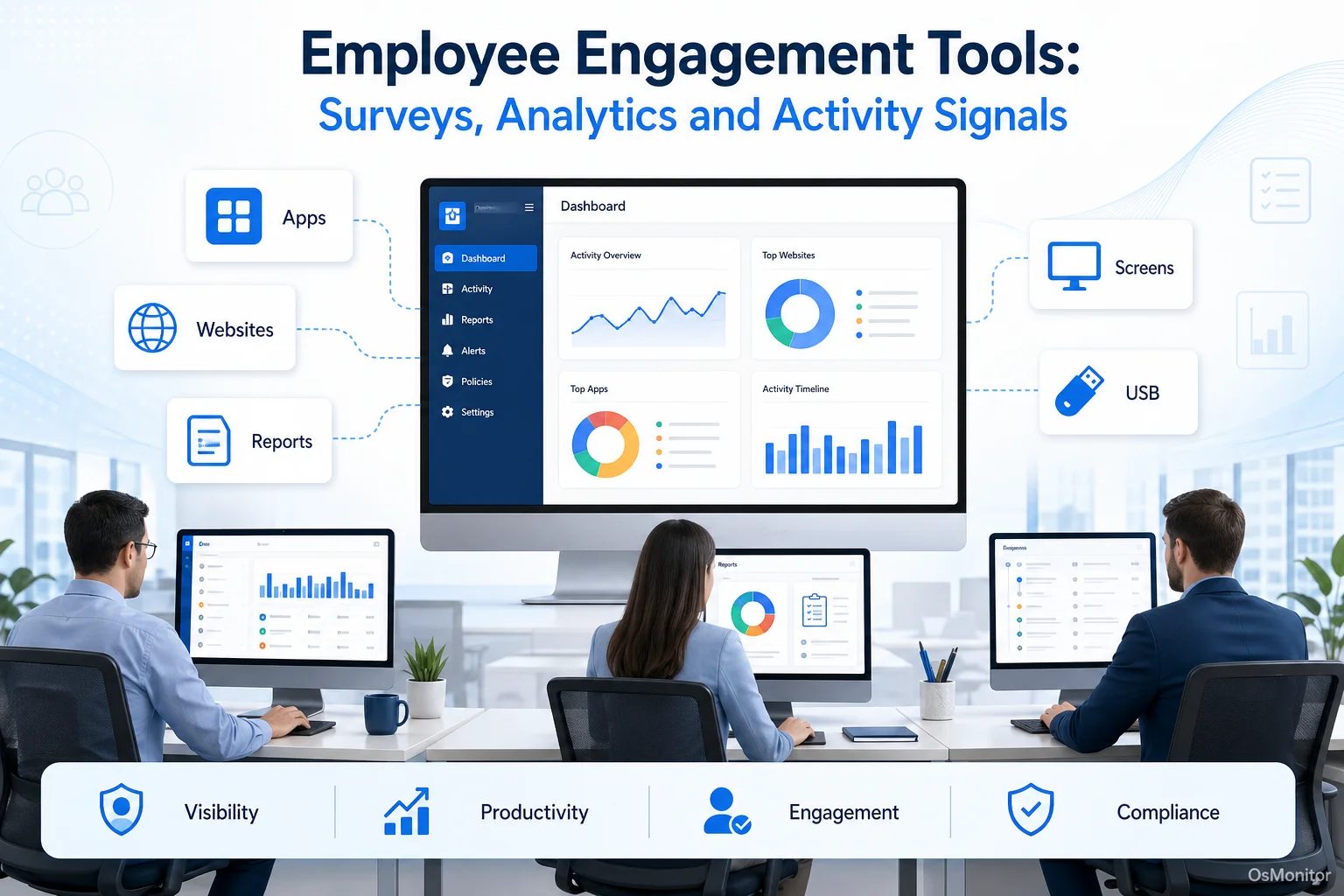
A practical overview of employee engagement tool for workplace computer management.
Some companies use attitude or opinion surveys to measure employee engagement. Others use productivity reports, computer activity records, or digital workplace data. Many companies use both. The right employee engagement measurement tool depends on your company’s goals, culture, privacy requirements, and IT environment.
How to Choose the Right Employee Engagement Tool
Choosing the right employee engagement tool starts with a simple question: what are you trying to measure or improve?
If you want to understand morale, surveys may be the right starting point. If you want to improve computer-based productivity, you may need application and website activity reports. If you want to support remote workers, IT assistance and screen activity review may matter. If you want a full employee experience program, you may need several tools working together.
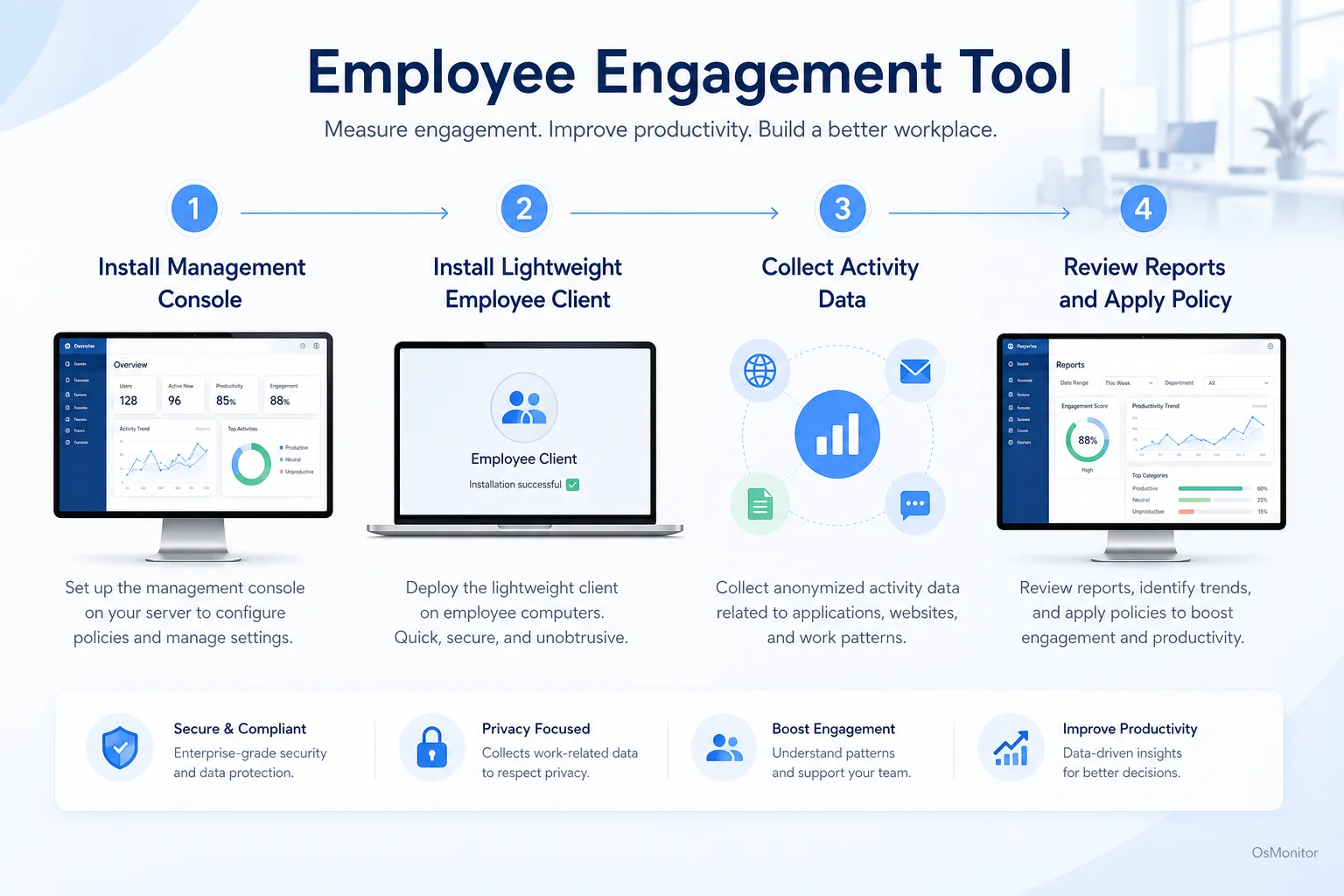
A simple workflow showing how workplace signals can support employee engagement tool.
Deployment Model: Cloud SaaS vs. On-Premise
The deployment model affects where the software runs, where your data is stored, and how much control your company keeps.
Cloud SaaS: Many employee engagement companies provide cloud-based survey, feedback, and analytics platforms. These tools are convenient, easy to access, and often updated automatically. The tradeoff is that employee data is stored by a third-party vendor, and pricing is usually subscription-based.
On-Premise or Self-Hosted: On-premise software is installed on your own management computer or server. This gives the business more direct control over employee activity records, access permissions, backups, and data retention. It can be a better fit for companies with strict data privacy requirements or a preference for one-time licensing.
Neither model is automatically better. The right choice depends on your risk tolerance, budget, IT skills, and data control requirements.
Data Ownership and Privacy
Employee engagement data can be sensitive. Survey responses, activity reports, website records, screenshots, and productivity summaries all need careful handling.
Before choosing a tool, ask:
- Where is the data stored?
- Who can access the reports?
- Can the company control retention and deletion?
- Does the vendor use the data for anything beyond providing the service?
- Are employees clearly informed about what is collected?
For tools that measure computer activity, data ownership is especially important. On-premise systems can simplify this because normal activity data stays inside your own infrastructure.
Operating System Compatibility
A tool is only useful if it fits your environment.
Survey platforms are often browser-based, so they may work across many devices. Computer activity management tools are usually more specific. If your company mainly uses Windows PCs, dedicated Windows Employee Monitoring Software can be a practical choice.
If your team uses Windows, macOS, Linux, mobile devices, and virtual desktops, you will need to check compatibility carefully before choosing any employee engagement software.
Reporting and Analytics Capabilities
The value of employee engagement measurement tools depends on whether they turn raw data into useful reports.
Look for reporting features such as:
- Clear dashboards for managers.
- Department-level summaries.
- Individual reports where appropriate and legally allowed.
- Time-based trends.
- Exportable reports.
- Visual charts that are easy to understand.
- Alerts or policy event summaries.
For computer activity tools, useful reports may include application usage time, website visit history, active and idle time, bandwidth usage, file activity, and policy violations.
Control and Policy Enforcement
Some tools only measure engagement. Others help managers take action.
If the business problem is distraction, policy enforcement may matter. That can include website blocking, application blocking, USB control, bandwidth review, or alerts when company rules are violated.
These features should be used carefully. The goal is not to judge every small action. The goal is to create a focused work environment, apply rules consistently, and support responsible workplace computer management.
Pricing and Licensing Clarity
Pricing can vary widely.
Cloud employee engagement platforms usually charge per user per month or per year. That may be convenient at first, but costs can grow as the company expands.
On-premise software may use a one-time purchase model. This can be easier for companies that prefer predictable costs and long-term ownership.
Before choosing a tool, compare:
- Setup cost.
- Monthly or annual fees.
- Per-user licensing.
- Upgrade costs.
- Support fees.
- Data storage or hosting costs.
- Contract terms.
A low starting price is not always the lowest long-term cost.
Common Types of Employee Engagement Tools
There is no single best employee engagement tool for every company. Companies with best employee engagement practices usually combine feedback, communication, performance support, and workplace data.
1. Survey and Feedback Platforms
Survey platforms are the traditional tools for measuring employee engagement. They collect employee opinions, sentiment, satisfaction levels, and feedback.
- How they work: These platforms run pulse surveys, annual engagement surveys, eNPS surveys, and feedback forms. They help HR and leadership understand morale, trust, communication, and alignment.
- Examples: Culture Amp, Glint, Peakon, Lattice.
- Best for: Companies that want to understand how employees feel and how workplace culture is changing.
This answers a common question: how do companies measure employee engagement? Many companies start with surveys because attitude and opinion data can reveal motivation, frustration, and workplace concerns.
2. Time Tracking and Productivity Apps
Time tracking and productivity apps focus on how work time is spent. They may track projects, tasks, billable hours, app usage, or activity levels.
- How they work: Employees may start timers manually, or the software may record time spent on tasks and applications.
- Examples: Time Doctor, Hubstaff, RescueTime.
- Best for: Agencies, remote teams, contractors, service teams, and businesses that need billable-hour tracking or project time reports.
These tools can support engagement analysis, but they should not be confused with culture measurement. High activity does not always mean high engagement, and low activity may require context.
3. On-Premise Computer Monitoring Software
On-premise computer activity management tools provide objective data from company-owned computers. They focus on observable workplace signals rather than survey opinions.
- How they work: A central management console collects data from lightweight clients installed on employee computers. The data may include application usage, website activity, active time, screen activity, file operations, device usage, and policy events.
- Examples: OsMonitor.
- Best for: Businesses that use company-owned Windows PCs, need policy-based computer management, and prefer to keep data on their own hardware.
This category can be useful for operations-heavy teams, call centers, back-office teams, and businesses that need employee engagement software for logistics or similar computer-based workflows.
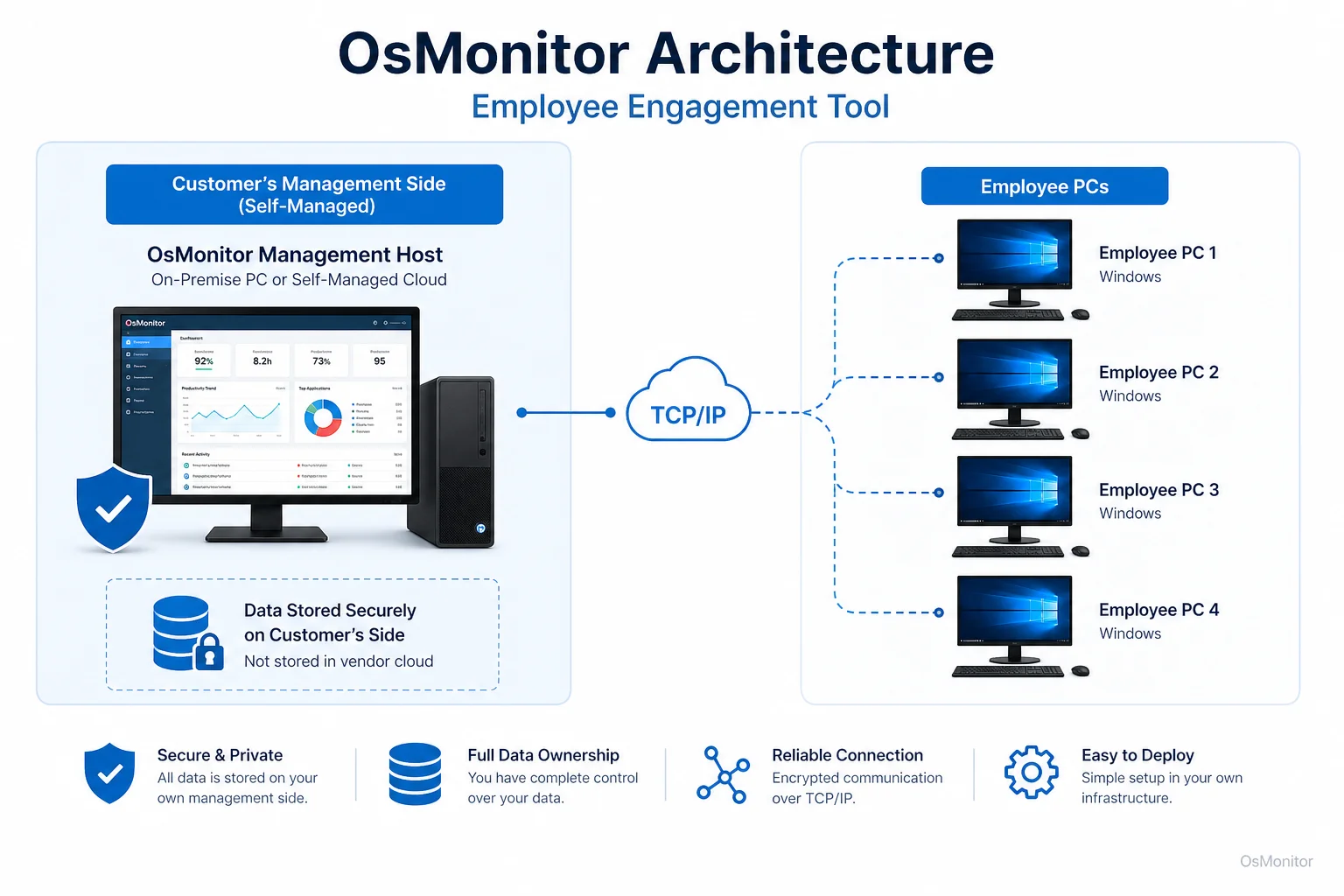
OsMonitor keeps monitoring data under the customer’s control on the management computer or self-managed server.
4. Project Management and Collaboration Hubs
Project management and collaboration tools are not always sold as employee engagement measurement tools, but they can still show useful work patterns.
- How they work: These tools show task completion, project progress, communication frequency, deadlines, and collaboration activity.
- Examples: Asana, Trello, Jira, Slack.
- Best for: Project-driven teams that want to understand work progress and collaboration.
These tools can show whether projects are moving, but they usually do not provide detailed computer usage or website activity records.
5. Digital Employee Experience (DEX) Platforms
DEX platforms focus on how employees experience workplace technology. They may include device health, application performance, IT service data, user feedback, and employee experience analytics.
- How they work: They collect technology experience data and help IT teams identify friction, device issues, slow applications, and support needs.
- Examples: Nexthink, 1E, ControlUp.
- Best for: Larger companies with complex IT environments, many endpoints, and a need for proactive IT experience management.
Some buyers search for phrases like “dex platforms workforce experience employee engagement.” In clearer business language, they are usually looking for tools that connect employee technology experience with workforce productivity and engagement signals.
Where OsMonitor Fits: On-Premise Computer Activity Management
OsMonitor is workplace productivity and employee computer activity management software for company-owned Windows PCs. It fits into the on-premise computer monitoring and management category.
It is not a survey platform, not a full HR suite, and not a complete DEX platform. Its role is more focused: helping businesses understand and manage how work computers are used.
OsMonitor can provide:
- Application usage reports.
- Website activity records.
- Real-time screen activity review.
- Historical activity records.
- Website and application blocking.
- USB and device control.
- Document backup.
- Department and individual reports.
- On-premise data storage.
The main value is data control. OsMonitor stores collected data on the customer’s own management computer or self-managed server. Normal activity data is not stored on a vendor-controlled cloud. This makes OsMonitor a practical On-Premise Employee Monitoring Software option for organizations that want direct control over workplace activity records.
OsMonitor is intended for legal, transparent business use on company-owned computers. Used responsibly, it can complement survey-based employee engagement tools. For example, surveys may show that employees feel distracted or unsupported, while OsMonitor reports can help identify whether the issue is non-work browsing, inefficient software, slow IT support, or unclear policies.
Key OsMonitor Features for Measuring Engagement Signals
OsMonitor captures workplace activity signals that may support employee engagement analysis. These signals should be interpreted with context. Computer activity data does not tell the whole story, but it can help managers ask better questions.
Effective Employee Activity Monitoring Software should turn raw activity into useful reports that managers can understand.
| Feature Category | Engagement Signal Measured | OsMonitor Capability |
|---|---|---|
| Software Usage | Focus on work-related tools compared with distractions. | Tracks time spent in each application. |
| Website Browsing | Internet use patterns and policy alignment. | Logs visited URLs and can block non-work sites according to company policy. |
| Activity Levels | General computer activity compared with idle time. | Records active and idle time for managed employee computers. |
| Document Access | Interaction with project files or important documents. | Tracks file operations and can back up selected documents. |
| Device Usage | Compliance with device and data policies. | Controls and logs usage of USB drives and printers. |
Application and Website Usage Analytics
OsMonitor records applications used and websites visited on each managed Windows computer, along with active time.
This helps managers understand:
- Which business applications are used most.
- Whether approved tools are being adopted.
- Which websites consume work time.
- Whether company internet policies are working.
- Which teams may need training, support, or clearer expectations.
This is especially useful when the goal is to connect employee engagement with practical work patterns.
Real-Time Screen Viewing and History Playback
Authorized managers or IT staff can view employee screens in real time or review historical screen activity where appropriate.
This can be useful for:
- Training.
- IT support.
- Workflow review.
- Call center supervision.
- Data entry quality review.
- Understanding whether an employee is blocked by a technical issue.
This feature should be used transparently and according to company policy.
Policy Enforcement: Website and App Blocking
If non-work websites or applications are a recurring problem, OsMonitor can help apply policy-based restrictions.
For example, a company may block gaming sites, entertainment websites, or unauthorized applications during work hours. This can reduce distractions and make expectations clearer.
The better goal is not punishment. The better goal is a more focused work environment and fair, consistent policy enforcement.
Document and File Operation Tracking
OsMonitor can track file operations such as copying, deleting, printing, or transferring files. It can also back up selected work documents to the central server.
This can help businesses protect important work files, understand document workflows, and reduce the risk of accidental data loss.
Comprehensive Reporting
OsMonitor generates reports for individuals, groups, departments, or the whole company. Reports may include application usage, website activity, activity timelines, screen records, policy events, and file activity.
These reports can support productivity review, employee engagement measurement, IT policy management, and coaching conversations.
Some people ask how companies can improve employee engagement right now. One practical answer is: remove avoidable friction. Give employees clear expectations, better tools, timely IT support, fair policies, and managers who review data responsibly instead of guessing.
Limitations and Ideal Use Cases for OsMonitor
No employee engagement tool fits every need. OsMonitor is strong in computer activity management, but it is not meant to replace every other engagement tool.
OsMonitor is best suited for businesses that:
- Use company-owned Windows computers.
- Need website and application usage reports.
- Want on-premise data storage.
- Need policy-based computer management.
- Prefer a one-time software purchase over subscription pricing.
- Want practical activity signals to support productivity and engagement discussions.
OsMonitor has clear limitations:
- Windows-Only: OsMonitor is designed for Windows business computers, including Windows 7 and later versions.
- Client Installation Required: A lightweight client must be installed on each managed employee computer.
- Not a Survey Tool: It does not collect employee opinions, pulse survey answers, or engagement sentiment.
- Not a Full HR Platform: It does not manage payroll, benefits, hiring, or formal performance reviews.
- Best for On-Premise Control: Companies that want a simple cloud-only SaaS tool may prefer another option.
For many small and mid-sized businesses, OsMonitor works best alongside other tools. Surveys can explain how employees feel. Project tools can show task progress. OsMonitor can show how company-owned computers are actually used during the workday.
Frequently Asked Questions (FAQ)
What is an employee engagement tool?
An employee engagement tool is software that helps a business measure, understand, or improve how connected employees are to their work and workplace. It may include survey platforms, feedback tools, project collaboration systems, productivity apps, DEX platforms, or computer activity management software.
What are employee engagement measurement tools?
Employee engagement measurement tools are systems used to collect engagement-related data. Some tools measure employee opinions through surveys. Others measure work patterns through productivity reports, project activity, or computer usage data.
How do companies measure employee engagement?
Companies commonly measure employee engagement through surveys, pulse checks, manager feedback, retention rates, performance trends, collaboration patterns, and workplace activity data. Companies use attitude or opinion to measure employee engagement through surveys, but many also use operational data to add context.
Is using an employee engagement tool legal for businesses?
In many regions, businesses may manage and review activity on company-owned computers for legitimate business purposes when a clear policy is in place and employees have been properly notified. However, laws vary by country, state, province, and industry. Businesses should consult qualified legal counsel before implementing computer activity monitoring or employee engagement measurement tools.
Does OsMonitor require a client on employee computers?
Yes. OsMonitor uses a client/server model. The management console runs on a manager’s computer or self-managed server, and a lightweight client must be installed on each employee Windows computer the business wants to manage.
Where is OsMonitor monitoring data stored?
OsMonitor stores collected data on the customer’s own management computer or self-managed server. Normal activity data is not stored on an OsMonitor vendor cloud, giving the business direct control over workplace computer activity records.
Can OsMonitor work without internet in a LAN?
Yes. OsMonitor can work inside a local area network without requiring internet access for its core monitoring, reporting, and management functions.
What Windows versions does OsMonitor support?
OsMonitor supports Windows 7, Windows 8, Windows 10, Windows 11, and Windows Server editions. It supports both 32-bit and 64-bit Windows systems.
Is OsMonitor a good fit for companies with high employee engagement?
Yes, it can still be useful. Companies with high employee engagement often have clear expectations, good tools, fair policies, and strong support. OsMonitor can help maintain that structure by providing computer usage reports, remote assistance, and policy-based management for company-owned Windows PCs.
Choosing the right employee engagement tool is not about buying the most complicated platform. It is about matching the tool to the business problem. If you need employee opinions, use surveys. If you need project progress, use collaboration tools. If you need computer activity records, website reports, policy controls, and on-premise data storage, OsMonitor may be the practical fit.
To compare licensing options for on-premise computer activity management, you can View OsMonitor Pricing and see how it fits your budget.